Introduction to Agentic AI
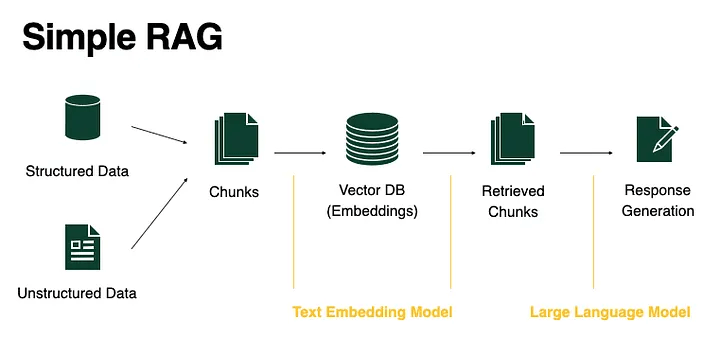
RAG
What is RAG?
- RAG = Retrieval Augmented Generation
- Combines LLM with external data via vector databases
- Used in AI chatbots, recommendation systems, etc.
Retrieval Augmented Generation the origin
attention, 2014/09
seq2seq model, 2014/09
Transformer, 2017/06
GPT-2, 2019
BERT, 2018/10
Prompt Engineering, 2018/06
Lewis, Patrick, et al. "Retrieval-augmented generation for knowledge-intensive nlp tasks." Advances in Neural Information Processing Systems 33 (2020): 9459-9474.
RAG, 2020/05

RAG for knowledge intensive tasks
1. parametric memory: a pre-trained seq2seq model
2. non-parametric memory: a dense vector index of Wikipedia
e.g. word embedding
embedding of x
向量搜尋
embedding of 文件zi
向量搜尋前n名
RAG for Knowledge Intensive Tasks
Lewis, Patrick, et al. "Retrieval-augmented generation for knowledge-intensive nlp tasks." Advances in Neural Information Processing Systems 33 (2020): 9459-9474.
1. Temperature(以OpenAI為例)
介於 0至2之間,數值越高生成結果越隨機。
語言模型生成內容時可調參數(非所有模型都支援):兼具正確性與創造性
2. Top-P (Nucleus Sampling, 以OpenAI為例)
p介於0.1至1之間,以0.1為例,代表生成「下一個token時」只考慮排序後,前10%的tokens。
3. Top-K (Top-K Sampling)
k為一正整數,以32為例,代表生成「下一個token時」只考慮排序後,前32名的tokens。
RAG for Knowledge Intensive Tasks
Lewis, Patrick, et al. "Retrieval-augmented generation for knowledge-intensive nlp tasks." Advances in Neural Information Processing Systems 33 (2020): 9459-9474.
non-parametric memory: a dense vector index of Wikipedia
內部知識
外部知識

語言模型
vector embedding
或
graph embedding
問題
解答
parametric memory: a pre-trained seq2seq model
實作方式
RAG and other techniques for LLM rethink
內部知識
Factual Knowledge
語言模型
vector embedding
或
graph embedding
實作方式
RAG
MCP

External Tool Access
Model Weight Adjustment
Finetune

Procedural Knowledge
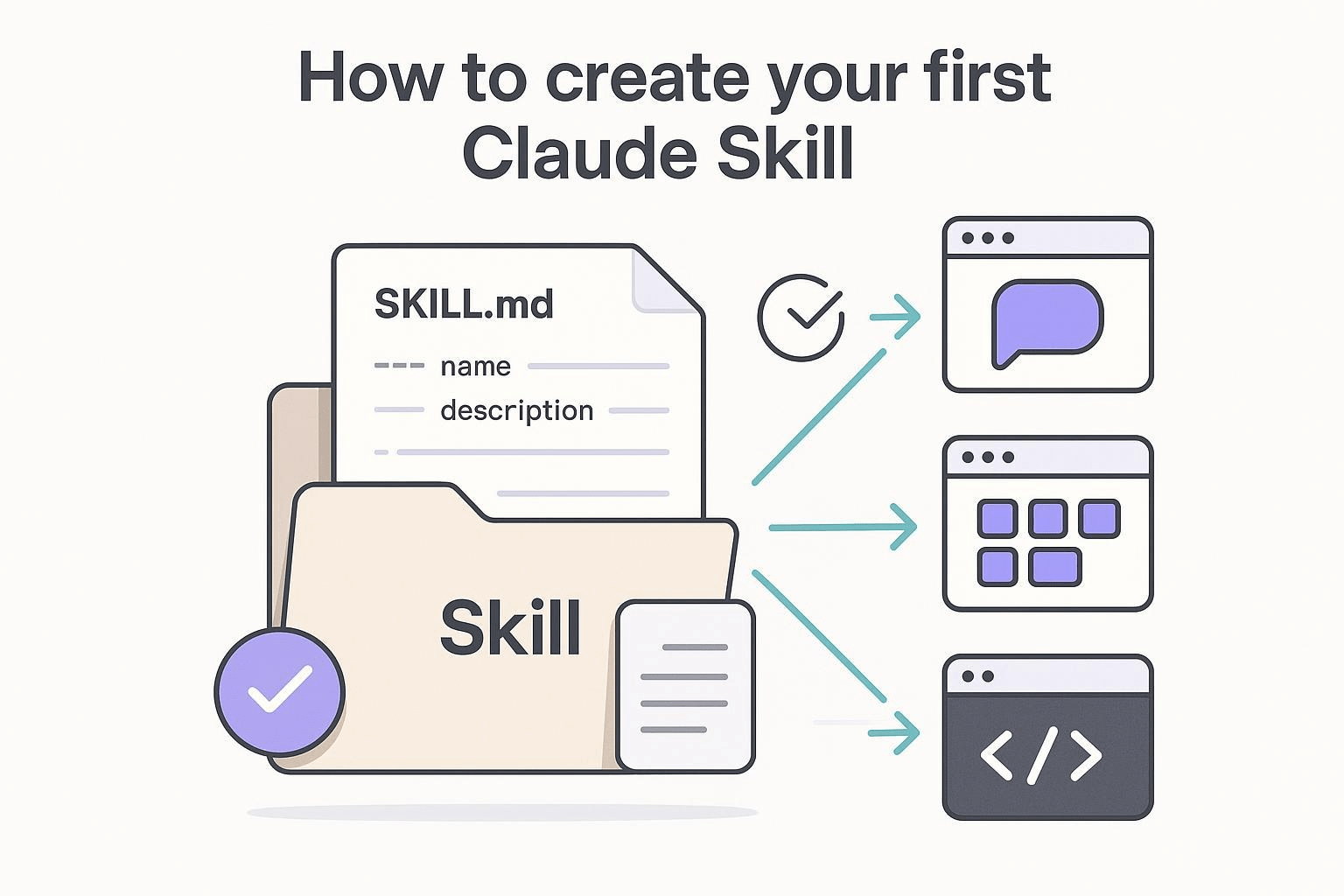
Skills
LLM
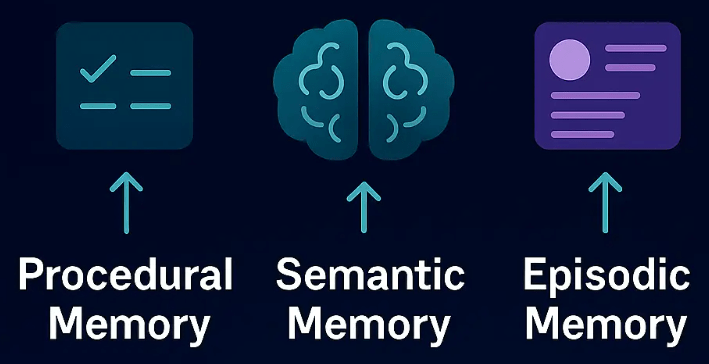
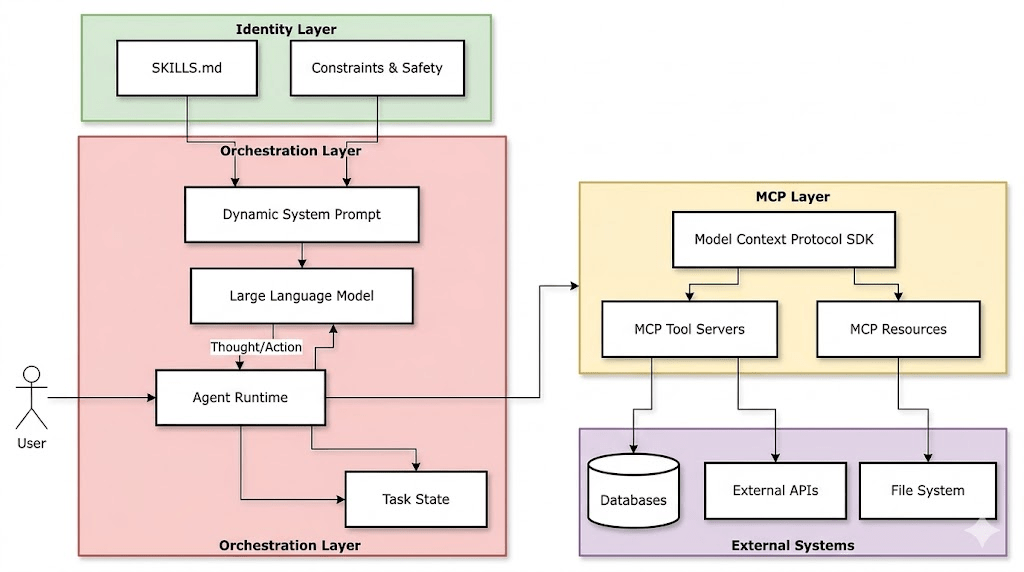
RAG and other techniques for LLM rethink
Source: Deep Dive SKILL.md (Part 1/2)
Skill.md: Procedural knowledge of LLM
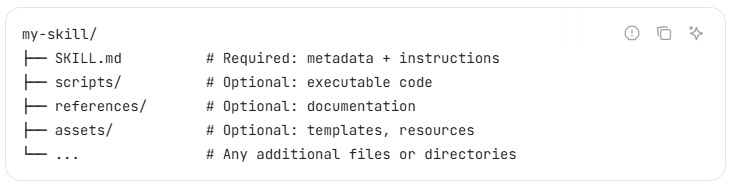
Source: https://agentskills.io/home
Skill Folder的內容:
Skill.md: Procedural knowledge of LLM
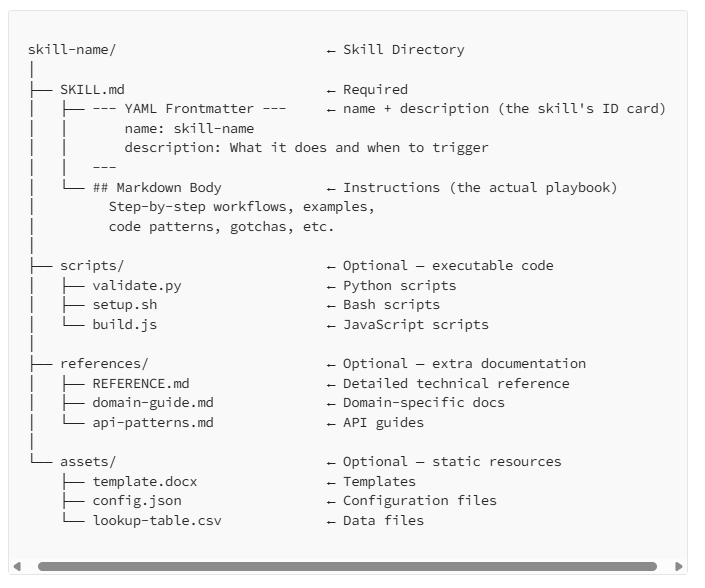
Source: Deep Dive SKILL.md (Part 1/2)
how to use it
rules: constraints, safety
Skill.md: Procedural knowledge of LLM progressive disclosure
- Progressive disclosure
- work at scale
- load only the required skills and when it is really required
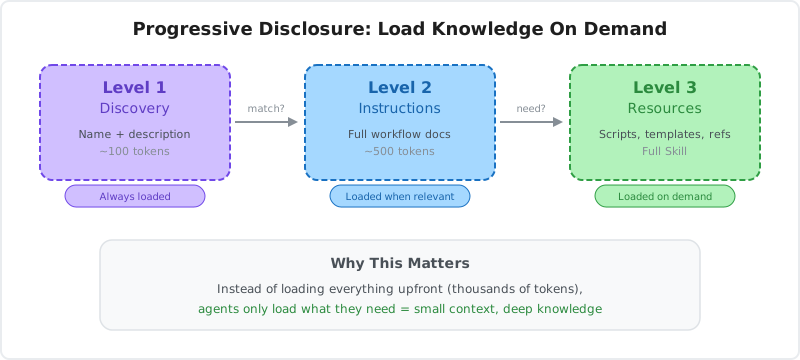
Skill.md: Procedural knowledge of LLM Lifecycle
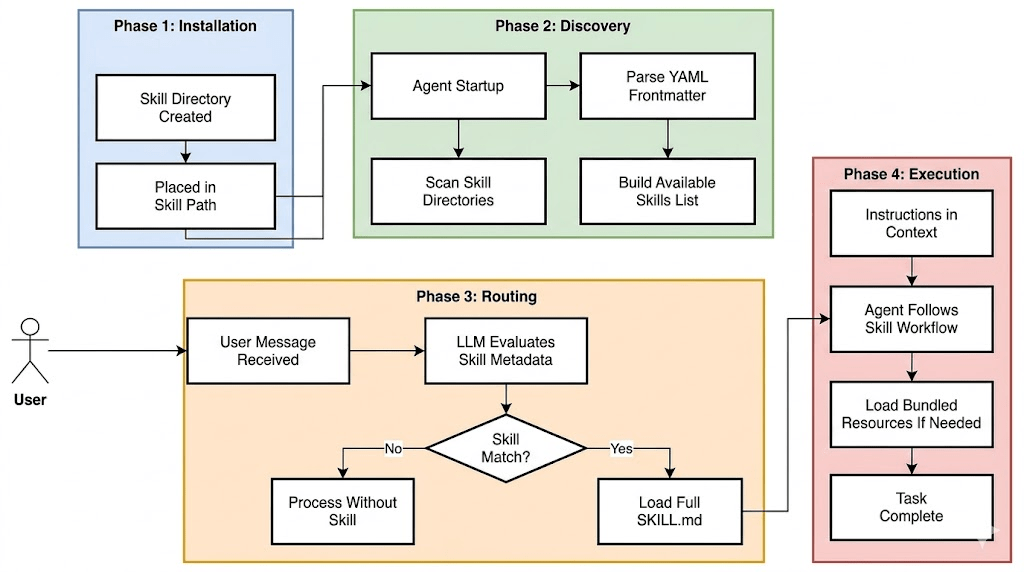
Source: Deep Dive SKILL.md (Part 1/2)
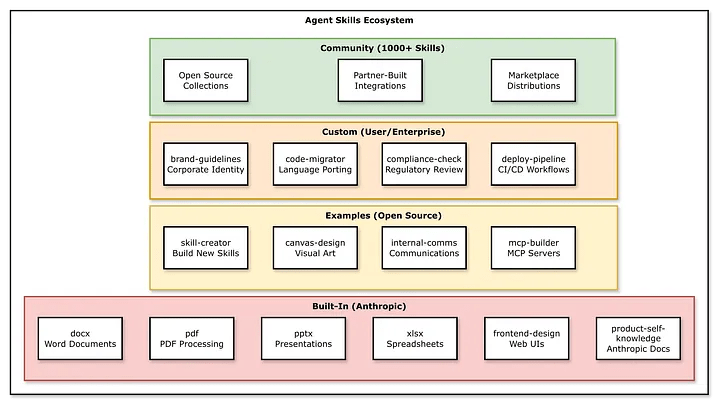
Skill.md: Procedural knowledge of LLM Skill Categories
Source: Deep Dive SKILL.md (Part 1/2)
Skill.md: Procedural knowledge of LLM Security and Trust
Source: Deep Dive SKILL.md (Part 1/2)
Threats:
- Prompt injection
- Tool poisoning
- Hidden malware
Legal issuses
How to mitigate?
allowed-toolsfieldlicensefield- ...
Implementation Issues
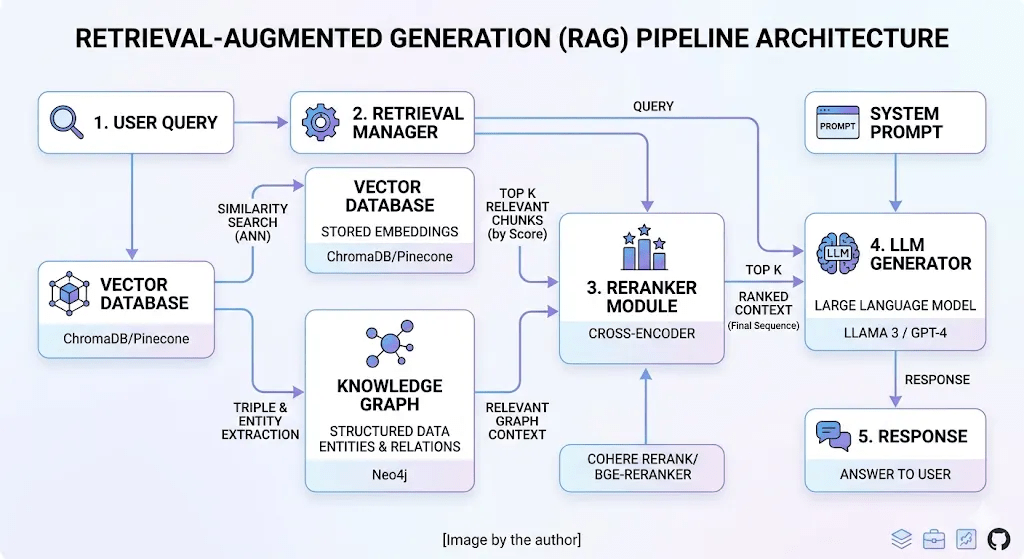
RAG Pipeline architecture 2026
Ingestion
Retrieval
Re-Rank
Generate
Data Ingestion, Data Warehoue & Data Lake
Data Ingestion: 將資料從外部來源移入內部Repository
- data warehouse: relational, structured
- data lake: original format with schema-on-read capability
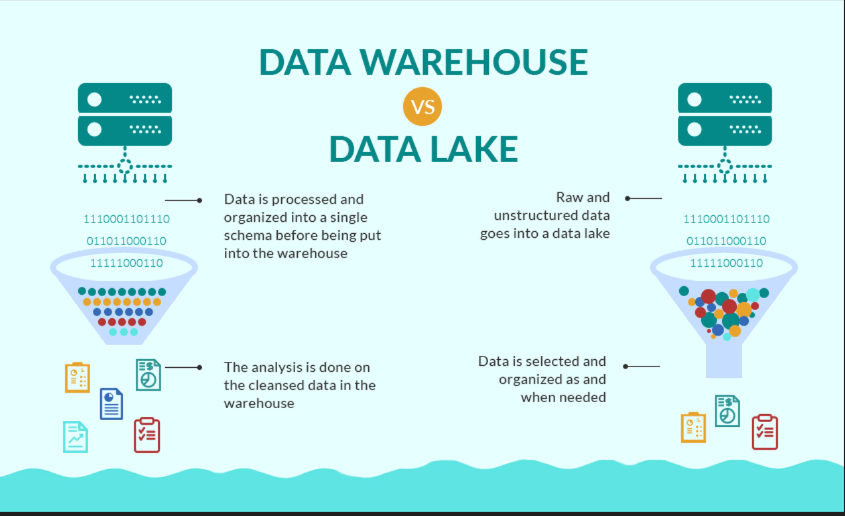
Preparation and Ingestion Pipeline
- 資料萃取 (Extraction Layer)
- 從 PDF、HTML、Word 或 Markdown 中提取純文字。
- 主流工具:PyMuPDF、Unstructured、LlamaParse
- 文本切塊 (Chunking & Preprocessing)
- 將長文章切成固定或語意完整的片段(清理:移除 HTML 標籤、特殊符號與重複雜訊 )
- 策略:固定長度(帶重疊區間)、依 Markdown 標題、或Semantic Chunking
- 嵌入向量生成 (Embedding Generation)
- 將chunks轉換為高維度數值向量(抓取語意特徵)。
- 常用模型:OpenAI
text-embedding-3-small、Cohere Embedding、BGE 或 mE5 模型
- Metadata增強 (Metadata Enrichment)
- 為每個chunk加上標籤,以利後續精準篩選。
- 常見標籤:來源檔案名稱、頁碼、章節標題、創建日期、關鍵字。
- 向量寫入 (Vector Insertion)
- 將向量連同metadata與原始文字,一起寫入向量資料庫。
- 主流資料庫:Pinecone、Milvus、Chroma、Qdrant、pgvector
Ingestion Pipeline: loading & others
import hashlib
from datetime import datetime
from langchain.document_loaders import PyPDFLoader
from langchain.text_splitter import RecursiveCharacterTextSplitter
from langchain.embeddings import OpenAIEmbeddings

class VectorIngestionPipeline:
    def __init__(self, vector_db, embedding_model):
        self.vector_db = vector_db
        self.embeddings = embedding_model
        # 保持良好的切分大小
        self.text_splitter = RecursiveCharacterTextSplitter(
            chunk_size=1000,
            chunk_overlap=200
        )

    def process_document(self, file_path, metadata=None):
        # 安全處理預設 metadata,避免 None 導致報錯
        base_metadata = metadata or {}
        if "source" not in base_metadata:
            base_metadata["source"] = file_path

        # 1. 提取 PDF 文字
        loader = PyPDFLoader(file_path)
        documents = loader.load()

        # 2. 切分區塊
        chunks = self.text_splitter.split_documents(documents)

        # 提取所有區塊的文字列表,用於一次性批量生成向量
        texts = [chunk.page_content for chunk in chunks]

        # 3. 批量生成向量 (大幅減少 API 呼叫延遲)
        embeddings = self.embeddings.embed_documents(texts)

        # 4. 準備批量寫入的資料
        vectors_to_upsert = []
        for i, chunk in enumerate(chunks):
            # 雜湊值計算
            content_hash = hashlib.sha256(chunk.page_content.encode()).hexdigest()

            # 擴充元資料:必須包含原始文字 "text"
            enriched_metadata = {
                **base_metadata,
                "text": chunk.page_content,
                "chunk_id": i,
                "page": chunk.metadata.get("page", 0), # 保留 PDF 原本的頁碼資訊
                "timestamp": datetime.now().isoformat(),
                "content_hash": content_hash
            }

            vector_id = f"{base_metadata['source']}_{i}"
            vectors_to_upsert.append((vector_id, embeddings[i], enriched_metadata))

        # 5. 單次批量寫入資料庫 (效能提升數十倍)
        self.vector_db.upsert(vectors=vectors_to_upsert)
參考範例pseudo code
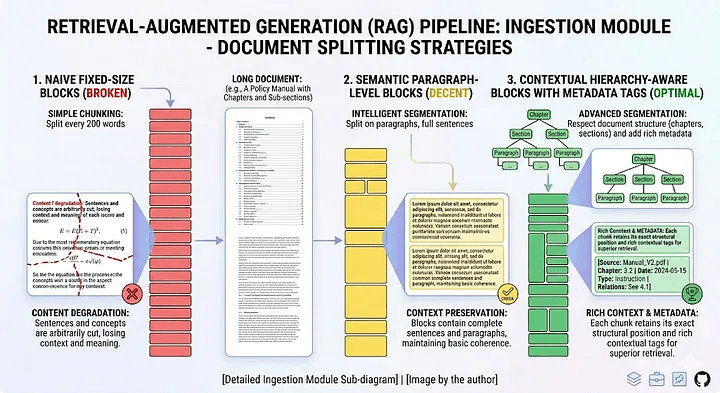
Ingestion: Smart Chunking
- Naive Chunking: 固定長度(512) + overlapping
- Recursive Chunking(Semantic Chunking): Sentence based, Paragraph based.
- Context Chunking: use another LLM to break the content into chunks , and then augment the context to them.
Ingestion: Semantic Chunking
from langchain.text_splitter import RecursiveCharacterTextSplitter
import spacy
class SmartChunker:
    def __init__(self):
        self.nlp = spacy.load("en_core_web_sm")

    def semantic_chunking(self, text, max_chunk_size=1000):
        """Chunk by sentences while respecting max size"""
        doc = self.nlp(text)
        sentences = [sent.text.strip() for sent in doc.sents]
        chunks = []
        current_chunk = ""
        for sentence in sentences:
            if len(current_chunk + sentence) <= max_chunk_size:
                current_chunk += sentence + " "
            else:
                if current_chunk:
                    chunks.append(current_chunk.strip())
                current_chunk = sentence + " "
        if current_chunk:
            chunks.append(current_chunk.strip())
return chunksIngestion: Context Chunking
# Example: Contextual chunking with metadata enrichment
from langchain.text_splitter import RecursiveCharacterTextSplitter

splitter = RecursiveCharacterTextSplitter(
    chunk_size=800,
    chunk_overlap=200,
    separators=["\n## ", "\n### ", "\n\n", "\n", " "]
)

chunks = splitter.split_documents(documents)

# Enrich each chunk with hierarchical context
for chunk in chunks:
    chunk.metadata["section_title"] = extract_parent_heading(chunk)
    chunk.metadata["doc_summary"] = doc_level_summary
    chunk.metadata["source"] = document.metadata["source"]
1. What is the natural unit of meaning in your corpus?
2. What is the average complexity of your users’ queries?
3. What is your latency budget for retrieval?
data特性
query特性
Summary of Chunking
Vector Embeddings types
- Word embeddings
- used to represent words in NLP
- Word2Vec, GloVe, FastText
- Sentence and document embeddings
- semantic meaning of sentences and documents.
- BERT, Doc2Vec
- Graph embeddings
- nodes and edges of graphs in vector space
- link prediction, node classification.
- Image embeddings
- images in a compact vector form
- image recognition, image classification.
Pavan Belagatti, Vector Embeddings Explained for Developers!
Vector Embeddings
Central to many NLP, recommendation, and search algorithms.

數值
物件、文字、圖像...
Vector Embeddings semantic similarity
Vector Space: semantic similarity
Barančíková, P., & Bojar, O. (2019). In search for linear relations in sentence embedding spaces.

Vector Embeddings creating embeddings using Huggingface
pip install -U transformers torchfrom transformers import AutoTokenizer, AutoModel
import torch
def get_huggingface_embedding(text,
model_name='sentence-transformers/all-MiniLM-L6-v2'):
tokenizer = AutoTokenizer.from_pretrained(model_name)
model = AutoModel.from_pretrained(model_name)
inputs = tokenizer(text, return_tensors="pt", padding=True,
truncation=True, max_length=512)
with torch.no_grad():
outputs = model(**inputs)
# You can choose how to derive the final embeddings, e.g., mean pooling
embeddings = outputs.last_hidden_state.mean(dim=1).squeeze().numpy()
return embeddings
# Example usage
text = "Pavan is a developer evangelist."
embedding_huggingface = get_huggingface_embedding(text)
print(embedding_huggingface)Embedding: Sentence Transformers
from sentence_transformers import SentenceTransformer

# 1. Load a pretrained Sentence Transformer model
model = SentenceTransformer("sentence-transformers/all-MiniLM-L6-v2")
# The sentences to encode
sentences = [
    "The weather is lovely today.",
    "It's so sunny outside!",
    "He drove to the stadium.",
]
# 2. Calculate embeddings by calling model.encode()
embeddings = model.encode(sentences)
print(embeddings.shape)
# [3, 384]

# 3. Calculate the embedding similarities
similarities = model.similarity(embeddings, embeddings)
print(similarities)
# tensor([[1.0000, 0.6660, 0.1046],
#         [0.6660, 1.0000, 0.1411],
#         [0.1046, 0.1411, 1.0000]])
pip install -U sentence-transformersall-MiniLM-L6-v2
Embedding: Sentence Transformers
from sentence_transformers import SentenceTransformer

# Download from the 🤗 Hub
model = SentenceTransformer("google/embeddinggemma-300m")
# Run inference with queries and documents
query = "Which planet is known as the Red Planet?"
documents = [
    "Venus is often called Earth's twin because of its similar size and proximity.",
    "Mars, known for its reddish appearance, is often referred to as the Red Planet.",
    "Jupiter, the largest planet in our solar system, has a prominent red spot.",
    "Saturn, famous for its rings, is sometimes mistaken for the Red Planet."
]
query_embeddings = model.encode_query(query)
document_embeddings = model.encode_document(documents)
print(query_embeddings.shape, document_embeddings.shape)
# (768,) (4, 768)

# Compute similarities to determine a ranking
similarities = model.similarity(query_embeddings, document_embeddings)
print(similarities)
# tensor([[0.3011, 0.6359, 0.4930, 0.4889]])
pip install -U sentence-transformersgoogle/embeddinggemma-300m
Embedding: E5
from langchain_community.embeddings import HuggingFaceEmbeddings

# Initialize Multilingual-E5
embeddings = HuggingFaceEmbeddings(
    model_name="intfloat/multilingual-e5-base",
    model_kwargs={"device": "cpu"}
)

# E5 requires 'query: ' and 'passage: ' prefixes
query_text = "query: 什麼是區塊鏈?"
doc_texts = [
    "passage: 區塊鏈是一種去中心化的分散式帳本技術。",
    "passage: 台北101是台灣著名的地標建築。"
]

query_vector = embeddings.embed_query(query_text)
doc_vectors = embeddings.embed_documents(doc_texts)
intfloat/multilingual-e5-base: 繁體中文適用
Embedding: gemini API
import os
from langchain_google_genai import GoogleGenAIEmbeddings

# 初始化 Gemini 向量模型,目前最新通用推薦型號為 text-embedding-004
embeddings = GoogleGenAIEmbeddings(
    model="models/text-embedding-004"
)
# 1. 轉換單一搜尋問題(Query)
query_text = "台灣高鐵的票價如何查詢?"
query_vector = embeddings.embed_query(query_text)
# 2. 轉換多筆資料庫文本(Documents)
documents = [
    "台灣高鐵提供商務車廂與標準車廂,票價依據乘車距離計算。",
    "台北到高雄的標準車廂對號座全票票價為新台幣 1,490 元。",
    "高雄捷運是服務高雄市、屏東縣及台南市的捷運系統。"
]
doc_vectors = embeddings.embed_documents(documents)

# 3. 輸出檢驗資訊
print(f"向量維度大小: {len(query_vector)}") # text-embedding-004 預設維度為 768
print(f"成功生成 {len(doc_vectors)} 筆文本向量。")
text-embedding-004
需要google ai api-key
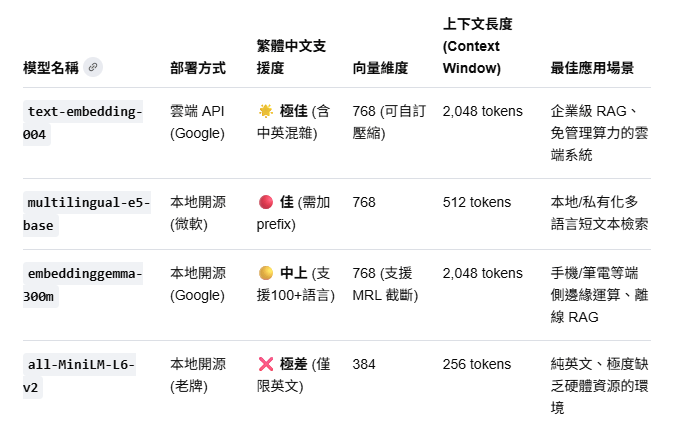
Embedding comparison
* 使用時,問題必須手動加上 "query: " 前綴,資料庫文本必須加上 "passage: " 前綴,否則準確度會大幅下滑。
*
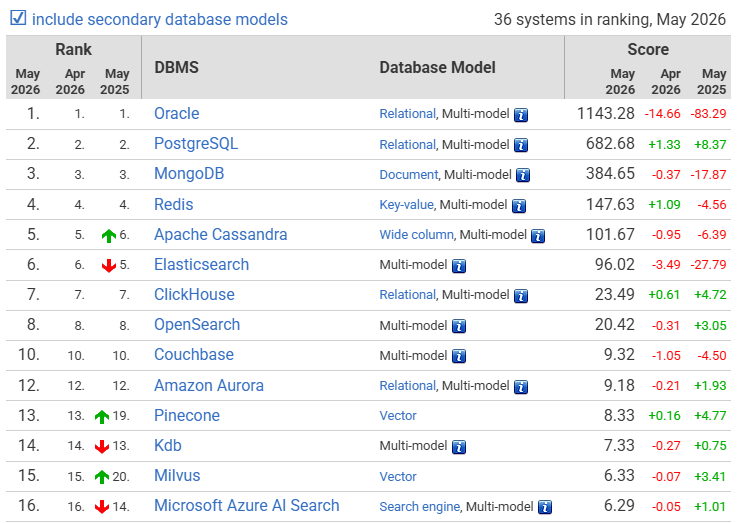
Ranking of Vector DBMS
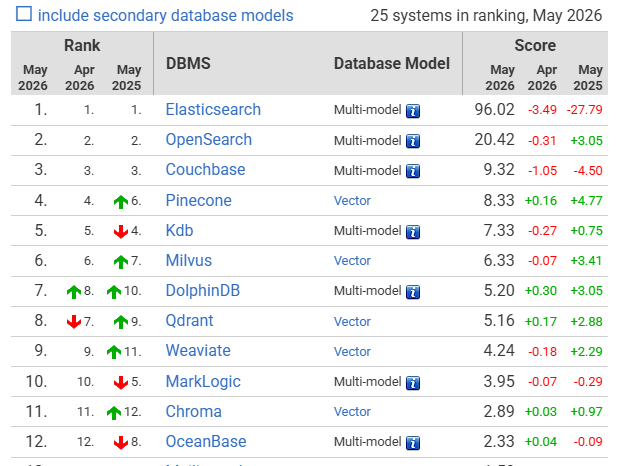
Ranking of Vector DBMS
Retriever hybrid search
Retriever hybrid search
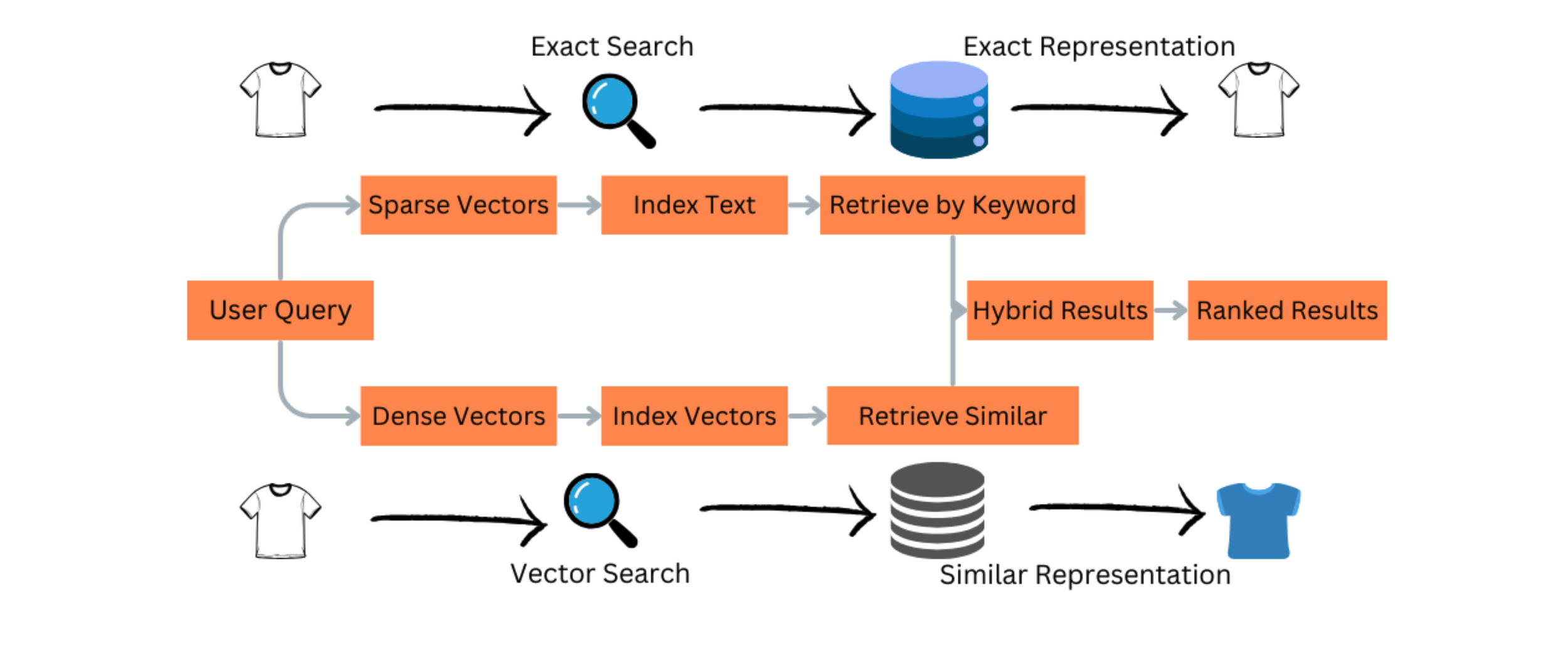
問題: Semantic similarity 與 factual relevance並非同一件事
Vector similarity
Semantic similarity
解法:
exact search(lexical search) + vector search
reranker 排除離題的context
+
BM25, TF-IDF
Semantic Search
Retriever hybrid search
# Hybrid search with RRF fusion
from rank_bm25 import BM25Okapi
import numpy as np

# BM25 lexical retrieval
bm25 = BM25Okapi(tokenized_corpus)
lexical_scores = bm25.get_scores(tokenized_query)
lexical_top_k = np.argsort(lexical_scores)[-20:][::-1]
# Dense vector retrieval
vector_results = vector_store.similarity_search(query, k=20)

# Reciprocal Rank Fusion
def reciprocal_rank_fusion(ranked_lists, k=60):
    fused_scores = {}
    for ranked_list in ranked_lists:
        for rank, doc_id in enumerate(ranked_list):
            fused_scores[doc_id] = fused_scores.get(doc_id, 0) + 1 / (k + rank + 1)
    return sorted(fused_scores, key=fused_scores.get, reverse=True)

final_ranking = reciprocal_rank_fusion([lexical_top_k, vector_doc_ids])
Press enter or click to view image in full size
pip install rank_bm25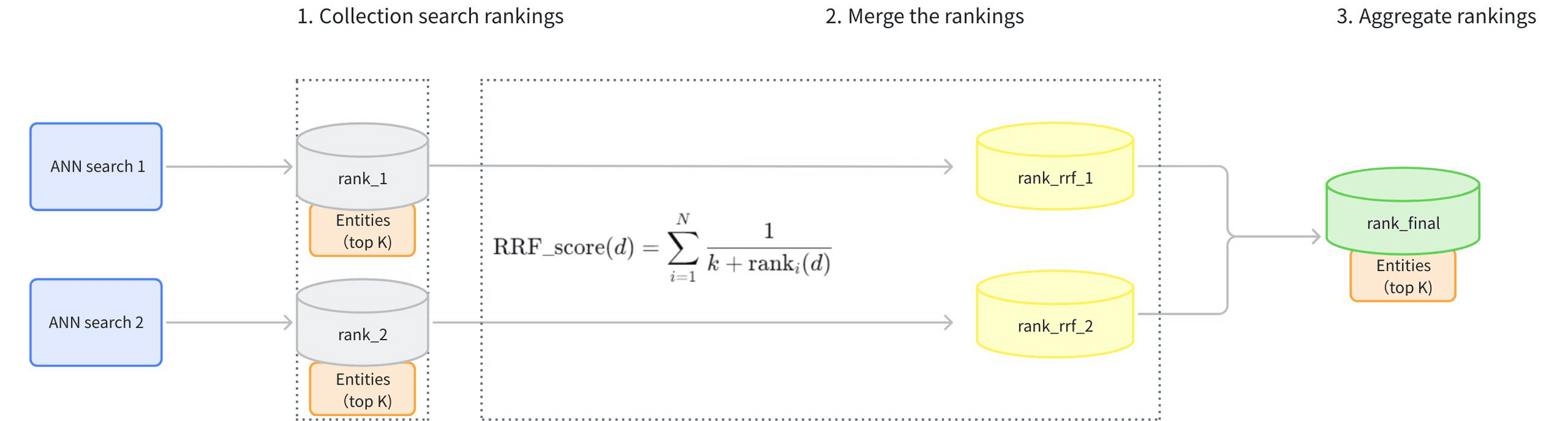
Retriever hybrid search
RRF(Reciprocal Rank Fusion) Ranker
不同搜尋方式的排名
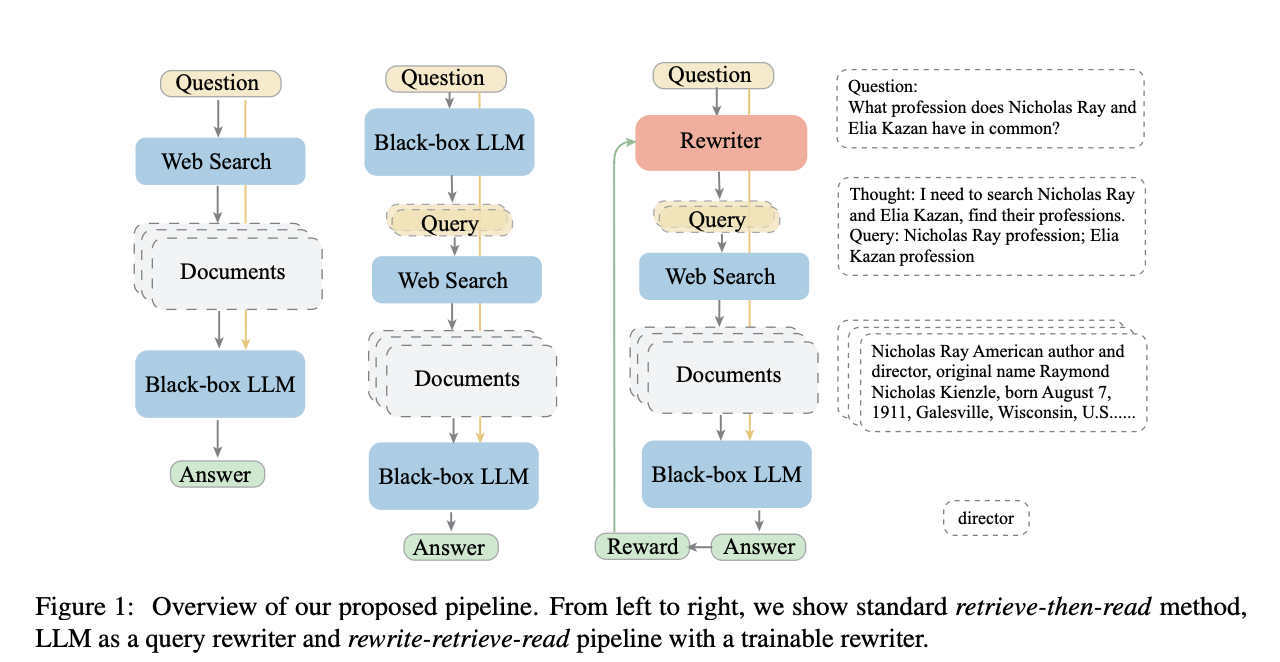
User's Query Transformation
Users are terrible at writing query.
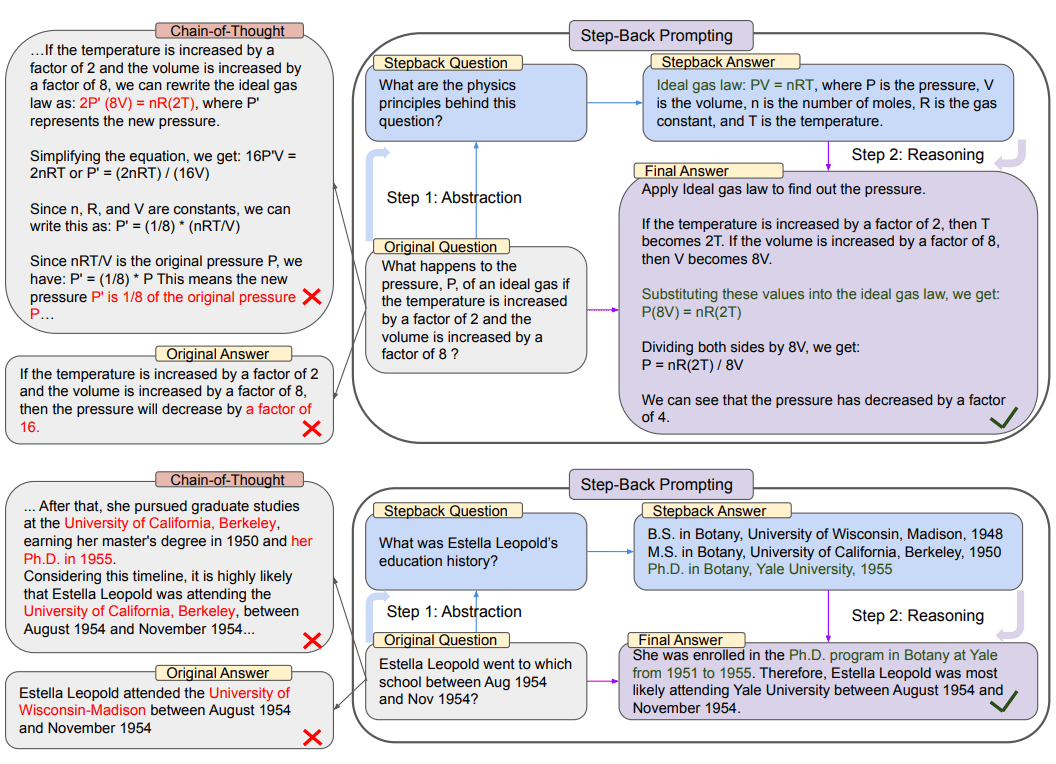
Query Transformation
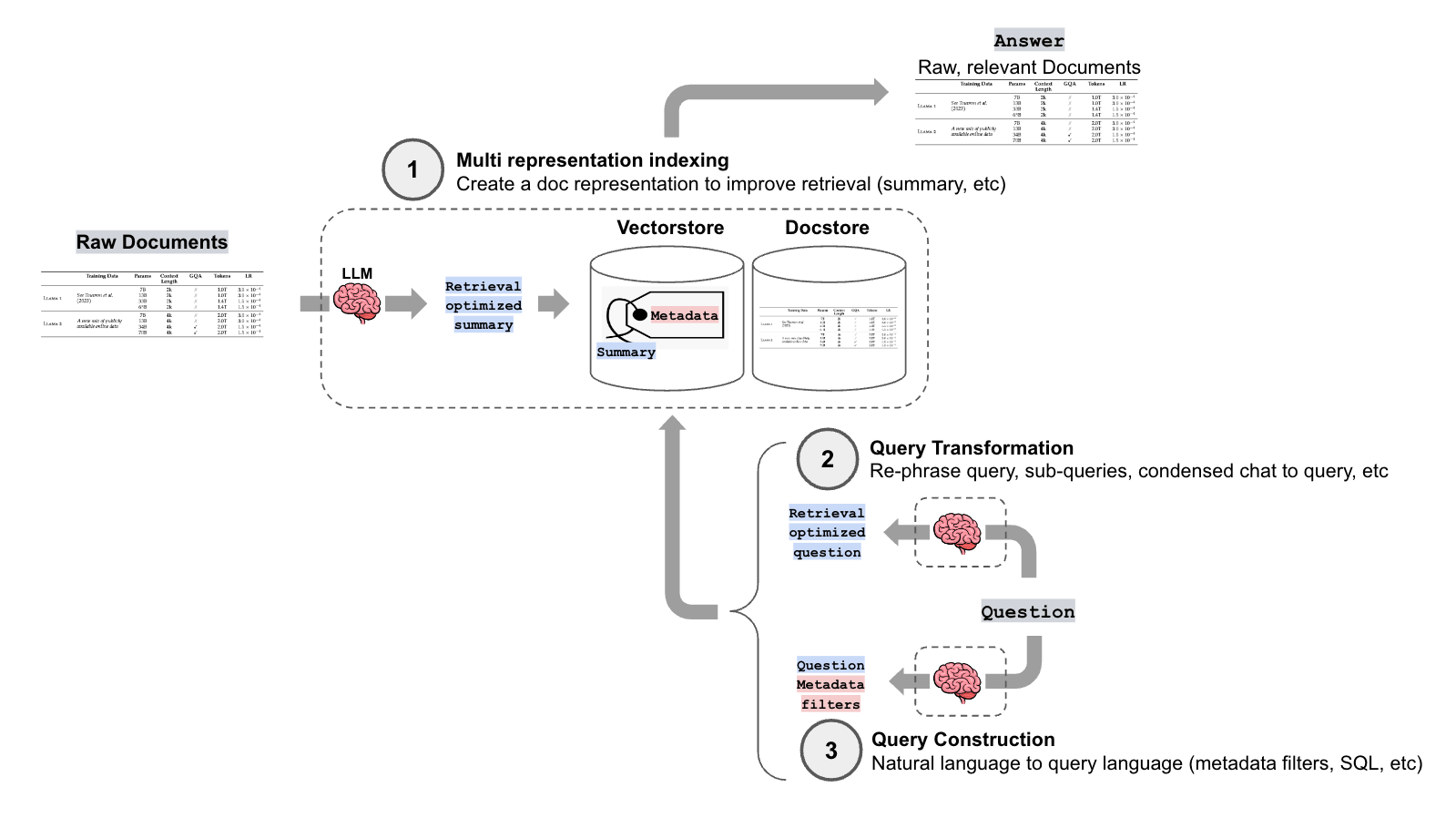
- Query Rewriting
- Step-back Prompting
- Sub-query Decomposition
Query Transformation query rewriting/ rewrite-retrieve-read
Query Transformation step-back prompting
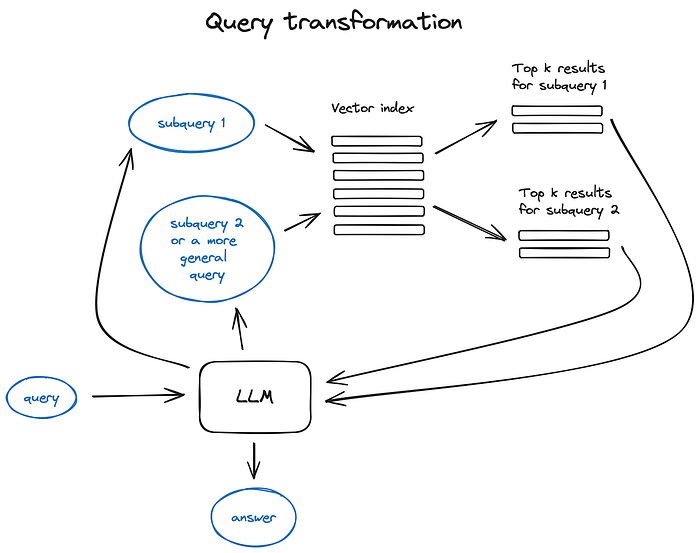
Query Transformation Subquery decomposition
Query Transformation Implementation
- Import libraries and set environment variables
from langchain_openai import ChatOpenAI
from langchain.prompts import PromptTemplate

import os
from dotenv import load_dotenv

# Load environment variables from a .env file
load_dotenv()

# Set the OpenAI API key environment variable
os.environ["OPENAI_API_KEY"] = os.getenv('OPENAI_API_KEY')
# 或改使用local llmQuery Transformation Implementation-query rewriting
re_write_llm = ChatOpenAI(temperature=0, model_name="gpt-4o", max_tokens=4000)

# Create a prompt template for query rewriting
query_rewrite_template = """You are an AI assistant tasked with reformulating user queries to improve
retrieval in a RAG system. Given the original query, rewrite it to be more specific, detailed, and
likely to retrieve relevant information.

Original query: {original_query}

Rewritten query:"""

query_rewrite_prompt = PromptTemplate(input_variables=["original_query"], template=query_rewrite_template)

# Create an LLMChain for query rewriting
query_rewriter = query_rewrite_prompt | re_write_llm

def rewrite_query(original_query):
    """
    Rewrite the original query to improve retrieval.
    Args:
    original_query (str): The original user query
    Returns:
    str: The rewritten query
    """
    response = query_rewriter.invoke(original_query)
return response.contentQuery Transformation Implementation-query rewriting
# example query over the understanding climate change dataset
original_query = "What are the impacts of climate change on the environment?"
rewritten_query = rewrite_query(original_query)
print("Original query:", original_query)
print("\nRewritten query:", rewritten_query)
Demostration
Original query: What are the impacts of climate change on the environment?
Rewritten query: What are the specific effects of climate change on various ecosystems, including changes in temperature, precipitation patterns, sea levels, and biodiversity?
Query Transformation Implementation: Step back prompting
step_back_llm = ChatOpenAI(temperature=0, model_name="gpt-4o", max_tokens=4000)


# Create a prompt template for step-back prompting
step_back_template = """You are an AI assistant tasked with generating broader, more general queries to improve context retrieval in a RAG system.
Given the original query, generate a step-back query that is more general and can help retrieve relevant background information.

Original query: {original_query}

Step-back query:"""

step_back_prompt = PromptTemplate(
    input_variables=["original_query"],
    template=step_back_template
)

# Create an LLMChain for step-back prompting
step_back_chain = step_back_prompt | step_back_llm

def generate_step_back_query(original_query):
    """
    Generate a step-back query to retrieve broader context.

    Args:
    original_query (str): The original user query

    Returns:
    str: The step-back query
    """
    response = step_back_chain.invoke(original_query)
    return response.content
Query Transformation Implementation: Step back prompting
You are an expert of world knowledge. I am going to ask you a question.
Your response should be comprehensive and not contradicted with the following
context if they are relevant. Otherwise, ignore them if they are not relevant.

{normal_context}
{step_back_context}

Original Question: {question}
Answer:The other step back prompt template
Query Transformation Implementation: Step back prompting
# example query over the understanding climate change dataset
original_query = "What are the impacts of climate change on the environment?"
step_back_query = generate_step_back_query(original_query)
print("Original query:", original_query)
print("\nStep-back query:", step_back_query)
Demostration
Original query: What are the impacts of climate change on the environment?
Step-back query: What are the general effects of climate change?
Query Transformation Sub-query Decomposition
sub_query_llm = ChatOpenAI(temperature=0, model_name="gpt-4o", max_tokens=4000)

# Create a prompt template for sub-query decomposition
subquery_decomposition_template = """You are an AI assistant tasked with breaking down complex queries into simpler sub-queries for a RAG system.
Given the original query, decompose it into 2-4 simpler sub-queries that, when answered together, would provide a comprehensive response to the original query.

Original query: {original_query}

example: What are the impacts of climate change on the environment?

Sub-queries:
1. What are the impacts of climate change on biodiversity?
2. How does climate change affect the oceans?
3. What are the effects of climate change on agriculture?
4. What are the impacts of climate change on human health?"""


subquery_decomposition_prompt = PromptTemplate(
    input_variables=["original_query"],
    template=subquery_decomposition_template
)

# Create an LLMChain for sub-query decomposition
subquery_decomposer_chain = subquery_decomposition_prompt | sub_query_llm

def decompose_query(original_query: str):
    """
    Decompose the original query into simpler sub-queries.

    Args:
    original_query (str): The original complex query

    Returns:
    List[str]: A list of simpler sub-queries
    """
    response = subquery_decomposer_chain.invoke(original_query).content
    sub_queries = [q.strip() for q in response.split('\n') if q.strip() and not q.strip().startswith('Sub-queries:')]
return sub_queriesQuery Transformation Implementation: Step back prompting
# example query over the understanding climate change dataset
original_query = "What are the impacts of climate change on the environment?"
sub_queries = decompose_query(original_query)
print("\nSub-queries:")
for i, sub_query in enumerate(sub_queries, 1):
    print(sub_query)
Demostration
Sub-queries:
Original query: What are the impacts of climate change on the environment?
1. How does climate change affect biodiversity and ecosystems?
2. What are the impacts of climate change on oceanic conditions and marine life?
3. How does climate change influence weather patterns and extreme weather events?
4. What are the effects of climate change on terrestrial environments, such as forests and deserts?
Lesson 6: RAG
By Leuo-Hong Wang