The top open source framework
for building amazing
mobile apps.

Luis Henrique G Camilo
Software Engineer
2




What's Progressive Web App?
- App-like - Web App that acts like native
- Installable, Fresh - Saved to home screen and always up-to-date
- Connectivity independent - Offline functionality
- No App Store - No review process
- Progressive - Works on every platform
- Re-engageable - Push notification support
- Discoverable, Linkable - easily found through search and access via URL
Progressive Web App
or P.W.A.
- Safe - Served via HTTPS
Mobile strategy
4 categories of analysis
Distribution
Capabilities
Performance
Productivity
Why use the Ionic 2?
Code once. Deploy everywhere.
- Built on top of Angular - advanced framework with an active community
- Native like UI - Standard native mobile app UI guidelines for each OS
- Native SDKs - via Ionic Native and Cordova
- Hybrid App - uses Cordova to deploy natively
- Progressive Web App - Runs in the browser
- Powerful CLI
- Performance obsessed - Hardware accelerated transitions, touch-optimized gestures, native scrolling
How to create an application ionic 2
Create an Ionic App
# Install ionic tools
$ npm install -g cordova ionic

# Create Ionic 2 project
$ ionic start example

# Run Ionic 2 project
$ ionic serve

# Build the project
$ ionic build

# Generate pipes, components, pages, directives, providers, and tabs (ionic-angular >= 3.0.0)
$ ionic generate pipes|components|pages|directive|provider
http://ionicframework.com/getting-started/
Web app manifest
{
  "name": "Angular Hack Day Ionic 2 PWA",
  "short_name": "AngularHackDay",
  "description": "Ionic 2 PWA demo for Angular Hack Day - Sydney",
  "start_url": "index.html",
  "display": "standalone",
  "orientation": "portrait",
  "background_color": "#79C273",
  "theme_color": "#79C273",
  "icons": [{
    "src": "../resources/android/icon/drawable-ldpi-icon.png",
    "sizes": "36x36",
    "type": "image/png"
  },
  ...
  ],
  "related_applications": [{
    "platform": "web",
    "url": "https://.../"
  }]
}
https://developer.mozilla.org/en-US/Add-ons/WebExtensions/manifest.json
Enable home screen install
Service Workers
https://developers.google.com/web/fundamentals/getting-started/primers/service-workers
- Cache data & files
- Send push notifications
- Intercept network requests
- Run by browser in the background
Enable offline capability
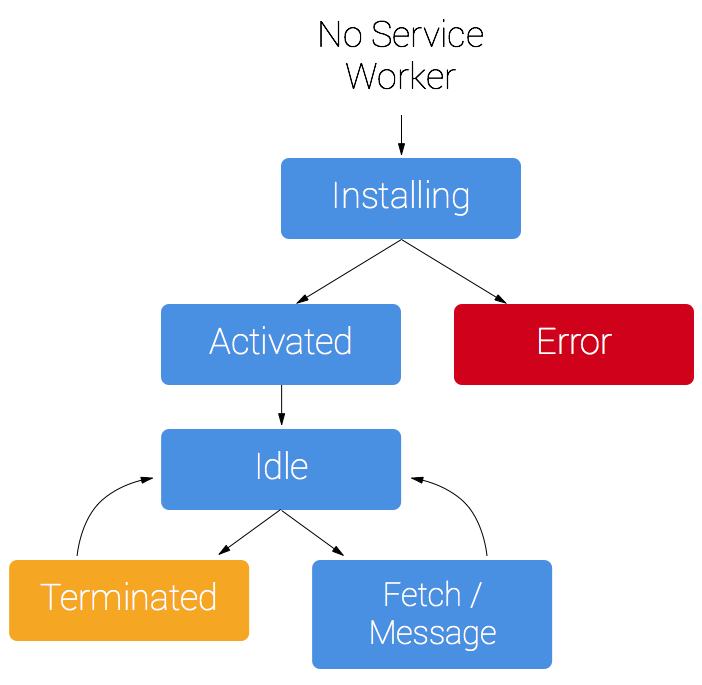
https://serviceworke.rs/
App Cache
https://developer.mozilla.org/en-US/docs/Web/HTML/Using_the_application_cache
As a fallback
https://goo.gl/ec1p6N
- Offline browsing - navigate even when offline
- Speed - fast loading via local cached resources
- No partial update - a byte-by-byte manifest comparison to trigger the update
- Deprecated - Service Workers offers a replacement for Application Cache
- Reduced server load - only downloads resources that have changed
- No background sync - local cache only
Instalação do Ionic
Ionic CLI and Cordova
# install cordova in global scope
$ npm install -g ionic cordova
Primeiro, tenha certeza que o nodejs6+ esteja instalado na sua máquina
Criando sua primeira aplicação
# Create your fist mobile app
$ ionic start cutePuppyPics
Inicializando
$ cd cutePuppyPics
$ ionic serve
Templates app
Criando aplicação com template
# Create your fist mobile app
$ ionic start cutePuppyPics tabs
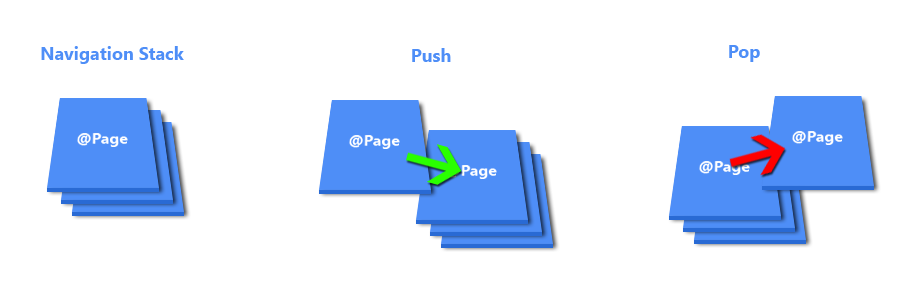
NavController
NavController
- É a classe base para navegação entre componentes como tabs e nav
Uso Básico
import { Component } from `@angular/core`;
import { StartPage } from './start-page';

@Component(
  template: `<ion-nav [root]="rootPage"></ion-nav>`
})
class MyApp {
  // set the rootPage to the first page we want displayed
  public rootPage: any = StartPage;

  constructor(){
  }
}
Uso Básico
import { NavController } from 'ionic-angular';

class MyComponent {
  constructor(public navCtrl: NavController) {

  }
}
Injetando NavController
Navegando entre paginas
import { Component, ViewChild } from '@angular/core';
import { NavController } from 'ionic-angular';

@Component({
   template: '<ion-nav #myNav [root]="rootPage"></ion-nav>'
})
export class MyApp {
   @ViewChild('myNav')
   nav: NavController;

   public rootPage: any = TabsPage;

   /** Wait for the components in MyApp's template to be initialized
    * In this case, we are waiting for the Nav with reference variable of "#myNav"
    */
   ngOnInit() {

      // Let's navigate from TabsPage to Page1

      this.nav.push(Page1);
   }
}
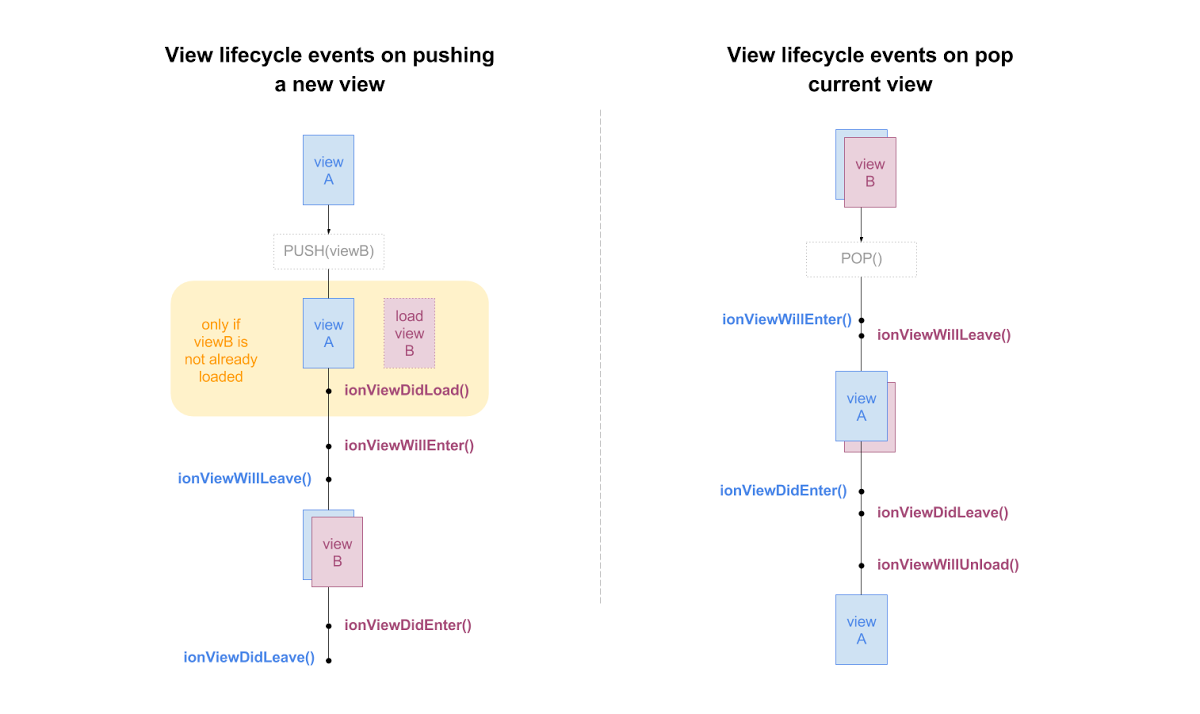
Pages
Lifecycle page
Páginas de overlay(modal, alert)
import { Component } from '@angular/core';
import { App, ViewController } from 'ionic-angular';

@Component({
    template: `
    <ion-content>
      <h1>My PopoverPage</h1>
      <button ion-button (click)="pushPage()">Call pushPage</button>
     </ion-content>
    `
  })
  class PopoverPage {
    constructor(
      public viewCtrl: ViewController
      public appCtrl: App
    ) {}

    pushPage() {
      this.viewCtrl.dismiss();
      this.appCtrl.getRootNav().push(SecondPage);
    }
  }
Obrigado!

lhenriquegomescamilo

lhenriquegomescamilo
Fonts

- Angular Connect 2016
- Building Progressive Web Apps and Hybrid Apps with Ionic Adam Bradley and Brandy Carney - https://youtu.be/seOk-PejrMc
- Mobile apps? Trust no one except me Jeff Cross - https://youtu.be/FP1w89F5OtI
- Ionic Framework - http://ionicframework.com
- Mozilla Developer Framework - https://developer.mozilla.org/en-US/docs/Web/API/ServiceWorker
- Google Developer - https://developers.google.com/web/progressive-web-apps/
Ionic 2
By Luis Henrique Gomes Camilo
Ionic 2
Ionic 2 allows you to create hybrid (installed as native app) and progressive web app from a single code base. Webpack optimises the the builds for you and reduce the size of the app to a maximum. Angular Hack Day - Sydney, Australia - 5th November 2016 - http://angularhackday.com/sydney/