Automated OS Installation
Purpose of Automation
- Time Saving.
- Eliminating error-prone manual Process.
- Handle many system at a time.
Tools for OS Automation
- Jump/Kick Start
- Cobbler
- Viper
- Razor
- System Imager
We Choose Razor For this purpose.
WHY's Razor
- Full insight into the latest, up-to-date status of your hardware inventory.
- Event Driven Instead of User Driven
- Many tools claim automation but require a user to have to select the 24 servers and push a button
- We can directly integrate with DevOps toolsets to allow for cloud configuration.
What's Razor
Cloud Provisioning tool
Automates Server Deployment
Physical and Virtual
Organised Information of all the nodes
Key Components
Discovery
Policy
Tagging
Task
Brokers
Razor:Discovery
-
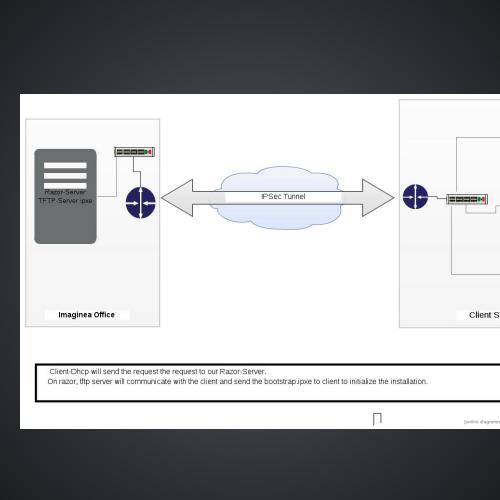
When a server is booted, DHCP server will point the server to a static PXE provided by Razor.
- This PXE file will point the server at the Razor API and automatically pull down the MK and load it.
- Kernel will contact the razor-server and register the node with razor.
Razor:Tagging
if processorcount<=10 and memorysize>= 1024MB
then tag:demo_tag
{
"name": "demo_tag",
"rule": ["and",
["<=", ["num", ["fact", "processorcount"]], 10],
[">=", ["num", ["fact", "memorysize_mb"]], 1024]]
}
Razor:Policy
A Policy in Razor is a rule that takes a repo and applies it to a Node based on matching against Tags.
{"name": "ubuntu-server",
"repo": { "name": "ubuntu" },
"task": { "name": "ubuntu" },
"broker": { "name": "puppet" },
"hostname": "host${id}.pdlab.local",
"root_password": "pramati",
"max_count": "100",
"tags": [{ "name": "tag2"}]}
Installation
For razor set up you can follow below link:
https://docs.google.com/a/imaginea.com/document/d/16_KZiCulg23cOq2Ic0TnXx0wcSHhSICJbSIVjAN71BQ/edit?usp=sharing
AutoMATED OS
By magicharshit
AutoMATED OS
- 187