Task Automation with NPM Run
http://substack.net/task_automation_with_npm_run
https://docs.npmjs.com/misc/scripts
- prepublish
- publish
- preinstall
- install
- preuninstall
- postuninstall
- pretest, test, posttest
- prestop, stop, poststop
- prestart, start, poststart
- prerestart, restart, postrestart
$ npm test
$ npm run test
$ npm run-script test
Reserved script names:
{
"name": "demo",
"version": "1.0.0",
"description": "",
"main": "index.js",
"scripts": {
"test": "echo \"Error: no test specified\" && exit 1"
},
"author": "",
"license": "ISC"
}
package.json:
$ npm run build
$ npm run-script build
{
"name": "demo",
"version": "1.0.0",
"description": "",
"main": "index.js",
"scripts": {
"build": "echo \"Building...\"",
"test": "echo \"Error: no test specified\" && exit 1"
},
"author": "",
"license": "ISC"
}
package.json:
$ npm run test-n-build
$ npm run-script test-n-build
{
"name": "demo",
"version": "1.0.0",
"description": "",
"main": "index.js",
"scripts": {
"test-n-build": "npm test && npm run build",
"build": "echo \"Building...\"",
"test": "echo \"Testing...\""
},
"author": "",
"license": "ISC"
}
package.json:
{
"name": "demo",
"version": "1.0.0",
"description": "",
"main": "index.js",
"scripts": {
"test-n-build": "npm test && npm run build",
"build": "echo \"Building...\"",
"test": "echo \"Testing...\""
},
"author": "",
"license": "ISC"
}
package.json:

but we still need to get ; and &
{
"name": "demo",
"version": "1.0.0",
"description": "",
"main": "index.js",
"scripts": {
"test-n-build": "sh scripts/test-n-build.sh",
"build": "echo \"Building...\"",
"test": "echo \"Testing...\""
},
"author": "",
"license": "ISC"
}
package.json:
npm under cygwin still defaults to cmd.exe
#! /bin/bash
npm test & npm run build;
scripts/test-n-build.sh:
{
"name": "demo",
"version": "1.0.0",
"description": "",
"main": "index.js",
"config" : { "port" : "8080" },
"scripts": {
"printenv": "printenv"
},
"author": "",
"license": "ISC"
}
package.json:
$ npm run printenv
npm_config_sign_git_tag=
USER=jacksons
LANGUAGE=en_US
UPSTART_INSTANCE=
npm_package_config_port=8080
npm_config_user_agent=npm/2.5.1 node/v0.12.0 linux x64
npm_config_always_auth=
COMP_WORDBREAKS=
"'><;|&(:
XDG_SEAT=seat0
TEXTDOMAIN=im-config
npm_config_bin_links=true
npm_config_key=
SESSION=xubuntu
npm_config_description=true
npm_config_fetch_retries=2
npm_config_heading=npm
npm_config_init_version=1.0.0
npm_config_user=1002
{
"name": "demo",
"version": "1.0.0",
"description": "",
"main": "index.js",
"scripts": {
"learn": "learnyounode"
},
"author": "",
"license": "ISC",
"dependencies": {
"learnyounode": "^2.5.2"
}
}
package.json:
$ npm run learn
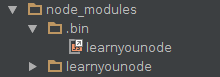
items in node_modules/.bin/ are added to the path
npm-run
By Michael A. Jackson
npm-run
How to use npm for task automation