Maria João Mira Paulo
Data Structures | Complex data types
Python - Module 2
- List
- Tuples
- Dictionaries
Complex Types
Data Structures
ok, nice 😀
 - To hold the history of the last 4 days of a single stock price for one-time use ➡️ tuple

- To hold the history of the stock price and add new prices every that ➡️ list

- To hold the history of the stock price and associate them with the respective company ➡️ dictionary
...complex Type should I choose?
But which...
- To create, use two parens with data in between, separeted by a comma.
Tuples
my_tuple = (1,2,3)

print(type(my_tuple), my_tuple)

# <class 'tuple'> (1, 2, 3)
- Access elements one at a time by their “index” (remember that all indexes start at 0 and not 1)
What can I do...
with tuples?
my_tuple = (1,2,3)

print(my_tuple[0]) # 1

print(my_tuple[1]) # 2

print(my_tuple[2]) # 3
- Acess a slice of a tuple with the ":" syntax.
- A slice of a tuple is still a tuple
What can I do...
with tuples?
my_tuple = (1,2,3)

print(my_tuple[0:2]) # (1,2)

print(my_tuple[1:2]) # (2)

print(my_tuple[0:3]) # (1,2,3)
- Change tuple elements.
- Tuples are immutable: once you create the tuple you cannot modify the contents.
What you can't do...
with tuples
my_tuple = (1, 2, 3)
my_tuple[0] = 999

TypeError: 'tuple' object does not support item assignment
- To create, it's the same as tuples but with brackets instead of parens.
List
my_list = [1,2,3]

print(type(my_list), my_list)

# <class 'list'> [1, 2, 3]
- Everything you can do with a tuple, push much more.
- A list is for changing, you can add, remove and re-order elements.
What can I do...
with a list?
my_list = [1,2,3]

print(my_list[0:2]) # (1,2)

print(my_list[1:2]) # (2)

print(my_list[0:3]) # (1,2,3)
- Using append() function.
Add items
my_list = [1, 2, 3]

my_list.append(4)

print(my_list) # [1, 2, 3, 4]
to a list
- Access the element you are interested in with the [index] syntax and then set it to a new value.
Change item value
my_list = [1, 2, 3]

my_list[1] = 4

print(my_list)  # [1, 4, 3]
of a list
- Calling the sort() function on a list, you can sort the values stored inside of it.
- You can pass in one argument called reverse which will allow you to sort the item in ascending or descending order.
Sort items
my_list = [2, 1, 3]

my_list.sort()

print(my_list)  # [1, 2, 3]

my_list.sort(reverse=True)

print(my_list)  # [3, 2, 1]
of a list
- They are used to associate two things in a dynamic way.
- Allow you to store key-value pars.
Dictionaries
What is a dictionary?
my_dict = { 'key1' : 'value1', 'key2' : 'value2'}


print(type(my_dict), my_dict)

# <class 'dict'> {'key1': 'value1', 'key2': 'value2'}
More with...
Dictionaries
- Dictionary already have some functions implemented "on" them, the same way list have the sort() function "on" it.
- You can check what is inside the dictionary with the following functions: keys(), values() and items()
brand_types = {'Zara': 'fashion', 'Aldi': 'grocery', 'Adidas': 'sports'}

print(brand_types.keys())    # dict_keys(['Zara', 'Aldi', 'Adidas'])
print(brand_types.values())  # dict_values(['fashion', 'grocery', 'sports'])
print(brand_types.items())
# dict_items([('Zara', 'fashion'), ('Aldi', 'grocery'), ('Adidas', 'sports')])
More with...
Dictionaries
- Add or update an item of a dictionary.
brand_types = {'Zara': 'fashion', 'Aldi': 'grocery', 'Adidas': 'sports'}

brand_types['Tesla'] = 'vehicles'

print(brand_types)
# {'Zara': 'fashion', 'Aldi': 'grocery', 'Adidas': 'sports', 'Tesla': 'vehicles'}

brand_types['Adidas'] = 'sport fashion'

print(brand_types)
# {'Zara': 'fashion', 'Aldi': 'grocery', 'Adidas': 'sport fashion', 'Tesla': 'vehicles'}
Recapping
Data Scrutures
- When you need to have a collection of things and don't need to change it ➡️ tuple

- When you need a collection of things and want to be able to change it ➡️ list

- When you need to associate two things using a key-value store ➡️ dictionary
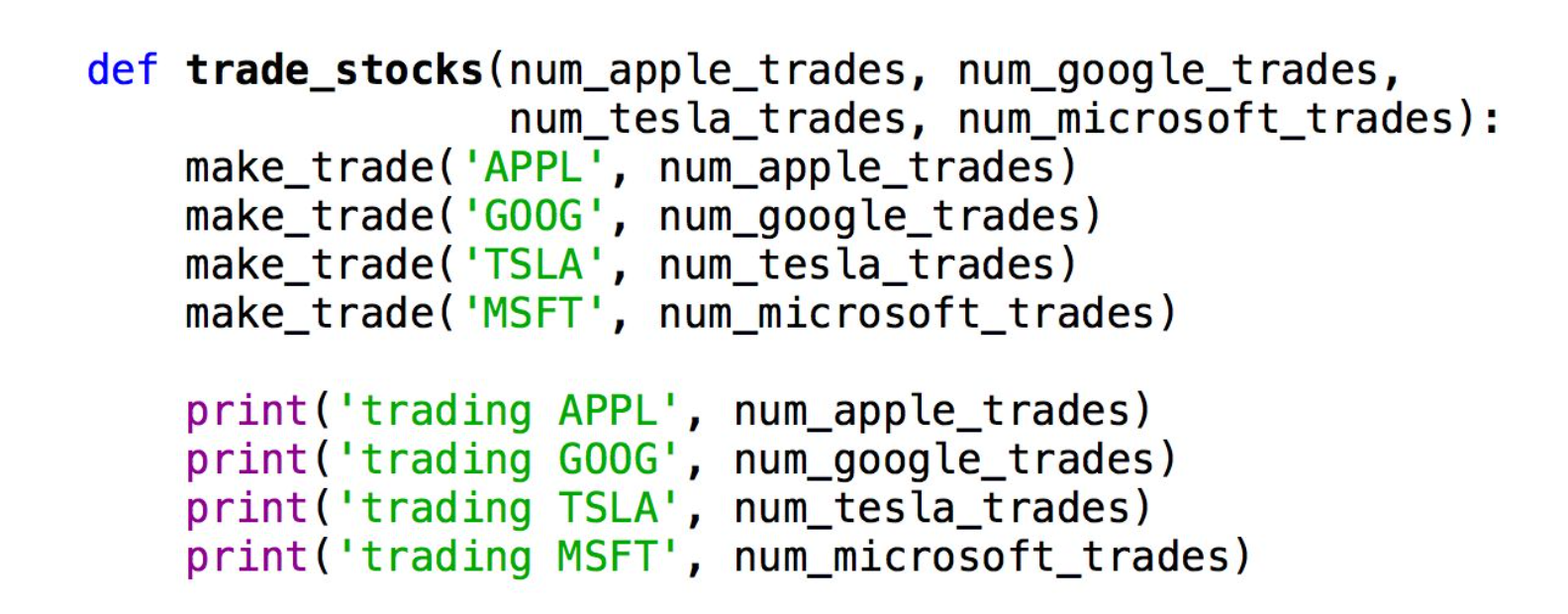
- We could associate a variable to each of the values at a time.
- Why do we need a dictionary?
Because we may need to associate lots of key/pair values without having to create a symbol (variable) for each one
of them.
Dictionaries
Why do we need them?
Exercise
Let’s say that we need to write a function that takes the number of trades to make for 4 different stocks, makes the trades, and prints the trades.
Dictionaries
1.
Implement it only using variables ( a lot of code needed right? )
2.
And now using a dictionary.
Python - Module 2
By Maria João Mira Paulo