IVS modern
Struttura e Coding Standards
Agenda
- Rilascio
- Configurazioni
- Struttura Progetto
- Come si compila
- Gestione delle dipendenze
- Coding Standards
- Testing
- Continuous Integration
Rilascio
Pacchetti
- ivsbe-0.73.1-1.i686.rpm
- ivsdb-0.73.1-1.i686.rpm
- ivsfe-0.73.1-1.i686.rpm
- ivsfel-0.73.1-1.i686.rpm
- ivscfg-0.73.1-1.i686.rpm
- ivscfg-0.73.1_ODIN-1.i686.rpm
- ivscfg-0.73.1_MEGDAM-1.i686.rpm
- ivscfg-0.73.1_DOPPIOZERO-1.i686.rpm
Backend
DB
Frontend
Fronted Legacy (vecchio Tomcat)
Configurazioni
Rilascio
Installazione tipica su sistema con interfaccia MitoCube (modern)
> rpm -vhi ivsbe-0.73.1-1.i686.rpm \
  ivsdb-0.73.1-1.i686.rpm \
  ivscfg-0.73.1-1.i686.rpm \
  ivsfe-0.73.1-1.i686.rpm
Installazione tipica su sistema con interfaccia IVSViewer (mixed)
> rpm -vhi ivsbe-0.73.1-1.i686.rpm \
  ivsdb-0.73.1-1.i686.rpm \
  ivscfg-0.73.1-1.i686.rpm \
  ivsfel-0.73.1-1.i686.rpm
Trova la differenza....
Vengono distribuiti dei jar/war
ivs-archiver-rpm.jar
ivs-batch-rpm.jar
ivs-cronivs-rpm.jar
ivs-exporter-rpm.jar
ivs-index-rpm.jar
ivs-ipomelo-rpm.jar
ivs-ivsff-rpm.jar
ivs-repo-rpm.jar
ivs.war
Rilascio (dove)
Modern
Mixed
- Estero (monitoring center)
- Spagna
- DoppioZero e ZeroUno
Italia ... coming soon
Configurazioni
- Rilasciate con il pacchetto rpm ivscfg
- Distribuite su più file
- Generalmente file di properties ma anche json o xml
- Raggruppate nella directory /opt/ivs/bin/components/configs
- Configurazione dei log con formato xml log4j per applicativo
- Porre attenzione DOVE si inserisce la configurazione
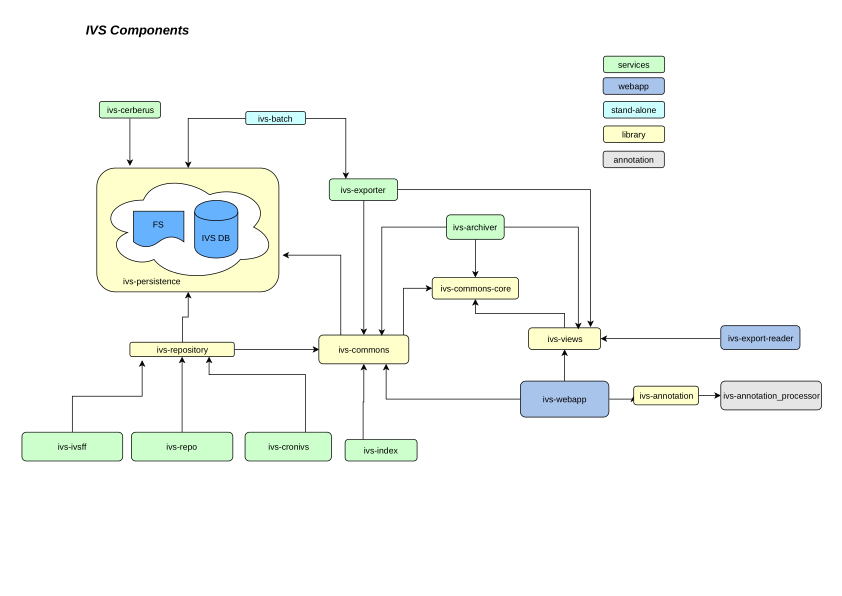
Struttura
src/components/$ tree -L 1
.
├── deploy_to.sh
├── ivs-annotation
├── ivs-annotation_processor
├── ivs-archiver
├── ivs-batch
├── ivs-cerberus
├── ivs-commons
├── ivs-commons_core
├── ivs-cronivs
├── ivs-exporter
├── ivs-export_reader
├── ivs-index
├── ivs-ivsff
├── ivs-persistence
├── ivs-pomelo
├── ivs-repo
├── ivs-repository
├── ivs-views
├── ivs-webapp
├── pom.xml
└── script

19 directories, 2 files
src/components/ivs-commons$ tree -L 3
.
├── pom.xml
└── src
├── main
│ ├── java
│ └── resources
└── test
├── java
├── kotlin
└── resources
8 directories, 1 file
- Il pom padre
- I pom dei sottoprogetti
- Dove sono i test
- Dove si mettono le risorse
Struttura
Compilazione
- Java8
- Progetto maven
- Installare maven sul proprio pc
- Impostare le configurazioni di settings.xml per maven
- Aggiungere il certificato nexus alla propria jvm
- Compilare con:
- Oppure nella sottodirectory per compilare un modulo
- Cercare su internet se volte fare operazioni particolari come ad esempio escludere i test
> mvn compile- Perdete un po di tempo a far quadrare il vostro IDE
- Provate a lanciare i test dal vostro IDE
- Compilate da un server ivs
- Guardate lo script deploy_to.sh oppure chiedetemi per trovare la soluzione migliore per voi
Compilazione (settings maven)
<settings>
    <mirrors>
        <mirror>
            <!--This sends everything else to /public -->
            <id>nexus_IVSPublic</id>
            <mirrorOf>*</mirrorOf>
            <url>https://nexus.rcslab.it/repository/IVS_public</url>
        </mirror>
    </mirrors>
</settings>
Gestione delle Dipendenze
- Tutte le dipendenze si aggiungono con la versione nel pom.xml padre
- Ogni sottoprogetto che la usa deve dichiararla
<dependency>
    <groupId>org.jsoup</groupId>
    <artifactId>jsoup</artifactId>
    <version>1.10.3</version>
</dependency>
pom padre
<dependency>
    <groupId>org.jsoup</groupId>
    <artifactId>jsoup</artifactId>
</dependency>
ivs-view
Coding Standards
Regole generali
- Funzioni e classi "piccole"
- Niente codice commentato
- Nomi coerenti
- Usiamo i tipi corretti (non stringhe ovunque)
- Blocchi try piccoli
- Evitare di lanciare Exception
- Evitare di catchare Exception
Lasciamo il codice meglio di come lo troviamo
Farlo funzionare è solo l'inizio
In particolare
- Evitare troppi nest
- Verificare se un blocco ha un nome
- if sempre con graffe (usate IDE)
- Controllate i nomi delle variabili
- Controllate i nomi delle classi
- Evitate troppi argomenti
Evitiamo copia e incolla: cerchiamo un fattore comune
Coding Standards(cont)
		errorGobbler.start();
		outputGobbler.start();

		Worker worker = new Worker(proc);
		worker.start();
	//	errorGobbler.join();
	//	outputGobbler.join();
		try {
			worker.join(timeout);
			if (worker.exit != null){
				retValue = worker.exit;
				Log.log(Log.INF, "Executed ["+command+"]");
				return retValue;
			}
			else
				throw new TimeoutException();
		} catch(InterruptedException ex) {
			errorGobbler.interrupt();
			outputGobbler.interrupt();
			worker.interrupt();
			Thread.currentThread().interrupt();
			throw ex;
		} finally {
			proc.destroy();
		}
Coding Standards(cont)
	public List<ConfiguredCdmModule> getConfiguredModules(int targetId)
			throws IvsException {
		try {
			Map<String, CdmConfigure> configs = cdmDBAccess.getConfigurations(targetId);
			Map<Integer, CdmModule> modules = moduleH.getAllModules();
			return combine(modules, configs);
		} catch (IvsPersistenceException | IOException e) {
			throw new IvsException(e);
		}
	}
if(!archivedItems.contains(item))archivedItems.add(item);Coding Standards(cont)
configs = configs.entrySet().stream().collect(
			Collectors.toMap(
			    e -> e.getKey().toLowerCase(),
                Entry::getValue
            )
          );
private String resolveModule(int modId) throws IvsException {
    try {
	    return moduleH.getName(modId)
		              .orElseThrow(() -> new IvsException("module_id '" + modId + "' doesn't exist"));
    } catch (IOException e) {
        throw new IvsException(e);
	}
}
Usare costrutti Java8 ove ha senso
Testing
- Scriviamo test unit
- Possiamo usare Java o Kotlin
- Se volete modificare qualcosa non testato scrivete prima i test
- Quando inserite nuove cose siete incoraggiati a scrivere il test
- Tutto si può testare
- Se non sapete come testare chiedete
Testing
Andiamo sul codice
CI
FINE
Sviluppo su IVS modern: Struttura a Coding Standards
By Michele D'Amico
Sviluppo su IVS modern: Struttura a Coding Standards
Piccola presentazione sulla struttura del progetto e su come sviluppare in questo ambiente.