Git for Exi
In the previous session
Please keep this in your mind ...
Exi gitlab server
this is where your git projects are stored
Repository
We also called it as project or simply called it as repo
Branch
It is a stage area of your project
Protected Branch
Well, it is a branch but protected
Commit
Basically you're adding a changes into stage area
We will simply reference commit as :
- Adding / deleting files with git add / git rm
- Commiting with git commit
git commitgit addgit rmRemote URL
Your repository's URL

Copy from :
# add remote
git remote add remote_name your_url
git remote add origin git@git.extrainteger.com:exi/open-project.git
git remote add mainrepo git@git.extrainteger.com:exi/open-project.git

# remove remote
git remote remove remote_name
git remote remove mainrepo

# update
git remote update

# fetch
git fetch remote_name
Command :
Push
Upload commit to server
git push remote_name current_branchCommand :
Pull
Download commit to server
git pull remote_name current_branchCommand :
Merge
Combine current branch with another branch
git merge another_branch_nameCommand :
Rebase
Get the latest branch's update and implement it to current branch
# rebase with local branch
git rebase branch_name

# rebase with remote branch
git rebase remote_name/branch_name
Command :
Merge Request / Pull Request (PR)
Asking owner to implement your changes

Accept PR
Owner accepting your PR

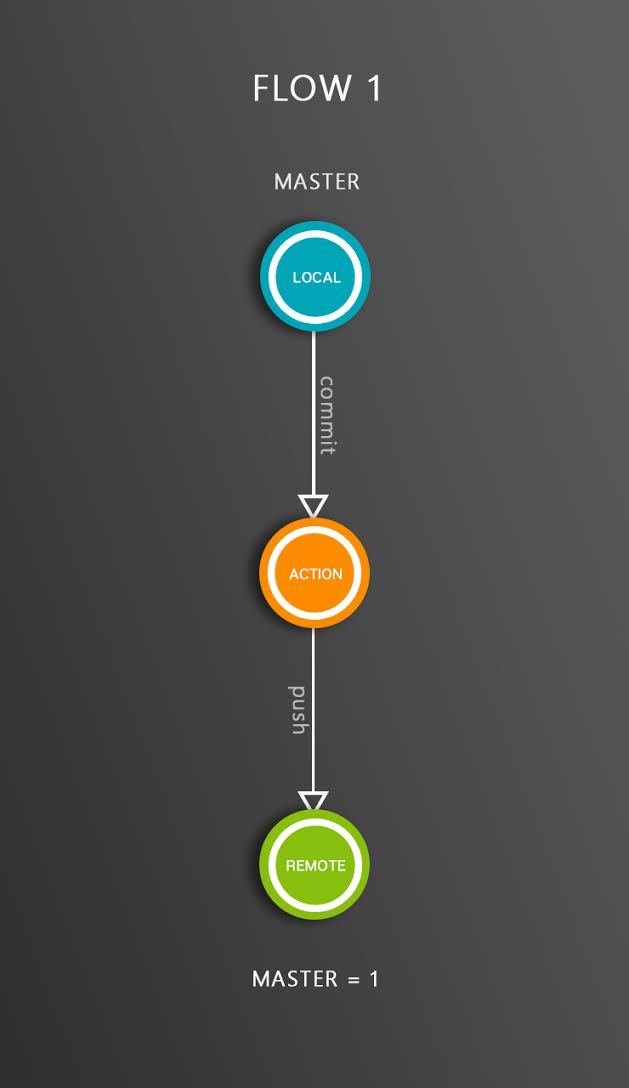
Good practice if you work alone or in a very small team
Single workflow :
- Commit your changes
- Push to server
Team workflow :
- Commit your changes
- Pull from server to get update
- Fix conflict (otherwise skip)
- Push to server
git commit -m "update readme"git add .git push origin master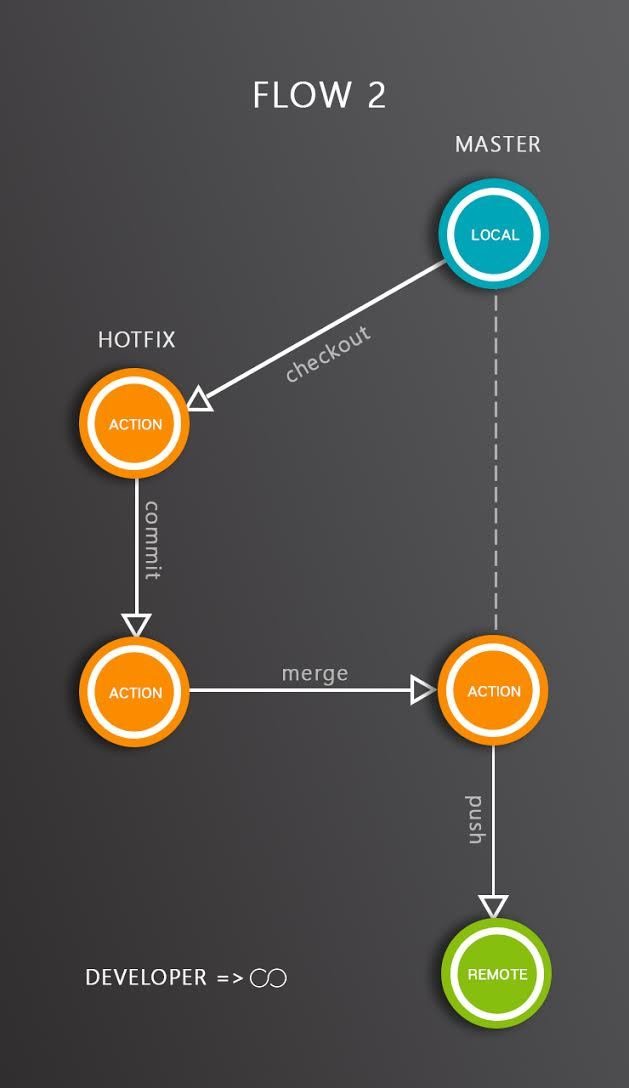
Good practice if you work in a small team. All members are equal.
workflow :
- Create your branch from main branch
- Commit your changes
- Go to main branch
- Pull from server (when team updated repository)
- Merge with your branch
- Fix conflict (otherwise skip)
- Push
git checkout -b add-readme-pagegit add .git commit -m "update readme"git checkout mastergit merge add-readme-pagegit pull origin master
git push origin master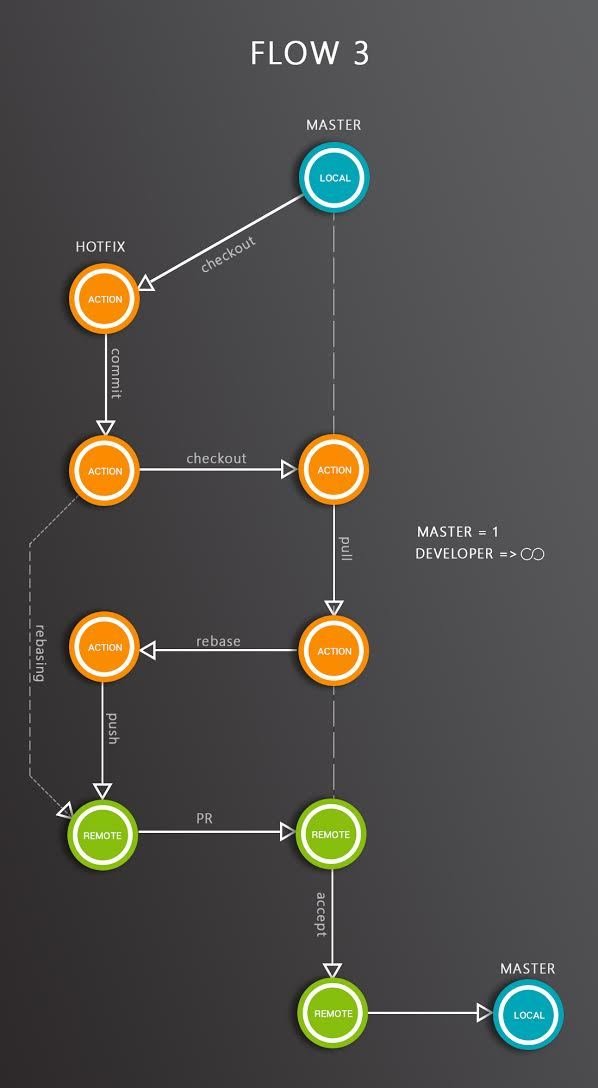
Good practice if you work in :
- Organized team
- Single repository
A master is the one that maintain main branch (protected)
Developers commits in their branch and makes PR
workflow :
- Create your branch from main branch
- Commit your changes
- Go to main branch
- Pull from server (when team updated repository)
- Go to your branch
- Rebase with main branch
- Fix conflict (otherwise skip)
- Push
- PR
- Master accepting PR
git checkout -b add-readme-pagegit add .git commit -m "add readme page"git checkout mastergit pull origin mastergit checkout add-readme-pagegit rebase mastergit push origin mastergit checkout mastergit pull origin masterGood practice if you work in :
- Organized team
- Multiple repository
Similiar with flow 3 but using main branch and forked branch
workflow :
- Fork main repo *
- Clone / fetch *
- Add main remote to forked repo *
- Commit your changes
- Rebase with main repo branch
- Fix conflict (otherwise skip)
- Push
- PR
- Master accepting PR
* one time only
Errors = More Codes
e = mc^{2}
Happy Coding !
Git for Exi
By Mukhammad Yunan Helmy