Beginner Guide
HTML and CSS
HTML
Hyper Text Markup Language
SEMANTIC
CSS
Cascading Style Sheets
STYLE
Where you can :
- Use multimedia (audio / video)
- Draw something using SVG
- Local storage
- Geolocation
- Etc ...
Welcome to the HTML5 Era
Now back to the basic ...
Declaration
<!DOCTYPE html>Structure
<html>
<head>
    <title></title>
</head>
<body>

</body>
</html>
Heading and Paragraph
<h1>Heading One</h1>
<h2>Heading Two</h2>
<h3>Heading Three</h3>
<h4>Heading Four</h4>
<h5>Heading Five</h5>
<h6>Heading Six</h6>

<p>Lorem ipsum dolor sit amet, consectetur adipisicing elit, sed do eiusmod
tempor incididunt ut labore et dolore magna aliqua. Ut enim ad minim veniam,
quis nostrud exercitation ullamco laboris nisi ut aliquip ex ea commodo
consequat. Duis aute irure dolor in reprehenderit in voluptate velit esse
cillum dolore eu fugiat nulla pariatur. Excepteur sint occaecat cupidatat non
proident, sunt in culpa qui officia deserunt mollit anim id est laborum.</p>
Do It Yourself
Link
Image
Format (bold, italic, small, etc)
Code
Table
<table>
    <tr>
	<th>No.</th>
	<th>Name</th>
	<th>Age</th>
    </tr>
    <tr>
	<td>1</td>
	<td>Paijo</td>
	<td>25</td>
    </tr>
    <tr>
	<td>2</td>
	<td>Paimin</td>
	<td>28</td>
    </tr>
</table>
List
<ul>
    <li>Android</li>
    <li>iOS</li>
    <li>Blackberry</li>
</ul>

<ol>
    <li>Guitar</li>
    <li>Piano</li>
    <li>Drum</li>
</ol>
Do it yourself
Block (div & span)
Iframe
Form
<form action="">
	<input type="text" name="firstname">
	<br>
	<input type="password" name="password">
	<br>
	<input type="radio" name="gender" value="male" checked> Male<br>
  <input type="radio" name="gender" value="female"> Female<br>
  <br>
   <select name="language">
	  <option value="ruby">Ruby</option>
	  <option value="php">PHP</option>
	  <option value="go">Go</option>
	</select>
	<br>
	<textarea name="description">
	</textarea>
	<br>
	<input type="checkbox" name="brand" value="Yamaha"> I like Yamaha<br>
  <input type="checkbox" name="brand" value="Honda"> I like Honda
  <br>
  <input type="submit" value="Submit">
</form>
Example of HTML5 Semantic
Video
<video width="320" height="240" controls>
  <source src="movie.mp4" type="video/mp4">
  <source src="movie.ogg" type="video/ogg">
Your browser does not support the video tag.
</video>
SVG
<svg width="100" height="100">
  <circle cx="50" cy="50" r="40" stroke="blue" stroke-width="4" fill="red" />
</svg>
Basic CSS
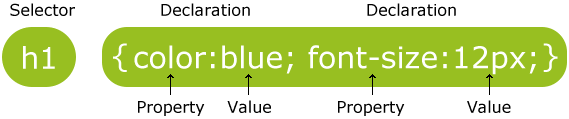
Syntax
Type
- External
- Internal
- Inline
Example
Color & Background
h1{
    color: red;
}

h1.black{
    color: #000000;
}

p#lorem{
    background-color: blue;
}
Margin & Padding
div.bottom-section{
    margin-bottom: 10px;
    padding-top: 20px;
}

div.main{
    margin: 10 10 10 10;
}

div.right{
    padding-left: 10px;
    padding-right: 10px;
}
Font
body{
    font-family: "Times New Roman", Times, serif;
}

h1{
    font-size: 25px;
}

p.title{
    font-weight: bold;
    font-size: 125%;
}Case
Make your personal profile
Push to Repo
Next Session
Responsive Layout Using Bootstrap
HTML and CSS
By Mukhammad Yunan Helmy