WebAuthN
The Future of Auth
What is WebAuthN
Should I care?
Description
WebAuthN is a way to authenticate web applications by using your device's method of authentication (e.g. PIN, fingerprint, pattern, face,...). This can be used as an extra factor or maybe even replace passwords.
The Web Authentication API (WebAuthN) is an extension of the Credential Management API (aka FIDO) which allows the use of USB devices (like a YubiKey) to allow authentication.
Venacular
Relying Party - The entity whose web application utilizes the WebAuthN to register and authenticate users.
Authenticator (Client Device) - Devices that support WebAuthN (e.g. phones, security keys, computers, etc...)
FIDO (U2F) - Universal 2-Factor is an open authentication standard that enables internet users to securely access any number of online services with one single security key instantly and with no drivers or client software needed.
FIDO2 - The standard for WebAuthN. A backwards compatible extension of FIDO.
Adoption
Mozilla Firefox, Google Chrome, and Microsoft Edge have all announced support.
https://caniuse.com/#search=webauthn
https://developer.mozilla.org/en-US/docs/Web/API/Web_Authentication_API#Browser_compatibility
JavaScript
//Register
navigator.credentials.create(publicKeyCredentialCreationOptions)

//Authenticate
navigator.credentials.get(PublicKeyCredentialRequestOptions)

/* Credentials and other parameters need to be of the type ArrayBuffer */
//String to Binary
function strToBin(str) {
    return Uint8Array.from(
        atob(str),
        function(c){ return c.charCodeAt(0); }
    );
}

//String to ArrayBuffer
strToBin(str).buffer

//Binary to String
function binToStr(bin){
    return btoa(new Uint8Array(bin).reduce(
            function(s, byte){ return s + String.fromCharCode(byte); }
            , ''
    ));
}
Other Authentication
Is this better?
Passwords
Memorized things that we all are forced to use.
Problems:
- Easy to forget
- Should be, but never are, unique to domains
- Easy to phish and guess
2-Factor Code
Rotating codes make authentication more secure than a password alone.
Problems:
- Shared Public Key
- Can be entered into a phishing site

SMS\Phone Call
Some sites will send codes over SMS or through a robocall.
Problems:
- Website needs a way to send texts or make robocalls
- Hackers can takeover voicemail or intercept sms
- Codes can be entered into a phishing site
Security Key
There are devices that can authenticate using USB, NFC, or Bluetooth. The use FIDO and have similar benefits to WebAuthN.
Problems:
- Another thing to carry


WebAuthN
- Authentication can be done using your browser (e.g. phone). A device that people carry with them at all times anyway
- A user uses the same authentication method that they use to unlock their phone (fingerprint, PIN, face, etc.)
- A private key is a saved only on the device
- Domain is saved by the browser making phishing impossible
- A one time use challenge is sent with each request to make replay attacks impossible
Registration
Creating a credential
Flow Diagram
Summary
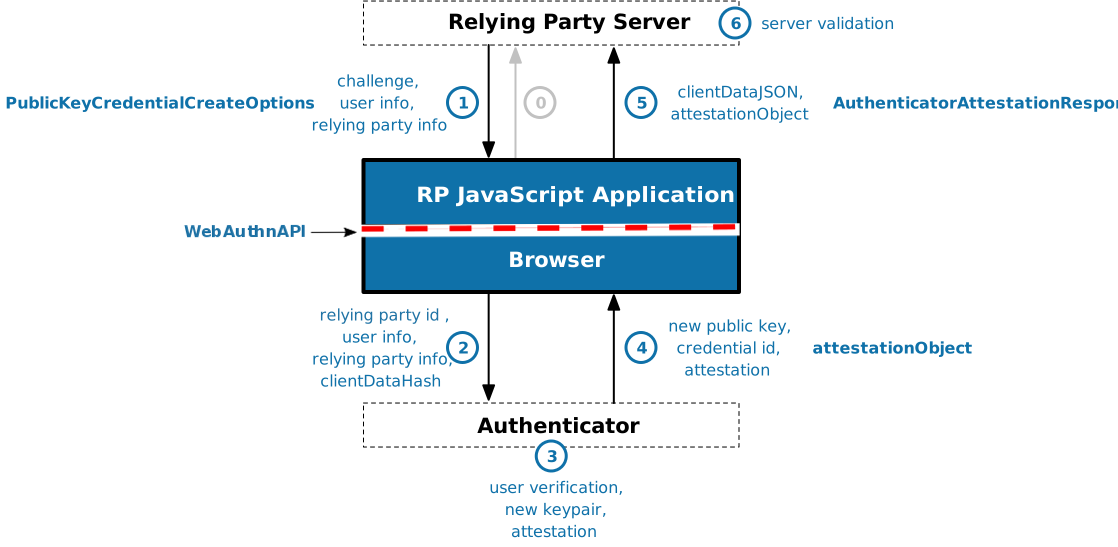
- The rely party server create a challenge
- The browser attaches anything in needs including the domain of the page and sends it to the authenticator
- The authenticator (your device) registers the user, in part creating a credential id with public and private keys
- The credential ID and public key are sent back to the browser with an attestation
- The browser sends those back to the server
- The server follows the 19 step validation process then removes the challenge to avoid replay attacks.
Creating a credential
WebAuthN is a way to authenticate web applications by using your device's method of authentication (e.g. PIN, fingerprint, pattern, face,...)
The Web Authentication API (WebAuthN) is an extension of the Credential Management API (aka FIDO) which allows the use of USB devices (like a YubiKey) to allow authentication.
Registration Example
var publicKeyCredentialCreationOptions = {
    publicKey: {
        rp: { // Relying Party (a.k.a. - Service):
            name: "Acme"
        },
        user: {
            id: new Uint8Array(16),
            name: "john.p.smith@example.com",
            displayName: "John P. Smith"
        },
        pubKeyCredParams: [{
            type: "public-key",
            alg: -7
        }],
        attestation: "direct",
        timeout: 60000,
        challenge: new Uint8Array([
            // must be a cryptographically random number sent from a server
        ]).buffer
    }
};
navigator.credentials.create(publicKeyCredentialCreationOptions)Helpful Hints
Lorem ipsum dolor sit amet, consectetur adipiscing elit. Proin urna odio, aliquam vulputate faucibus id, elementum lobortis felis. Mauris urna dolor, placerat ac sagittis quis.
//Decoding the ClientDataJSON and attestationObject

navigator.credentials.create(publicKeyCredentialCreationOptions).then(r => {
    let clientDataJSON = JSON.parse(atob(binToStr(r.response.clientDataJSON)));
    let attestationObject = CBOR.decode(r.response.attestationObject);
});
// Including CBOR - https://github.com/paroga/cbor-js

<script
    src="https://rawgit.com/paroga/cbor-js/master/cbor.js"
    type="text/javascript">
</script>
Authentication
Logging in
Flow Diagram
Summary
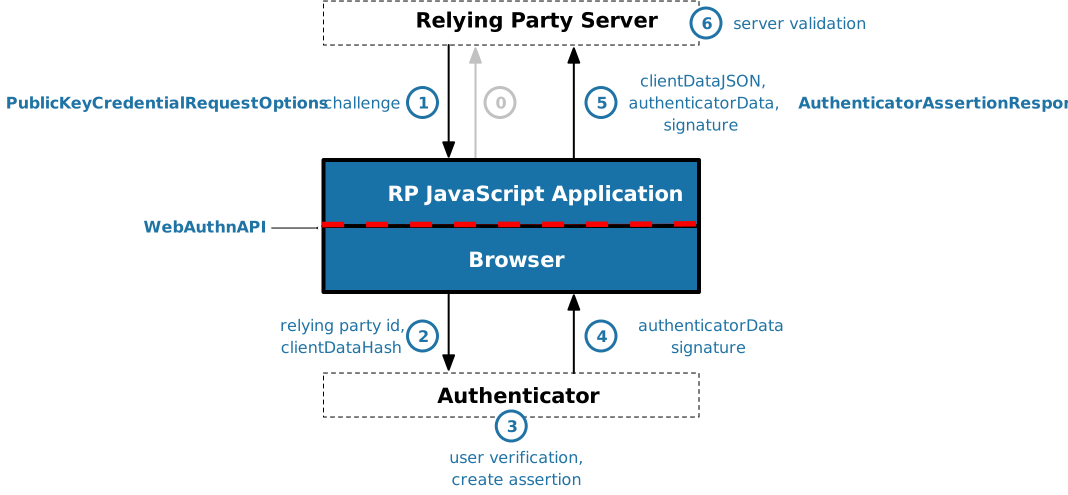
- Relying Party creates a challenge
- Browser sends the challenge, credential ID, and the domain to the Authenticator
- Authenticator authenticates
- Authenticator sends authenticator data and a signature back to the browser
- The browser passes data back to the relying party
- The relying party does an 18 step verification and deletes the challenge
Authentication Example
var PublicKeyCredentialRequestOptions = {
    publicKey: {
        timeout: 60000,
        challenge: new Uint8Array([
            // must be a cryptographically random number sent from a server
        ]).buffer,
        var idList = [{
            id: "", // credential id from registration
            transports: ["usb", "nfc", "ble"],
            type: "public-key"
        }];
    },
};
navigator.credentials.get(PublicKeyCredentialRequestOptions)Demos
Can I really use this?
Demos
https://webauthndemo.appspot.com/
WebAuthN
YubiCo
https://demo.yubico.com/webauthn/
My attempt https://github.com/mvndaai/webauthn_demo
Enabling
Support is still in development. Over time it should become more automatic, especially in mobile.
In Chrome look for the flag:
chrome://flags/#enable-web-authentication-api
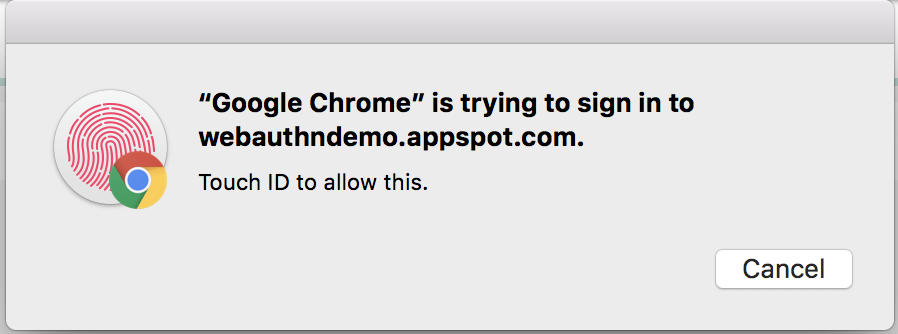
Mac Chrome can use Touch ID by enabling this flag:
What it doesn't do
Extra work?
It does not ...
- know which device is being used
- Browsers are mostly anonymous
- Saving credentials for multiple devices is up to the design of the rely party
- remove all other authentication methods
- A flow needs to be designed when a device is lost
Questions/Comments
What am I missing?
Credits / More Info
Slides by Jason Mavandi @mvndaai
https://w3c.github.io/webauthn/#registering-a-new-credential
https://fidoalliance.org/
WebAuthN
By Jason Mavandi