F2E
Getting Start
林罡北
2017.05.26
(Front-End Engineer)
What will we discuss?
- 前端遇到的問題
- 前處理器(Preprocessor)
- Problem of HTML - Jade
- Problem of CSS - stylus
- Practice~
- Problem of Js - JQ & ES6
- Use Github
開發
- code大多無法重複使用(沒有模組化,元件化)
- 原生html css js語言模組功能不足
維護
- 維護難度係數高
- web前後端code混雜
- mutilple css / Js code 管理難度高
前端遇到哪些問題?
寫其他語言,翻譯成HTML , CSS , JS
我們怎麼解決?
靠什麼翻譯?
CSS:前處理器(Preprocessor)
JS:轉譯器(transpiler)
HTML:模板引擎(template engine)
前處理器(Preprocessor)

Preprocessor
Transpiler
transpiler =transfer (轉換) + compiler(編譯)
.jade
.html
Google翻譯
template engine
Problem - HTML
- 每次都要寫 start/end Tag , 好麻煩 , 忘了end tag 造成bug 當下卻沒出現
- 沒有模板引擎/模組化 超難維護
Solution - HTML
- Emment
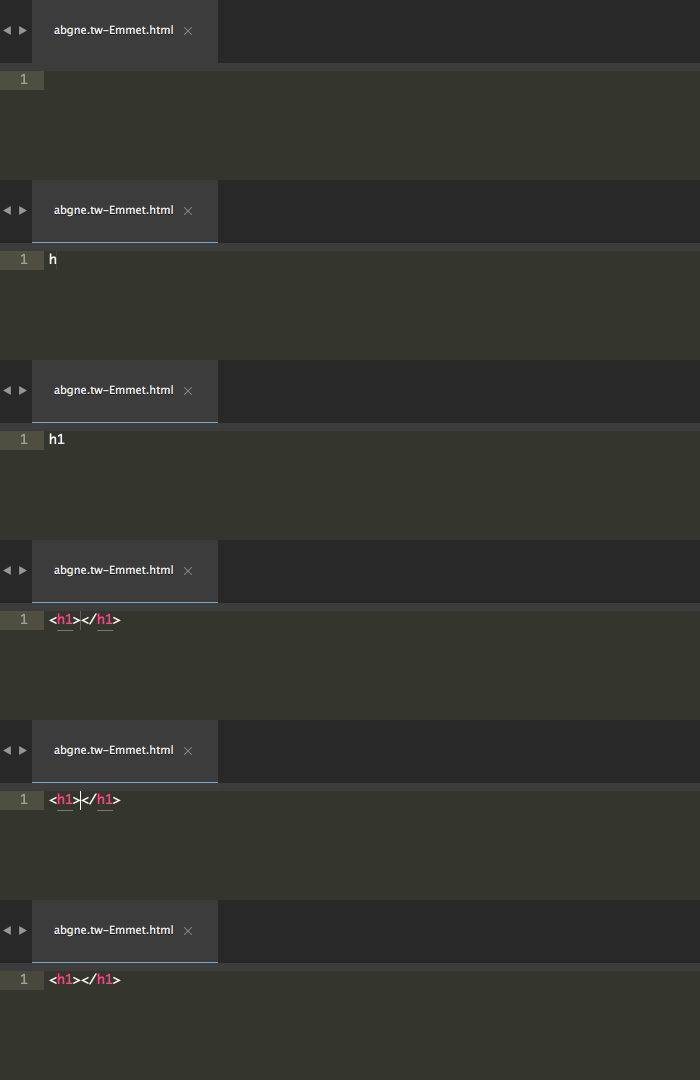
只要會按TAB TAB TAB TAB TAB
讓你快速產出html code,不會忘記加上end tag
我懶
Reference:
Solution - HTML
- Jade (pug) - Js base template engine
<header>
    <p>我是Header</p>
</header>

<main id="content">
    <h1>我是Page1</h1>
</main>

<footer>
    <p>我是Footer</p>
</footer>
<header>
    <p>我是Header</p>
</header>

<main id="content">
    <h2>我是Page2</h2>
</main>

<footer>
    <p>我是Footer</p>
</footer>
<header>
    <p>我是Header</p>
</header>

<main id="content">
    <h3>我是Page3</h3>
</main>

<footer>
    <p>我是Footer</p>
</footer>
page1.html
page2.html
page3.html
讓code可以reuse,舒服
Reference:
Solution - HTML
- Jade (pug) - include
include "header.jade"

<main id="content">
    <h1>我是Page1</h1>
</main>

include "footer.jade"
<header>
    <p>我是Header</p>
</header>
page1.jade
page2.jade
page3.jade
header.jade
<footer>
    <p>我是Footer</p>
</footer>
header.jade
include "header.jade"

<main id="content">
    <h2>我是Page2</h2>
</main>

include "footer.jade"
include "header.jade"
<main id="content">
<h3>我是Page3</h3>
</main>
include "footer.jade"Syntax Error
Solution - HTML
- Jade (pug) - include
include "header.jade"

main#content
    h1 我是Page1

include "footer.jade"
header
    p 我是Header
page1.jade
page2.jade
page3.jade
header.jade
footer
    p 我是Footer
header.jade
include "header.jade"

main#content
    h2 我是Page2

include "footer.jade"
include "header.jade"

main#content
    h3 我是Page3

include "footer.jade"
能不能再更好?
Solution - HTML
- Jade (pug) - extends
include "header.jade"

main#content
    block main-content

include "footer.jade"
header
    p 我是Header
temp.jade
page1.jade
page2.jade
header.jade
footer
    p 我是Footer
header.jade
extends "temp.jade"

block main-content
    h1 我是Page1
extends "temp.jade"

block main-content
h2 我是Page2Reference:
Solution - HTML
- Jade (pug) - mixin
<div class="square">
    1
</div>
<div class="square">
2
</div><div class="square">
3
</div>1
2
3
mixin square(number)
  .square = number
- for (var i = 0; i < 3; i++)
      +square(i+1)
- var list = ["Uno", "Dos", "Tres"]
each item in list
+square(item)Problem - CSS
- CSS component與layout之間依賴度高
- 多人協作,class , id名稱容易衝突
- 原生CSS沒有任何架構與限制
易寫難精,更難維護
Solution - CSS
- CSS design pattern
將CSS的開發軟工化,制定一套流程與規格,讓團隊依照規範,按照既定方式進行開發
OOCSS
Reference
Solution - CSS
- stylus - Js base css preprocess
Stylus Basic Sytanx
body
  font  12px bold Helvetica, Arial, sans-serif


.button
  text-align  center
  width  25px
  border-radius  5px
body
font: 12px bold Helvetica, Arial, sans-serif;
.button
text-align: center;
width: 25px;
border-radius: 5px;body{
font: 12px bold Helvetica, Arial, sans-serif;
}
.button{
text-align: center;
width: 25px;
border-radius: 5px;
}最後冒號跟分號也一起省略
現在是CSS的語法
首先省略大括號
Solution - CSS
- stylus - variables
.rectangle{
  height: 20px;
  width: 30px;
}
3
2
.rectangle
$rectangle_with = 20px;

.rectangle
  height: $rectangle_with
  width:  $rectangle_with*3/2
.rectangle
  height: 20px
  width:  (@height*3/2)
in CSS
in Stylus
Solution - CSS
- stylus - @extend / placeholder
.fullwidth
  width: 100%
.button
  @extend .fullwidth
  @extend .textCenter , .f20
  height: 30px
  background: red
code reuse!!
.f20
  font-size: 20px
.textCenter
  text-align: center
.paragraph
  @extend .fullwidth, .f20
  font-weight: bold
$fullwidth
  width: 100%
$textCenter
  text-align: center
$f20
  font-size: 20px
Practice
用OOCSS的想法
寫出屬於自己的Button class
Problem - Js (ES5)
- 有關DOM操作的API都字數不少
- 沒有模組管理系統(name space)
變數名稱容易衝突
- 本質與觀念上都是OOP,但與現在主流OOP(C++ , Java)語法與觀念差異大,會寫容易,寫得好難
- 弱型別語言,有些bug只有在run time才會出現
JS (ES5) dynamic this
this指向的是使用該物件的物件
this指向誰,在函數定義時不會被決定,真正會知道this指向誰時是在函數執行時(run time)
保留字new能夠改變this的指向
(大部分情況都可以這樣解釋)
JS (ES5) dynamic this
function Doraemon(audioObject, playButton, accessoryImg, msgDiv) {
    this.audioObject = audioObject;
    this.playButton = playButton;
    this.accessoryImg = accessoryImg;
    this.msgDiv = msgDiv;
    var dieValue;

    this.start=function(){
        this.playButton.addEventListener( "click", this.startGame, false );
        this.audioObject.addEventListener( "ended", this.showDice, false );
        this.accessoryImg.src = "blank.png";
    }

    this.startGame=function(){
        audioObject.play();
    }

    this.showDice=function(){
        dieValue = Math.floor( Math.random() * 10);
        if ( isFinite( dieValue ) )
            accessoryImg.src = pic_name[dieValue] + ".png";
        else
            accessoryImg.src = "blank.png";
            msgDiv.innerHTML = "您抽到"+tool_name[dieValue]+"!";
    }
}
var doraemon = new Doraemon(audioObject, playButton, accessoryImg, msgDiv);
doraemon.start();Solution - JS (ES5)
- JQuery
<script src="http://code.jquery.com/jquery-3.2.1.min.js">
</script>- 開放原始碼的JavaScript函式庫
- API的設計讓程式碼簡潔許多
- 用來操作DOM、處理事件、建立動畫與特效
- 幫你做好了Js的跨瀏覽器處理
Solution - JS(ES5)
- JQuery - syntax
$(selector).action();基本語法
(selector) 表示想選取的DOM物件
$ 符號表示為jQuery語法
action() 表示對選取的DOM要執行的操作
Solution - JS(ES5)
- JQuery - example
Live Coding Now
Solution - JS (ES6)
- ES6 - class example
class Doraemon {

  constructor(audioObject, playButton, accessoryImg, msgDiv) {
    this.audioObject = audioObject;
    this.playButton = playButton;
    this.accessoryImg = accessoryImg;
    this.msgDiv = msgDiv;
  }

  start() {
    this.playButton.addEventListener( "click", this.startGame, false );
    this.audioObject.addEventListener( "ended", this.showDice, false );
    this.accessoryImg.src = "blank.png";
  }

  startGame() {
    audioObject.play();
  }

  // ..etc
}Use Github
- What is Github?
- Student Developer
- How to deploy your static page on Github (Github pages)
Thx for your attention


About me
AmazingTalker F2E
Funhouse Inc. android Dev.

NTOUCS - 大四QQ
F2E Getting Start
By northbei