Omar Patel
Software developer/instructor
Last week, we went over creating a database, adding tables, creating a structure for the table, inserting data into those tables, and then retrieving that data from the table.
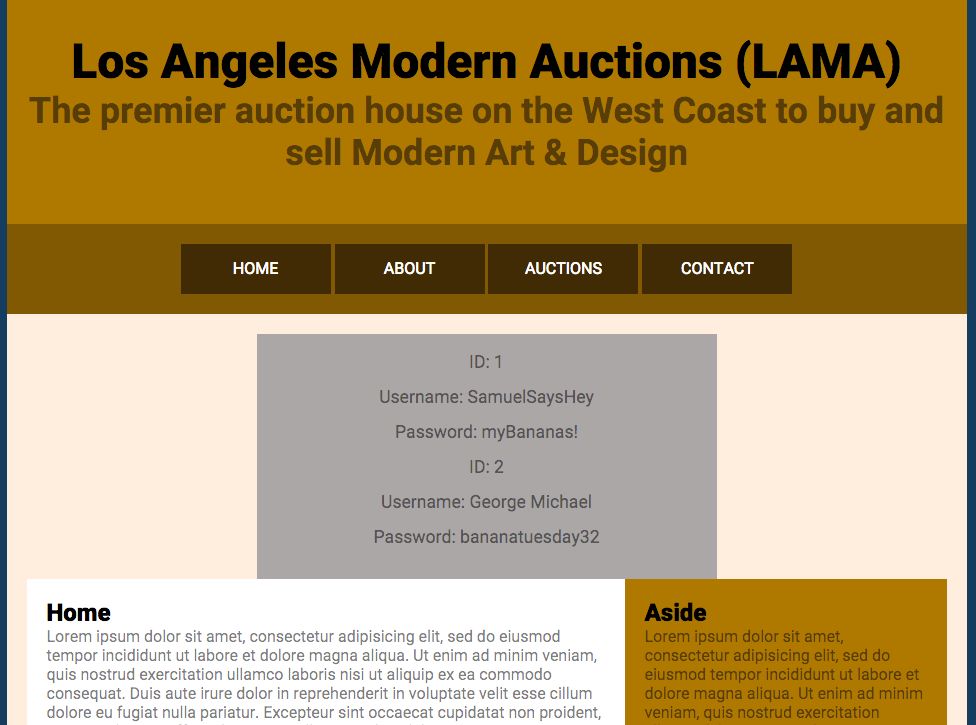
Using the Data from the Table
Here is the code for the final solution: https://drive.google.com/file/d/0BzZc9xnaQ0vqSlp5SzM1TVZQZUk/view?usp=sharing
Using the Data from the Table
Your final result should look like this:
USING SQL Queries
We briefly used SQL queries last week in order to retrieve data from our table. It looked like:
This specific query goes through our "Staff" table we created and gets all of the information from it. Now, this is great if we always want to get everything from a database, but most of the time, we only want very specific things or we want to create, update, and destroy data (CRUD).
Now, this might sound scary, but you've already been doing this using phpMyAdmin. Except, instead of using SQL to perform CRUD commands, you used the GUI and simply clicked "Edit", "Destroy", etc. We're now going to learn how to run basic queries by hand.
$sql = "SELECT * FROM `Staff`";USING SQL Queries
Why Do I have to do it by hand?
Well, that's a good question. We want to learn how to run SQL queries by hand, because
A) we might not have the capacity to perform the query using phpMyAdmin due to its limits
B) Creating a CMS requires at least a basic understanding of Database language.
C) SQL is used across a large variety of database systems, meaning that you'll be able to utilize it outside of PHP.
USING SQL Queries
Alright, alright, how do I learn it?
Well, I'd like you all to complete the first 10 lessons of Code Academy's Learn SQL program (just the part named "Manipulation") with me: https://www.codecademy.com/learn/learn-sql
From there, I'll show you how to implement some of what we learned into our project.
Using SQL Queries
Using SQL Queries
By Omar Patel