Omar Patel
Software developer/instructor
Last week, we went over using SQL queries to Create, Read, Update, and Destroy (CRUD) data from a database.
Creating a Login System
This week and next week, we're going to be creating a login and registration system, collectively known as an authentication system.
An authentication system is seen across most major sites and allows you and the user to have control over the data and who can access what/where. It also provides personalization, making the user more attached to the application.
Now, this might be a bit tricky, so I've found a video that can help, along with the slides:
https://www.youtube.com/watch?v=6Z3zlt31Fl0
Again, note that the video might be different than the code I have. This is due to the video being somewhat out-of-date, so I'll be implementing some functionality differently.
Creating a Login and Registration System
Today, we're going to go over Creating the Registration of a User and creating a cookie and a salt. No, we're not doing any baking.
Cookies
Cookies
Cookies
// These two if statements were created last week. I'm putting them in here to
// show you where to put the setCookie() code.
if(count($userArray) <= 0) {
	die("That username doesn't exist! Try making <i>$username</i> today!
            <a href='login.php'>Back</a>");
}
if ($userArray['Password'] != $password) {
	die("Incorrect password! <a href='login.php'>Back</a>");
}

setcookie("c_user", hash("sha512", $username), time() + 24 * 60 * 60, "/");
Notice that the setCookie() function is taking the 4 arguments we mentioned. That is, we have a name for the cookie ("c_user"); a value for the user ($username, but I've "hashed" it, which just means that I've encrypted it so hackers won't be able to see the data); the amount of time that the cookie will last, in terms of seconds (adding 24 and then multiplying by 60 and 60 will give you 1 day, in seconds, since there are 86,400 seconds in a day); and finally, the path for the cookie, which we'll be setting to "/" for our cookies.
Cookies
// These two if statements were created last week. I'm putting them in here to
// show you where to put the setCookie() code.
if(count($userArray) <= 0) {
	die("That username doesn't exist! Try making <i>$username</i> today!
            <a href='login.php'>Back</a>");
}
if ($userArray['Password'] != $password) {
	die("Incorrect password! <a href='login.php'>Back</a>");
}

setcookie("c_user", hash("sha512", $username), time() + 24 * 60 * 60, "/");
setcookie("c_salt", $salt, time() + 24 * 60 * 60, "/");
Now that we have a username cookie, let's set another cookie for our password.
Now, we've used a variable in our cookie named "$salt", but that isn't defined. Also, what would "$salt" contain? Go to the next page to find out.
Cookies
// These two if statements were created last week. I'm putting them in here to
// show you where to put the setCookie() code.
if(count($userArray) <= 0) {
	die("That username doesn't exist! Try making <i>$username</i> today!
            <a href='login.php'>Back</a>");
}
if ($userArray['Password'] != $password) {
	die("Incorrect password! <a href='login.php'>Back</a>");
}

$salt = hash("sha512", rand() . rand() . rand());

setcookie("c_user", hash("sha512", $username), time() + 24 * 60 * 60, "/");
setcookie("c_salt", $salt, time() + 24 * 60 * 60, "/");
A salt is basically just a way to prevent hackers from cracking your data. So, if you salt your password, there is a low possibility of someone being able to duplicate the password and pretend they are you. Notice that we're using the hash function again and we're sending in a bunch of randomized numbers into the hash. Again, we're just creating a super-secure password, similar to generating a strong password (except much stronger in this case). We then pass that value to our second cookie.
// These two if statements were created last week. I'm putting them in here to
// show you where to put the setCookie() code.
if(count($userArray) <= 0) {
	die("That username doesn't exist! Try making <i>$username</i> today!
            <a href='login.php'>Back</a>");
}
if ($userArray['Password'] != $password) {
	die("Incorrect password! <a href='login.php'>Back</a>");
}

$salt = hash("sha512", rand() . rand() . rand());

setcookie("c_user", hash("sha512", $username), time() + 24 * 60 * 60, "/");
setcookie("c_salt", $salt, time() + 24 * 60 * 60, "/");

$userID = $userArray['ID'];
insert_or_update_info("UPDATE users SET Salt='$salt' WHERE ID='$userID'");

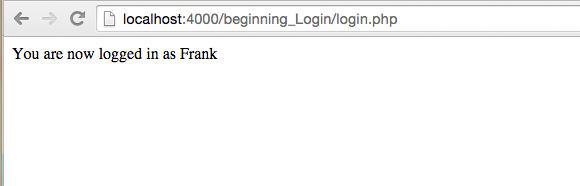
die("You are now logged in as $username");
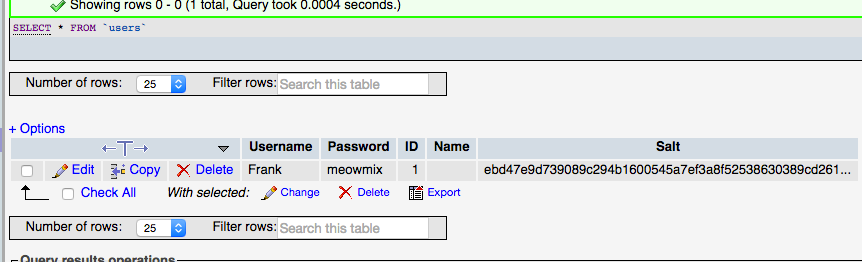
OK, so finally, we're going to store our $salt variable in our user using an UPDATE clause. Then, we're going to kill our connection and tell the user they are now logged in. In order to check if this worked, simply type in the correct username and password into the login form and then click the login button. You should see the last message we created and your user should have his/her Salt field supplied with a randomly generated aphanumeric. See next page for an example.
We now have a fully functional login page. Let's move on to creating a registration page to go along with it.
A registration page is where users sign up if they haven't already done so. Open up the register.php page and we can get started.
We're going to start off by building another form.
<div id="container">
	<?php include "includes/header.php" ?>
	<?php include "includes/nav.php" ?>
	<h1>Register</h1>
	<form method="post" action="">
		<ul>
			<li>
				<label for="username">Username</label>
				<input id="username" type="text" name="username" value="" />
			</li>
			<li>
				<label for="password">Password</label>
				<input id="password" type="password" name="password" value=""/>
			<li>
			<li>
				<label for="name">Name</label>
				<input id="name" type="text" name="name" value=""/>
			<li>
				<input type="submit" name="register" value="register">
			</li>
		</ul>
	</form>
	<?php include 'includes/footer.php' ?>
</div>require 'require/error_reporting.php';
if (isset($_POST['register']) && trim($_POST['register']) != '') {
if (isset($_POST['username']) && isset($_POST['password']) &&
trim($_POST['username']) != '' && trim($_POST['password']) != '') {
$username = escape_quotes($_POST['username']);
$password = escape_quotes(hash("sha512", $_POST['password']));The next few lines are going to look very similar to the code from login.php. In fact, the only differences above are that "login" is replaced by "register" and that the password is stored securely using the "hash" method.
So, again, just checking to see if someone clicked on the "submit" button and then making sure that they entered a username and password. We then store the username and password into variables.
if (isset($_POST['login']) && trim($_POST['login']) != '') {
	if (isset($_POST['username']) && isset($_POST['password']) &&
            trim($_POST['username']) != '' && trim($_POST['password']) != '') {

		$username = escape_quotes($_POST['username']);
		$password = escape_quotes(hash("sha512", $_POST['password']));

                // In case user doesn't enter a name
                $name = '';
		if ($_POST['name']) {
			$name = escape_quotes(strip_tags($_POST['name']));
		}
Next, we're going to check if there is a "name" key value pair inside of our $_POST super global variable. If there is, we escape any quotes from it and remove any possible HTML tags (again, for anti-hacking purposes). The method for removing the tags is aptly called "strip tags": http://php.net/manual/en/function.strip-tags.php.
		$username = escape_quotes($_POST['username']);
		$password = escape_quotes(hash("sha512", $_POST['password']));

		if ($_POST['name']) {
			$name = escape_quotes(strip_tags($_POST['username']));
		}

		$check = get_all_info("SELECT * FROM users WHERE Username='$username'");

		// Get the first instance of the user and store it into an array
		$userArray = $check->fetch_assoc();
We then run a SQL query to see if the username already exists in the database and store that result in a variable named "$check" (since we're going to check this data).
Again, we use the fetch_assoc() method to check to get the first record and convert it into an array. That array is then stored into a variable named "$userArray".
		$check = get_all_info("SELECT * FROM users WHERE Username='$username'");

		// Get the first instance of the user and store it into an array
		$userArray = $check->fetch_assoc();

		if (count($userArray) > 0) {
		   die("That username already exists! Try creating another username.
                        <a href='register.php'>Back</a>");
		}
		if (!ctype_alnum($username)) {
	           die("Username contains special characters! Only numbers and
                        letters are permitted. <a href='register.php'>Back</a>" );
		}
		if (strlen($username) > 20) {
                   die("Username must contain less than 20 characters.
                        <a href='register.php'>Back</a>" );
		}
Our next few steps are actually pretty easy.
Our first if statement checks to see if there is any info in our $userArray. If there is, that means someone has already created a user with that username.
The next if statement checks to make sure the username only contains alphanumeric characters. That is, only numbers and letters and not any characters like ^$*#)@. This is up to you to decide to include or not. (continued on next slide)
		$check = get_all_info("SELECT * FROM users WHERE Username='$username'");

		// Get the first instance of the user and store it into an array
		$userArray = $check->fetch_assoc();

		if (count($userArray) > 0) {
		   die("That username already exists! Try creating another username.
                        <a href='register.php'>Back</a>");
		}
		if (!ctype_alnum($username)) {
	           die("Username contains special characters! Only numbers and
                        letters are permitted. <a href='register.php'>Back</a>" );
		}
		if (strlen($username) > 20) {
                   die("Username must contain less than 20 characters.
                        <a href='register.php'>Back</a>" );
		}
Continued from last slide
The last if statement checks to see if the length of the string is bigger than 20 characters.
		if (strlen($username) > 20) {
			die("Username must contain less than 20 characters.
                            <a href='register.php'>Back</a>" );
		}

		$salt = hash("sha512", rand() . rand() . rand());

		insert_or_update_info("INSERT INTO users (Username, Password, Name, Salt)
			VALUES ('$username', '$password', '$name', '$salt')");
Next, we're going to create a "salt", just like we did before.
The step after that is going to be where we actually create the user. This is going to insert the $username, $password, $name, and $salt into the appropriate columns of our user table.
		insert_or_update_info("INSERT INTO users (Username, Password, Name, Salt)
			VALUES ('$username', '$password', '$name', '$salt')");

		setcookie("c_user", hash("sha512", $username), time() + 24 * 60 * 60, "/");
		setcookie("c_salt", $salt, time() + 24 * 60 * 60, "/");

		die("Your account has been created and you are now logged in.");
	}
	else {
		echo "Please enter a username and password.";
	}
}
Next, we create a cookie for our user and end the connection (just like in our login page)
The following is a link that shows how the end result of the register.php page should look like:
https://goo.gl/Hpca91
So, now that we have a registered user and we can log in to our system, we're going to make one quick change. Let's go back to our login.php page and change our $password variable line to look like this instead:
$password = escape_quotes(hash("sha512", $_POST['password']));The final result of our login.php should look like:
https://goo.gl/BjCepU
Great, so now we have the ability to register a user and login a user, we're going to use that login as part of the functionality.
Create a file called "cookie_login.php" and place it in the "require" sub-directory.
Next, we're going to create some functionality that checks the $_COOKIE super global variable to see if the user is logged in. This $_COOKIE is created when we ran the set_cookie() method. So, the data that we sent using the set_cookie() method is then available for us to use within the $_COOKIE super global variable.
In our cookie_login.php file, we're going to require our "functions.php" file, since we're going to use some of the functions from there.
Next, we're going to check if the user and salt were set inside the $_COOKIE.
We then store the c_user and c_salt inside of variables.
<?php
require_once 'functions.php';

$logged = false;

if (isset($_COOKIE['c_user']) && trim($_COOKIE['c_user']) != ''
    && isset($_COOKIE['c_salt']) && trim($_COOKIE['c_salt']) != '') {
    $cuser = escape_quotes($_COOKIE['c_user']);
    $csalt = escape_quotes($_COOKIE['c_salt']);
}

?>Then, we do a query to our database and see if there is a user that matches the salt we have. We convert that user to an array, just like we did before.
Then, if there is a user in the database that matches, we set a variable named "$logged" to true.
We can then include this code wherever we need it.
    $csalt = escape_quotes($_COOKIE['c_salt']);
    $user = get_all_info("SELECT * FROM users WHERE Salt='$csalt'");

    // Get the first instance of the user and store it into an array
    $userArray = $user->fetch_assoc();

    if (count($userArray) > 0) {
        if (hash("sha512", $userArray['Username']) == $cuser) {
            $logged = true;
        }
    }
}W can start using our $logged variable to get some functionality. For instance, I created a file called "login_check.php", which does a simple require to the cookie_login.php, checked if $logged is set to true, and then printed that the user is logged in or not.
I then required this "login_check.php" file in my index.php page and wherever else I needed to use to $logged functionality.
<?php

require_once 'cookie_login.php';

if ($logged == true) {
    echo $userArray['Username'] . " is logged in";
} else {
    echo "User not logged in";
}

?>Finally, I've also developed a basic logout mechanism. I've put the code inside of a file called "logout.php". The code for this also requires a change to the index.php page, where I've taken the code we had earlier and modified it a bit.
In addition, I've also created a logout button that goes to the "logout.php" page, which is located just below the login form.
<?php
if (isset($_POST['logout']) && trim($_POST['logout']) != '') {
    setcookie("c_user" , '' , time()-50000, '/');
    $logged = false;
    header("Location: index.php");
    exit;
}
?>
<form method="post" action="logout.php">
<ul>
<li>
<input type="submit" name="logout" value="Logout">
</li>
</ul>
</form>By Omar Patel