

Dynamic Web 2 Week # 5

Submit WordPress Application!

Link to guidelines: https://goo.gl/XtGIpH

Drupal Essential Training

Please open up "Drupal Essential Training" on Lynda.com

Let's watch these together and then discuss what we learned. 

Drupal Notes

We'll now be covering Drupal and we'll be doing it in a very similar way as we did with WordPress. That is, we'll be:

  • Installing Drupal on our local machines and on a live site
  • Learning the Essentials of how to use Drupal
  • Learning how to extend functionality

Please refer to the videos, "Drupal 7 Essential Training" for this course. Note that we'll actually be using Drupal version 8, but the content is very similar. 

We will also be skipping some videos or modifying the content of the videos, so please pay careful attention to the notes.

Drupal Notes

What is Drupal?

Refer to the video "Managing Content with Drupal" under the category of "Defining Drupal"

  • Drupal is a content management system (CMS), so it is
    • server based (we've been using Apache)
    • accesses a backend database (we've been using MySQL)
    • Extensible - we can add new functionality to the core of it
    • Separates Administration from viewing - Users don't see the content management side, only the nice, beautiful site.

Drupal Notes

How does Drupal Compare Against other CMS?

Refer to the video "Comparing Drupal Against Other Content Management Systems" under the category of "Defining Drupal"

  • Backendbattles.com is no longer operating, but here are some good sites for comparing CMS systems against one another:
    • https://support.rackspace.com/how-to/cms-comparison-drupal-joomla-and-wordpress/
    • https://www.g2crowd.com/categories/web-content-management
    • https://www.trustradius.com/cms
  • Video breaks down CMS comparison into 4 categories:
    • Abilities: What the CMS can do
    • Support: How much community and native support the CMS offers
    • Usage: How many people use the CMS
    • Maturity: How long the CMS has existed

Drupal Notes

How does Drupal Compare Against other CMS?

Refer to the video "Comparing Drupal Against Other Content Management Systems" under the category of "Defining Drupal"

  • Abilities
    • ​Drupal: Loved by developers and can handle many requests 
    • WordPress: Loved by beginners and has matured
    • Joomla!: Loved by designers due to templating
  • Support
    • ​Drupal: Native and community support under one authority
    • WordPress: Native and community support under one authority
    • Joomla!: Community support thorugh forums, but not necessarily under any authority

Drupal Notes

How does Drupal Compare Against other CMS?

Refer to the video "Comparing Drupal Against Other Content Management Systems" under the category of "Defining Drupal"

  • Usage
    • ​WordPress has the most usage by far
    • Drupal has the next closest
    • Joomla! is last in terms of usage
  • ​Maturity
    • ​WordPress: 2003
    • Drupal: 2001
    • Joomla!: 2001/2005

Drupal Notes

How does Drupal Compare Against other CMS?

Refer to the the rest of the videos under "Defining Drupal"

  • Before asking a question on the Drupal forum on Drupal.org, be sure you have your questions researched. 
  • Ignore jerks that try and make you feel bad about asking questions.
  • After you found a solution, be sure to report back to the post with the solution.

Discussion

Please explain, in turns, the concepts we have learned in "Defining Drupal". Be sure to explain the differences mentioned between the different CMS

10 minues

Drupal Notes

Installing Drupal on a Local Machine
We'll be using the videos from "Installing Drupal on Mac OSX or Windows"

  • Uses AMP, which is what we've been using with WordPress. AMP stands for Apache, MySQL, and PHP. 
  • Drupal + AMP = DAMP
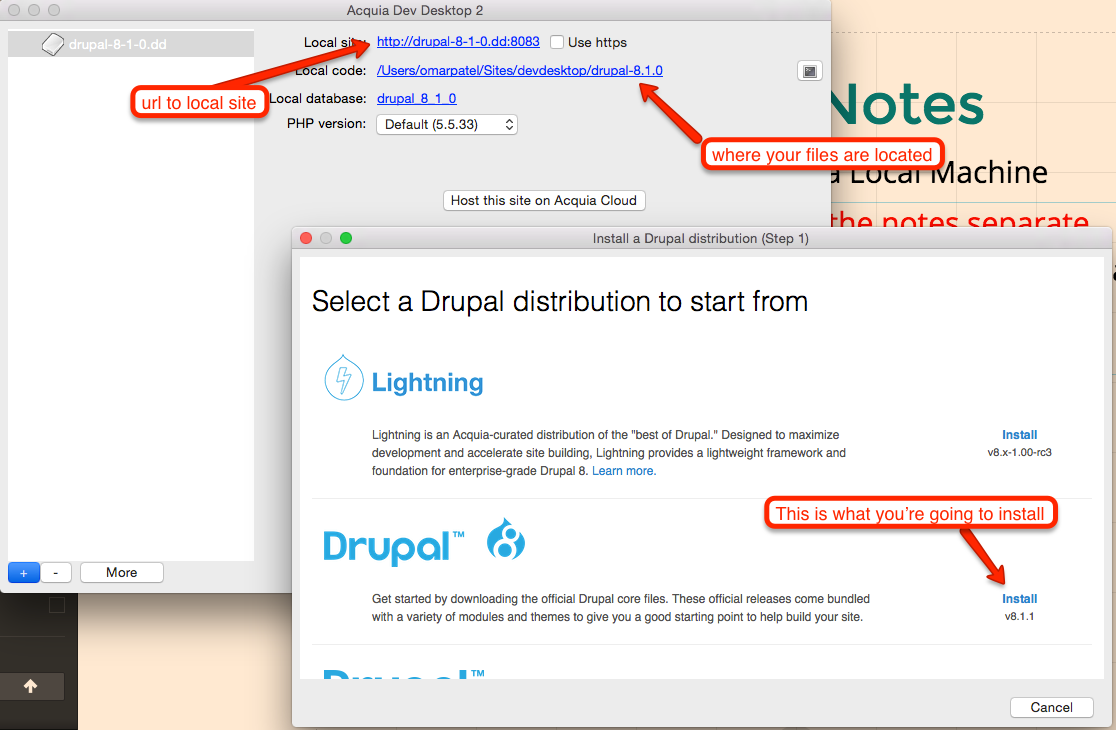
  • We'll be using the Acquia Dev Desktop on Mac and PC in order to install our projects. Dev Desktop comes with DAMP.
  • Install Dev Desktop
  • Note: this is where the video and the notes separate
    • The video mentions that Dev Desktop uses only its own version of Drupal, but the video is old and the newer version allows you to download the latest version of Drupal.

Drupal Notes

Installing Drupal on a Local Machine


  • Note: this is where the video and the notes separate
    • Open up the installed Dev Desktop and click on "Start from scratch, I don't have an existing Drupal site"
    • Choose the latest version of Drupal to install
    • Go to the url of your site to install Drupal on your local machine
    • Be sure to write down your credentials!
    • Note: If your Drupal site is running into an error with loading, you may need to copy the default settings.php over the original settings.php and then set the username and password to “root” and empty. You can find these files by going to the directory of where your files are located (picture on next page)


Discussion

Please explain, in turns, the concepts we have learned in "Installing Drupal on Mac OSX or Windows". Be sure that you and your partner's projects are working on your local machines.

15 Minutes

Drupal Notes

Installing Drupal on a Hosted Server


  • Note: this is where the video and the notes separate
    • Instead of following the instructions on "Installing Drupal on a Server", we are going to go with an easier solution provided by Acquia free cloud hosting. The choice was made after reading through: http://getlevelten.com/blog/kyle-taylor/best-bang-no-bucks-comparison-free-drupal-hosting-platforms
    • You have 2 options for hosting on Acquia free cloud hosting:

      • ​Setting it up online through https://www.acquia.com/free

      • or Click on the button on your Acquia Dev Desktop that says "Host this site on Acquia Cloud". Either way, you will need to create a free Acquia account.

    • ​Try setting up your sites through the options above now. Be sure to save your credentials!

Discussion

Please explain, in turns, the concepts we have learned with hosting Drupal on a live server. Be sure that you and your partner's projects are working on the live servers.

15 Minutes

Project Update


Make sure your Drupal site works on your local machine and on a live site!


Dynamic Web 2: Week # 5

By Omar Patel

Dynamic Web 2: Week # 5

  • 682