VPython
安裝VPython
一些需要的連結
- 最新版的Python 2.7:https://www.python.org/downloads/

一些需要的連結
- Vpython 6 (32-bit Windows):http://sourceforge.net/projects/vpythonwx/files/6.11-release/VPython-Win-32-Py2.7-6.11.exe/download
- (似乎64bit不能使用)
測試一下
- 開啟IDLE
- 輸入from visual import *
- 輸入box

基礎Python
變數
我們可以存資料,也要能夠輕鬆的使用資料,那就幫你要存的資料取個名字吧!
JIZZ = 7122變數名稱
指定
值
資料存起來不只要能夠看,當然還要能夠運算
  JIZZ = JIZZ * 5
  JIZZ = JIZZ + 3
  JIZZ = JIZZ - 3
  JIZZ = JIZZ / 5
  JIZZ = JIZZ % 45
  JIZZ = JIZZ // 5
  JIZZ = JIZZ ** 3
乘法(執行完後JIZZ變成35610)
加法(執行完後JIZZ變成35613)
減法(執行完後JIZZ變成35610)
除法(執行完後JIZZ變成7122)
取餘數(執行完後JIZZ變成12)
整數乘法(執行完後JIZZ變成2)
冪次(執行完後JIZZ變成8)
資料型別/顯示資料
str:"jizz", 'jizz', str(7122)
int:7122, int("7122")
float:71.22, float("712.2")
list:[7, 1, 2, 2], ["7", 1, 2.2]
tuple:(0, 0, 0), (7, 1, 2, 2), (1, 2)
   jizz = 7122
   print jizz
   print "jizz"
str/list/tuple
相同之處們:
(7, 1, 2, 2)[0]
"jizz"[0]
[2, 2, 1, 7][0]

(7, 1, 2, 2)[0:3]
"jizz"[0:3]
[2, 2, 1, 7][0:3]

len((7, 1, 2, 2))
len("jizz")
len([2, 2, 1, 7])

a, b, c = (1, 2, 3)
d, e, f = [7, 1, 2]
g, h, i = "jiz"
相異之處們:
(7, 1, 2, 2)[0] = 1
"jizz"[0] = 'k'
[2, 2, 1, 7][0] = 90
獨有的功能:
jizz = [7, 1, 2, 2]
jizz.append(9)

"jizz: %d" % 7122

a = 1,
if elif else
if a >= b and a >= c:
    get_max = a
else:
    if b >= a and b >= c:
        get_max = b
    else:
        get_max = c

if a >= b and b >= c:
    get_max = a
elif b >= a and b >= c:
    get_max = b
else:
    get_max = c
a = 0
if True:
a = 1
elif True:
a = 2
else:
a = 3
print a迴圈
for迴圈
for i in range(10):
    print i
for i in [7, 1, 2, 2]:
    print i
for i in "jizz":
    print i
for i in (2, 2, 1, 7):
    print i
while迴圈
cnt = 0
while cnt < 10:
    print cnt
    cnt += 1
流程控制
for x in range(1, 100):
    if x == 1:
        continue
    for n in range(2, x):
        if x%n == 0:
            print x, 'equals', n, '*', x/n
            break
    else:
        print x, 'is prime'
函數
def dis(x1, y1, x2, y2):
    ans = ((x1-x2)**2 + (y1-y2))**0.5
    return ans
定義:
def關鍵字
函數名稱
參數(以逗號隔開)
一個冒號
縮
排
使用
d = dis(7, 1, 2, 2)
print d
有趣的return
def isPrime(n):
    for i in range(2, n):
        if n%i == 0:
            return False
    return True
變數範圍
try it!
def f():
    x = 1
    print x
f()
print x
def f():
x = 1
print x
x = 0
f()
print xdef f():
print x
x = 0
f()
print xWTF!?
變數範圍
x
f:
x
大家都知道的人
小圈圈才知道的人
變數範圍
x = 10
def f():
    x = 5
    print x
f()
print x
x = 10
def f():
global x
x = 5
print x
f()
print x模組
import 模組:模組.變數
import math
math.e
math.pi
from 模組 import 變數:變數
from math import pi, e
pi
e
from 模組 import *:變數
from math import *
pi
e
常用模組
import math
math.sqrt(7122)
math.sin(math.pi/2)
math.cos(math.pi/4)
math.floor(712.2)
math.round(712.2)
math.ceil(712.2)
import random
random.random()
random.randint(22, 71)
random.choice(["jizz", 7122])
random.uniform(22, 71)Vpython Module
各式各樣的3D物件
ball = sphere(pos=vector(1,2,1),
            radius=0.5,
            color=color.blue)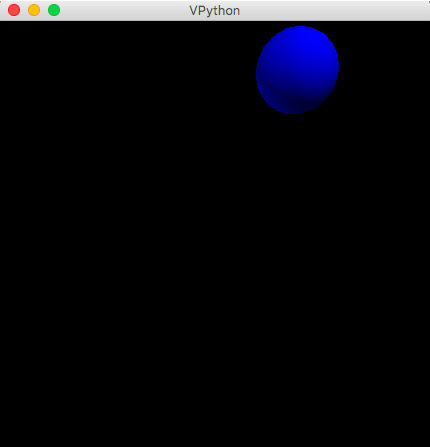

各式各樣的3D物件
mybox = box(pos=(1,1,1),
            length=5, height=3, width=2)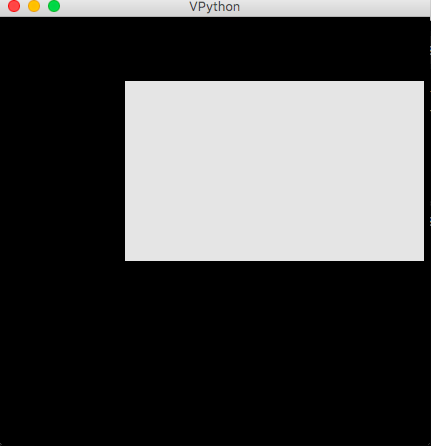

各式各樣的3D物件
cone(pos=(5,2,0), axis=(12,0,0),
     radius=1)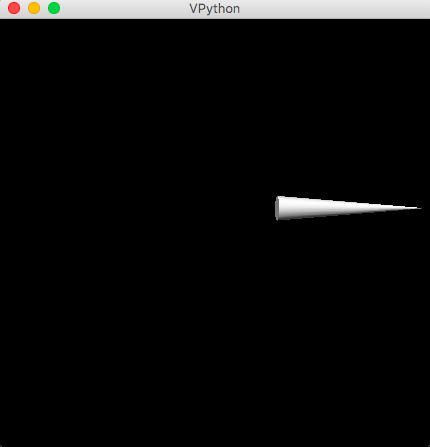

該如何使用
from visual import *
# from visual import color, ball, rate, sphere

ball = sphere(pos=(1,2,1), radius=0.5, color=color.blue)

while True:
    rate(30)
    ball.pos.x += 0.01
場景設定
scene1 = display(title='Haha')
scene2 = display(title='Examples of Tetrahedrons',
     x=0, y=0, width=600, height=200,
     center=(5,0,0), background=(0,1,1))
scene1.width = 1000
scene1.height = 600
scene1.autocenter = False
scene1.range = 10
scene1.autoscale = False
scene1.userzoom = False
scene1.userspin = False

aa = box(display=scene1)
bb = box(display=scene2)
事件處理
from visual import *
ev = scene.waitfor('click keydown')
if ev.event == 'click':
    print('You clicked at', ev.pos)
else:
    print('You pressed key '+ev.key)

scene.range = 4
box() # display a box for context
def showSphere(evt):
    loc = evt.pos
    sphere(pos=loc, radius=0.2, color=color.cyan)

scene.bind('click', showSphere)
Let's Have Fun~
寒訓VPython
By Tommy Chiang