CI/CD

for Frontend Projects

Contents

  • What is CI/CD?
  • Continuous Integration
  • Continuous Delivery
  • Advantages of CI/CD
  • Responsibility: Developers or DevOps?
  • CI Tools
  • Frontend deployment variations
  • Best practices
  • Integrations
  • Useful tools
  • Q & A

What is CI/CD?

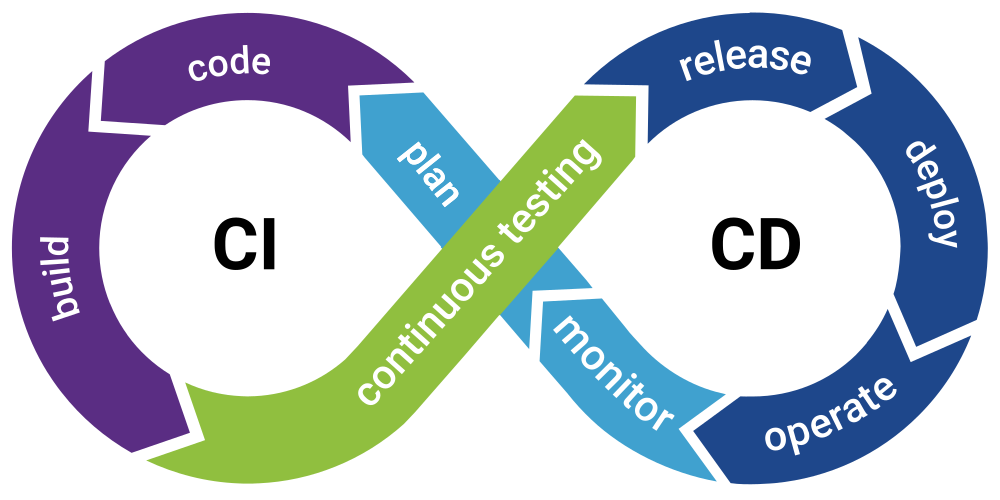
  • Abbreviation of Continuous Integration and Continuous Delivery (or Deployment)
  • A stage of application development
  • Enforces automation
    • building
    • testing
    • deployment
    • monitoring

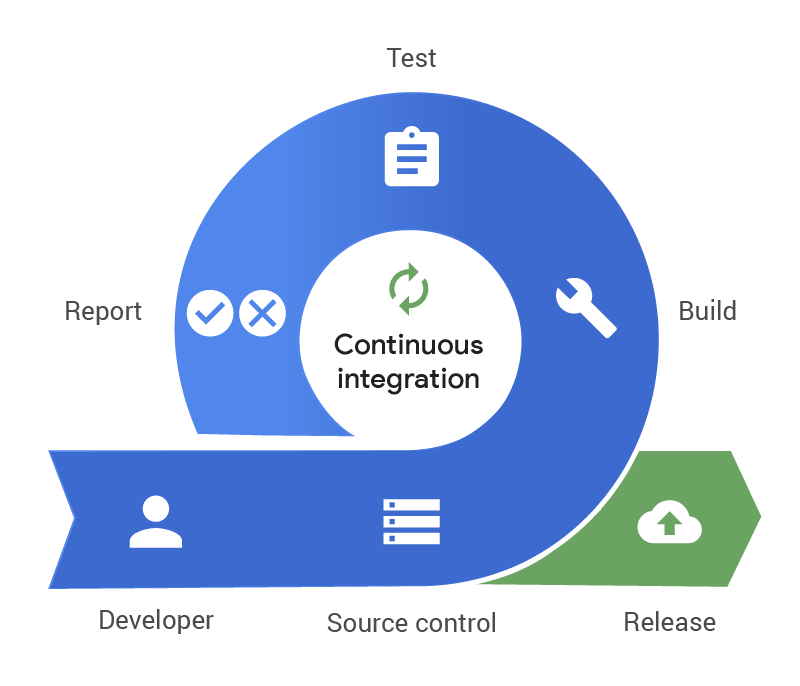
Continuous Integration

  • Source Control (Github, Gitlab, BitBucket, Azure Repos etc.)
  • Build
  • Test (unit, integration, e2e)
  • Report (Pass & Fail)
  • Agent is responsible to execute the steps
  • It can be used without CD

Continuous Delivery

  • Automation
  • Managing environments is easier
  • It can be applicable for any time
  • Eliminates human intervention
  • It can't be used CD without CI 

Advantages of CI/CD

  • Easy to collaborate with multiple developers
  • Better DX (Developer experience)
  • Reduce risks (fails early)
  • Better code quality
  • Shorter review time
    • Static code quality checks (eslint, stylelint etc.)
    • Semantic assessments might be supported by AI
  • Measurable progress (built times, release frequency etc.)

Responsibility:

Developers or Devops?

  • At minimum, developer team should decide their requirements
  • Application developers know their own build environment and necessities
  • At most tools, pipeline configs stay inside source control (Jenkinsfile, gitlab-ci.yml, azure-pipelines.yml, Dockerfile)
  • Installations, upgrades, domain and network configs are not managed by developer team

CI Tools

  • Gitlab CI/CD
  • Jenkins
  • Bamboo
  • Azure Pipelines
  • Bitbucket Pipelines
  • Github Actions
  • Jetbrains Teamcity

They might be cloud-based or on-premises

Frontend Deployment variations

  • Single Page Application
    • old school ftp copy (manual)
    • http server(apache, nginx) + asset copy
    • dockerized (asset + nginx conf)
  • SSR
    • node on server + copy build folder
    • dockerized version

*builds might be on agent itself or docker image

Case 1

  • Source Control: Gitlab
  • CI Tool: Jenkins
    • Config is at the repository: Jenkinsfile
    • Checkouts at MR's -> build status
    • Automatic deploy for dev merge
    • Manual trigger for test, uat, prod
  • Docker images with versions stored at Nexus
  • Relevant environment pulls and runs container
  • Same container can be run with different environment variables for different environments

Case 2

  • Source Control: Gitlab
  • CI Tool: Bamboo
    • Config is at the Bamboo UI
    • Checkouts at MR's -> build status stayed at Bamboo
  • Build artifacts are stored (assets, scripts etc.)
  • Assets are sent to http server via sftp

Case 3

  • Source Control: Gitlab
  • CI Tool: Jenkins
    • Config is at the repository: Jenkinsfile
    • Checkouts at MR's -> build status
  • npm package is published to Gitlab package registry

Case 4

  • Source Control: Gitlab
  • CI Tool: None
  • CD:
    • Code push to mirror repo on Azure Repos
    • Build & Deploy config at the Azure Pipelines UI

Best Practices

  • Localization update
  • Codegen integration
  • PR or MR pass/fail status
  • Typescript checks
  • npm package updates
  • npm audit

Best Practices (cont.)

  • Dockerized applications (more control over underlying technologies)
  • Versioning and easy rollback
  • Handling environment variables
  • Reduce built times with caching (on-premises)
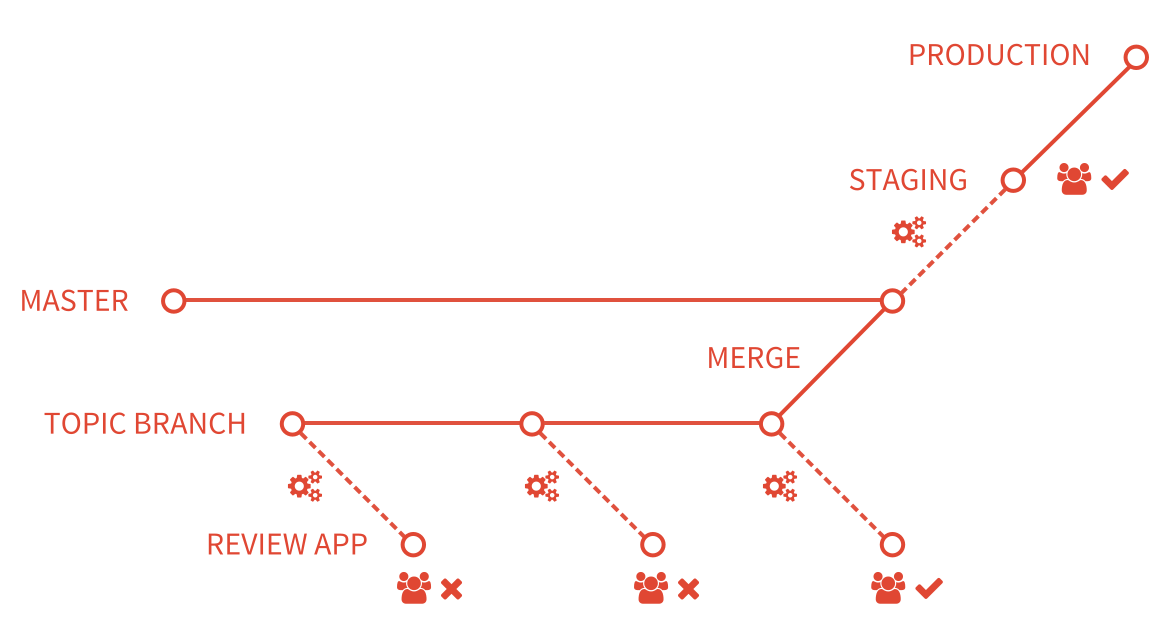
  • Review Apps*

Review Apps

Integrations

  • Deployment Notifications (Teams, e-mail etc.)
  • Pipeline fail notifications
  • Task status changes (JIRA, Azure Boards, Gitlab Issues) 

Useful tools

  • Nginx (http server)
    • Proxying
  • Docker
  • Pm2 (node process manager)
  • Kubernetes (rancher, lens)
  • Nexus
  • Gitlab (Package & container registries)

??? Q & A ???

Thank you for listening

Web CI/CD

By Özgün Bal

Web CI/CD

  • 48