Kotlin and new libraries
"A new way of thinking about Android"
by Pablo Arqueros
About me
Architect (of buildings...)
Android dev engineer
Lover Design UX/UI
email: pearqueros@gmail.com
twitter: @pearqueros

Kotlin
Syntax, Null Safety and more...
Kotlin Syntax
Kotlin is a Concise, Safe and Statically typed programming language focused on Interoperability with Java.
Kotlin Syntax
public class MainActivity extends AppCompatActivity {
    @Override
    protected void onCreate(Bundle savedInstanceState) {
        super.onCreate(savedInstanceState);
        setContentView(R.layout.activity_main);
        Toolbar toolbar = (Toolbar) findViewById(R.id.toolbar);
        setSupportActionBar(toolbar);
        FloatingActionButton fab = (FloatingActionButton) findViewById(R.id.fab);
        fab.setOnClickListener(new View.OnClickListener() {
            @Override
            public void onClick(View view) {
                Snackbar.make(view, "Replace with your own action", Snackbar.LENGTH_LONG)
                        .setAction("Action", null).show();
            }
        });
    }
}
class MainActivity : AppCompatActivity() {
    override fun onCreate(savedInstanceState: Bundle?) {
        super.onCreate(savedInstanceState)
        setContentView(R.layout.activity_main)
        val toolbar = findViewById(R.id.toolbar) as Toolbar
        setSupportActionBar(toolbar)
        val fab = findViewById(R.id.fab) as FloatingActionButton
        fab.setOnClickListener { view -> Snackbar.make(view, "Replace with your own action", Snackbar.LENGTH_LONG).setAction("Action", null).show() }
    }
}
Java (19 lines)
Kotlin (12 lines)
Kotlin Syntax
Extend and Implement
The words “extends” and “implement” were replaced by a colon “:”
Fun - ctions
class MainActivity : AppCompatActivity()
We don’t have our classic “public void methodName()” structure.
But where is the type returned from our “onCreate” method?
override fun onCreate(savedInstanceState: Bundle?) {
override fun onCreate(savedInstanceState: Bundle?) : Unit {
Kotlin Syntax
Bye Semicolon;
In Kotlin you don’t have to put the semicolon at the end of a sentences but still you can do it if you want (don’t do it).
Values and Variable
val price = 100        // Int
price = 30             // don't compile! it's a constant
var total = price * 3  // Int
val name = "Juancho"   // String
val lastname : String = "Keddit" // explicit type definition
var size : Double = 30.0
var time : Float = 15f
Kotlin Syntax
Properties and Fields
resources.getString(R.string.id)
// vs
getResources().getString(R.string.id) // still allowed
Safe?:Safe!
val a : String = null  // don't compile!
var b : Int          // neither as must be initialized or abstract.
val ok : String? = null // OK :)
everything in Kotlin is not nullable unless you specifically declare it in this way
Kotlin Syntax
Safe call
val context : Context? = null
val res = context?.getResources() // not crash, res will be null
Smart cast
val context : Context? = null
if (context != null) {
    val res = context.getResources()    // Don't need '?' anymore
    val appName = res.getString(R.string.app_name)
    val shortName = appName.substring(0, 2)
}
val context : Context? = null
context?.let {
    val res = context.getResources()    // Don't need '?' anymore
    val appName = res.getString(R.string.app_name)
    val shortName = appName.substring(0, 2)
}
Example kotlin
Fragments
NewsFragment.kt: Extensions Function, Android Extensions and more…
NewsFragment.kt
- Extension Functions (Utility class?)
- Default Values in Parameters
- Android Extensions (bind view)
- Delegated Properties
RecyclerView
Delegate Adapters & Data Classes with Kotlin
- Init Constructor
- Object Expressions
- Single Expressions
- Data Classes
- Ranges
- List & Lambdas (introduction)
NewsAdapter
Kotlin,RxJava & RxAndroid
NewsManager
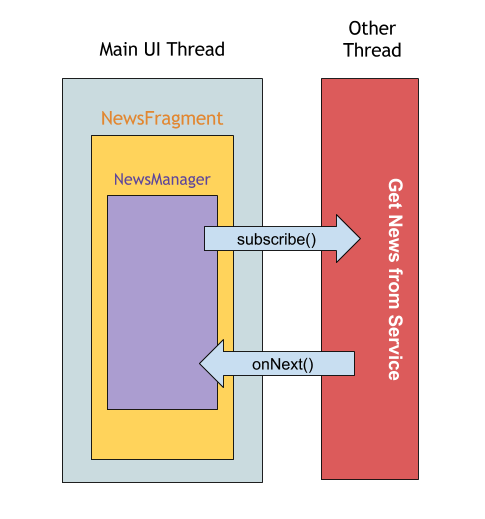
Observable
fun getNews(): Observable<List<RedditNewsItem>> {
    ...
}
onNext(item: T)
onCompleted()
onError(e: Throwable)
Kotlin,RxJava & RxAndroid
NewsManager
Subscribe>Subscription>Observer
val subscription = newsManager.getNews().subscribe (
        { retrievedNews ->
            ...
        },
        { e ->
            ...
        }
onNext
onError
Kotlin,RxJava & RxAndroid
NewsManager
SubscribeOn
val subscription = newsManager.getNews()
        .subscribeOn(Schedulers.io())
        .subscribe (...)
- io: intended for IO-bound work.
- computation: intended for computational work.
- newThread: creates a new Thread for each unit of work.
- test: useful for debugging.
Kotlin,RxJava & RxAndroid
NewsManager
ObserveOn in the main thread
val subscription = newsManager.getNews()
        .subscribeOn(Schedulers.io())
        .observeOn(AndroidSchedulers.mainThread())
        .subscribe ( ...
)
AndroidSchedulers.mainThread()
Retrofit & Kotlin
- API Model: Kotlin Classes
- API Interface
- Rest API
Kotlin & Dagger 2
...and finally....
Dagger 2
Generated Code
Purpose
- NO Show you how to use Dagger 2 on your project.
- YES take a deep dive into Dagger’s generated code and understand what Dagger does internally to generate your dependency graph
Starting with Dagger 2
- Starting - Like a black box
- I knew hot to use it, but I had no idea how it internally generates my dependency graph
- So, whenever I got an error, it took a lot of time to fix
- So I decided to try (only try) to read the generated code and that’s when I realised, it is not as difficult as its reputation.
Starting with Dagger 2
What happened after this?

Prerequisites

Prerequisites
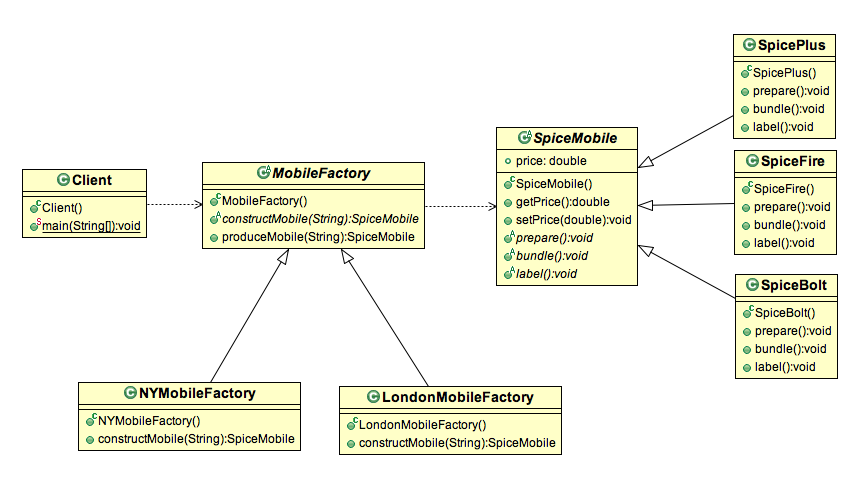
Familiarity with Dagger 2 Library
- @Inject — base annotation whereby the “dependency is requested”
- @Module — classes which methods “provide dependencies”
- @Provide — methods inside @Module, which “tell Dagger how we want to build and present a dependency“
- @Component — bridge between @Inject and @Module
- @Scope — enables to create global and local singletons
- @Qualifier — if different objects of the same type are necessary
Base elements (annotations) of Dagger 2
Prerequisites
Tree representation of the dependency graph for our example repo
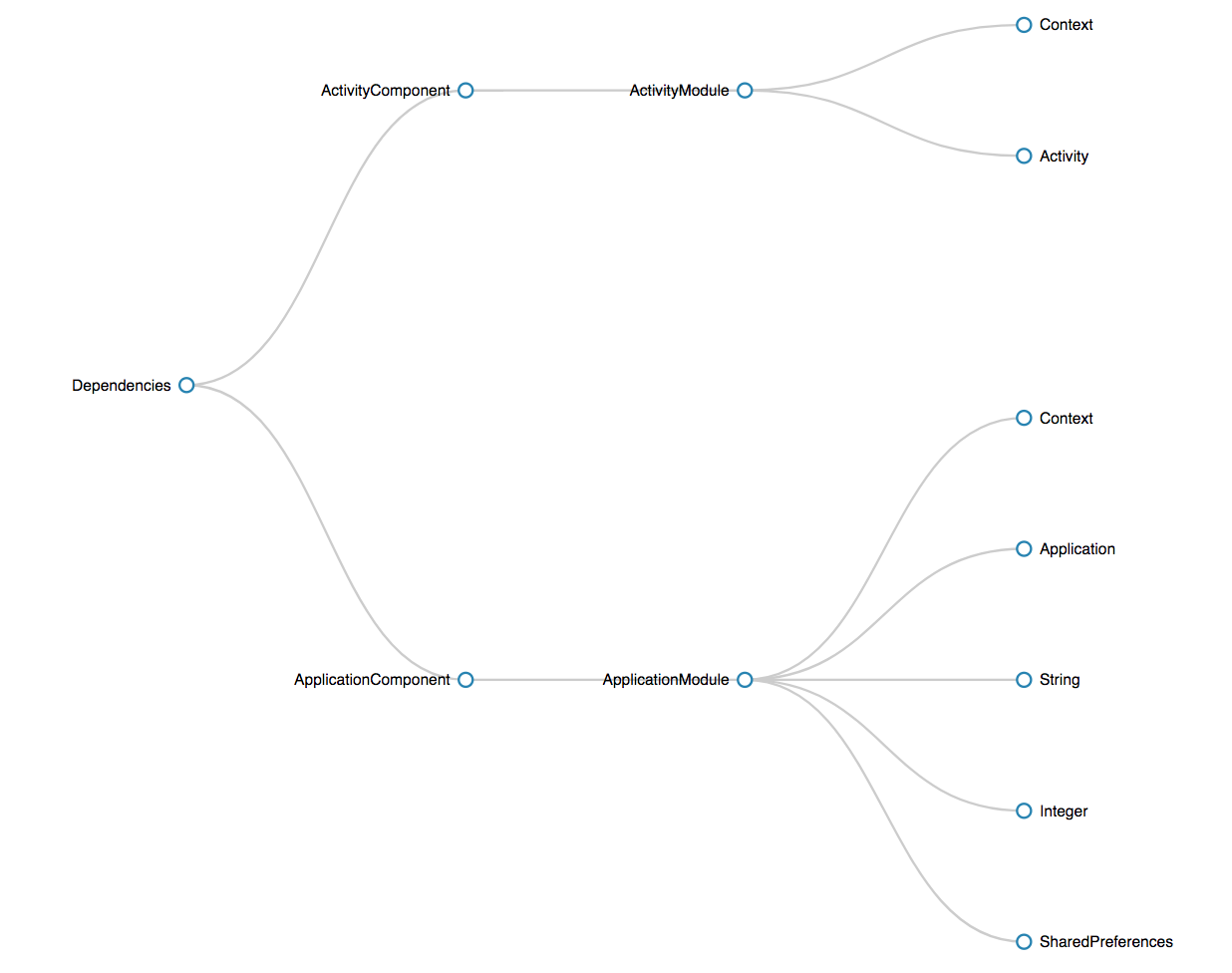
Graph generated by daggraph
To generate this dependency we need two modules:
-
ApplicationModule -
Activity Module
and their respective components:
-
ApplicationComponent
-
ActivityComponent
ApplicationModule
@Module
public class ApplicationModule {
    private final Application mApplication;
    public ApplicationModule(Application app) {
        mApplication = app;
    }
    @Provides
    @ApplicationContext
    Context provideContext() {
        return mApplication;
    }
    @Provides
    Application provideApplication() {
        return mApplication;
    }
   ...
    @Provides
    @DatabaseInfo
    String provideDatabaseName() {
        return "demo-dagger.db";
    }
    @Provides
    @DatabaseInfo
    Integer provideDatabaseVersion() {
        return 2;
    }
    @Provides
    SharedPreferences provideSharedPrefs() {
        return mApplication.getSharedPreferences("demo-prefs", Context.MODE_PRIVATE);
    }
}
ActivityModule
@Module
public class ActivityModule {
    private Activity mActivity;
    public ActivityModule(Activity activity) {
        mActivity = activity;
    }
    @Provides
    @ActivityContext
    Context provideContext() {
        return mActivity;
    }
    @Provides
    Activity provideActivity() {
        return mActivity;
    }
}
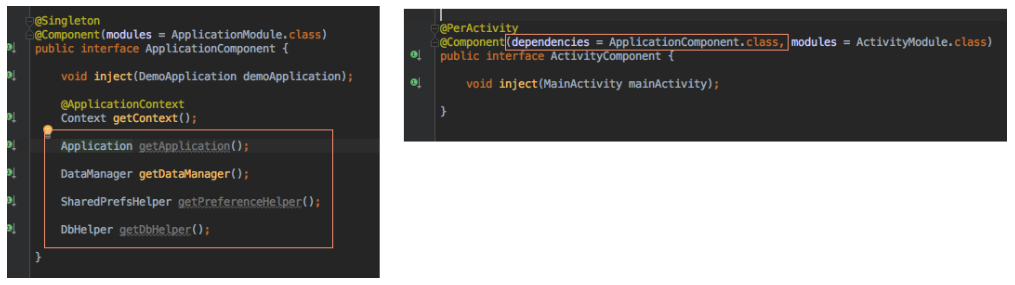
@Singleton
@Component(modules = ApplicationModule.class)
public interface ApplicationComponent {
    void inject(DemoApplication demoApplication);
    @ApplicationContext
    Context getContext();
    Application getApplication();
    DataManager getDataManager();
    SharedPrefsHelper getPreferenceHelper();
    DbHelper getDbHelper();
}
ApplicationComponent
ActivityComponent
@PerActivity
@Component(dependencies = ApplicationComponent.class, modules = ActivityModule.class)
public interface ActivityComponent {
    void inject(MainActivity mainActivity);
}

Generated Code
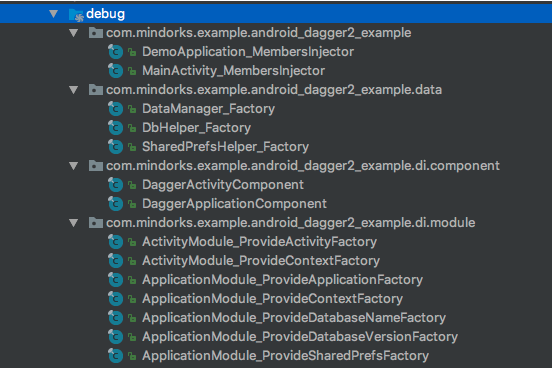
@provide annotations
Generated Code
ApplicationComponent

Thanks for your time!!!
Questions?

Kotlin and new libraries
By Pablo Arqueros