دوره
دی 1403 - رسول پاشایی
Modern JavaScript
پیش نیاز های دوره
- Programming Basics
- Function
- Variables
- Control Flow
- OOP
- Class
- Object
- Inheritance
- ...
- HTML
- CSS
- Css Selector
Course Content
Language
- Building Blocks
- Dynamic Programming
- Object Oriented Programming
- Debugging
- Serialization
- Reflection
- Events
- ES6 Features
Async
- Async vs Sync
- Callback
- Promise
- async/await
- Observable
UI
- DOM
- Validation
- Animation
- Event Handling
- Drag & Drop
- Keyboard Events
Data Transfer
- Ajax
- CORS
- Web Service
- JSON
- Binary File
- JSONP
- GraphQL
JavaScript Libraries
- Axios
- Handlebars js
- Lodash
- Ramda
- Leaflet
Tips
- JavaScript Template
- iFrame
- Security
- HTTP Message
- Obfuscation
- Minifying
JavaScript
What is JavaScript?
Interpreted
- High-Level
- Dynamic
- Weakly typed
- Prototype based
- Multi-paradigm
- Event driven
- Object Oriented
- Functional
- Imperative
Brandon Eich
- 1995
- Scheme
- Java Syntax
- 10 Days
- Name
- Mocha
- LiveScript
- JavaScript™
Influence
- Self
- Prototypal inheritance
- Dynamic objects
- Scheme
- Lambda
- Loose typing
- Java
- Syntax
- Conventions
- Perl
- Regex
Scheme Sample
(let loop ((n 1))
  (if (> n 10)
      '()
      (cons n
	    (loop (+ n 1)))))

===> (1 2 3 4 5 6 7 8 9 10)
Many contrast
- Best ideas
- Worst Ideas
- And a lot between
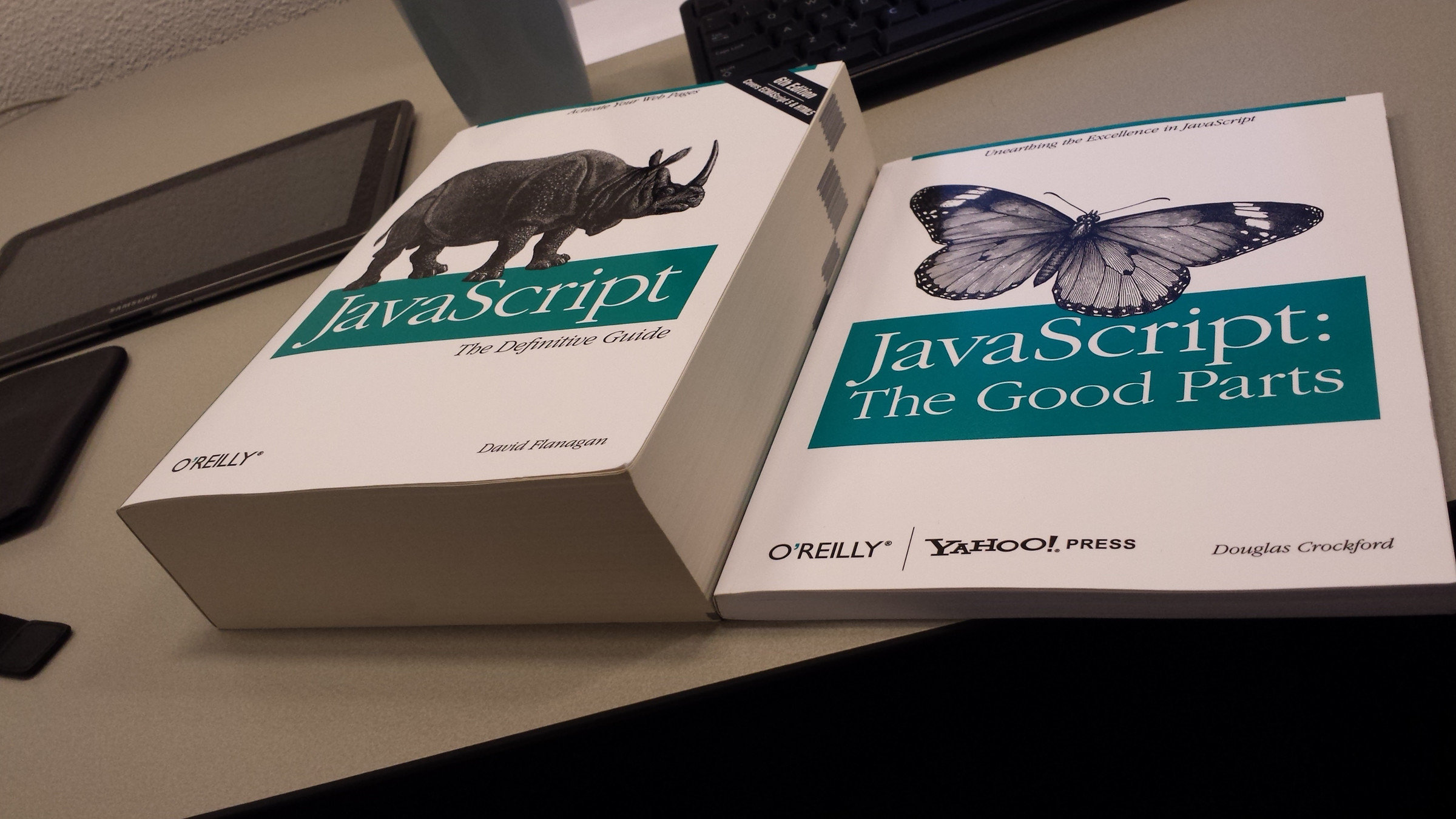
Good, Bad, Ugly
JavaScript vs Java
JavaScript Program
ECMAScript
Platform (Browser, Node, Mobile, ... )
Run-time (V8, Spidermonkey, Chakra, ...)
JavaScript Is Everywhere
-
Chrome - V8
-
Firefox - SpiderMonkey
-
MS Edge - Chakra
Web Browser
-
Node?
-
Bun
-
Deno
-
Rhino
Server
-
Electron
-
Tauri
-
AppJS
-
nodewebkit
-
Bracket Shell
Desktop App
-
Tauri
-
Cordova
-
Capacitor
-
NativeScript
-
ReactNative
Mobile App
-
MongoDB
-
PunchDB
-
NeDB
Database
-
JerryScript
-
Espruino
-
Duktape
IOT
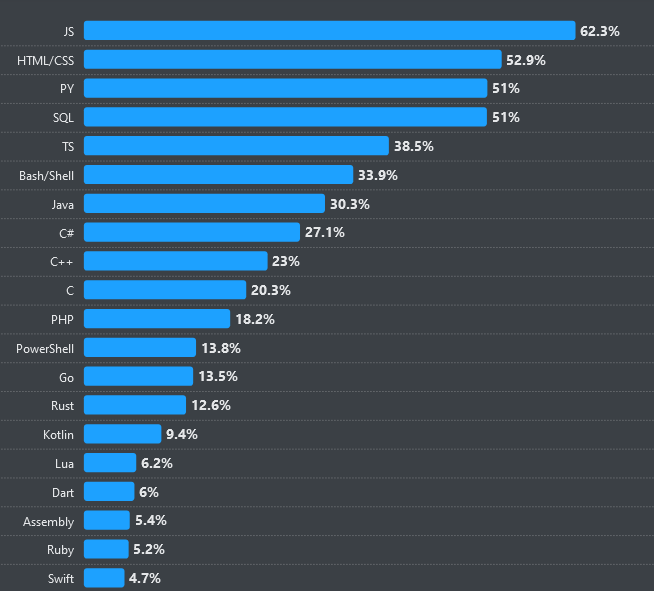
Languages That Compile To JavaScript
- Dart
- TypeScript
- Elm
- PureScript
- CoffeScripts
- ClojureScript
- Scala.js
- Reason
What is ECMAScript?
ECMAScript Versions
| Edition | Formal name | Release date |
|---|---|---|
| ES1 | ES1 | June 1997 |
| ES2 | ES2 | June 1998 |
| ES3 | ES3 | December 1999 |
| ES4 | ES4 | Disposed |
| ES5 | ES5 | December 2009 |
| ES 5.1 | ES 5.1 | June 2011 |
| ES6 | ES2015 | June 2015 |
| ES7 | ES2016 | June 2016 |
| ES8 | ES2017 | June 2017 |
| ES9 | ES2018 | June 2018 |
| ES10 | ES2019 | June 2019 |
| ES11 | ES2020 | June 2020 |
| ES12 | ES2021 | June 2021 |
| ES13 | ES2022 | June 2022 |
| ES14 | ES2023 | June 2023 |
| ES15 | ES2024 | June 2024 |
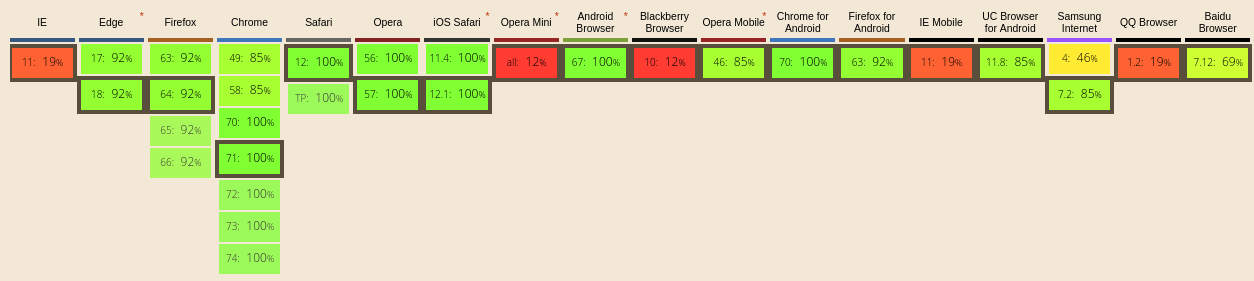
Transpile Vs Compile
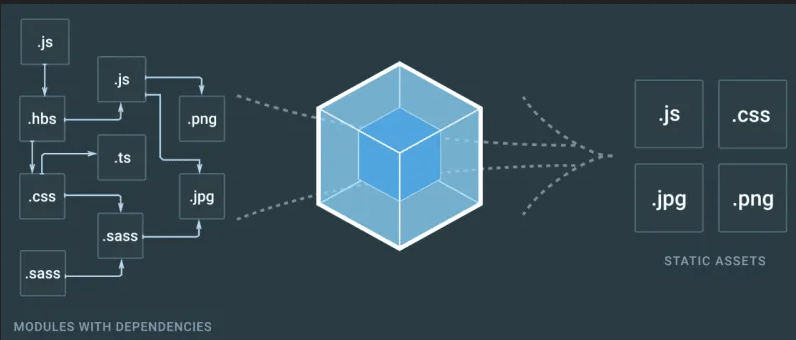
Bundle
یاد آوری
HTTP
Hypertext Transfer Protocol
URL
Uniform Resource Locator
- Web Server
- Responses to HTTP Requests
- Runs in server-side
- Dynamic/Static content
- Full access to server resources
- Example
- Apache
- IIS
- Tomcat
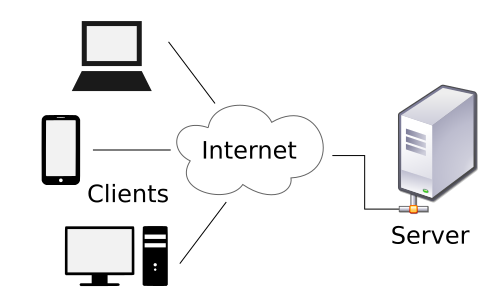
- Web Browser
- Runs in client
- Render content
- Example
- Chrome
- Firefox
- IE
- Safari
Web Site
vs
Web Application
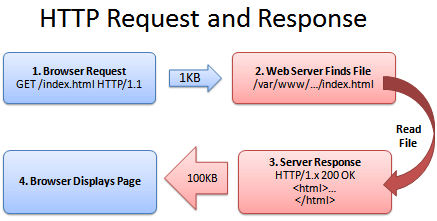
Request / Response
-
URL
-
Header - None mandatory
-
Method
-
Body
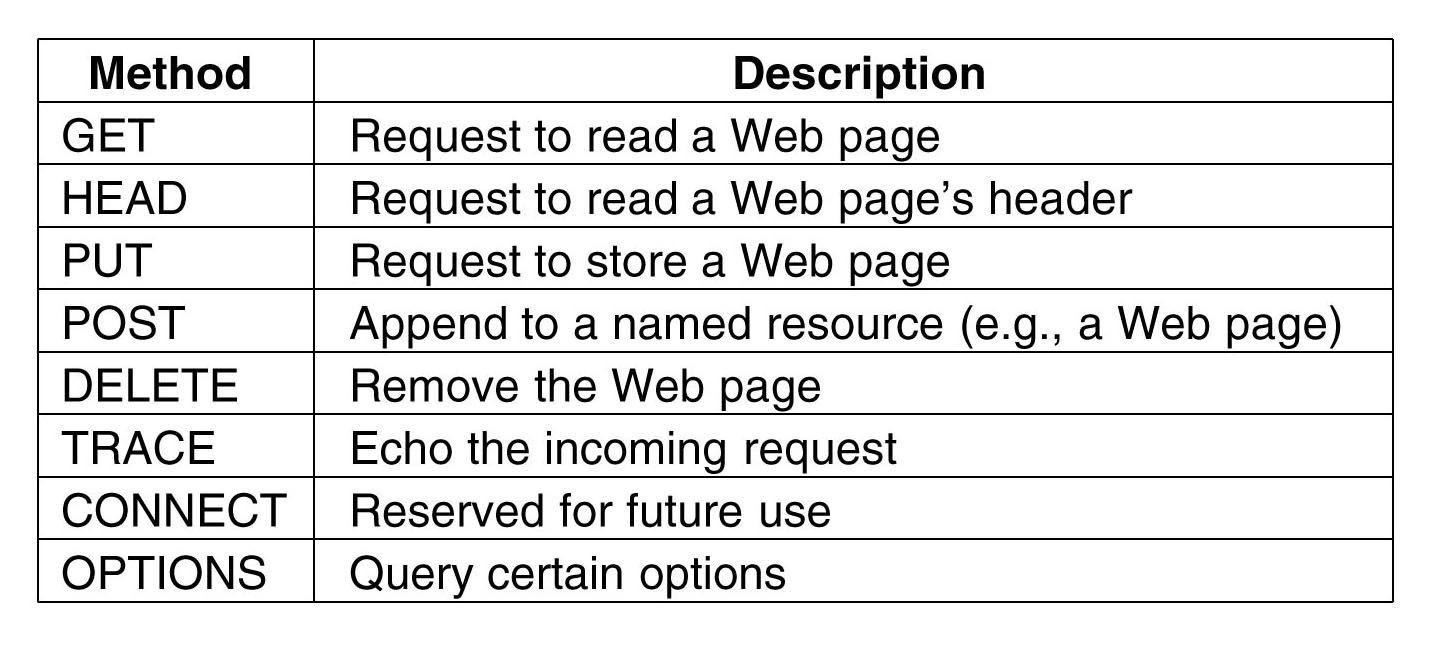
HTTP Request methods
Response Status Codes
- Informational 1XX
- Successful 2XX
- Redirection 3XX
- Client Error 4XX
- Server Error 5XX
More Details https://httpstatuses.com/
HTTP/1.1 vs HTTP/2
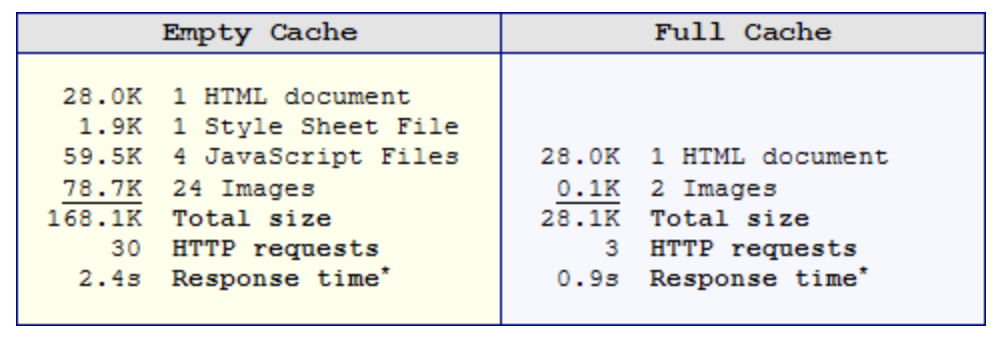
Why is this important?
Main Types of Client-Side Caching
- HTTP Response Code
- JavaScript/Ajax
- HTML5/PWA
How to disable in development mode
HTML
Hypertext Markup Language
Element vs Attribute
Sample HTML
<!DOCTYPE html>
<html>
  <head>
    <title>This is a title</title>
  </head>
  <body>
    <p>Hello world!</p>
  </body>
</html>
<!DOCTYPE html>
<html>
<head>
<meta charset="UTF-8">
<meta name="viewport" content="width=device-width, initial-scale=1.0">
<meta http-equiv="X-UA-Compatible" content="ie=edge">
<link href="//netdna.bootstrapcdn.com/twitter-bootstrap/2.3.2/css/bootstrap-combined.min.css" rel="stylesheet" id="bootstrap-css">
<script src="//netdna.bootstrapcdn.com/twitter-bootstrap/2.3.2/js/bootstrap.min.js"></script>
<script src="//code.jquery.com/jquery-1.11.1.min.js"></script>
<title>Login</title>
</head>
<body>
<div class="container">
<div class="row">
<div class="span12">
<form class="form-horizontal" action='' method="POST">
<fieldset>
<div id="legend">
<legend class="">Login</legend>
</div>
<div class="control-group">
<!-- Username -->
<label class="control-label" for="username">Username</label>
<div class="controls">
<input type="text" id="username" name="username" placeholder="" class="input-xlarge" required data-validation-endpoint="check-username-exists.php" >
</div>
</div>
<div class="control-group">
<!-- Password-->
<label class="control-label" for="password">Password</label>
<div class="controls">
<input type="password" id="password" name="password" placeholder="" class="input-xlarge">
</div>
</div>
<div class="control-group">
<!-- Button -->
<div class="controls">
<button class="btn btn-success">Login</button>
</div>
</div>
</fieldset>
</form>
</div>
</div>
</div>
</body>
</html>Minify vs Uglify
CSS
Cascading Style Sheets
CSS Selectors
CSS Selector Usage
- CSS
- DOM Selection
- querySelector/querySelectorAll
- jquery
- HTML code generator
Resources
- CSS Diner
- W3School
- Learn
- Game - Cheat Sheet

#page>div.logo+ul#navigation>li*5>a{Item $}<div id="page">
<div class="logo"></div>
<ul id="navigation">
<li><a href="">Item 1</a></li>
<li><a href="">Item 2</a></li>
<li><a href="">Item 3</a></li>
<li><a href="">Item 4</a></li>
<li><a href="">Item 5</a></li>
</ul>
</div>Resource
Contact Info
- WhatsApp Group
- Email: Pashaie@gmail.com
Code Playground
Getting Started!
JS140310
By pashaie