Intro to Front End

Typical Web Application
What is HTML?
- Hyper Text Markup Language
- Not a programming language
- Markup language for creating web pages/documents
- Building block of the web
Tag Syntax
<tag>Contents</tag>HTML Page Structure
<!DOCTYPE html>

<html>

    <head>

        <title>Welcome</title>
        <meta charset="UTF-8">
        <meta name="description" content="Description">
        <meta name="keywords" content="abco, advisory board, healthcare">
        <meta name="author" content="ABCO INDIA">
        <meta name="viewport" content="width=device-width, initial-scale=1.0">

    </head>

    <body>

        Layout and contents

    </body>

</html>
<head> element is a container for metadata (data about data) and is placed between the <html> tag and the <body> tag.
HTML metadata is data about the HTML document.
| Tags | Desc |
|---|---|
| <title> | Defines the title of a document |
| <style> | Defines style information for a document |
| <link> | to link to external style sheets |
| <script> | Defines a client-side script |
| <meta> | Defines metadata about an HTML document |
*Metadata is not displayed.
What is DOCTYPE?
<!DOCTYPE html>Inline vs Block Elements
Block elements are those that take up the full width available on a web page, effectively blocking out any other elements from sitting next to it on the left or right.
Inline elements are those who only take up as much width as is needed to display the contents of the element, thereby allowing other elements to be in line with the inline element.
Attributes
HTML attributes generally appear as key-value pairs, separated by =, and are written within the start tag of an element, after the element's name
<tag attribute="value">content to be modified by the tag</tag>- Standard Attributes
- Event Attributes
Selectors
Events
Semantic Tags

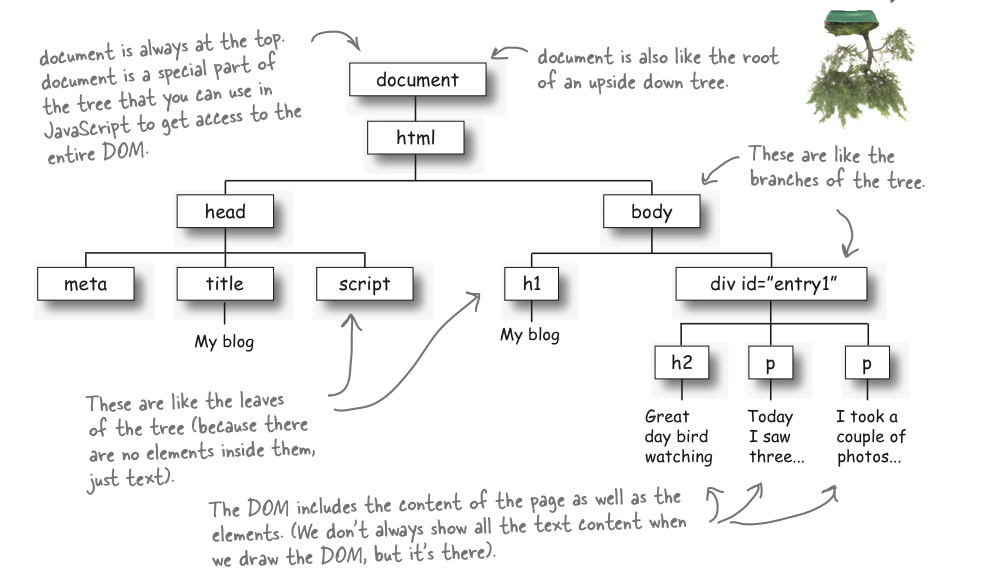
DOM
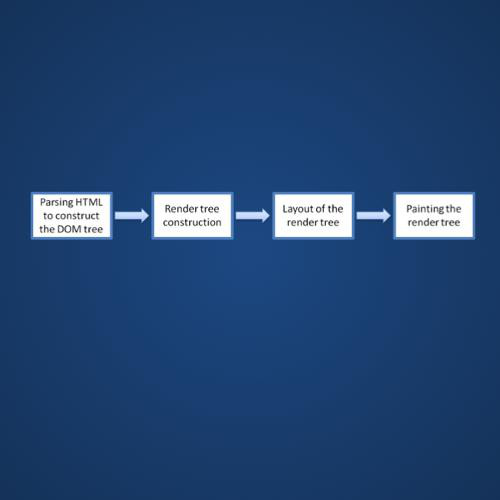
The Document Object Model (DOM) is a programming API for HTML and XML documents. It defines the logical structure of documents and the way a document is accessed and manipulated.
With the Document Object Model, programmers can create and build documents, navigate their structure, and add, modify, or delete elements and content.
Debugging
Intro to HTML
By praveen_jegan