AUTHOR
TOMAS HERICH
Software Engineer Frontend / Java @mimacom
- more than two years of Angular JS experience
- projects of various sizes and in various domains
- Angular JS focused blog
- curious affinity for frontend build systems :)
- reddit /r/javascript /r/programming /r/angularjs addict




LET'S GET STARTED

OVERVIEw
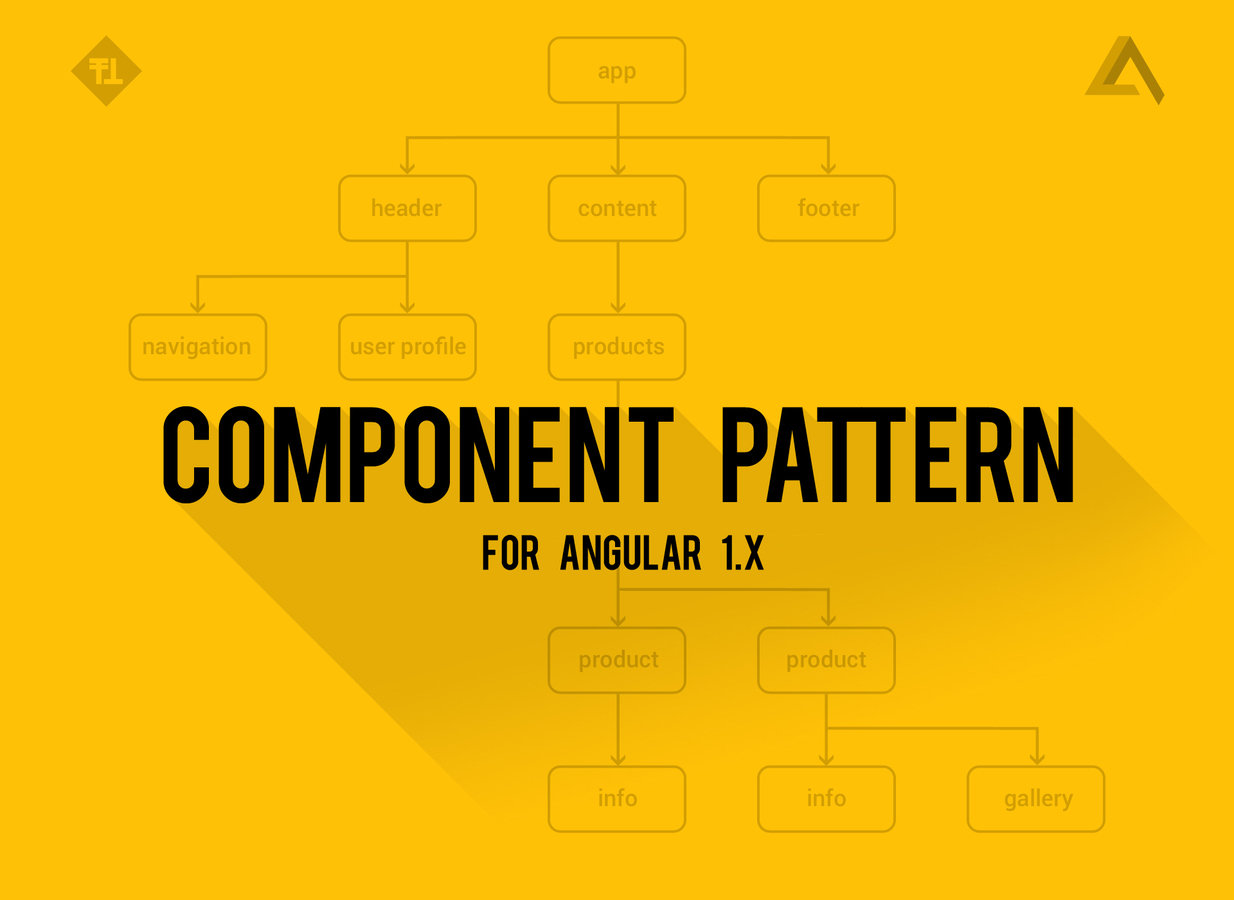
Component Pattern
- component pattern, using directive
- using ui-router to navigate to particular component
- reusing components
- components with newNgRouter
- looking forward - how to migrate to Angular 2.0
-
evolution of Angular JS concepts ($scope, ngRoute, ...)
ROAD TO COMPONENTS
LIVE DEMO
-
if we have enough time :)
EVOLUTION OF CONCEPTS
ROAD FROM FROM ANCIENT ng-CONTROLLER to COMPONENTS

EVOLUTION OF CONCEPTS
ROAD FROM FROM ANCIENT ng-CONTROLLER to COMPONENTS
- ng-controller directly in HTML template
- $scope (& scope inheritance and resulting problems)
- ngRoute - better but not flexible (eg: no nested states / views)
- controllerAs syntax - solution to $scope problems (Angular 1.2+)
- ui-router - solution to ngRoute problems (nested states, partial views)
- bindToController syntax for implementing directives without $scope
- component pattern for Angular 1.X
- ngNewRouter - easier routing to components (convention over conf...)
- Angular 2.0 first class components
CURRENT STATE OF ART AND FUTURE
NG-CONTROLLER
IN TEMPLATE...
<div ng-app="myApp" ng-controller="myCtrl">

    First Name: <input type="text" ng-model="firstName"><br>
    Last Name: <input type="text" ng-model="lastName"><br>

    Full Name: {{firstName + " " + lastName}}

</div>

// myCtrl.js
angular.module('myApp', [])
    controller('myCtrl', function($scope) {
        $scope.firstName = "John";
        $scope.lastName = "Doe";
    });
- only for very simple applications, no routing
$scope
AND NESTED SCOPE INHERITANCE PROBLEMS...
<div ng-app="myApp" ng-controller="parentCtrl">

    Parent: <input type="text" ng-model="user.name" />

    <div ng-controller="childCtrl">
        Child: <input type="text" ng-model="user.name" />
    </div>

</div>

// myCtrl.js
angular.module('myApp', [])
    .controller('parentCtrl', function($scope) {
        $scope.user = {
            name: 'John Doe'
        }
    })
    .controller('childCtrl', function($scope) {
});- scope inheritance, tight coupling, problems with debugging and reusability
$scope
AND NESTED SCOPE INHERITANCE PROBLEMS LIVE EXAMPLE...
ng Route
official but not that great routing solution
angular.module('app', []);

    .config(['$routeProvider', function($routeProvider) {
        $routeProvider
            .when('/someUrl', {
                templateUrl: 'some-tempalte.html',
                controller: 'SomeController',
                resolve: {}
});- decouple controller from template
- support for resolving data before entering controller
- not flexible enough
- impossible to nest states and views (only top level ng-view)
controller as syntax
SOLution to $scope inheritance problem
// routes.js
angular.module('app', [])
    .config(['$routeProvider', function($routeProvider) {
        $routeProvider
            .when('/someUrl', {
                templateUrl: 'some-tempalte.html',
                controller: 'SomeController as ctrl'
             });

// someController.js
angular.module('app')
    .controller('SomeController', function() {
        this.property = 'some value';
    });

// some-tempalte.html
<div>
    {{ctrl.property}}
</div>
- properties bound directly to controller (controller's this)
- removed dependency to $scope
- enhanced re-usability
UI-ROUTER
THE BEGINNING OF THE GREAT ERA
$stateProvider
    .state('parent', {
        url: '/parent',
        templateUrl: 'parent.html'
    })
    .state('parent.child', {
        url: '/child',
        templateUrl: 'child.html'
    })
    .state('parent.anotherchild', {
        url: '/anotherchild',
        views: {
            '': { templateUrl: 'anotherchild.html' },
            'sidebar@anotherchild': { // ui-view="sidebar"
                template: 'Look I am a sidebar!'
            }
        }
});- routing based on unique state name not url
- nested states injected into ui-view directive in parent template
- partial views
BIND TO CONTROLLER
SYNTAX THAT ENABLES CONTROLLER AS USAGE FOR DIRECTIVES WITH ISOLATE SCOPE
// some app tempalte
<div some-directive prop='value'></div>

// directive
angular.module('app', [])
    .directive('someDirective', function () {
        return {
            scope: {
                prop: '@'
            },
            templateUrl: 'someTemplate.html',
            controller: SomeController,
            controllerAs: 'ctrl',
            bindToController: true // also as of angular 1.4.1 it is possible
                                   // to specify props {} here instead of scope
        };
    })
    .controller('SomeController', function() {
        this.prop; // 'value'
    });

// directive tempalte: someTemplate.html
<div>{{ctrl.prop}}</div>
- bind scope properties to controller's this automatically
COMPONENT PATTERN
FOR ANGULAR 1.X
angular
    .module('app', [])
    .directive('someComponent', someComponent);

    function someComponent() {
        return {
            restrict: 'A',
            scope: {
                // isolated scope, use to pass data from parent, eg: data: '='
            },
            controller: SomeComponent,
            controllerAs: 'ctrl',
            bindToController: true,
            templateUrl: 'some-component.tpl.html'
        };
    }

    function SomeComponent(SomeService, SomeOtherDependency) {
        this.name = 'John Doe';
}- directive used to define component (controller & template)
- encapsulated functionality, dependencies are passed explicitly
new ng router
convention over directive definition object
// app.js
angular.module('app', ['ngNewRouter'])
    .controller('AppController', ['$router', AppController]);

AppController.$routeConfig([
    {path: '/', component: 'home' }
]);
function AppController ($router) {}

// components/home/home.js
angular.module('app.home', [])
    .controller('HomeController', [function () {
        this.name = 'John Doe';
    }]);

// components/home/home.html
<h1>Hello {{home.name}}!</h1>- component name is specified in route definition
ANGULAR 2.0
FIRST CLASS COMPONENTS
- component and template specified by decorators (@Component & @Template)
@Component({
    selector: 'some-component',
    componentServices: [
        SomeService
    ]
})
@Template({
    url: './some-component.html',
    directives: [Foreach] // directives used in template
})
class SomeComponent {
    constructor() {
        this.SomeService = SomeService;
        this.name= 'John Doe';
    }
    doStuff() {
        this.SomeService.doStuff();
    }
}
OK... LET'S DO THIS

MODELING VIEWS
AS A COMPONENT TREE
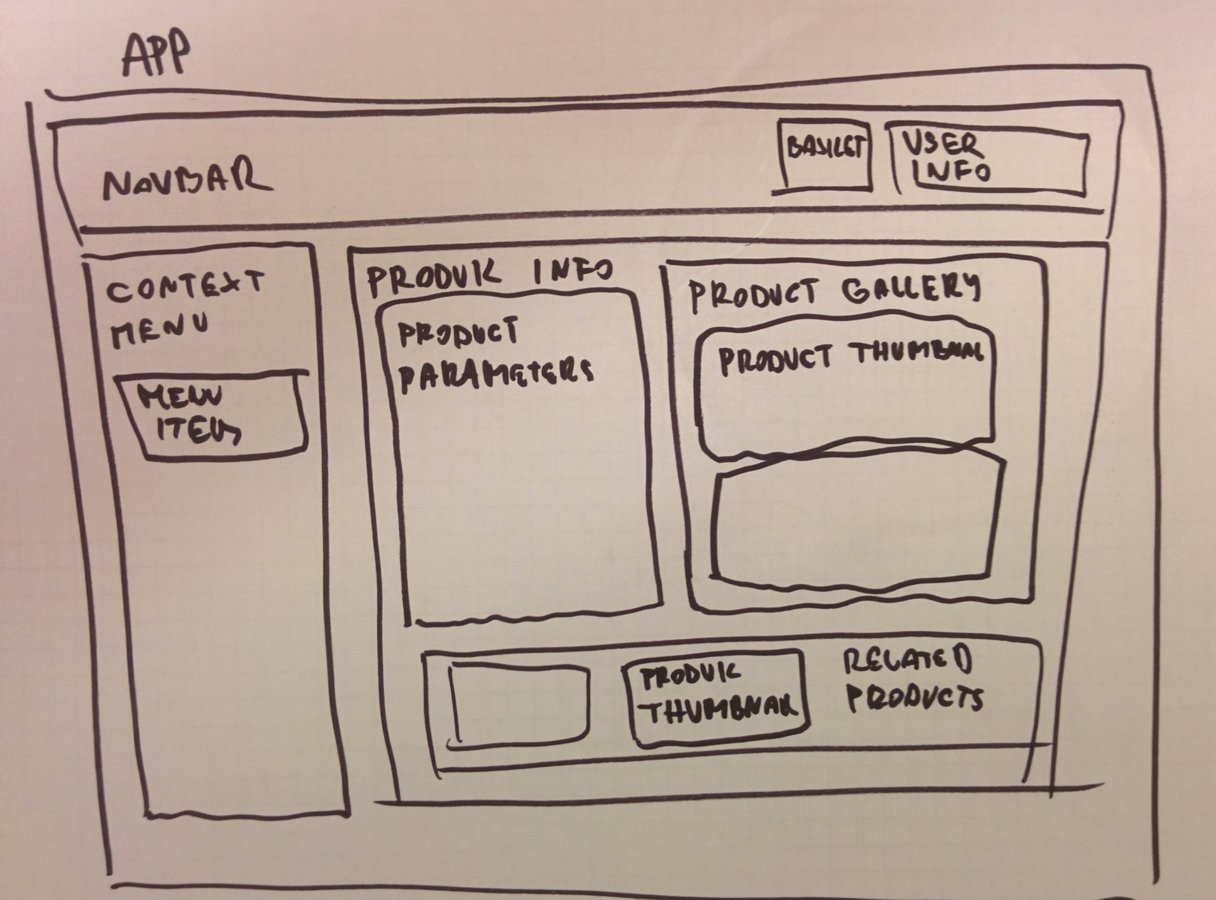
COMPONENT PATTERN
FOR ANGULAR 1.X - DIRECTIVE DEFINITION OBJECT
- directive used to define component (controller & template)
// someComponent.js

// directive definition object used to specify component

function someComponent() {
    return {
        restrict: 'A', // only attribute eg: <div my-component></div>
        scope: {
            // isolated scope, use to pass data from parent, eg: data: '='
        },
        controller: SomeComponent,             // controller function
        controllerAs: 'ctrl',                  // controller alias in template
        bindToController: true,                // bind scope props to controller's this
        templateUrl: 'some-component.tpl.html' // components template url
    };
}
COMPONENT PATTERN
FOR ANGULAR 1.X - COMPONENT'S CONTROLLER
- component's controller referenced in previously specified directive definition object
- functionality for component's template
// someComponent.js

function SomeComponent(SomeService) {

    var vm = this;

    vm.name = 'John Doe';

    vm.calculate = calculate;

    function calculate(param) {
        return SomeService.performCalculation(param);
    }
}
COMPONENT PATTERN
FOR ANGULAR 1.X - COMPONENT'S TEMPLATE
- show data and call functions exposed in component's controller
- only data and actions of the component's controller because of isolation (directive's isolated scope and controllerAs syntax)
// some-component.tpl.html

<div>
    {{ctrl.name}}

    <button ng-click="ctrl.calculate();">Calculate!</button>
</div>
COMPONENT PATTERN
NAVIGATE TO PARTICULAR COMPONENT WITH UI-ROUTER
- specify component as a inline template of the state
// some-component.tpl.html

angular
    .module('app', ['ui.router'])
    .config(config);

    function config($stateProvider) {
        $stateProvider
            .state('app.some', {
                url: '/some',
                template: '<div some-component></div>',
                resolve: {
                    // ... resolve data, init models
                },
            });
    }
COMPONENT PATTERN
REUSE EXISTING COMPONENTS
- reuse component in different states
- reuse component in template of other component
// for multiple routes
$stateProvider
    .state('app.admin.users.user', {
        url: '/app/admin/users/user/{userId}" ',
        template: '<div user-info-component></div>'
    })
    // ... other states ...
    .state('app.user.profile', {
        url: '/app/user/{userId}/profile" ',
        template: '<div user-info-component></div>'
    });

// inside of another component's template... header.tpl.html
<div>
    <!-- navigation ... -->
    <div user-info-component></div>
<div>
COMPONENT PATTERN
EASY MIGRATION TO ANGULAR 2.0
- use component together with ES6 syntax for extra convenient migration to Angular 2.0
- use newNgRouter as soon as available to get rid of directive definition object
- use ES7/TS @decorators when Angular 2.0 is available
// someComponent.js (ES6)
class SomeComponent {
    constructor(SomeService) {
        this.someProperty = 'some value accessible in template';
        this.SomeService = SomeService;
    }

    calculate() {
        this.SomeService.performCalculation();
    }
}
THAT'S ALL FOLKS !
I HOPE YOU ENJOYED THE PRESENTATION
PRESENTATION LINK
- about evolution of Angular JS concepts
- how to use them to implement Component Pattern
- why it makes sense and how it helps with respect to future
WE LEARNED

GITHUB LINK
Copy of Component pattern for Angular JS (1.X)
By Praveen Poonia
Copy of Component pattern for Angular JS (1.X)
How and why to implement Component Pattern in Angular JS 1.X. Lightning overview of evolution of Angular JS concepts, Component Pattern implementation, migration path to Angular 2.0