














Fanis Prodromou
I am a Senior Software Engineer with a passion for Front End development with Angular. I have developed vast experience in code quality, application architecture, and application performance.
Fanis Prodromou
@prodromouf
https://blog.profanis.me
/prodromouf
<div class="wrapper-container">

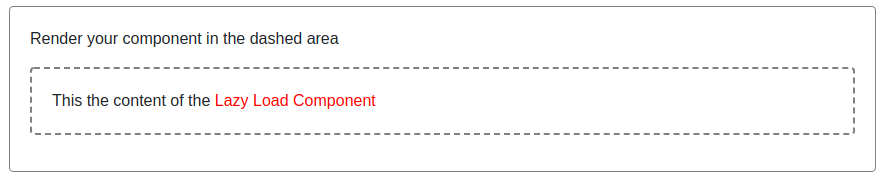
  <p>Render your component in the dashed area</p>
  <div class="child-container mt-3 mb-3">
    <!-- Render your component here -->
  </div>

</div>
import { Component } from '@angular/core';

@Component({
  selector: 'app-lazy-content',
  template: `
    This the content of the <span style="color: red">Lazy Load Component</span>
  `,
})
export class LazyContentComponent  {}
@Component({
  selector: 'app-1cmp',
  template: `
    1 cmp content
  `,
})
export class OneComponent  {}
@Component({
selector: 'app-2cmp',
template: `
2 cmp content
`,
})
export class TwoComponent {}@Component({
selector: 'app-3cmp',
template: `
3 cmp content
`,
})
export class ThreeComponent {}|
|
|---|
|
|
|
|
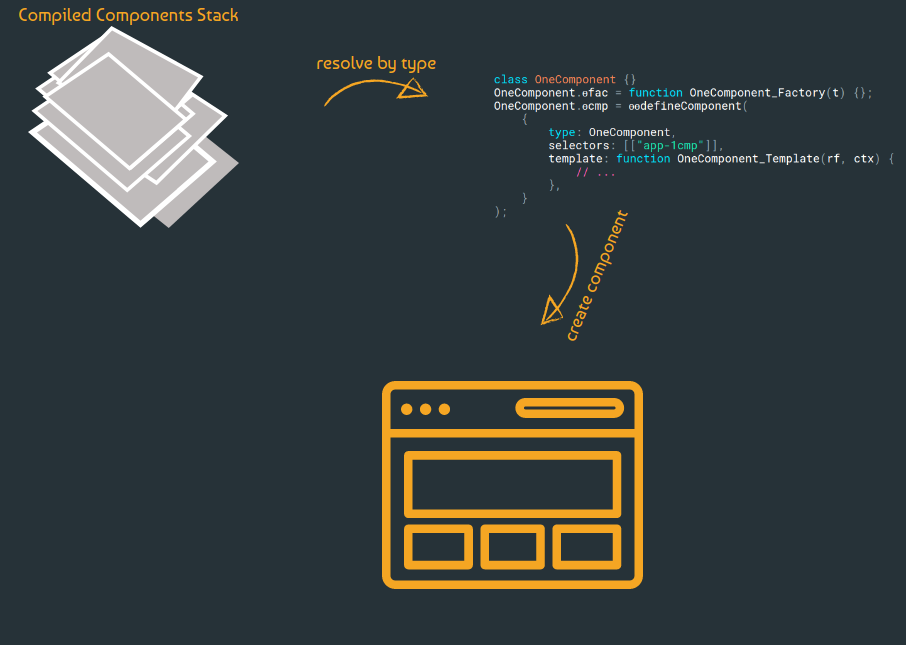
Compiled Components Stack
class OneComponent {}
OneComponent.ɵfac = function OneComponent_Factory(t) {};
OneComponent.ɵcmp = ɵɵdefineComponent(
    {
        type: OneComponent,
        selectors: [["app-1cmp"]],
        template: function OneComponent_Template(rf, ctx) {
            // ...
        },
    }
);
class TwoComponent {}
TwoComponent.ɵfac = function TwoComponent_Factory(t) {};
TwoComponent.ɵcmp = ɵɵdefineComponent(
    {
        type: TwoComponent,
        selectors: [["app-2cmp"]],
        template: function TwoComponent_Template(rf, ctx) {
            // ...
        },
    }
);
class ThreeComponent {}
ThreeComponent.ɵfac = function ThreeComponent_Factory(t) {};
ThreeComponent.ɵcmp = ɵɵdefineComponent(
    {
        type: ThreeComponent,
        selectors: [["app-3cmp"]],
        template: function ThreeComponent_Template(rf, ctx) {
            // ...
        },
    }
);
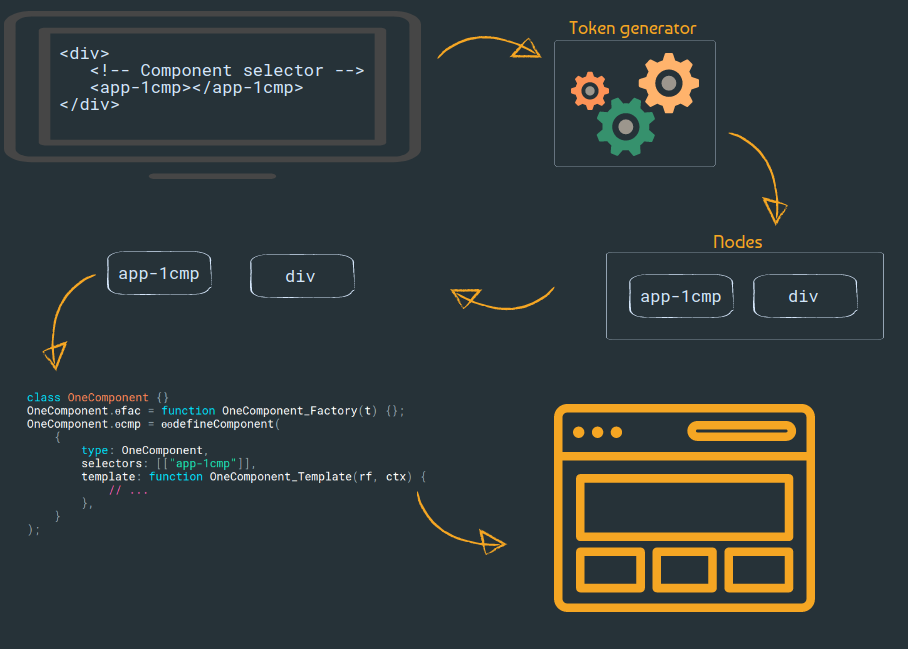
<div>
  <!-- Component selector -->
  <app-1cmp></app-1cmp>
</div>
Token generator
Token: div
Type: HTML
Token: app-1cmp
Type: Component
Layout
| ɵfac | OneComponent_Factory |
| ɵcmp | { type: OneComponent, selectors: [["app-1cmp"]] } |
| ɵfac | TwoComponent_Factory |
| ɵcmp | { type: TwoComponent, selectors: [["app-2cmp"]] } |
| ɵfac | ThreeComponent_Factory |
| ɵcmp | { type: ThreeComponent, selectors: [["app-3cmp"]] } |
Lazy Load the components
<div class="wrapper-container">

  <p>Render your component in the dashed area</p>
  <div class="child-container mt-3 mb-3">

    <ng-container #lazyContent></ng-container>  <!-- here is the container -->

  </div>

</div>export class LazyWrapperComponent implements OnInit {
@ViewChild('lazyContent', { read: ViewContainerRef, static: true })
lazyContentContainer: ViewContainerRef
ngOnInit(): void {
this.lazyContentContainer.createComponent(LazyContentComponent)
}
}<div class="wrapper-container">
<p>Render your component in the dashed area</p>
<div class="child-container mt-3 mb-3">
<ng-container #lazyContent></ng-container> <!-- here is the container -->
</div>
</div>@Component({
selector: 'app-1cmp',
template: `
1 cmp content
`,
})
export class OneComponent {}@Component({
selector: 'app-2cmp',
template: `
2 cmp content
`,
})
export class TwoComponent {}@Component({
selector: 'app-3cmp',
template: `
3 cmp content
`,
})
export class ThreeComponent {}|
|
|---|
|
|
|
|
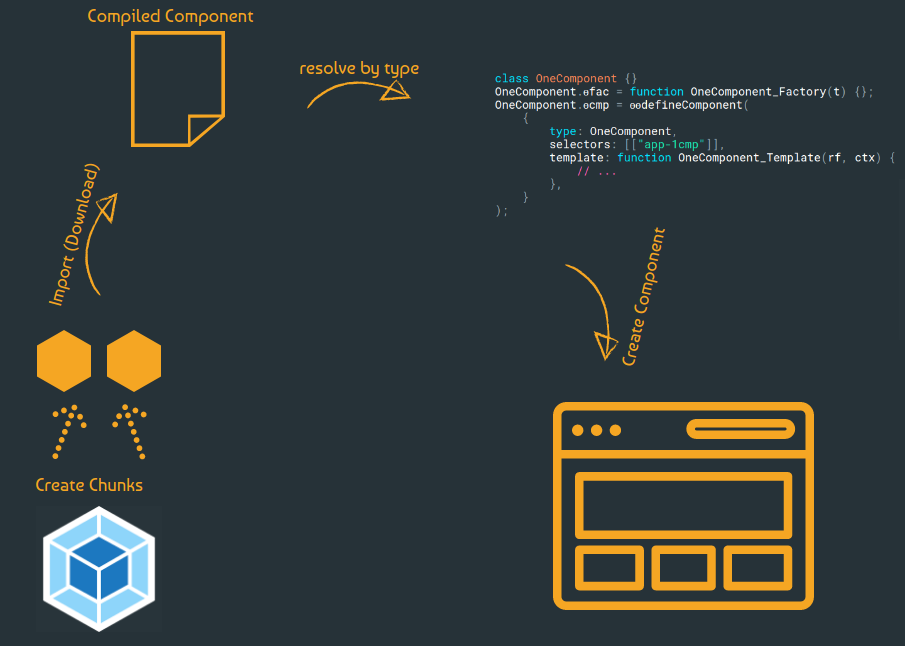
Stack
class OneComponent {}
OneComponent.ɵfac = function OneComponent_Factory(t) {};
OneComponent.ɵcmp = ɵɵdefineComponent(
    {
        type: OneComponent,
        selectors: [["app-1cmp"]],
        template: function OneComponent_Template(rf, ctx) {
            // ...
        },
    }
);
class TwoComponent {}
TwoComponent.ɵfac = function TwoComponent_Factory(t) {};
TwoComponent.ɵcmp = ɵɵdefineComponent(
    {
        type: TwoComponent,
        selectors: [["app-2cmp"]],
        template: function TwoComponent_Template(rf, ctx) {
            // ...
        },
    }
);
class ThreeComponent {}
ThreeComponent.ɵfac = function ThreeComponent_Factory(t) {};
ThreeComponent.ɵcmp = ɵɵdefineComponent(
    {
        type: ThreeComponent,
        selectors: [["app-3cmp"]],
        template: function ThreeComponent_Template(rf, ctx) {
            // ...
        },
    }
);
export class LazyWrapperComponent implements OnInit  {
  @ViewChild('lazyContent', { read: ViewContainerRef, static: true })
  lazyContentContainer: ViewContainerRef


  async ngOnInit() {
    const lazyContentComponent = await import(`../lazy-content/lazy-content.component`)
    const componentTypeToLoad =  lazyContentComponent.LazyContentComponent
    this.lazyContentContainer.createComponent(componentTypeToLoad)
  }
}Lazy Load components using a pattern
Thank you !!
@prodromouf
https://blog.profanis.me
/prodromouf
Code Shots With Profanis
By Fanis Prodromou