Simplifying OLTP and Real-Time Analytics
Jeff Taylor

Fabric SQL Database
Jeff Taylor
Principal Data Consultant
Database Consulting, LLC


Super Hero Suit
https://dayofdata.org/jax - May 1-2, 2026
https://dayofdata.org/jax
May 1-2, 2026



AI Bulletproof DBA: Thriving with SQL Performance in the AI Era
Pinal Dave
Pre-con: Using AI to be your Data Engineering Partner
Andy Leonard, Stephen Leonard

Simplifying OLTP and Real-Time Analytics
Jeff Taylor
Fabric SQL Database
Introduction to Microsoft Fabric SQL Database
-
Overview: Developer-friendly transactional database based on Azure SQL Database.
-
Integration: Easily integrates with development frameworks and analytics.
-
Replication: Automatic data replication (mirroring) into OneLake for analytics.
- Performance: Intelligent performance features like automatic index creation.
Key Features of Microsoft Fabric SQL Database
-
OLTP Workloads: Home for OLTP workloads, easy to configure and manage. Most of the same features you know and use in SQL Server.
-
Analytics Setup: Automatically replicates (mirrors) data into OneLake in near real-time.
-
Development Tools: Supports SQL Server Management Studio (SSMS), Visual Studio Code, and a web-based editor in the Fabric portal.
-
Intelligent Performance: Features like automatic tuning and index creation.
- Ready for AI: RAG, Vectors, Embeddings, Vector Search
Analytical Endpoint
- Paired Endpoint: Each Fabric SQL database has a paired (mirrored) SQL analytics endpoint. (Available after web UI refresh)
- Reporting Queries: Run reporting queries against the OneLake copy of the data. No overhead on OLTP database.
- Access Methods: Accessible via the Fabric portal, SSMS, Visual Studio Code, PowerBI Desktop, and TDS (Tabular Data Stream).
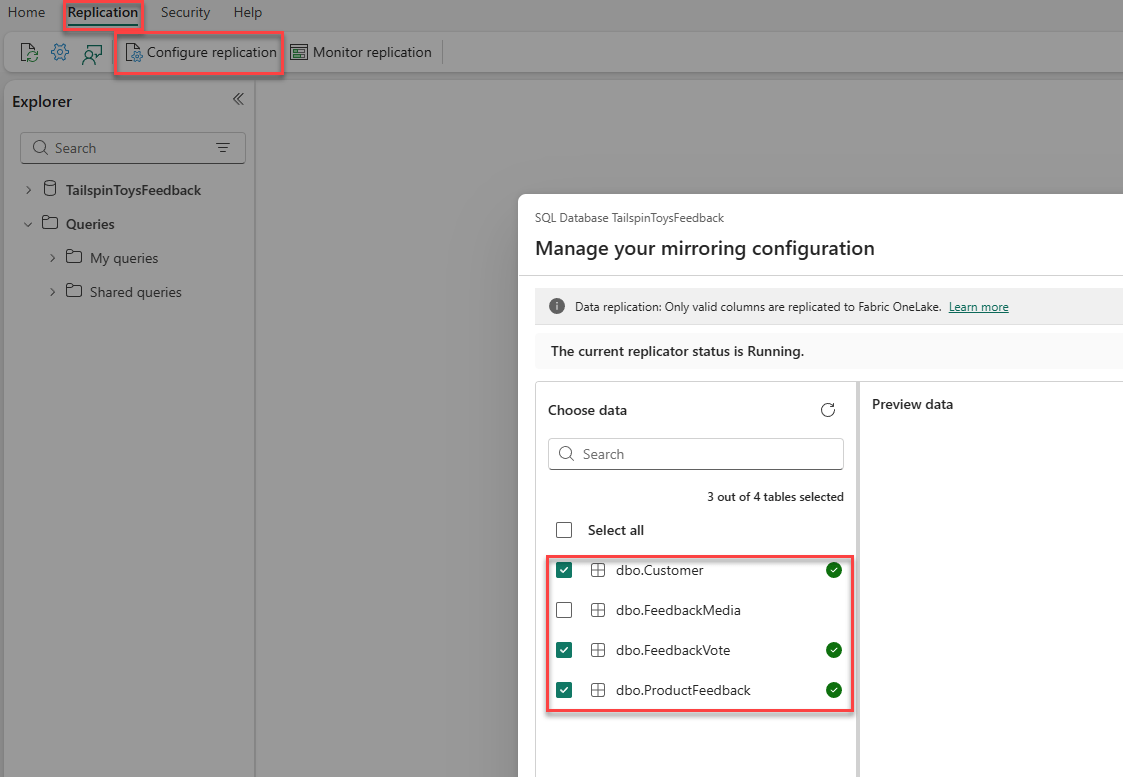
- Selective Mirroring/Replication: Now available! Rolling out region by region.
Analytical Endpoint
Connecting to the Database
-
Web-Based Editor: Use the web-based editor in the Fabric portal.
-
SSMS: Connect using SQL Server Management Studio, browse (SSMS 22) or direct.
-
Connection Strings: Provided for various tools, including ADO.NET, JDBC, ODBC, PHP, and Go.
-
Visual Studio: Connection string
- Visual Studio Code: MSSQL extension, connection string
Semantic Model
-
Custom Models: Ability to create multiple models from one database.
- Integration: Integrated with PowerBI for visualizations and analysis.
Cross-Database Queries
- Querying Across Databases: Write cross-database queries joining data from other SQL databases, mirrored databases, warehouses, and the SQL analytics endpoint.
Azure SQL vs. Fabric SQL Database
- Common Code Base: Both share a common code base with the latest stable version of the Microsoft SQL Database Engine.
Differences
- Always Encrypted: Supported in Azure SQL but not in Fabric SQL.
- Change Data Capture (CDC): Supported in Azure SQL but not in Fabric SQL.
- Elastic Pools: Available in Azure SQL but not in Fabric SQL.
- Provisioning Control: Detailed control in Azure SQL, autonomous management in Fabric SQL.
- Integration: Fabric SQL is fully integrated with other workloads in the Microsoft Fabric platform by default
- No EXECUTE AS: Supported in Azure SQL, not Fabric SQL
Azure SQL vs. Fabric SQL Database
- Full Text Search: Azure SQL third-party work breakers aren't supported, Fabric SQL is now supported as of this week (Fabcon/SQLCon 2026).
- SQL Users: Azure SQL Supports, Fabric SQL does not. (MFA, Service Principal only)
- Server-level roles: Azure Supports, Fabric SQL does not.
- TDE: Azure SQL supports, but Fabric SQL does not, but it uses storage encryption with service-managed keys. Customer-managed keys are now supported.
- Active geo-replication: Azure SQL, not Fabric SQL
- Common Code Base: Both share a common code base with the latest stable version of the Microsoft SQL Database Engine.
Differences
Azure SQL vs. Fabric SQL Database
Azure SQL Database
Fabric SQL Database
- Compute Tiers: Provisioned or serverless.
- Hardware Configurations: Gen5 (balanced), Fsv2 (compute optimized), DC (confidential computing).
- Elastic Pools: Yes.
- Maximum Resource Limits: Higher limits for vCores, DTUs, and storage.
- Compute Tiers: Serverless.
- Hardware Configurations: Latest configurations.
- Elastic Pools: No.
- Maximum Resource Limits: Lower limits compared to Azure SQL Database.
Azure SQL vs. Fabric SQL Database

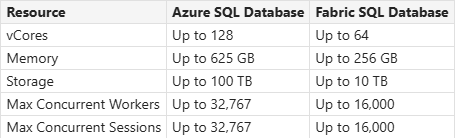
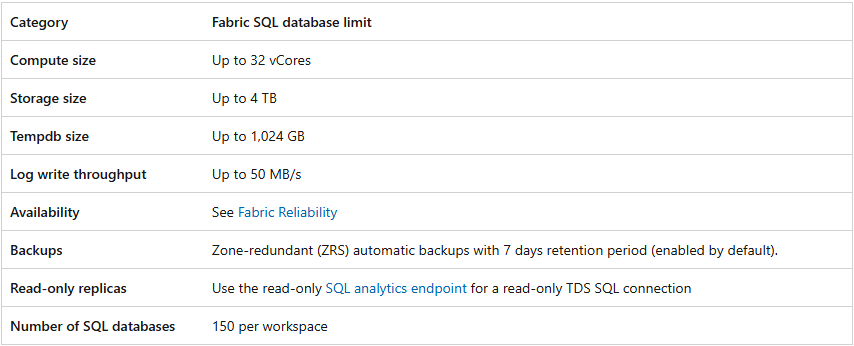
Memory 3GB per vCPU
Azure SQL vs. Fabric SQL Database Backups
Fabric SQL
- Full backups every week
- Differential backups every 12 hours
- Transaction log backups are approximately every 10 minutes
- Backups Zone-redundant (ZRS) automatic backups with 7 days retention period (enabled by default).
- Retention can be adjusted to 1-35 days
- Data Encrypted at rest
- First full backup is within 30 minutes of creation
Azure SQL
- Full backups every week.
- Differential backups every 12 or 24 hours.
- Transaction log backups are approximately every 10 minutes.
- Backups can be - Locally redundant storage (LRS), Zone-redundant storage (ZRS), or Geo-redundant storage (GRS) with a retention period of 7 days by default.
- Retention can be adjusted up to 10 years
- Database encryption with TDE, backups are encrypted at rest.
Azure SQL vs. Fabric SQL Database Backups
Limitations
- You cannot control the frequency of backups in SQL database in Fabric.
- You can only restore database backups from the live SQL databases.
- You can only restore database backups within the same workspace. Cross-workspace PITR is not supported.
- If you delete a workspace, all databases on that workspace are also deleted and can't be recovered.
- All backups are stored in a single region replicated across different Azure availability zones. There are no geo-replicated backups.
- Only short-term retention backups are supported. No long-term retention backups support.
- Backups can be restored only through Fabric portal. Currently, there's no REST API, Azure PowerShell, or Command Line Interface (CLI) commands enabled.
Azure SQL vs. Fabric SQL Database Restores
Limitations
- Retention of backups is seven days for a live database.
- Restoring backups from dropped databases isn't currently possible after the retention period of seven days.
- Cross-workspace restore isn't supported.
- Cross-region restore isn't supported.
- If you delete the database during the restore, the restore operation is canceled. You can't recover the data from the deleted database.
Source Control
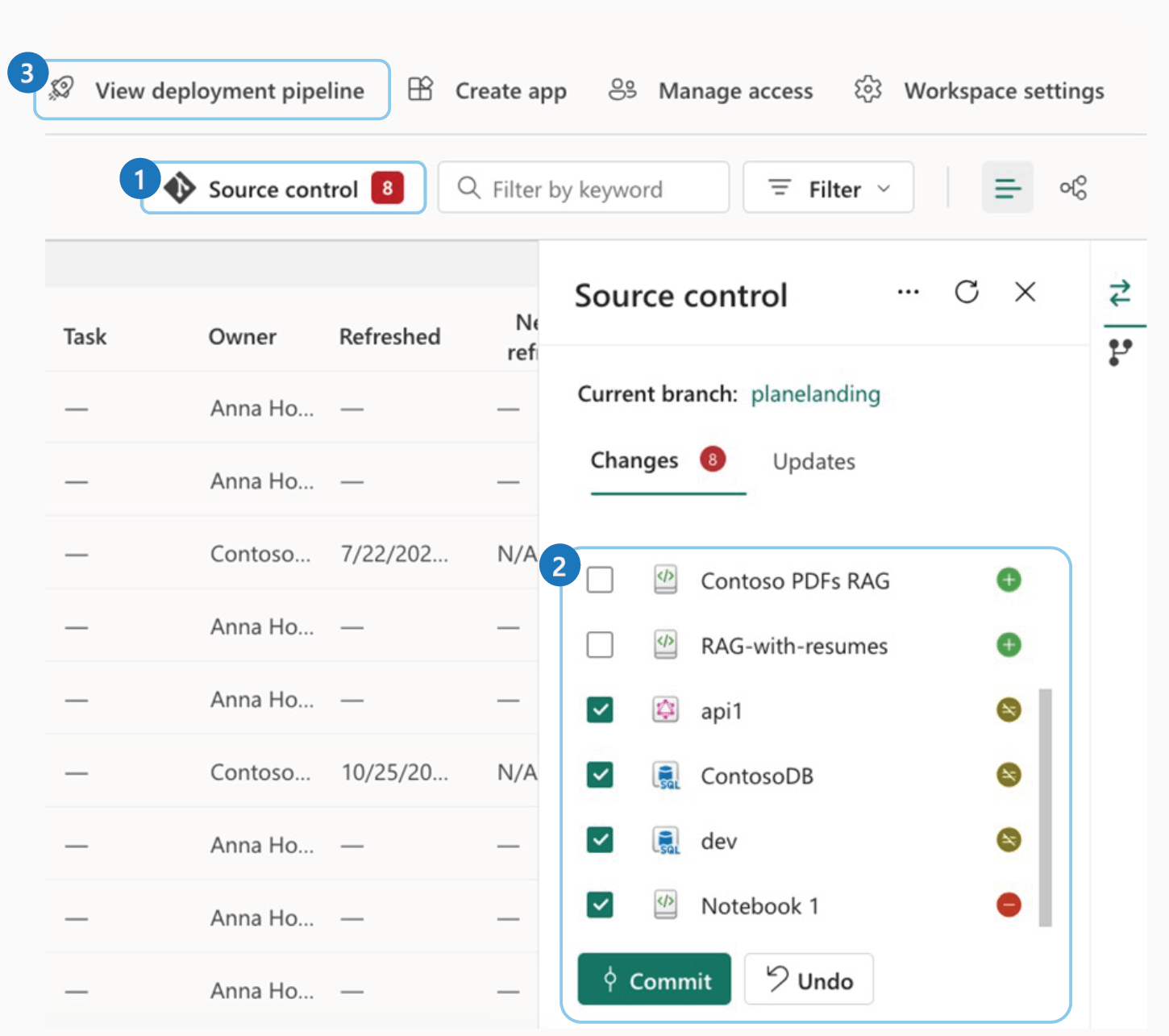
- Fabric SQL DB integrates with git
- Commit directly from Fabric web UI
- Enable Git integration in tenant settings
- Repo connection is at the workspace level
- Database must exist before committing
to source control
Fabric SQL Database
Mirroring APIs
-
Stop and Start Mirroring: Use API's to start and stop mirroring.
-
Fabric SQL: https://learn.microsoft.com/en-us/rest/api/fabric/sqldatabase/mirroring
-
Azure SQL: https://learn.microsoft.com/en-us/rest/api/fabric/mirroreddatabase/mirroring
Demo
Create a SQL database in the Fabric portal
Demo
Use SQL Analytics Endpoint
Demo
Connect to the Database - SSMS
Demo
Semantic Model
Best Use Cases
-
Reverse ETL: Have data available in near real-time for operational consumption, by applications or APIs.
-
Operational Data Store (ODS): near-real-time, integrated data store to consolidate multiple operational systems for reporting.
-
Translytical Applications: Perform both transactional and analytical workloads.
Microsoft's Recommendations
Resources
https://learn.microsoft.com/en-us/fabric/database/sql/overview
https://learn.microsoft.com/en-us/shows/data-exposed/sql-integration-with-microsoft-fabric-data-exposed
https://learn.microsoft.com/en-us/fabric/data-warehouse/tutorial-sql-cross-warehouse-query-editor
https://learn.microsoft.com/en-us/fabric/database/sql/mirroring-limitations
https://learn.microsoft.com/en-us/fabric/database/sql/limitations
https://learn.microsoft.com/en-us/rest/api/fabric/sqldatabase/mirroring
https://learn.microsoft.com/en-us/rest/api/fabric/mirroreddatabase/mirroring

Questions?
Thank you!
Jeff Taylor
Thank you for attending my session today.
If you have any additional questions, please don't hesitate to reach out.




How was the session?
Fabric SQL Database: Simplifying OLTP and Real-Time Analytics
By reviewmydb