Observables

Let's first talk about...
Functional Programming
"In computer science, functional programming is a programming paradigm [...] that treats computation as the evaluation of mathematical functions and avoids changing-state and mutable data."
from Wikipedia
var arr = [{num: 12}, {num: 5}, {num: 1}, {num: 27}, {num: 32}];

for(var i = 0; i < arr.length; i++) {
    arr[i].num = arr[i].num * 2;
}
Functional Programming
var movies = [
    {
        "id": 70111470,
    	"title": "Die Hard",
    	"rating": 4.0
    },
    {
    	"id": 654356453,
    	"title": "Bad Boys",
    	"rating": 5.0
    },
    {
    	"id": 65432445,
  	"title": "The Chamber",
    	"rating": 4.0
    },
    {
    	"id": 675465,
    	"title": "Fracture",
    	"rating": 5.0
    }
];
I want the title and id (concatenated) of the movies rated 5.0
movies
    .filter(m => m.rating == 5.0)
    .map(m => m.id + ": " + m.title)

// ["654356453: Bad Boys", "675465: Fracture"]
But what if our data arrives over time?
Observables
An Observable is an event stream which can emit zero or more events, and may or may not finish. If it finishes, then it does so by either emitting an error or a special “complete” event.
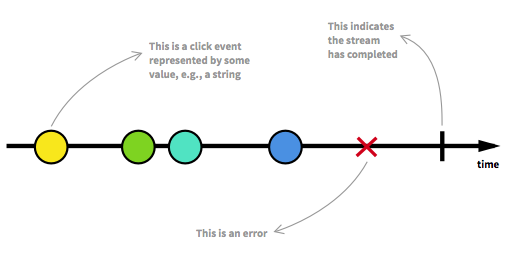
Stream?
A stream is simply a collection that arrives over time.
moviesStream
    .filter(m => m.rating == 5.0)
    .map(m => m.id + ": " + m.title)
    .subscribe(m => console.log(m));

// "654356453: Bad Boys"

// "675465: Fracture"
RxJS - The Reactive Extensions for JavaScript
var stream = Rx.Observable.from([1, 2, 3, 4, 5]);

// Prints out each item
var subscription = stream.subscribe(
  x => console.log('onNext: ' + x),
  e => console.log('onError: ' + e),
  () => console.log('onCompleted')
);

// => onNext: 1
// => onNext: 2
// => onNext: 3
// => onNext: 4
// => onNext: 5
// => onCompleted
...is a set of libraries to compose asynchronous and event-based programs using observable collections and Array#extras style composition in JavaScript
So...
-
Observables are like Collections, they let you use map(), filter(), reduce() and more!
-
They arrive over time - asynchronously.
-
Observables are like Promises, except:
-
they work with multiple values.
-
they can be cancelled.
-
they can be fired more then once.
-
But what can i to with it?
Observables from DOM Events


Multi-click Example
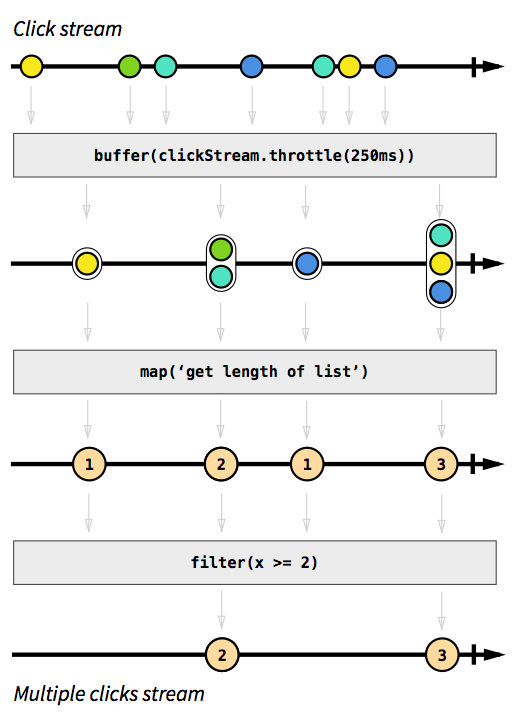
var button = document.querySelector('.btn');
var clickStream = Rx.Observable.fromEvent(button, 'click');
var multiClickStream = clickStream


    .bufferTime(250)


    .map(list => list.length)


    .filter(x => x >= 2);


multiClickStream
   .subscribe(num => console.log('clicks: ' + num));
Dive deeper
let's say I have a stream of URL resources that I want to consume.
In other words, I need to "map()" each URL to it's response.
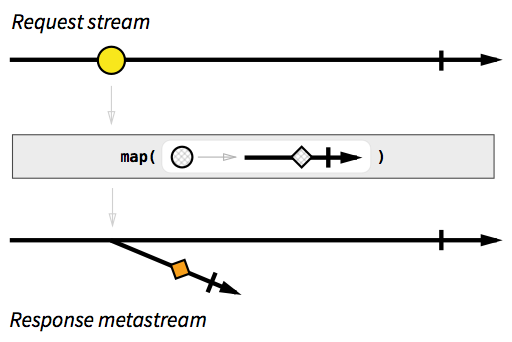
function requset(url) {
    // creates an observable that completes when the response arrives
}

urlsStream.map(url => request(url));
but...
flatMap()
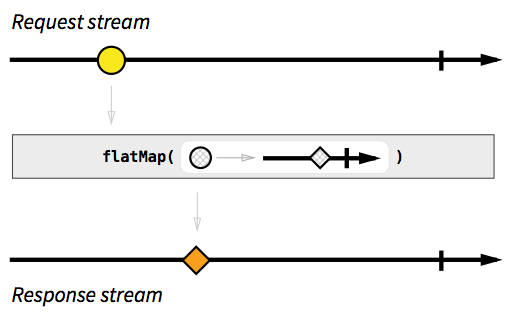
A version of map() that "flattens" multi-streams, by emitting on the "trunk" stream everything that will be emitted on "branch" streams.
Autocomplete - Live
What should a good autocomplete component do?
- we don't want to send a request for a term with less then two letters.
- We don't want to send a request for each keydown, we want to wait for the user to stop typing.
- We don't want to send the same request again (in case the user typed a letter and deleted it).
- We don't want to wait for non relevant requests.
(Try think about doing this with promises...)
Angular 2 Http service
"Http is available as an injectable class, with methods to perform http requests. Calling request returns an Observable which will emit a single response when a response is received."
from angular.io
Simple Get Call
import {Component} from 'angular2/core';
import {Http, Response} from 'angular2/http'

@Component({
    selector: 'http',
    template: `{{ result }}`
})
export class HttpSample {
    result;
    constructor(http: Http) {
        http.get('data.json')
            .map((res: Response) => res.json())
            .subscribe(res => this.result = res);
    }
}
ATTENTION
let requstObservable = http.get('data.json');
requstObservable.subscribe(res => this.result = res);- Unlike Promises, the request won't be sent until we subscribe() the observable.
- Unlike Promises, the request will be sent each time we subscribe() the observable.
Simple Post Call
var headers = new Headers();
headers.append('Content-Type', 'application/json');

this.http.post('/addUser',
    JSON.stringify({ firstName: 'Bob', lastName: 'Marley' }),
    { headers: headers }
).map((res: Response) => res.json())
 .subscribe((res:Person) => this.postResponse = res);
Response Object
class Response {
    type: ResponseType; // One of "basic", "cors", "default", "error", or "opaque".
    ok: boolean; // True if the response status is within 200-299
    url: string;
    status: number; // Status code returned by server.
    statusText: string;
    bytesLoaded: number;
    totalBytes: number;
    headers: Headers;
    blob(): any;
    json(): any;
    text(): string;
    arrayBuffer(): any;
}
Error handling
this.http.get('data.json')
    .map((res: Response) => res.json())
    .subscribe(
        res => this.result = res,
        error => this.error = error
    );
Dependent calls (flatMap)
this.http.get('customer.json')
    .map((res: Response) => res.json())
    .flatMap((customer) => this.http.get(customer.contractUrl))
    .map((res: Response) => res.json())
    .subscribe(res => this.contract = res);
Parallel requests
import {Observable} from 'rxjs/Observable';

Observable.forkJoin(
    this.http.get('friends.json').map((res: Response) => res.json()),
    this.http.get('customer.json').map((res: Response) => res.json())
).subscribe(res => this.combined = { friends: res[0], customer: res[1] });
Cancel Observables
getPerson(id){
    if(this.pendingRequest){
        this.pendingRequest.unsubscribe();
    }

    this.pendingRequest = this.http.get('person/' + id)
        .map((res: Response) => res.json())
        .subscribe(res => this.person = res);
}
Promises
this.http.get('data.json')
    .toPromise()
    .then((res: Response) => this.data = res.json());
Observables in Angular 2 forms
@Component({
  selector: 'observed-input',
  template: `
        <input [ngFormControl]="term" />
  `,
})
export class ObserveInputComponent {
    term = new Control();

    constructor() {
        this.term.valueChanges
            .subscribe(val => console.log(val));
    }
}
Observable Methods
create()
var source = Rx.Observable.create(function (observer) {
    observer.onNext(42);
    observer.onCompleted();

    // optional, you do not have to return this if you require no cleanup
    return function () {
        console.log('disposed');
    };
});

var subscription = source.subscribe(
    function (x) {
        console.log('Next: ' + x);
    },
    function (err) {
        console.log('Error: ' + err);
    },
    function () {
        console.log('Completed');
    });

// => Next: 42
// => Completed

subscription.unsubscribe();

// => disposed
return()
var source = Rx.Observable.return(42);

var subscription = source.subscribe(
  function (x) {
    console.log('Next: %s', x);
  },
  function (err) {
    console.log('Error: %s', err);
  },
  function () {
    console.log('Completed');
  });

// => Next: 42
// => Completed
from()
Rx.Observable.from([1, 2, 3]) // any iterable, '123' will work the same
   .subscribe(
      function (x) {
        console.log('Next: ' + x);
      },
      function (err) {
        console.log('Error: ' + err);
      },
      function () {
        console.log('Completed');
      }
   );

// => Next: 1
// => Next: 2
// => Next: 3
// => Completed
range()
var source = Rx.Observable.range(0, 3);

var subscription = source.subscribe(
    function (x) {
        console.log('Next: ' + x);
    },
    function (err) {
        console.log('Error: ' + err);
    },
    function () {
        console.log('Completed');
    });

// => Next: 0
// => Next: 1
// => Next: 2
// => Completed
interval()
var source = Rx.Observable.interval(100)

var subscription = source.subscribe(
    function (x) {
        console.log('Next: ' + x);
    },
    function (err) {
        console.log('Error: ' + err);
    },
    function () {
        console.log('Completed');
    });

// => Next: 0
// => Next: 1
// => Next: 2
// => Next: 3
// ......
take()
var source = Rx.Observable.interval(100)
               .take(3);

var subscription = source.subscribe(
    function (x) {
        console.log('Next: ' + x);
    },
    function (err) {
        console.log('Error: ' + err);
    },
    function () {
        console.log('Completed');
    });

// => Next: 0
// => Next: 1
// => Next: 2
// => Completed
merge()
var source1 = Rx.Observable.interval(100)
                .map(() => 1)
                .take(3);
var source2 = Rx.Observable.interval(100)
                .map(() => 2)
                .take(3);

var subscription = Rx.Observable.merge(source1, source2).subscribe(
    function (x) {
        console.log('Next: ' + x);
    },
    function (err) {
        console.log('Error: ' + err);
    },
    function () {
        console.log('Completed');
    });

// => Next: 2
// => Next: 1
// => Next: 2
// => Next: 2
// => Next: 1
// => Next: 2
// => Completed
Observables
By risweb