Proxies in ES6
What are proxies?
Proxies enable you to intercept and customize operations performed on objects (such as getting properties). They are a metaprogramming feature.
Programming vs metaprogramming
In programming, there are levels:
- At the base level (also called: application level), code processes user input.
- At the meta level, code processes base level code.
The classic example for this is the eval () function, which lets you evaluate/compile JavaScript code on the fly.
Other JavaScript operations may not look like metaprogramming, but actually are, if you look closer:
// Base level
const obj = {
    hello() {
        console.log('Hello!');
    }
};

// Meta level
for (const key of Object.keys(obj)) {
    console.log(key);
}
Metaprogramming: Programming with the ability to treat programs as data. It enables expressing certain solution better, or allows greater flexibility in handling new situations without modification.
Kinds of metaprogramming:
- Introspection: you have read-only access to the structure of a program (ES3/5)
- Self-modification: you can change the structure (ES3/5)
- Intercession: you can redefine the semantics of some language operations (ES2015 Proxies)

Source : https://kangax.github.io/compat-table/es6/#test-Proxy

But still, what's so special about these proxies
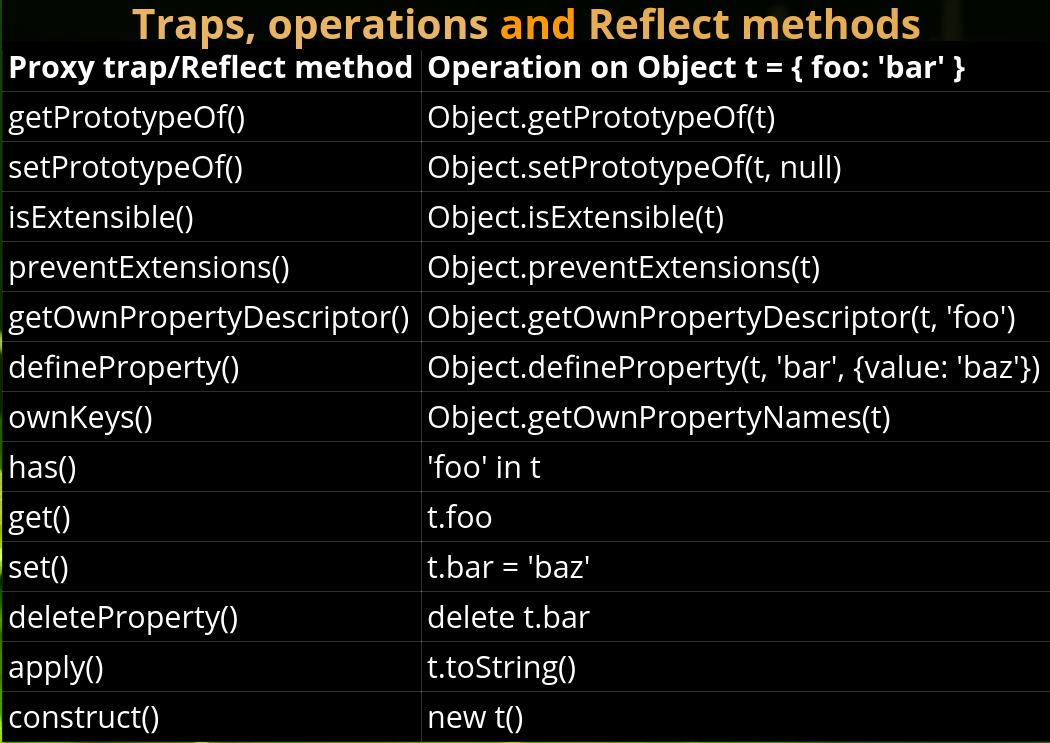
1. Proxies enable you to intercept and customize operations performed on objects ( such as getting, setting properties, invoking functions and others). They overload operators such as '.' and 'new'.
2.Proxies are a metaprogramming feature
3.Proxies let you do awesome things, which are otherwise impossible.
Sematics and terminology
-
target: object to proxy
-
handler: proxy definition, containing operation traps
- trap: method intercepting an operation on the target


//manipulating dom events

let view = new Proxy({
  selected: null
},
{
  set: function(obj, prop, newval) {
    let oldval = obj[prop];

    if (prop === 'selected') {
      if (oldval) {
        oldval.setAttribute('aria-selected', 'false');
      }
      if (newval) {
        newval.setAttribute('aria-selected', 'true');
      }
    }

    // The default behavior to store the value
    obj[prop] = newval;
  }
});

let i1 = view.selected = document.getElementById('item-1');
console.log(i1.getAttribute('aria-selected')); // 'true'

let i2 = view.selected = document.getElementById('item-2');
console.log(i1.getAttribute('aria-selected')); // 'false'
console.log(i2.getAttribute('aria-selected')); // 'true'
//Value correction and an extra property
let products = new Proxy({
browsers: ['Internet Explorer', 'Netscape']
},
{
get: function(obj, prop) {
// An extra property
if (prop === 'latestBrowser') {
return obj.browsers[obj.browsers.length - 1];
}
// The default behavior to return the value
return obj[prop];
},
set: function(obj, prop, value) {
// An extra property
if (prop === 'latestBrowser') {
obj.browsers.push(value);
return;
}
// Convert the value if it is not an array
if (typeof value === 'string') {
value = [value];
}
// The default behavior to store the value
obj[prop] = value;
}
});
console.log(products.browsers); // ['Internet Explorer', 'Netscape']
products.browsers = 'Firefox'; // pass a string (by mistake)
console.log(products.browsers); // ['Firefox'] <- no problem, the value is an array
products.latestBrowser = 'Chrome';
console.log(products.browsers); // ['Firefox', 'Chrome']
console.log(products.latestBrowser); // 'Chrome'The Proxy object is used to define custom behavior for fundamental operations (e.g. property lookup, assignment, enumeration, function invocation, etc).
Thank you for your attention !
Proxies
By Robert Pop