Orchestrate
your
Amazon EC2
at
robustack.com
EC2 Orchestra Members
Instance
ext4 FS
EBS Volumes
App Varnish
Instance
ext4 FS
App HTTP
Instance
xfs FS
App MySQL
Part 'Front'
Part 'Middle'
Part 'Back'
Cache
DataBase
Web
EBS Volumes
EBS Volumes
Instance
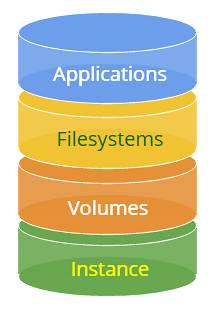
Filesystems
Volumes
Applications
Instance
Filesystems
Volumes
Applications
Instance
Filesystems
Volumes
Applications
Conduct Orchestra
Part 'Front'
Part 'Middle'
Part 'Back'
Cache
DataBase
Web
Start
Stop
Scale
Scale
Scale
Sign Up https://console.robustack.com
Read More http://robustack.com
User Guide Slides
http://user-guide.robustack.com
7 days free trial +
1,000 running ECU free.
Credit card info NOT required.
Orchestrate
with
Workflow Commands

A workflow cmd is combined cmd pattern consists of several EC2 cmds or Bash scripts and those controls.
EC2 API Cmds
Bash Scripts
Status Checks
Sub Task Waitings
Next Task Assignments
Log Writes
Sub Task Triggers
Workflow Cmd Example
'Launch Groupstack'
| Instance HTTP/PHP |
|---|
| Instance MySQL |
|---|
| Volume /dev/sdf |
|---|
| Volume /dev/sdf |
|---|
| Filesystem /var/www |
|---|
| Filesystem /var/lib/mysql |
|---|
| Application HTTP, PHP |
|---|
| Application MySQL |
|---|
Apache, PHP singlestack
MySQL singlestack
LAMP Groupstack
Security Group
Security Group
| amazonLinux, m3.medium |
|---|
| RHEL7, m3.xlarge |
|---|
| EBS SSD 4GB |
|---|
| EBS IOPS 100GB |
|---|
| ext4, /var/www |
|---|
| xfs, /var/lib/mysql |
|---|
| Apache HTTP, PHP |
|---|
| MySQL |
|---|
Apache, PHP singlestack
MySQL singlestack
(1) Create Security Groups and Rules
SSH (22)
SSH (22)
HTTP (80)
MySQL (3306)
Workflow Cmd Example
'Launch Groupstack'
| amazonLinux, m3.medium |
|---|
| RHEL7, m3.xlarge |
|---|
| EBS SSD 4GB |
|---|
| EBS IOPS 100GB |
|---|
| ext4, /var/www |
|---|
| xfs, /var/lib/mysql |
|---|
| Apache HTTP, PHP |
|---|
| MySQL |
|---|
Apache, PHP singlestack
MySQL singlestack
(2) Launch Instances
Workflow Cmd Example
'Launch Groupstack'
| Instance - Pending |
|---|
| Instance - Pending |
|---|
| EBS SSD 4GB |
|---|
| EBS IOPS 100GB |
|---|
| ext4, /var/www |
|---|
| xfs, /var/lib/mysql |
|---|
| Apache HTTP, PHP |
|---|
| MySQL |
|---|
Apache, PHP singlestack
MySQL singlestack
(3) Create EBS Volumes
Workflow Cmd Example
'Launch Groupstack'
| Instance - Running |
|---|
| Instance Running |
|---|
| Volume - Available |
|---|
| Volume - Available |
|---|
| ext4, /var/www |
|---|
| xfs, /var/lib/mysql |
|---|
| Apache HTTP, PHP |
|---|
| MySQL |
|---|
Apache, PHP singlestack
MySQL singlestack
(4) Attach EBS Volumes
Workflow Cmd Example
'Launch Groupstack'
| Instance - Running |
|---|
| Instance Running |
|---|
| Volume - In-Use |
|---|
| Volume - In-Use |
|---|
| mkfs.ext4 |
|---|
| mkfs.xfs |
|---|
| Apache HTTP, PHP |
|---|
| MySQL |
|---|
Apache, PHP singlestack
MySQL singlestack
(5) Create Filesystems
Workflow Cmd Example
'Launch Groupstack'
| Instance - Running |
|---|
| Instance Running |
|---|
| Volume - In-Use |
|---|
| Volume - In-Use |
|---|
| mount /var/www |
|---|
| mount /var/lib/mysql |
|---|
| Apache HTTP, PHP |
|---|
| MySQL |
|---|
Apache, PHP singlestack
MySQL singlestack
(6) Mount Filesystems
Workflow Cmd Example
'Launch Groupstack'
| Instance - Running |
|---|
| Instance Running |
|---|
| Volume - In-Use |
|---|
| Volume - In-Use |
|---|
| /var/www - Mounted |
|---|
| /var/lib/mysql - Mounted |
|---|
| yum install HTTP, PHP |
|---|
| yum install MySQL |
|---|
Apache, PHP singlestack
MySQL singlestack
(7) Install Applications
Workflow Cmd Example
'Launch Groupstack'
| Instance - Running |
|---|
| Instance Running |
|---|
| Volume - In-Use |
|---|
| Volume - In-Use |
|---|
| /var/www - Mounted |
|---|
| /var/lib/mysql - Mounted |
|---|
| Apache, PHP - Installed |
|---|
| systemctl start mysqld |
|---|
Apache, PHP singlestack
MySQL singlestack
(8) Start Application MySQL
Workflow Cmd Example
'Launch Groupstack'
| Instance - Running |
|---|
| Instance Running |
|---|
| Volume - In-Use |
|---|
| Volume - In-Use |
|---|
| /var/www - Mounted |
|---|
| /var/lib/mysql - Mounted |
|---|
| service httpd start |
|---|
| MySQL - Running |
|---|
Apache, PHP singlestack
MySQL singlestack
(9) Start Application HTTP
Workflow Cmd Example
'Launch Groupstack'
| Instance - Running |
|---|
| Instance Running |
|---|
| Volume - In-Use |
|---|
| Volume - In-Use |
|---|
| /var/www - Mounted |
|---|
| /var/lib/mysql - Mounted |
|---|
| Apache HTTP - Running |
|---|
| MySQL - Running |
|---|
Apache, PHP singlestack
MySQL singlestack
(10) Groupstack Launch Completed
Workflow Cmd Example
'Launch Groupstack'
| Instance - Running |
|---|
| Instance Running |
|---|
| Volume - In-Use |
|---|
| Volume - In-Use |
|---|
| /var/www - Mounted |
|---|
| /var/lib/mysql - Mounted |
|---|
| Apache HTTP - Running |
|---|
| MySQL - Running |
|---|
Apache, PHP singlestack
MySQL singlestack
Workflow Cmd Example
'Stop Groupstack'
LAMP Groupstack
| Instance - Running |
|---|
| Instance Running |
|---|
| Volume - In-Use |
|---|
| Volume - In-Use |
|---|
| /var/www - Mounted |
|---|
| /var/lib/mysql - Mounted |
|---|
| Apache HTTP - Running |
|---|
| systemctl stop mysqld |
|---|
Apache, PHP singlestack
MySQL singlestack
Workflow Cmd Example
'Stop Groupstack'
(1) Stop Application MySQL
| Instance - Running |
|---|
| Instance Running |
|---|
| Volume - In-Use |
|---|
| Volume - In-Use |
|---|
| /var/www - Mounted |
|---|
| /var/lib/mysql - Mounted |
|---|
| service httpd stop |
|---|
| MySQL - Stopped |
|---|
Apache, PHP singlestack
MySQL singlestack
Workflow Cmd Example
'Stop Groupstack'
(2) Stop Application HTTP
| Instance - Running |
|---|
| Instance Running |
|---|
| Volume - In-Use |
|---|
| Volume - In-Use |
|---|
| umount /var/www |
|---|
| umount /var/lib/mysql |
|---|
| Apache HTTP - Stopped |
|---|
| MySQL - Stopped |
|---|
Apache, PHP singlestack
MySQL singlestack
Workflow Cmd Example
'Stop Groupstack'
(3) Unmount Filesystems
| Stop Instance |
|---|
| Stop Instance |
|---|
| Volume - In-Use |
|---|
| Volume - In-Use |
|---|
| /var/www - umounted |
|---|
| /var/lib/mysql - unmounted |
|---|
| Apache HTTP - Stopped |
|---|
| MySQL - Stopped |
|---|
Apache, PHP singlestack
MySQL singlestack
Workflow Cmd Example
'Stop Groupstack'
(4) Stop Instances
| Instance - Stopped |
|---|
| Instance - Stopped |
|---|
| Volume - In-Use |
|---|
| Volume - In-Use |
|---|
| /var/www - umounted |
|---|
| /var/lib/mysql - unmounted |
|---|
| Apache HTTP - Stopped |
|---|
| MySQL - Stopped |
|---|
Apache, PHP singlestack
MySQL singlestack
Workflow Cmd Example
'Stop Groupstack'
(5) Stop Groupstack Completed
Start Groupstack
Stop Groupstack
Snapshot Groupstack
Launch Groupstack
Reboot Groupstack
Launch Singlestack
Start Singlestack
Stop Singlestack
Block Security Rules
Restore Groupstack
Start Applications
Stop Applications
Set Variable
Suspend Schedule
Run Sequence
Resume Schedule
Unblock Security Rules
Orchestrate
with
Sequence Job
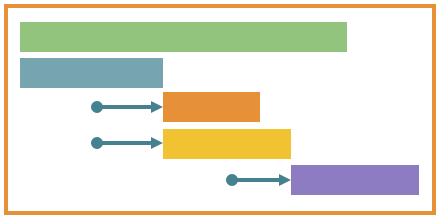
Tie any workflow commands or bash scripts on any group member objects in any locations with orders. Then create it as a 'Sequence Job' of your own. You can run simply by clicking a button or call the sequence job as a schedule action or a trigger action.

main
inst-main
ELB elb-west
app-main
back
inst-back
app-back
data-db
Sequence Job Example
'Online Security Patch [main]'
| Seq No. | Wait | Cmd Type | Target | Command |
|---|---|---|---|---|
| 010 | wait | workflow | back | Start Groupstack |
| 020 | no wait | workflow | [data-db] sec rule | Permission Source Update for [back] instances |
| 020 | wait | workflow | [back] inst-back | Register to Elastic LB elb-west |
| 030 | wait | workflow | [main] all apps | Stop Application |
| 040 | no wait | workflow | [main] inst-main | Deregister from Elastic LB elb-west |
| 050 | wait | workflow | main | Snapshot Groupstack |
| 060 | wait | bash script | [main] all instances | yum update --security -y |
| 070 | wait | workflow | main | Stop Groupstack |
| 080 | wait | workflow | main | Snapshot Groupstack |
| 090 | wait | workflow | main | Start Groupstack |
| 100 | wait | workflow | [main] inst-main | Register to Elastic LB elb-west |
Sequence Job Example
'Online Security Patch [main]'
online-sec-patch
main
inst-main
ELB elb-west
app-main
back
inst-back
app-back
data-db
Sequence Job Example
'Online Security Patch [main]'
010 Start Groupstack [back]
main
inst-main
ELB elb-west
app-main
back
inst-back
app-back
data-db
Sequence Job Example
'Online Security Patch [main]'
020 Permission Open for [back] instances
020 Register to Elastic LB [back] inst-back
main
inst-main
ELB elb-west
app-main
back
inst-back
app-back
data-db
Sequence Job Example
'Online Security Patch [main]'
030 Stop Application [main] all applications
main
inst-main
ELB elb-west
app-main
back
inst-back
app-back
data-db
Sequence Job Example
'Online Security Patch [main]'
040 Deregister from Elastic LB [main] inst-main
050 Snapshot Groupstack [main]
main
inst-main
ELB elb-west
app-main
back
inst-back
app-back
data-db
Sequence Job Example
'Online Security Patch [main]'
Bash 060 yum update -- security -y
[main] all instances
main
inst-main
ELB elb-west
app-main
back
inst-back
app-back
data-db
Sequence Job Example
'Online Security Patch [main]'
070 Stop Groupstack [main]
main
inst-main
ELB elb-west
app-main
back
inst-back
app-back
data-db
Sequence Job Example
'Online Security Patch [main]'
080 Snapshot Groupstack [main]
main
inst-main
ELB elb-west
app-main
back
inst-back
app-back
data-db
Sequence Job Example
'Online Security Patch [main]'
090 Start Groupstack [main]
main
inst-main
ELB elb-west
app-main
back
inst-back
app-back
data-db
Sequence Job Example
'Online Security Patch [main]'
100 Permission Open for [main] instances
main
inst-main
ELB elb-west
app-main
back
inst-back
app-back
data-db
Sequence Job Example
'Online Security Patch [main]'
110 Register to Elastic LB
[main] inst-main
main
inst-main
ELB elb-west
app-main
back
inst-back
app-back
data-db
Sequence Job Example
'Online Security Patch [main]'
Orchestrate
with
Schedule Job

if condition met
Schedule Time / Frequency
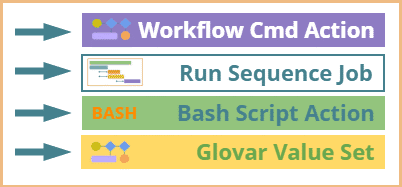
Workflow Cmd Action
Run Sequence Job
Bash Script Action
Global Variable Value Set
BASH
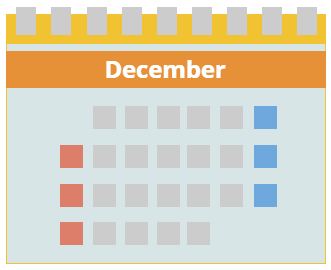
Schedule Actions
Schedule Condition
Every minute, 2 minutes, ...
Every hour, 2 hours, ...
Every Sunday at 22:00 PST, ...
Every month day 17 at 08:50, ...
Every 2nd Tuesday at 11:00, ...
Every last Friday at 23:00, ...
On November 21 at 12:35, ...
if condition met
IF Groupstack status equals, not equal, ...
IF Groupstack member status equals, ...
IF Bash return value equals, greater than, ...
IF Variable combined string equals, ...
IF Global variable value equals, not equal, ...
IF Variable combined Excel formula return value equals, not equals, greater than, ...
Workflow Cmd Action
Run Sequence Job
Bash Script Action
Glovar Value Set
BASH
Start groupstack ABC in region Sydney.
Stop application app-http of groupstack CDE in region usWest.
Snapshot groupstack FGH.
Suspend Schedule SCH00 of groupstack IJK.
Run Sequence SEQ001 of groupstack LMN in region Seoul.
Run Bash script "----".
Set global variable as rs:{ABC,inst.inst-drupal,sysVar.publicIpAddr}/32
Orchestrate
with
Trigger Job

| After instance started When start instance |
|---|
| After volume attached When attach volume |
|---|
| After filesystem mounted When mount filesystem |
|---|
| After application started When start application Before start application |
|---|

Singlestack Start
Register to Elastic LB
Run Sequence 010
Points of Triggers
Trigger Actions
| When stop instance After instance stopped |
|---|
| When detach volume After volume detached |
|---|
| When unmount filesystem After filesystem unmounted |
|---|
| Before stop application When stop application After application stopped |
|---|
Singlestack Stop
Deregister from ELB
Points of Triggers
Trigger Actions
Bash Script "oooo"
BASH
Orchestrate
across
Timing Borders
svc
app-core
Sequence 'patch-update'
'Stop Application' for app-front, app-core, app-backend
app-front
app-backend
020 - Wait
Bash Script 'Pre-work for App Stop'
BASH
010 - Wait
'Snapshot Groupstack' SVC
030 - Wait
Bash 'Patch Update' for all instances
BASH
040 - Wait
'Reboot Groupstack' SVC
050 - Wait
You have a sequence creatd
for 'Patch Update'
Run Sequence 'patch-update'
Schedule
Console Menu Button
Run Sequence 'patch-update'
Schedule Action
Trigger
Trigger Action
Run Sequence 'patch-update'
Run Sequence 'patch-update' whenever you want.
Orchestrate
across
Location Borders
AWS Region
Job Actions
Job Actions
Sequence
Schedule
Trigger
Ireland
AWS Region Sydney
AWS Region Oregon
AWS Cloud
Job Actions
Job Actions
Sequence
Schedule
Trigger
EC2 Classic
AWS Cloud VPC01
AWS Cloud VPC02
AWS Account
Mama
AWS Account Papa
Job Actions
AWS Account Me
Job Actions
Sequence
Schedule
Trigger
Orchestrate
with
Variables
rs:{ }
Robustack maintains some values, such as system parameters of the resource, during the lifecycle of a resource in a group servers. You can retrieved the values in any locations with the given format - 'variables'.
Run
Enter your command ...
Digest
Groupstack blog-ap
Groupstack blog-us
Groupstack blog-eu
String Input Window
Run
rs:{sysVar.publicIpAddr}
Digest
Groupstack blog-ap
Groupstack blog-us
Groupstack blog-eu
"74.103.23.9"
"107.2.56.7"
"50.65.172.31"
String Input Window
Run
rs:{sysCmd.growfs}
Digest
Groupstack blog-ap
Groupstack blog-us
Groupstack blog-eu
"resize2fs /dev/sdf"
"xfs_growfs /dev/xvdg"
"resize2fs /dev/xvdh"
String Input Window
Run
rs:{sysCmd.stop}
Digest
Groupstack blog-ap
Groupstack blog-us
Groupstack blog-eu
"service mysqld stop"
"service httpd stop"
"systemctl stop httpd.service"
String Input Window
Orchestrate
with
Command Launcher
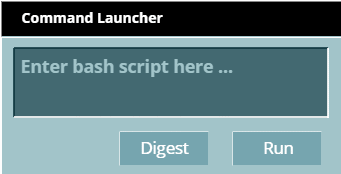
Instead of you log in to each instance with different key pairs and different IP addresses, just select instances, filesystems and applications in your all AWS regions together and run bash commands at once.
Run
vmstat 1 10
Digest
base-sydney
sch-tokyo
base-usEast
Command Launcher
Select resources in any locations on which you'd like to run Bash command.
inst-tokyo-eip # vmstat 1 10
procs -----------memory---------- ---swap-- -----io---- --system-- -----cpu-----
 r  b   swpd   free   buff  cache   si   so    bi    bo   in   cs us sy id wa st
 0  0      0 119224 145860 248464    0    0     0     1    3    0  0  0 100  0  0
 0  0      0 119208 145860 248464    0    0     0     0   36   81  0  0 100  0  0
 0  0      0 119208 145860 248464    0    0     0     0   26   70  0  0 100  0  0
 0  0      0 119208 145860 248464    0    0     0     0   55  125  0  1 99  0  0
 0  0      0 119208 145860 248464    0    0     0     0   46   90  0  0 100  0  0
 0  0      0 119208 145860 248464    0    0     0     0   57  121  0  0 100  0  0
 0  0      0 119208 145860 248464    0    0     0    12   46   95  0  0 99  1  0
 0  0      0 119208 145860 248464    0    0     0     0   26   70  0  0 100  0  0
 0  0      0 119208 145860 248464    0    0     0     0   39  113  0  0 100  0  0
 0  0      0 119208 145860 248464    0    0     0     0   26   70  0  0 100  0  0

sch-ue-inst # vmstat 1 10
procs -----------memory---------- ---swap-- -----io---- --system-- -----cpu-----
 r  b   swpd   free   buff  cache   si   so    bi    bo   in   cs us sy id wa st
 0  0  54364  49984 151920  51984    0    0     0     4    4    0  1  1 98  0  0
 0  0  54364  49984 151920  51980    0    0     0     0  107  178  0  0 100  0  0
 0  0  53352  44516 151920  56124 1420    0  5564     0  404  516  2  1 79 18  0
 0  0  53352  44500 151920  56124    0    0     0     0  124  255  1  3 96  0  0
 0  0  53352  44516 151920  56124    0    0     0     0   76  157  0  0 100  0  0
 0  0  53352  44516 151920  56124    0    0     0     0  101  187  1  0 99  0  0
 0  0  53352  44516 151928  56116    0    0     0    12   69  150  0  0 100  0  0
 0  0  53352  44516 151928  56124    0    0     0     0   90  155  0  0 100  0  0
 0  0  53352  44376 151928  56124    0    0     0     0  163  280  2  2 96  0  0
 0  0  53352  44392 151928  56124    0    0     0     0   76  145  0  0 100  0  0

sch-tokyo-inst # vmstat 1 10
procs -----------memory---------- ---swap-- -----io---- --system-- -----cpu-----
 r  b   swpd   free   buff  cache   si   so    bi    bo   in   cs us sy id wa st
 0  0  50936  55980 162672  76688    0    0     0     3    2    7  1  0 99  0  0
 0  0  50936  55972 162672  76708    0    0     0     0  149  191  1  0 99  0  0
 0  0  50936  55972 162672  76708    0    0     0    56   95  169  0  1 99  0  0
 0  0  50936  55996 162672  76708    0    0     0     0   89  137  0  0 100  0  0
 0  0  50936  55996 162672  76708    0    0     0     0   78  129  0  0 100  0  0
 0  0  50936  55996 162672  76708    0    0     0     0  101  168  1  0 99  0  0
 0  0  50936  55996 162672  76708    0    0     0     0   64  121  0  0 100  0  0
 0  0  50936  55996 162672  76708    0    0     0     0   61  151  0  0 100  0  0
 0  0  50936  55996 162672  76708    0    0     0    16   71  133  0  0 100  0  0
 0  0  50936  55996 162672  76708    0    0     0     0   80  129  1  0 99  0  0

inst-tokyo-sec # vmstat 1 10
procs -----------memory---------- ---swap-- -----io---- --system-- -----cpu-----
 r  b   swpd   free   buff  cache   si   so    bi    bo   in   cs us sy id wa st
 0  0 184892  13192  31652  14448    0    1     2     7    1    3  1  3 96  0  0
 0  0 184892  13176  31652  14480    0    0     0     0  167  450  1  1 98  0  0
 0  0 184892  13176  31652  14480    0    0     0     0  234  367  1  1 98  0  0
 0  0 184892  13188  31652  14480    0    0     0     0  114  303  1  1 98  0  0
 0  0 184892  12556  31652  14984   32    0   524     0  326  509  2  5 93  0  0
 0  0 184892  12556  31652  14972    0    0     0     0  127  317  0  0 100  0  0
 0  0 184892  12596  31660  14968    0    0     0    12  182  500  1  2 96  1  0
 0  0 184892  12504  31660  14972    0    0     0     0  387  423  2 11 87  0  0
 0  0 184892  12612  31660  14972    0    0     0     0  227  344  2  6 92  0  0
 0  0 184892  12528  31660  14972    0    0     0     8  261  451  0  1 99  0  0

inst-sydney # vmstat 1 10
procs -----------memory---------- ---swap-- -----io---- --system-- -----cpu-----
 r  b   swpd   free   buff  cache   si   so    bi    bo   in   cs us sy id wa st
 1  0  44092  57684 129252  57072    0    0     0     5    2    5  0  0 99  0  0
 0  0  44092  57644 129252  57072    0    0     0    16  277  612  0  0 100  0  0
 0  0  44092  57644 129252  57072    0    0     0     0  140  286  0  0 100  0  0
 0  0  44092  57284 129252  57072    0    0     0     0  138  394  1  0 99  0  0
 0  0  44092  57276 129252  57072    0    0     0     0  295  542  0  1 99  0  0
 0  0  44092  57376 129252  57072    0    0     0     0  156  372  0  0 100  0  0
11  0  44092  57376 129252  57072    0    0     0    16  291  543  2  0 98  0  0
 0  0  44092  57376 129252  57072    0    0     0     0  188  369  0  0 100  0  0
 0  0  44092  57400 129252  57072    0    0     0    24  143  345  0  0 100  0  0
 0  0  44092  57376 129252  57072    0    0     0     0  245  501  0  0 100  0  0

inst-ue # vmstat 1 10
procs -----------memory---------- ---swap-- -----io---- --system-- -----cpu-----
 r  b   swpd   free   buff  cache   si   so    bi    bo   in   cs us sy id wa st
 0  1 274172  10396  27000  39136    1    1     2     7    1    0  1  1 98  0  0
 2  0 273960  10272  27000  39160  232    0   232     0  319  689  1  1 93  5  0
 0  0 273960  10240  27000  39160    0    0     0     0  210  354  1  0 99  0  0
 0  0 273960  10272  27000  39160    0    0     0     0  220  466  0  2 98  0  0
 0  0 273960  10240  27008  39152    0    0     0    16  247  472  0  1 98  1  0
 0  0 273960  10208  27008  39160    0    0     0     0  151  296  1  0 99  0  0
 0  0 273960   9992  27008  39160    0    0     0     0  264  525  2  2 96  0  0
 0  0 273960   9992  27008  39160    0    0     0     0  221  370  1  0 99  0  0
 0  0 273960   9904  27008  39160    0    0     0     0  203  446  1  3 96  0  0
 0  0 273956   9928  27008  39156    8    0     8     0  273  457  1  0 97  2  0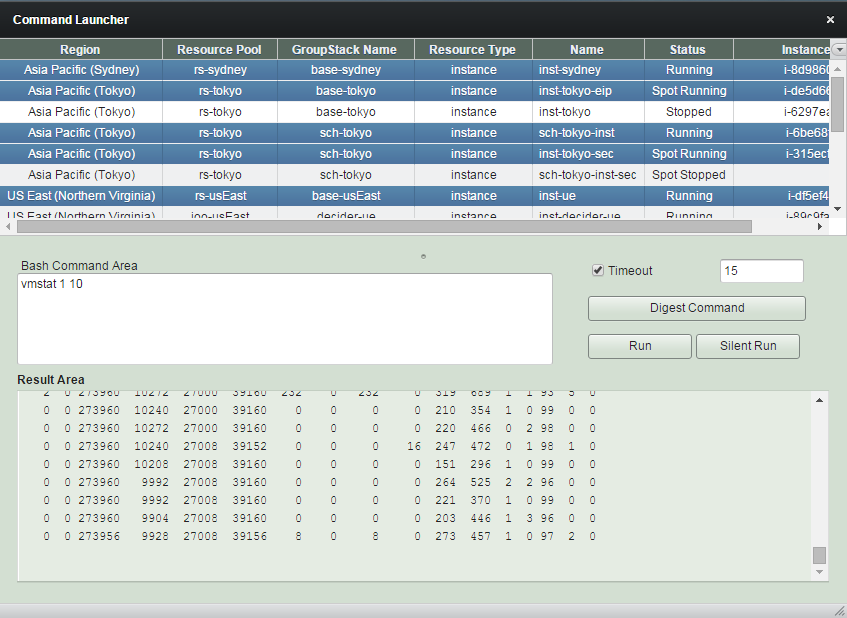
Contact Us
Feedback feedback@robustack.com
Question question@robustack.com
Support support@robustack.com
Amazon EC2 Orchestration
By robustack.com
Amazon EC2 Orchestration
Conduct your EC2 orchesta - robustack.com. 7 days free trial + 1,000 running ECU free credit