Managing
Running Instance
Spot Instance Specific
robustack.com
robustack.com
'Stopped Spot Instance' in robustack is the emulated representation of "EC2 Spot instance which is terminated but ready to launch with latest root volume preserved".
Reboot Spot SingleStack
Reboot workflow for spot singlestack is identical to that of on-demand singlestack's.
(1) Click "Instances" tab in groupstack sub table view. And select spot instances you want to reboot those singlestacks.
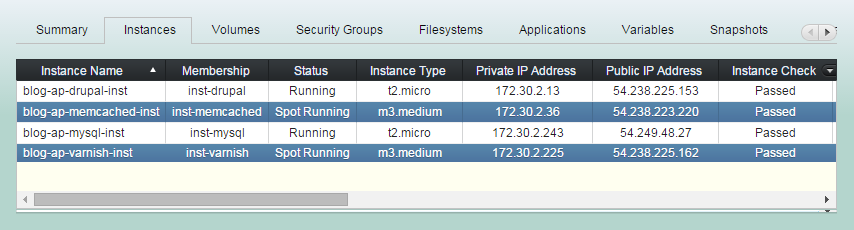
(2) Click "Reboot Spot SingleStack" button.
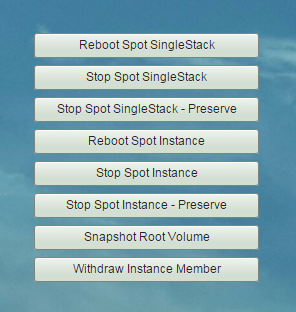
(3) Reboot Spot SingleStack workflow
1. Stops bound applications according to its groupstack-wide reverse 'Start Order' and 'Stop App Dependencies'.
2. Unmounts all bound filesystems.
(3) Reboot Spot SingleStack workflow
3. Reboots selected instances.
4. Waits selected instances are rebooted.
5. Mounts all bound filesystems.
6. Runs 'Post Bash Script'.
(3) Reboot Spot SingleStack workflow
7. Starts bound applications according to those groupstack-wide 'Start Orders' and 'Start App Dependencies'.
(4) Reboot SingleStack completed.
Stop Spot SingleStack
(1) Click "Instances" tab in groupstack sub table view. And select spot instances you'd like to stop those singlestacks.
(2) Click "Stop Spot SingleStack" button.
(3) Stop Spot SingleStack workflow
1. Stops bound applications according to its groupstack-wide reverse 'Start Order' and 'Stop App Dependencies'.
2. Unmounts all bound filesystems.
(3) Stop Spot SingleStack workflow
4. Terminates selected spot instances.
5. Deregisters instances from Elastic LB,
if 'Auto Register to ELB' are set to instances.
6. Waits until selected spot instances terminated.
(3) Stop Spot SingleStack workflow
7. Snapshots root volumes left from spot instance termination, if this is the first stop.
8. Creates new AMIs from the root snapshots,
if this is the first stop.
9. Changes AMIs for next spot requests, if this is the first stop.
(4) Stop Spot SingleStack completed
Stop Spot SingleStack - Preserve
This workflow is identical to 'Stop Spot SingleStack' except creating new AMI with current root volume contents. So that the newly created AMI could be used as its base AMI for next spot requests.
(1) Click "Instances" tab in groupstack sub table view. And select spot instances you'd like to stop those singlestacks.
(2) Click "Stop Spot SingleStack - Preserve"
(3) 'Stop Spot SingleStack - Preserve' workflow
1. Stops bound applications according to its groupstack-wide reverse 'Start Order' and 'Stop App Dependencies'.
2. Unmounts all bound filesystems.
(3) 'Stop Spot SingleStack - Preserve' workflow
4. Terminates selected spot instances.
5. Deregisters instances from Elastic LB,
if 'Auto Register to ELB' are set to instances.
6. Waits until selected spot instances terminated.
(3) 'Stop Spot SingleStack - Preserve' workflow
7. Snapshots root volumes left from spot instance termination.
8. Creates new AMIs from the root snapshots.
9. Changes AMIs for next spot requests.
(4) 'Stop Spot SingleStack - Preserve' completed
Reboot Spot Instance
'Reboot Spot Instance' will reboot
EC2 instances only.
Be sure when you run this.
The command will never mind its bound applications' stopping/starting nor bound filesystems' umounting/mounting.
(1) Click "Instances" tab in groupstack sub table view. And select spot instances
you'd like to reboot.
(2) Click "Reboot Spot Instance" button.
(3) Reboot Spot Instance workflow
1. Reboots selected spot instances.
2. Waits selected spot instances are rebooted.
(4) Reboot Spot Instance completed
You may need handling the bound filesystems and applications manually.
Stop Spot Instance
'Stop Spot Instance' doesn't care bound filesystems and applications.
Be sure when you run this.
The command will never mind its bound applications' stopping nor bound filesystems' umounting.
(1) Click "Instances" tab in groupstack sub table view. And select one or more ( CTRL^) spot instances you'd like to stop.
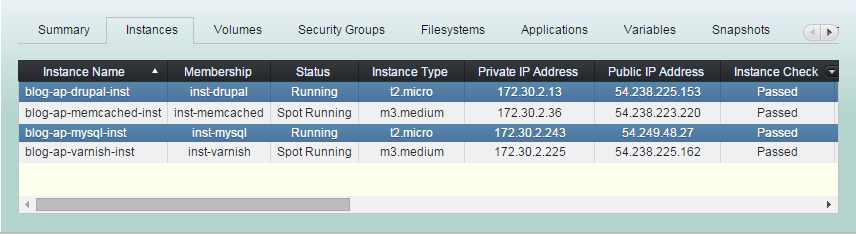
(2) Click "Stop Spot Instance" button.
(3) Stop Spot Instance workflow
1. Terminates all selected spot instances.
2. Deregisters instances from Elastic LB,
if 'Auto Register to ELB' are set to instances.
3. Waits until selected instances terminated.
(3) Stop Spot Instance workflow
4. Snapshots root volumes left from spot instance termination, if this is the first stop.
5. Creates new AMIs from the root snapshots,
if this is the first stop.
6. Changes AMIs for next spot requests, if this is the first stop.
(4) Stop Spot Instance completed
Managing Instance - Running Spot Instance
By robustack.com
Managing Instance - Running Spot Instance
Managing Instance - Running Spot Instance. Robustack is an Amazon EC2 Orchestration Platform. This slides shows managing running spot instance or singlestack ( a unit for an AWS EC2 instance and its bound volumes, security groups and filesystems, applications).