Interacting with HTML
Tools to use
What's DOM?
🤔
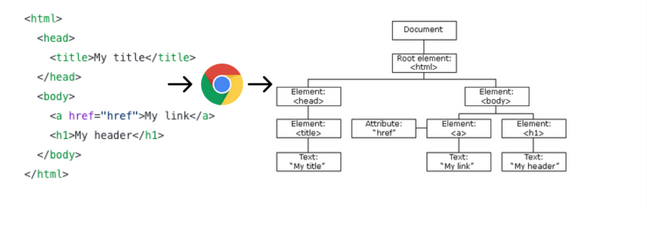
DOM (Document Object Model) is a tree-like structure that gets generated when the browser loads an HTML document.
- DOM is an object representation of the webpage which enables us modify it using javaScript
We can do the following on the DOM;
- Get Elements
- Create new elements
- Update existing elements
- Perform actions on javaScript events
- Delete elements
Terms Used
- The entire webpage is called the document node
- All elements are element nodes ( <head>,<body>, <h1>...)
- All HTML attributes are attribute nodes
- Text inside HTML elements are text nodes
- A single element is an element object while a group of elements is a NodeList(similar to a Javascript Array)
Everthing in the DOM is called a Node
Getting started
- Get an element
- Update Element
- Delete Element
- Create a new Element
💡💡
** The End **

💡💡💡 Data types in JS
-
Numbers - The number type represents both integer and decimal numbers.
-
Strings - Used to represent text in JavaScript and must be surrounded by quotes.
- Boolean (true or false)
💡💡💡 Variables in JS
-
A variable is a “named storage” for data. We can use variables to store goodies, visitors, and other data.
- Creating a variable that changes
-
Creating a variable that doesn't change
- Naming variables using.
💡💡💡 Prompt and Alert
- prompt - used to ask for user input
- alert - used to show a message
DOM Manipulation
By Roland Sankara