Docker containers
Ronen Shachar


Docker containers
What is Docker?
Docker is an open platform for developing, shipping, and running applications. Docker is designed to deliver your applications faster. With Docker you can separate your applications from your infrastructure AND treat your infrastructure like a managed application. Docker helps you ship code faster, test faster, deploy faster, and shorten the cycle between writing code and running code.
Docker’s architecture
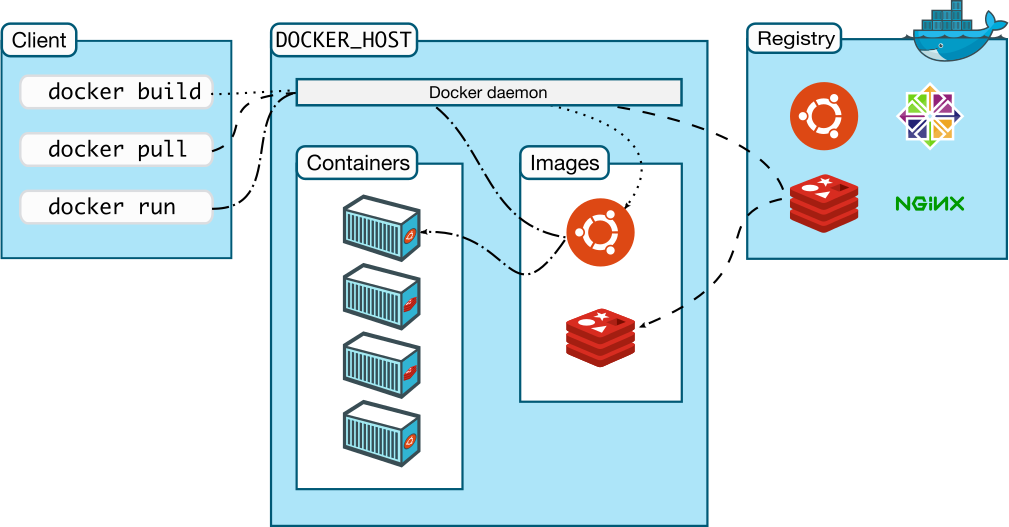
Docker image
- Docker images are read-only templates from which Docker containers are launched.
- Each image consists of a series of layers.
- Docker makes use of Union file systems to combine these layers into a single image. Union file systems allow files and directories of separate file systems, known as branches, to be transparently overlaid, forming a single coherent file system.
Docker image
- Every image starts from a base image.
E.g ubuntu, Apache. -
Docker images are then built from these base images using a simple, descriptive set of steps we call instructions.
-
Each instruction creates a new layer in our image.
Docker image - instructions
Instructions include actions like:
- Run a command.
- Add a file or directory.
- Create an environment variable.
- What process to run when launching a container from this image.
Docker container
- Container is built from an image.
- A container consists of an operating system, user-added files, and meta-data.
- That image tells Docker what the container holds, what process to run when the container is launched, and a variety of other configuration data.
- The Docker image is read-only.
- When Docker runs a container from an image, it adds a read-write layer on top of the image (using a union file system as we saw earlier) in which your application can then run.
Containers vs. VMs
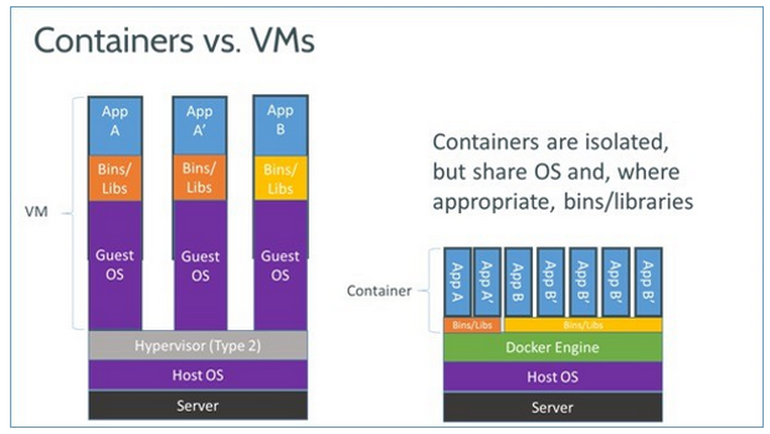
Containers vs. VMs
- Run in user space rather than kernel space
- VM duplicate hosting OS and libraries
- Docker re-use files (UnionFS)
- Docker smaller images make management easier
- Create immutable image per build
- Image deployment is faster
Docker images registry
- Images are stored locally, but can be pulled from an Image registry
- The Registry is a server that stores and lets you distribute Docker images.
Docker images registry
ubuntu@ip-172-31-1-114:~/docker$ docker run -d -P training/webapp python app.py
Unable to find image 'training/webapp:latest' locally
latest: Pulling from training/webapp
23f0158a1fbe: Pull complete
0a4852b23749: Downloading [==========================================>        ] 17.51 MB/20.71 MB
7d0ff9745632: Downloading [=============>                                     ] 13.77 MB/50.25 MB
99b0d955e85d: Download complete
33e109f2ff13: Download complete
cc06fd877d54: Download complete
b1ae241d644a: Download complete
b37deb56df95: Download complete
02a8815912ca: Download complete
e9e06b06e14c: Already exists
a82efea989f9: Already exists
37bea4ee0c81: Already exists
07f8e8c5e660: Already exists
Docker images registry
ubuntu@ip-172-31-1-114:~/docker$ docker run -d -P training/webapp python app.py
Unable to find image 'training/webapp:latest' locally
latest: Pulling from training/webapp
23f0158a1fbe: Pull complete
0a4852b23749: Pull complete
7d0ff9745632: Downloading [=======================>                           ] 23.43 MB/50.25 MB
7d0ff9745632: Pull complete
99b0d955e85d: Pull complete
33e109f2ff13: Pull complete
cc06fd877d54: Pull complete
b1ae241d644a: Pull complete
b37deb56df95: Pull complete
02a8815912ca: Already exists
a82efea989f9: Already exists
37bea4ee0c81: Already exists
07f8e8c5e660: Already exists

Digest: sha256:06e9c1983bd6d5db5fba376ccd63bfa529e8d02f23d5079b8f74a616308fb11d
Status: Downloaded newer image for training/webapp:latest
0be5d724dbd54a24b558a4ba3bcf312e885b41fe38057042c1e5f0132f5ee860
"Hello world" application
$ docker run ubuntu:14.04 /bin/echo 'Hello world'- First we specified the docker binary and the command we wanted to execute, run. This runs a containers.
- Next we specified an image: ubuntu:14.04. This is the source of the container we ran. Docker calls this an image. In this case we used an Ubuntu 14.04 operating system image
- Next we told Docker what command to run inside our new container:
/bin/echo 'Hello world'Hello world"Hello world" daemon (service)
$ docker run -d ubuntu:14.04 /bin/sh -c "while true; do echo hello world; sleep 1; done"- This time specifying docker run -d tells Docker to run the container and put it in the background, to daemonize it.
- We specified the same image: ubuntu:14.04.
- The command to run is a shell script echoes 'Hello world' forever.
/bin/sh -c "while true; do echo hello world; sleep 1; done"1e5535038e285177d5214659a068137486f96ee5c2e85a4ac52dc83f2ebe4147"Hello world" daemon (service)
$ docker psCONTAINER ID IMAGE COMMAND CREATED STATUS PORTS NAMES
1e5535038e28 ubuntu:14.04 /bin/sh -c 'while tr 2 minutes ago Up 1 minute insane_babbage$ docker logs insane_babbagehello world
hello world
hello world
. . .List containers
Look inside the container
$ docker stop insane_babbageinsane_babbageStop container
Docker swarm

Docker swarm in a nutshell
- Exposes several Docker Engines as a single virtual engine
- Serves the standard Docker API
- Extremely easy to get started
Docker swarm in a nutshell
- Create a cluster
- Add nodes to a cluster
- Start Swarm
$ swarm create$ swarm join --add=<node_ip> token://<token>$ swarm manage --addr=<swarm_ip> token://<token>Docker containers
- http://www.docker.com/
- http://docs.docker.com/
- http://docs.docker.com/windows/started/
-
Sample code
git clone https://github.com/ronen-shachar/docker-samples.git
Ronen Shachar @ronen_shachar
Docker containers
By Ronen Shachar