Securing Your Service on AWS
Overview
- IAM Security
- VPC Security
- Skyscanner Credential Management
IAM Security
(Identity and Access Management)
The Root Account
- Sudo, no access limit -> dangerous
- No restrictions possible
- Billing data is also accessible
- Suggestion is to use alternate IAM users day-to-day
Identity
- Extra users within a single AWS Account
- Authentication: 'Who is that user?'
- Federation possible
- E.g. Active Directory
- We're not using it though - use the Self Service portal to request an account
Access Management
- Authorization: 'What can this user do on my Account?'
- We use IAM Policies to control access rights
- A Policy can be attached to:
- Users
- Groups
- Roles
- Resources
User-based Policy Example
- Policy attached to a User / Role / Group
- The target Resource needs to be defined
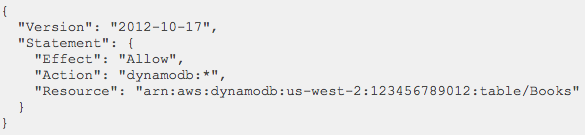
Resource-based Policy Example
- Policy attached to a Resource
- The Principal (~user) needs to be defined
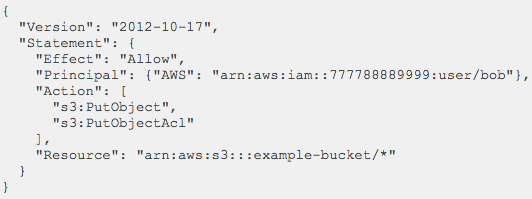
Roles
- Extra level of abstraction over Users
- Roles can also have policies attached
- Users and applications can assume Roles
Roles - for apps
- Roles can be assumed by AWS Resources
- E.g. an EC2 instance, a Lambda function, etc.
- Apps can get temporary credentials easily
- No need to manage credentials manually in the app
Roles - for users
- Roles can be assumed by Users too
- Even from different, trusted AWS Accounts
- Allows access to Resources via the assumed Role
- This is how you get access to Prod
- Use the Self-service Portal to request access
Best Practices
- Use Groups for easy Policy management for Users
- Use AWS Managed Policies when possible
- Use Roles to manage access right for apps
- Grant least privilege
- Avoid using the Root Account
VPC Security
(Virtual Private Cloud)
VPC Basics
- Create virtual private networks in the could
- Multiple VPCs / Account
- Multiple Subnets / VPC
- Define the Routing Tables for VPCs
- Define ACLs for VPC network traffic
VPC Example
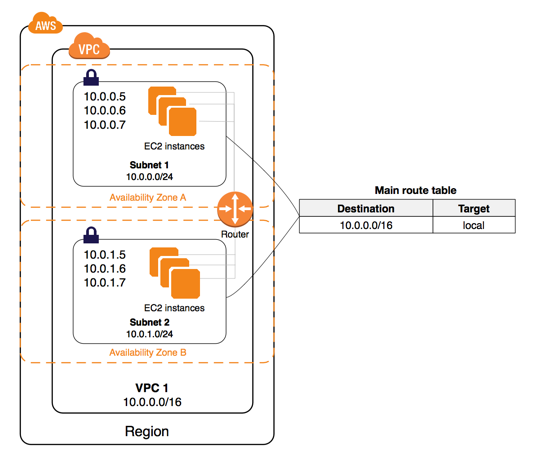
Security Groups - Overview
- Acts as a ~firewall for associated EC2 instances
- Explicit - you need to select it during EC2 creation
- You define ALLOW rules only
- All rules evaluated
- Separate configuration for inbound & outbound traffic
- STATEFUL! -> Return traffic is allowed
- 5 >= Sec Groups / instance
- For traffic source / destinations we can use:
- CIDR blocks (e.g. 173.3.0.0/16)
- Other Security Groups by ID
- Other VPCs by ID
Security Groups -
Web Server Example
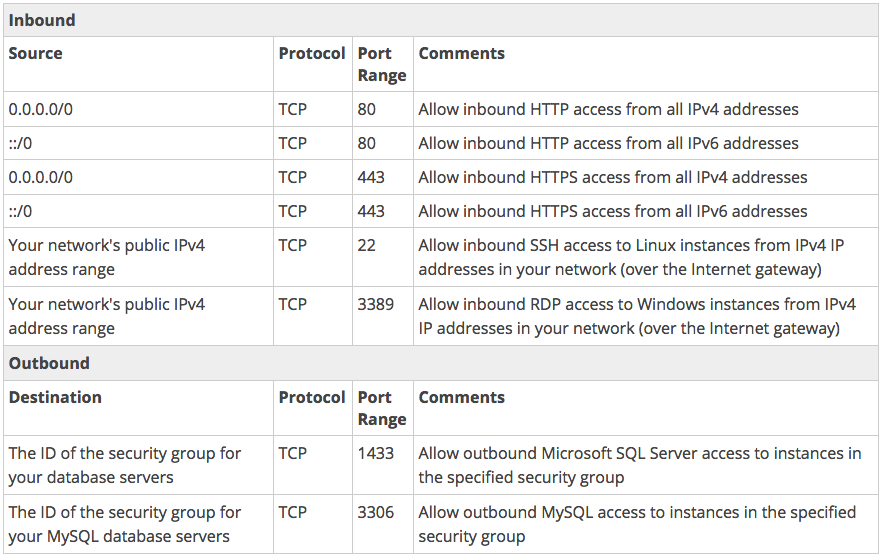
Network ACLs
- Extra, optional layer of VPC security
- Firewall for controlling traffic in and out of Subnets
- Set on the Subnet level, implicit for EC2 instances
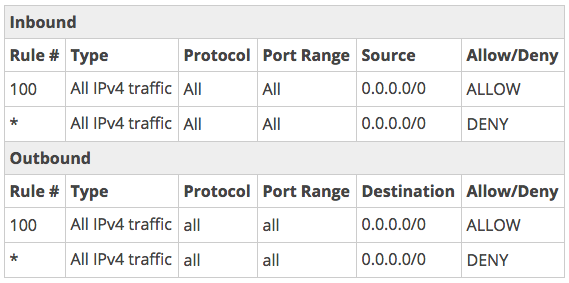
- Default one allows all traffic, in & out
- Each Subnet must have a Network ACL
- STATELESS -> You need to take care about return traffic too
Network ACL Rule Properties
- Rule #
- We start from the lowest #
- As soon as a match is found, we apply that rule
- Protocol
- TCP, UDP, ICMP
- Source / Destination CIDR range and port-range
- Allow / Deny
Network ACL Example
Skyscanner Credential Management
Credential Management
-
Skyscanner a way to safely retrieve sensitive data
- API keys, DB passwords, etc.
- Such data should not be stored in git repos
- Credential Management can store it
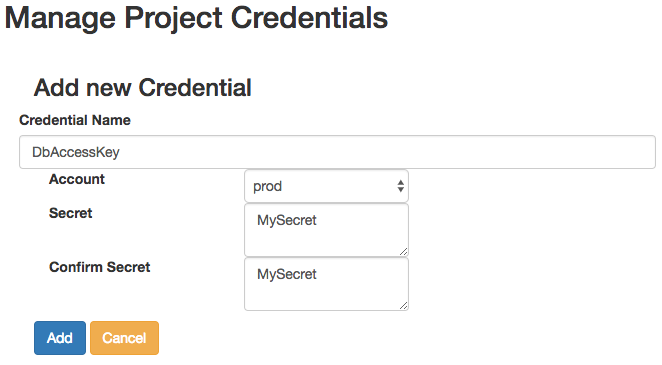
- Secrets can be managed on the Self Service portal
- You can access it runtime via MShell
- Documentation: http://bit.ly/2hVGlid
Architecture Overview
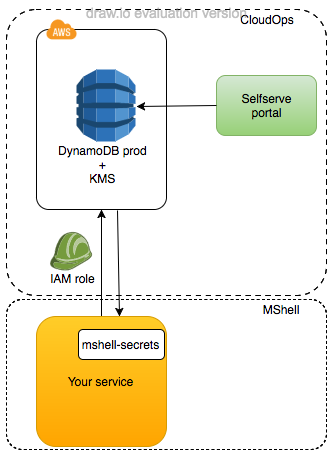
- Based on CredStash
- Stores secrets in DynamoDB
- Encrypts contents with KMS
- Contents replicated to all Slingshot regions
- Owned by CloudOps
Self Service Portal Secrets
Accessing Secrets
- Use the MShell libraries to access the decrypted secrets you stored for your project
- Currently available for Java, Python & .NET
- Tutorial: http://bit.ly/2hrz4cG
from mshell_secrets.secrets_decryptor import SecretDecryptor

role_arn = "arn:aws:iam::325714046698:role/sandbox-secrets-access"
secret_decryptor = SecretDecryptor(project_name="service-aws-name-as-in-self-service-portal",
                                   account="sandbox",
                                   preferred_region="eu-west-1",
                                   assume_role_arn=role_arn)

# retrieve one secret
secret = secret_decryptor.get_secret("name_of_secret")

# retrieve multiple secrets
secret_dict = secret_decryptor.get_secrets(["name_of_secret", "name_of_another_secret"])
Q & A
Securing Your Service on AWS
By rzsombor
Securing Your Service on AWS
Part 4 of the Skyscanner Budapest office AWS training.