Drupal 8 Theming
1. Theme folder structure
2. *.info.yml
3. Twig in Drupal 8
4. Sub-theming
5. Breakpoints in D8
6. Classy Theme
BUT BEFORE THAT ...
Some Expectations
<theme>.info.yml
name: <Theme Name>
Required. The human readable name will appear on the Appearance page, where you can activate your theme.
description: '<small description about your theme>'
Required. The description is also displayed on the Appearance page.
type: theme
The type key indicates the type of extension, e.g. module, theme or profile. For themes this should always be set to "theme".
package: Custom
The package key allows you to group themes together on the Appearance page.
base theme: classy
The theme can inherit the resources from another theme by defining it as a base theme.
core: 8.x
Required. The core key specifies the version of Drupal core that your theme is compatible with.
version: 8.x-1.0
For modules hosted on drupal.org, the version number will be filled in by the packaging script. You should not specify it manually, but leave out the version line entirely.
screenshot: dcptheme.png
With the screenshot key you define a screenshot that is shown on the Appearance page. If you do not define this key then Drupal will look for a file named 'screenshot.png' in the theme folder to display.
Removing Stylesheets
stylesheets-remove:
  - core/assets/vendor/normalize-css/normalize.css # 1
  - '@bartik/css/style.css' # 2
Adding regions
regions:
  - header: Header
  - content: Content # required!
  - sidebar_first: 'Sidebar first'
  - footer: Footer
Adding Libraries
The libraries key can be used to add asset libraries — which can contain both CSS and JS assets — to all pages where the theme is active.
libraries:
  - dcptheme/global-styling
Example *.info.yml file
name: dcptheme
type: theme
description: 'A drupal 8 theme for drupal camp pune website.'
package: Custom
core: 8.x
libraries:
  - fluffiness/global-styling
stylesheets-remove:
  - '@classy/css/layout.css'
  - core/assets/vendor/normalize-css/normalize.css
regions:
  header: Header
  content: Content
  sidebar_first: 'Sidebar first'
  footer: Footer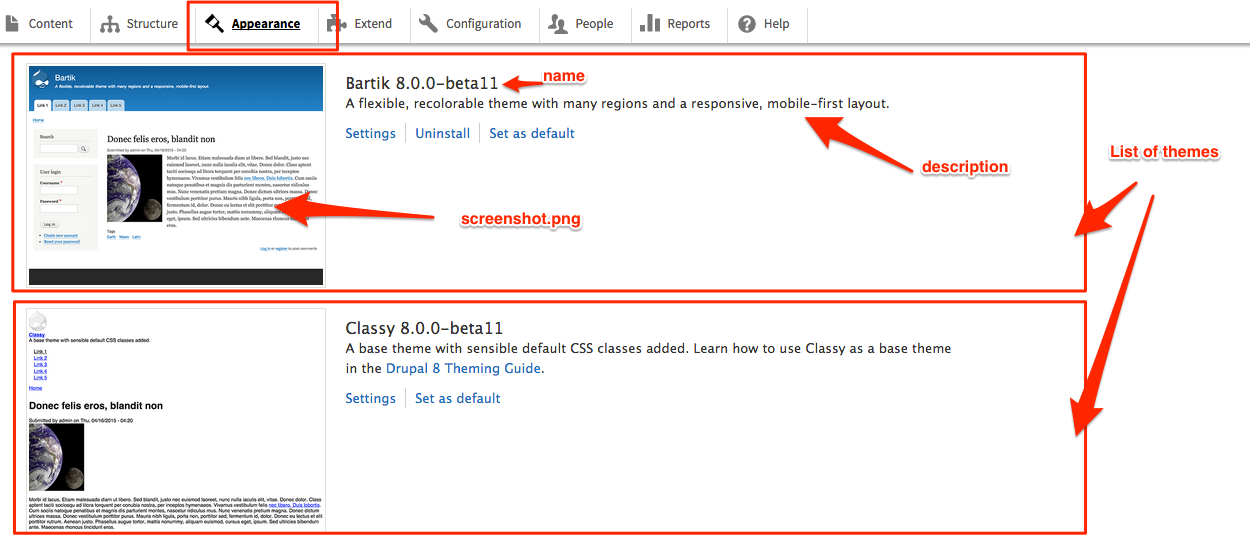
Defining Libraries
-
To define one or more (asset) libraries, add a *.libraries.yml file to your theme folder.
cuddly-slider:
  version: 1.x
  css:
    theme:
      css/cuddly-slider.css: {}
  js:
    js/cuddly-slider.js: {}
Each "library" in the file is an entry detailing CSS and JS files.
Adding Stylesheets using libraries
global-styling:
  version: 1.x
  css:
    theme:
      css/layout.css: {}
      css/style.css: {}
      css/colors.css: {}
      css/print.css: { media: print }
Managing Dependencies for library
So, to ensure jQuery is available for js/cuddly-slider.js, we update the above to:
cuddly-slider:
  version: 1.x
  css:
    theme:
      css/cuddly-slider.css: {}
  js:
    js/cuddly-slider.js: {}
  dependencies:
    - core/jquery
TWIG in Drupal 8
Twig is a template engine for PHP and it is part of the Symfony2 framework.
In Drupal 8 Twig replaces PHPTemplate as the default templating engine. One of the results of this change is that all of the theme_* functions and PHPTemplate based *.tpl.php files have been replaced in by *.html.twig template files.
Sample *.html.twig file
{% if items %}
    {% if menu_level == 0 %}
      <ul{{ attributes.addClass('menu-top') }}>
    {% else %}
      <ul class="menu">
    {% endif %}
      {% for item in items %}
        <li{{ item.attributes }}>
          {{ link(item.title, item.url) }}
          {% if item.below %}
            {{ menus.menu_links(item.below, attributes, menu_level + 1) }}
          {% endif %}
        </li>
      {% endfor %}
    </ul>
{% endif %}
Commenting in twig
{#
  /**
   * @file
   * File description
   */
#}
Variables
<div class="content">{{ content }}</div>Printing a variable
Assigning a variable
{% set custom_var = content.comments %}Conditionals
{% if content.comments %} {% endif %}{% if content.comments is not empty %} {% endif %}{% if content.comments is defined %} {% endif %}{% if count > 0 %} {% endif %}Control Structures
{% for item in items %}
    <li{{ item.attributes }}>
      {{ link(item.title, item.url) }}
      {% if item.below %}
    {{ menus.menu_links(item.below, attributes, menu_level + 1) }}
      {% endif %}
    </li>
{% endfor %}
Filters
{{ title|striptags }}Translate
{{ 'Welcome, @username'|t({ '@username': user.name }) }}Sub Theming
Breakpoints in drupal 8
New Drupal 8 Flavors
Classy Theme
If you want to start with markup with sensible classes you can use as styling hooks, then you can use Classy as your base theme. This is similar to the approach used with Drupal 7’s default markup, but with classes and markup significantly improved.
Stable Theme
However, if you want markup that is even more lean, you can use Stable as your base theme; in fact that’s the default. Stable still has some classes needed for front-end UI components like the toolbar and contextual links, but in general has far fewer classes than Classy, and even fewer wrapper elements.
THANK YOU
Saket Kumar
UI/UX Lead @qed42
twitter - saket_kmr

Drupal 8 Theming Guide
By Saket Kumar