Welcome back to School
Introduction to MVC
Obi Samuel
"No such thing as a life that's better than yours"
Agenda
- What is MVC?
- Why do we need MVC?
- How MVC works
- Model
- Route
- Views
- Controller
- What connects these pieces together?
- Conclusion
Lets dive straight into it

What is MVC
The Model-View-Controller (MVC) is an architectural pattern that separates an application into three main logical components: the model, the view, and the controller.

Disclaimer
I would be explaining some terms in this lecture and I would do so the way I understand them personally, so having said that pay less attention to the words used and try to understand the points I am trying to make. Thank you and lets get right back into the video, my bad I think I have streamed a lot of youtube videos
MVC is a way we arrange our server-side code giving it structure and making it easy to work with other engineers.
Lets break it down further, MVC is short for
- Model
- View
- Controller
we separate our server-side code to these 3 components but there is another important component which is the Route.
Why do we need MVC?
We need MVC so it is easy to work with other engineers in a team, MVC makes it easier to make changes in our code and not lose sleep at night. MVC helps use to abstract our server-side code and what do I mean by that, take a look at this server-side code
app.post('/addTodo', (request, response) => {
    db.collection('todos').insertOne({thing: request.body.todoItem, completed: false})
    .then(result => {
        console.log('Todo Added')
        response.redirect('/')
    })
    .catch(error => console.error(error))
})
The text circled red is our Route, the text circled blue is responsible for connecting to our database which in MVC is our Model, the text circled in green is our Controller. MVC helps to separate these different components so we could be able to make changes in one part and that changes would not affect the whole code, we could make changes in our route and the changes would not affect our Controller.
How does MVC work?
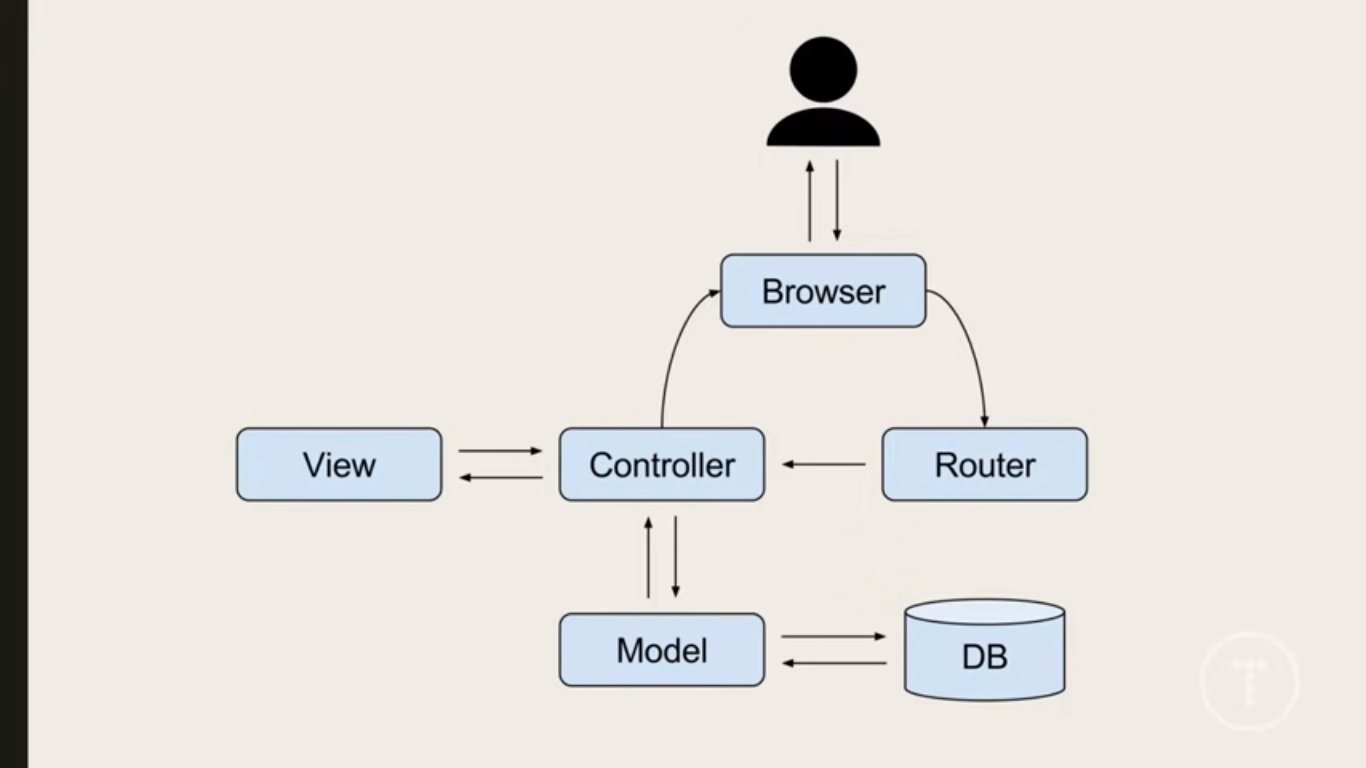
I want to use this opportunity to give Brad Traversy his flowers and other devs that make free content accessible to beginners. From the diagram above we can see how MVC works from when the user makes a request using the browser up until a response is sent back to the user and this happens in milliseconds , what can I say that's the beauty of the web.
There are few points to note from the diagram above
- The Route hears the request direct from the user and hands it over to the Controller in charge of that request.
- The Controller acts as the middleman - it receives request from the route, it may communicate with the model requesting for data, it then sends the data to the view, the view renders and sends HTML back to the controller and lastly the Controller responds the user's browser with the HTML.
- The views as the name implies handles the visuals and it communicates with the controller and sends response back to the controller.
- The model is the part of our server-side that connects with our database and it receives request from the controller and sends response back to the controller.
From the diagram in the previous slide we see that the user makes a request and the router hears that request and sends that request to the controller in charge of that request, the controller might need data from the database so it sends request to the model and the model responds with the data, then the controller finally loads everything (which may include the data gotten from the model) into the view, the view those its job and renders out HTML to the controller, the controller then sends the response to the user's browser.
Model
By now we know the job of the model which is - connects to the database and respond with data to the controller when a request is made.
How does the model connect to the database?
Firstly the database we are using in this lecture is Mongodb, we can connect to the database in different ways, one of the ways is Mongo Client but using this has a pitfall which is we can not control the type of data that is put into our database and this leads to inconsistency in the data in our database and many other problems especially when we are working with a team, so we use Mongoose which solves the problem of inconsistency with the help of Schema. Mongoose requires that we define a Schema and a Model. Schema is a structure of how we want the documents in our collection to look like.
This is an example of a Schema. In a Schema we define a field and its data type for example the name field would only accept a String as its value, permitted data types are String, Number, Boolean, Array, Mixed, Decimal128, Map, Date, Buffer, ObjectID. Schemas are rigid in the sense that a new field that was not defined in the Schema can not be declared in the Controller and also every field has a data type defined in the Schema, an error would occur if we assign a different data type to a field different from what was assigned in the Schema, for example we can not declare our age field to be a String.
const user = new Schema({
  name: String,
  age: Number,
  employed: Boolean,
})
Mongoose Model - Model takes our Schemas and applies them to each document in our collection. Models are responsible for all the document interactions (CRUD).
const User = mongoose.model('User', user)A model to me is just like when we created our object using constructor then we had to call the object and assign it values.
The above code is the model for the user Schema. The first argument 'User' would be the name of our database collection but Mongoose formats it further by changing it to lowercase and making it plural, so our collection name would then be 'users'. The second argument covered in green circle is the name of our Schema.
Route
We already have an idea what a Router does, it hears the request from the user's browser and sends the request to the Controller in charge of that request.
View
The view is the part of the website that the user sees.
The view consists of template engine(which is our case is EJS).
Note - other files that help to add styles and functionality to the website like CSS, and client-side javascript are kept in the Public folder in MVC.
The view communicates with the Controller and also the Controller can pass in data from the Model into the view and lastly the view renders out HTML which the controller responds the user with.
Controller
The controller acts like the middleman. The Controller receives request from the view, The Controller processes the requests (Get, Post, Put, Delete), The Controller gets data from the model, The Controller passes data to the view, and lastly the Controller sends response back to the user's browser.
What connects these pieces together?
- require
- modules.export
Here we are joining to look at two important concepts
- require
According to the Node.js website :-
Node.js follows the CommonJS module system, and the builtin require function is the easiest way to include modules that exist in separate files. The basic functionality of require is that it reads a JavaScript file, executes the file, and then proceeds to return the exports object.
To learn more about Node.js modules you can read this: Node.js modules
If you read the Node.js modules you would see that we have 3 modules, and our focus would be the local modules because Local modules are the files we create by ourselves in our Node.js application.
In local modules, we use both require and modules.export and lets use an example to explain further
const mongoose = require('mongoose')

const TodoSchema = new mongoose.Schema({
  todo: {
    type: String,
    required: true,
  },
  completed: {
    type: Boolean,
    required: true,
  }
})

module.exports = mongoose.model('Todo', TodoSchema)
The code circled orange is an example of a third-party module that is being required, I just wanted us to see as example of a third-party module.
The code above is from our model file and if we notice we would see a Schema, also we would see our mongoose model. We said earlier that the Model connects to our database and interacts with our Controller.
The code circled green is us exporting an object containing our schema from our model so it can be required where it is needed.
The code above is from our controller file, the circled text is us requiring the model from the previous example.
So from the two examples we can see that we export an object from one file so we can require that object in another file where it is needed.
Below is another example of require and modules.export, if you are interested in reading further here
const Todo = require('../models/Todo')

module.exports = {
    getTodos: async (req,res)=>{
        try{
            const todoItems = await Todo.find()
            const itemsLeft = await Todo.countDocuments({completed: false})
            res.render('todos.ejs', {todos: todoItems, left: itemsLeft})
        }catch(err){
            console.log(err)
        }
    }
}
Conclusion
Finally I am proud of myself for pushing and putting time into this lecture and I also want to say Thanks so much for sticking till the end of this lecture.
I hope that you gained something from this lecture and also understand why we use MVC, and how the pieces connect together so that you could build your projects with the MVC architecture.
deck
By Sam Undecided