
AGENDA
- What is React and why we should use it ?
- Installation
- Introducing JSX
- stateless, stateful component
- lifecycle
- refs
- context
- propTypes
- Virtual DOM

why we should use it
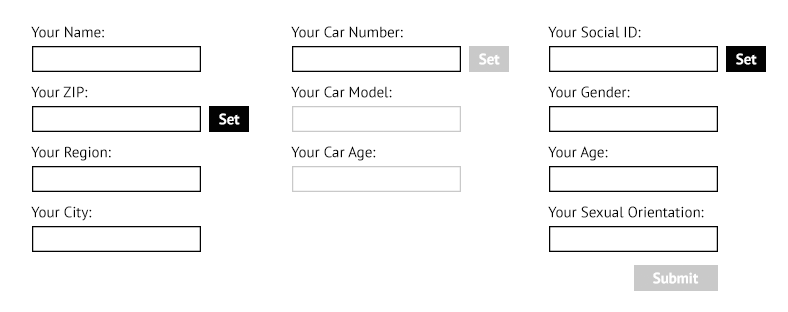
Installation
yarn add react react-dom
yarn add --save --dev babel-loader babel-core babel-preset-stage-3
yarn add --save --dev babel-preset-es2015 babel-cli webpack
{
"presets": [
["latest", { "modules": false }],
"stage-3",
// Candidate: complete spec and initial browser implementations.
"react"
// Transpile React components to JavaScript
]
}module: {
rules: [
// JavaScript / ES6
{
test: /\.js$/,
exclude: /node_modules/,
use: 'babel-loader',
}
]
}JSX
javascript xml syntax
const Element = (
  <h1 className="greeting">
    Hello, world!
  </h1>
);

export default Element;
import React from 'react';
const Element = React.createElement(
'h1',
{ className: 'greeting' },
'Hello, world!'
);
export default Element;JSX
JS
// Note: this structure is simplified
const Element = {
  type: 'h1',
  props: {
    className: 'greeting',
    children: 'Hello, world'
  }
};
VD
User-Defined Stateless Components Must Be Capitalized
function Hello(props) {
  return <div>Hello {props.toWhat}</div>;
}

ReactDOM.render(<Hello toWhat="World" />, document.body);
const Button = ({ children, background }) =>
<button style={{ background }}>
{ children } { ∞ - ∞ = ? }
</button>;
// List component
import Item from 'components/Item';

export default ({ todos, className }) => {
  const todos = ['item1', 'item2', item3];

  return (
    <ul className={ className }>
      // Keys help React identify which items have changed
      // Keys Must Only Be Unique Among Siblings
      {todos.map((msg, key) => (
            <Item key={ key } message={ msg } />
        ))}
    </ul>
  );
};
// Item component
export default props => (
<li>{props.message}</li>
);import Header from 'components/Header';
import Main from 'components/Main';
import List from 'components/List';
import Footer from 'components/Footer';
const Layout = (
<div>
<Header></Header>
<Main>
<List todos={ [...] } className='...' />
</Main>
<Footer></Footer>
</div>
);
ReactDOM.render(<Layout />, mountNode);Handling Events
function ActionLink() {
  function handleClick(e) {
    e.preventDefault();
    console.log('The link was clicked.');
  }

  return (
    <a href="#" onClick={ handleClick }>
      Click me
    </a>
  );
}

export default ActionLink;
Conditional Rendering
function Greeting(props) {
  const isLoggedIn = props.isLoggedIn;
  if (isLoggedIn) {
    return <UserGreeting />;
  }
  return <GuestGreeting />;
}

ReactDOM.render(
  <Greeting isLoggedIn={false} />,
  document.getElementById('root')
);
function Greeting(props) {
const isLoggedIn = props.isLoggedIn;
return (
<GuestGreeting>
{ isLoggedIn ? 'Hello bro!' : 'WHO ARE YOU ANIMAL ?' }
</GuestGreeting>
);
}
ReactDOM.render(
<Greeting isLoggedIn={ false } />,
document.getElementById('root')
);Preventing Component from Rendering
function WarningBanner(props) {
  if (!props.warn) {
    return null;
  }

  return (
    <div className="warning">
      Warning!
    </div>
  );
}

export default WarningBanner;
Stateful Component
React.createClass(es5) or React.Component(es2015+)
class LoginControl extends React.Component {
  constructor(props) {
    super(props);
    this.handleLoginClick = this.handleLoginClick.bind(this);
    this.handleLogoutClick = this.handleLogoutClick.bind(this);
    this.state = {isLoggedIn: false};
  }

  handleLoginClick() {
    this.setState({isLoggedIn: true});
  }

  handleLogoutClick() {
    this.setState({isLoggedIn: false});
  }

  render() {
    const isLoggedIn = this.state.isLoggedIn;

    let button = null;
    if (isLoggedIn) {
      button = <LogoutButton onClick={this.handleLogoutClick} />;
    } else {
      button = <LoginButton onClick={this.handleLoginClick} />;
    }

    return (
      <div>
        <Greeting isLoggedIn={isLoggedIn} />
        {button}
      </div>
    );
  }
}

export default LoginControl;
var SetIntervalMixin = {
componentWillMount: function() {
this.intervals = [];
},
setInterval: function() {
this.intervals.push(setInterval.apply(null, arguments));
},
componentWillUnmount: function() {
this.intervals.forEach(clearInterval);
}
};
var TickTock = React.createClass({
mixins: [SetIntervalMixin], // Use the mixin
getInitialState: function() {
return {seconds: 0};
},
componentDidMount: function() {
this.setInterval(this.tick, 1000); // Call a method on the mixin
},
tick: function() {
this.setState({seconds: this.state.seconds + 1});
},
render: function() {
return (
<p>
React has been running for {this.state.seconds} seconds.
</p>
);
}
});
ReactDOM.render(
<TickTock />,
document.getElementById('example')
);The Component Lifecycle
Mounting
- constructor()
- componentWillMount()
- render()
- componentDidMount()
Unmounting
State
IMMUTABLE
class CustomButton extends React.Component {
    someMethod(prevState) {
        this.setState({
            myInteger: prevState.myInteger
        });
    }
}
class CustomButton extends React.Component {
someMethod(prevState) {
this.setState({
...prevState,
myInteger: prevState.myInteger++
});
}
}class CustomButton extends React.Component {
someMethod(prevState) {
this.setState(Object.assign({},
prevState,
myInteger: prevState.myInteger++
});
}
}Context
class Button extends React.Component {
  render() {
    return (
      <button style={{background: this.context.color}}>
        {this.props.children}
      </button>
    );
  }
}

Button.contextTypes = {
  color: React.PropTypes.string
};

class Message extends React.Component {
  render() {
    return (
      <div>
        {this.props.text} <Button>Delete</Button>
      </div>
    );
  }
}

class MessageList extends React.Component {
  getChildContext() {
    return {color: "purple"};
  }

  render() {
    const children = this.props.messages.map((message) =>
      <Message text={message.text} />
    );
    return <div>{children}</div>;
  }
}

MessageList.childContextTypes = {
  color: React.PropTypes.string
};
Refs
class CustomTextInput extends React.Component {
  constructor(props) {
    super(props);
    this.focus = this.focus.bind(this);
  }

  focus() {
    // Explicitly focus the text input using the raw DOM API
    this.textInput.focus();
  }

  render() {
    // Use the `ref` callback to store a reference to the text input DOM
    // element in this.textInput.
    return (
      <div>
        <input
          type="text"
          ref={(input) => { this.textInput = input; }} />
        <input
          type="button"
          value="Focus the text input"
          onClick={this.focus}
        />
      </div>
    );
  }
}
Plus
Lifecycle/State/Refs/Context
Composition/Inheritance
Stateless vs Statefull
Minus
Mixins/Bind
React.Component vs React.createClass
Stateless or stateful
component
My presentational components:
- Usually have some DOM markup and styles of their own.
- Often allow containment via this.props.children.
- Don’t specify how the data is loaded or mutated.
- Receive data and callbacks exclusively via props.
- Rarely have their own state (when they do, it’s UI state rather than data).
My container components:
- usually don’t have any DOM
- Provide the data and behavior to presentational or other container components.
PropTypes
class MyComponent extends React.Component {
  render() {
    // This must be exactly one element or it will warn.
    const children = this.props.children;
    return (
      <div>
        {children}
      </div>
    );
  }
}

MyComponent.propTypes = {
  children: React.PropTypes.element.isRequired
};
Simple to usage
MyComponent.propTypes = {
  optionalArray: React.PropTypes.array,
  optionalBool: React.PropTypes.bool,
  optionalFunc: React.PropTypes.func,
  optionalNumber: React.PropTypes.number,
  optionalObject: React.PropTypes.object,
  optionalString: React.PropTypes.string,
  optionalSymbol: React.PropTypes.symbol,
  optionalNode: React.PropTypes.node,
  optionalElement: React.PropTypes.element,
  optionalMessage: React.PropTypes.instanceOf(Message),
  optionalEnum: React.PropTypes.oneOf(['News', 'Photos']),
  optionalUnion: React.PropTypes.oneOfType([
    React.PropTypes.string,
    React.PropTypes.number,
    React.PropTypes.instanceOf(Message)
  ]),
  optionalArrayOf: React.PropTypes.arrayOf(React.PropTypes.number),
  optionalObjectOf: React.PropTypes.objectOf(React.PropTypes.number),
  optionalObjectWithShape: React.PropTypes.shape({
    color: React.PropTypes.string,
    fontSize: React.PropTypes.number
  }),
  requiredFunc: React.PropTypes.func.isRequired,
  requiredAny: React.PropTypes.any.isRequired,
  customProp: function(props, propName, componentName) {
    if (!/matchme/.test(props[propName])) {
      return new Error(
        'Invalid prop `' + propName + '` supplied to' +
        ' `' + componentName + '`. Validation failed.'
      );
    }
  }
};
VirtualDOM
What is VD ?
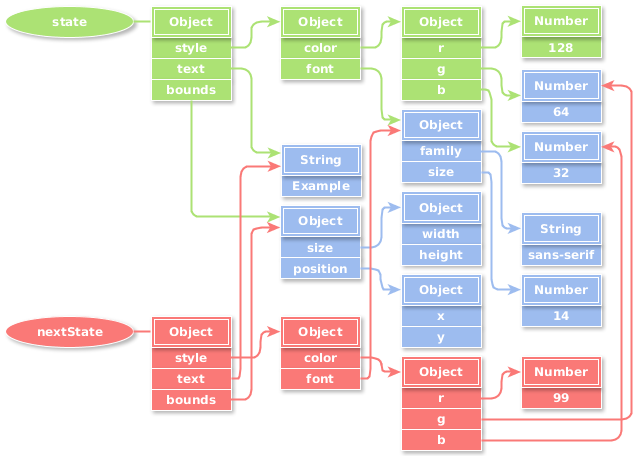
it's object
How it work ?
Diff
What problem it solves ?
Batching DOM read/write operations.
Efficient update of sub-tree only.
// Note: this structure is simplified
const element = {
  type: 'h1',
  props: {
    className: 'greeting',
    children: 'Hello, world'
  }
};
The Diffing Algorithm
The Diffing Algorithm
Finally, you have the possibility to prevent some sub-trees to re-render. If you implement the following method on a component:
shouldComponentUpdate(object nextProps, object nextState)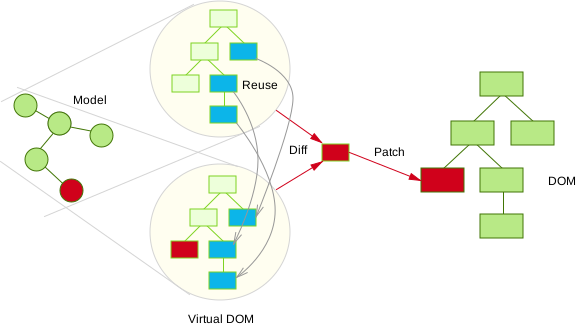
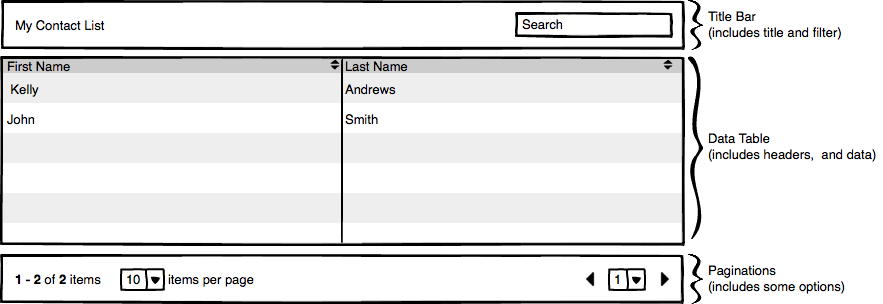
Home Work
Questions ?
React
By Sarhan Azizov