JavaScript JumpStart


Schedule
-
Lecture 1: 9:45 - 10:45
- Workshop 1: 10:45 - 12:30
- Review: 12:30 - 1:00
- Lunch: 1:00 - 2:00
-
Lecture 2: 2:00 - 2:30
- Workshop 2: 2:30 - 4:30
- Review 4:30 - 5:00
-
Lecture 3: 5:00 - 5:30
- Workshop 3: 5:30 - ?
- Closing Comments

What will we cover? (content)
JavaScript Fundamentals
- Values, Types and Operators
- Program Structure
- Functions
-
Data Structures
- Arrays
JumpStart Lecture
One
JavaScript Value Types
- Numbers
- Strings
- Booleans
-
Objects
- Functions, Arrays
- Null
- Undefined
var oneDozen = 12;var myName = "Scott"var theSkyIsBlue = truevar macBook = {
model: "2014 Air",
price: 1400
}
nullundefined;Topics and Concepts
- Defining Variables
- Value Types
- Numbers
- Strings
- Booleans
- Functions
- Arithmetic Operators
- Comparators
- Logical Operators
- Program Structure
- If Statements
- Loops
Variables
- How does a program remember things?
- To catch and hold values JavaScript provides variables
var one = 1;varThe "var" keyword indicates the definition of a local variable
var one"var" is followed by the name of the variable
var one = 1;The name is followed by the assignment operator and an expression or value
Variables
- Think of a Variable like a Label on a Box
Variables
- Declaration: Creating an empty variable
- Putting a label on it
- Initialization: Assigning a value to the variable
Why use a Variable?
- Easily Identifiable
- Reuse throughout your application without unnecessarily duplicating the value itself.
Variables
-
Naming Conventions
- Letters
- Digits
- Underscores
- Dollar Signs
- Must begin with a letter, underscore or dollar sign
- Case Sensitive
- Reserved Words cannot be used as a variable name
- CamelCase
var t3l_lo$ = "valid";var 2invalid = "invalid";var camelCase = "camelCase";var var = "invalid";var CaSeSeNsItIvE = "valid";Variables
var one = 1;
var two = one + one;
var two = 2
var one = 1;
var two = one + one;
one = one + two;
var one = 3
What is a Function?
- A function is similar to a baking recipe such as baking a cake
- The "values" or ingredients used changes the type of cake, but the outcome is still a cake.
- Ex: What ingredients are different between a Chocolate or Vanilla Cake?
function bakeCake(flavor){
  return "This is a " + flavor + "cake!";
}bakeCake("Chocolate");bakeCake("Vanilla");

Functions

Functions
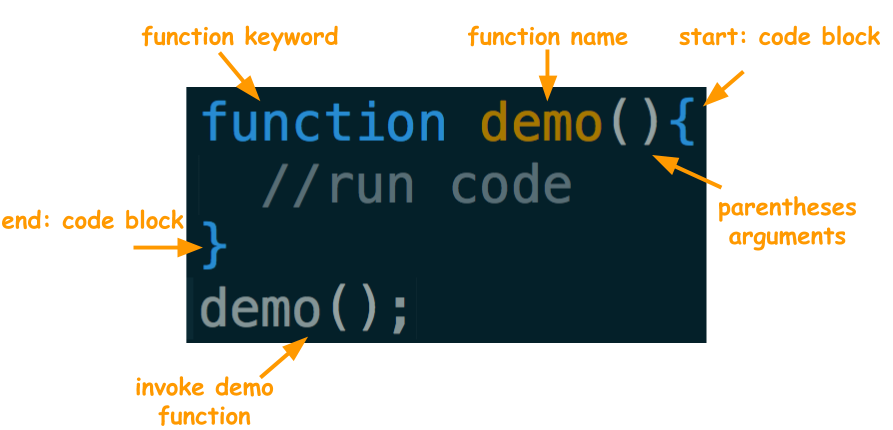
- A function is a block of reusable code.
- Executing a function is called invoking, calling, or applying it.
- Values inside the parentheses are passed to the program inside the function.
- Groups statements together
Functions
alert("My Name Is Scott");This is a JavaScript Statement that invokes the alert function which accepts a string value argument
Functions
// function declaration
function alertTwoTimes(message){
  alert("First Message: " + message);
  alert("Second Message: " + message);
}
alertTwoTimes("Hello"); //invoking the function- function keyword: tells the JavaScript engine to treat the block of code as a function
- name: after the function keyword is the name of the function (distance)
- parentheses: inside the parentheses are the parameters(the values passed to the function are arguments), Order Matters
- brackets: opening and closing squiggly brackets enclose any statements that you have inside
- content: the statements that are invoked
- calling: after the function is created it has to be called.
Booleans
- 1 of the 6 Types in JavaScript
- Two Possibilities:
- True
- False
Conditional Statements
- During your morning routine you make a series of decisions in a conditional format.
- If it is cold out you will wear a jacket
- If you are hungry you will have breakfast
- If you are running late you will move faster
- IF/ELSE Statement:
if(something_is_true){
  // do_something;
} else {
  // nothing is true
  // run this code
}
If/Else Example
function whichBrowser(browser){
    if(browser === "Google Chrome"){
        alert("This is Google Chrome!");
    } else {
        alert("Download Chrome!");
    }
}
whichBrowser("Google Chrome");
The "return" Keyword
- The "return" keyword gives back data from a function.
- When the "return" keyword is used, anything after the return keyword will not execute.
function returnValue(valueToReturn){
  return valueToReturn;
}
returnValue("JavaScript Rocks");
function exampleReturn(expression){
if(expression){
return "The expression is true";
} else {
return "The expression is false";
}
console.log(5);
}
exampleReturn(11<10);Conditional Operators
- Compare between two or more things
- The end goal is to return 'true' or 'false' so that our 'if statement' knows which block of code to execute
-
Basic Conditional Operators
- " > ": Greater Than
- " < ": Less Than
- " >= ": Greater Than or Equal To
- " <= ": Less Than or Equal To
- " === ": Equal To (Identity Operator)
- " !== ": Not Equal To
if(7 < 10){
  console.log("7 is less than 10");
} else {
  console.log("7 is greater than 10");
}
"else if" Statement Example
function isBakersDozen(guess){
    if(guess === 13){
        return "You are Correct";
    } else if(guess === 12){
        return "Close! But wrong Dozen";
    } else {
        return "Try Again";
    }
}- Adds more than one option to your program
- Checks from Top to Bottom
- Statements can be nested
Logical Operators
- Typically used with Boolean Values
- 3 Logical Operators
- " && " : AND
- Both Conditions must be true
- " || " : OR
- One Condition must be true
- " ! " : NOT
- Toggles a Statement from true to false or from false to true
- " && " : AND
true && true // returns truefalse || true // returns true!false || !true // returns trueNumbers
- Addition
- Subtraction
- Multiplication
- Division
- Modulus
var oneDozen = 12;
var twoDozens = 2 * oneDozen;
Common Arithmetic Operators in JavaScript
function add(num1, num2){
    return num1+num2;
}
add(5,6);
function modulo(num1,num2){
return num1%num2;
}
modulo(11,5);Shorthand Syntax(Operators)
- Declare a Variable and initialize a value
var one = 1;- Add 1 to the variable one
one = one + 1;- Shorthand
one++;one--;
one+=5;
one -=5;
one *= 2;
one /= 2;
one %= 3;Strings
- String: A series of characters enclosed by an apostrophe ( ' ) or quotation marks ( " )
- Concatenation: Combines strings together
var jump = "Jump";
var start = 'Start';
var currentClass = jump + start;String Properties
- Properties enable interaction with a value and are pre-defined.
- Methods are similar to properties except they are functions called on a value
- Access Characters with bracket notation
function whatCharacter(stringToCheck,indexInString){
    return stringToCheck[char];
}
whatCharacter("HelloWorld",5);
var helloWorld = "Hello World";
helloWorld.length;helloWorld.charAt(4);Common String Properties
and Methods
"hello world".length;.length property: returns the length of the string starting from the count of 1
"hello world".toUpperCase();.toUpperCase method: returns the calling string value converted to upper case characters
.toString method: converts a value to a string value
var two = 22;
two.toString();
Accessing Individual Characters
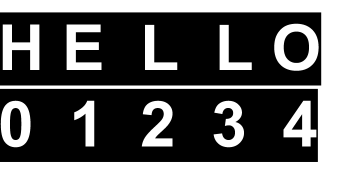
Strings look like one cohesive unit but they are actually made up of a series of characters
Zero-Based Index (the count starts from 0 instead of 1)
Index positions start at 0 and then move up
var hello = "Hello";Accessing Individual Characters
"Hello Fullstack".charAt(8);"Hello Fullstack"[4];charAt method: returns a character at a specified (the arguments) index value
Bracket Notation: returns the character at the specified index value.
"Hello Fullstack"[2+2];"hello world".slice(2,5);.slice method: returns a string based on the start and end point specified by the first and second argument
Common String Methods
.indexOf method: the arg is the substring or character to search for in the string. The return value is the index location of character or string
"Hello World".indexOf("World");Strings
- Special Characters
- \t - Tab Spacing
- \n - New Line
- String Comparisons
"Hello\t\tWorld";"Hello\n\nWorld";"HelloWorld" === "HelloWorld";Tab Spacing
New Line
Comparison
Loops
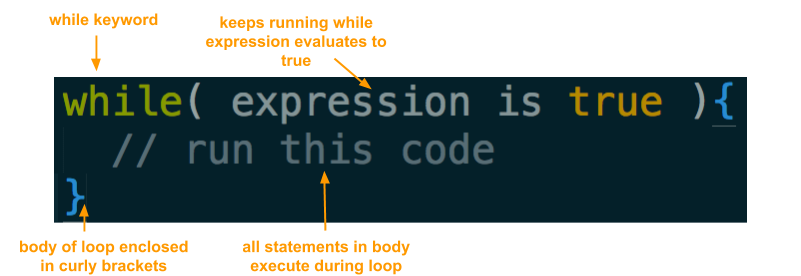
- A generalized solution for repeating code with control over how many times the code is repeated
- 3 Different Loops
- for...
- while...
- do...while
doSomething();
doSomething();
doSomething();
doSomething();
doSomething();
doSomething();
doSomething();
doSomething();
var count = 8;
for(var i = 0; i < count; i++){
  doSomething();
}
var count = 10;
while(count > 0){
count--;
doSomething();
}While-Loop
While-Loop
console.log("Repeat this #" + number + " 4 times");Loops allow code to be executed repeatedly.
Define a Variable
var number = 1;Create a counter to increase on every repetition of the loop
console.log("Repeat this #" + number + " 4 times");
number++;
Create an expression that evaluates to true or false
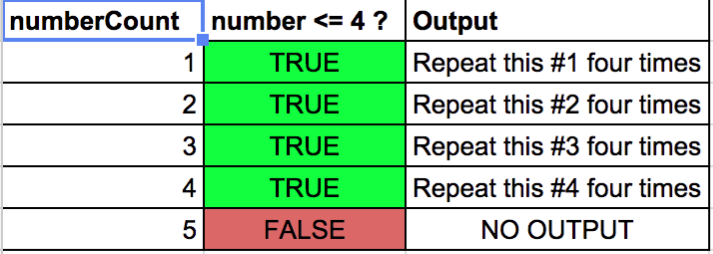
number <= 4;While-Loop
var number = 1;
while(number <= 4){
  console.log("Repeat this #" + number + " four times");
  number++;
}
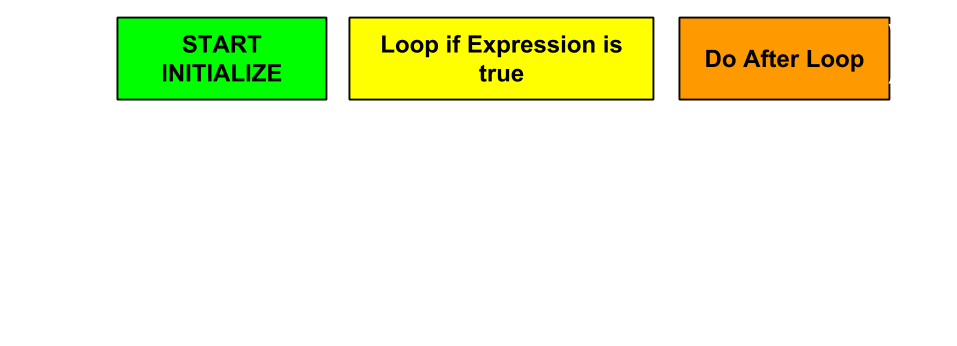
For - Loop
- START/INITIALIZE: Create a variable ex: var i = 0;
- EXPRESSION: Create an Expression ex: i < 10;
- DO AFTER: Change the initial variable ex: i++
For - Loop
- Initialize Counter
- Evaluate Expression
- Run Code
- Increment Counter
- Evaluate Expression
for(var i = 0; i < 10; i++){
  console.log(i);
}
1.
2.
3.
4.
For-Loop
function upToFive(){
  for(var i = 1; i<5; i++){
    console.log(5);
  }
}
upToFive();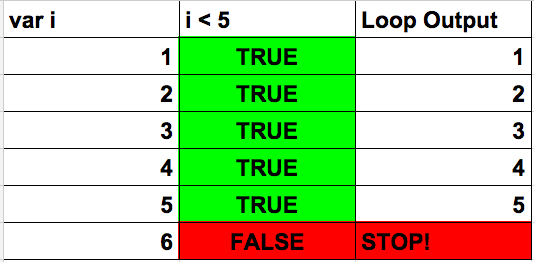
Time
for the
Workshop!
JumpStart
By Scott D'Alessandro