AngularJS
from ReactJS perspective


React
React is a JavaScript library for
for rendering user interfaces
React Component
const Link = (props) => (
  <a href={props.href}>
    {props.children}
  </a>
)

const App = (props) => (
  <Link href="/profile">
    <img src="/avatar.png" onClick={window.reload} />
  </Link>
)

ReactDOM.renderToStaticMarkup(<App />)
// => "<a href="/profile"><img src="/avatar.png" /></a>"

ReactDOM.render(<App />, document.body)
// => Also attaches onClick handler
JSX syntax is not magic
const Link = (props) => ({
  type: "a",
  props: {
    href: props.href,
    children: props.children
  }
})

const App = (props) => ({
  type: Link,
  props: {
    url: "/profile",
    children: [{
      type: "img",
      params: {
        src: "/avatar.png",
        onClick: window.reload
      }
    }]
  }
})

ReactDOM.render({ type: App }, document.body)
const Link = (props) => (
<a href={props.url}>
{props.children}
</a>
)
const App = (props) => (
<Link url="/profile">
<img
src="/avatar.png"
onClick={window.reload}
/>
</Link>
)
ReactDOM.render(<App />, document.body)React philosophies:
- Keep state of application in one place
- Manage state of application from multiple places
- Declarative views, re-render instead of update
- Uni-directional flow of changes in application
- Embracing standards, npm, webpack
React philosophy #1
Keep your state in one place
// state.js
import Immstruct from 'immstruct'

export default Immstruct({
  user: {
    id: 1,
    avatar: "/avatar.png"
  },
  visiblePosts: [
    {
      title: 'Hello world',
      body: 'Lorem ipsum dolor is amet'
    }
  ]
})
Keep your state in one place



How to update state?
Flux
Flux is an application architecture
utilizing unidirectional data flow
(not a library)
state = update(state, action)
action is a plain object
that describes what happened
state = update(state, { type: 'LIKE_ARTICLE', articleId: 42 })

state = update(state, { type: 'ADD_TODO', text: 'Read about Flux.'})
// userService.js
import dispatcher from './dispatcher'
import state from './state'
dispatcher.register(function(payload) {
if (payload.type === 'UPDATE_USER_AVATAR') {
state.update(['user', 'avatar'], payload.url)
}
});React philosophy #2:
Change state through dispatcher
angular.module('app')
.directive('editUser', function() {
  return {
    restrict: 'E',
    transclude: true,
    controller: function ($scope, dispatch) {
      $scope.onClickSave = function() {
         dispatch({ type: 'CHANGE_USER_AVATAR', url: $scope.url })
      }
    }
  };
});
Change state through dispatcher
React philosophy #3:
view = render(state)
const state = {
  user: {
    id: 1,
    avatar: "/avatar.png"
  }
}

const App = (state) => (
  <Link href={`/profile/${state.user.id}`}>
    <img src={state.avatar} />
  </Link>
)


ReactDOM.render(App, state)
Angular Lifecycle
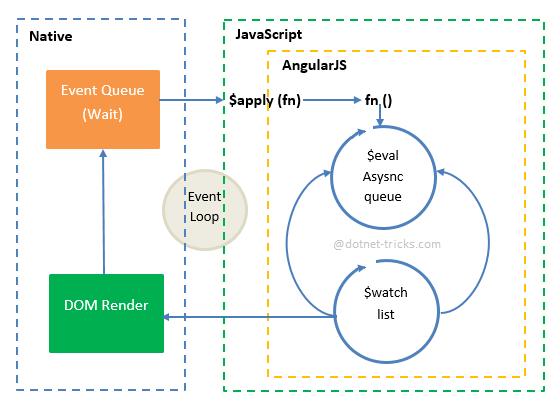
Angular Lifecycle

view = render(state)
action = human(view)
state = update(state, action)
\{
repeat
React Lifecycle
state = fetch(render, state)
view = render(state)
action = human(view)
state = update(state, action)
\{
repeat
React Lifecycle V2
React uses

Webpack

You can us it for templates
angular.module('app')
  .directive('application', function () {
    return {
      restrict: 'E',
      replace: true,
      template: require('./application.html')
    };
  });
Use it instead of ng-include
<div class="application">
  ${require('./header.html')}
  <div class="content">
    <ng-transclude></ng-transclude>
  </div>
  ${require('./footer.html')}
</div>
(requires "intepolate" flag for html-loader)
Use it for assets
<img src="${require('../assets/logo.png')}" />

// In production becomes:
<img src="/assets/logo-b524a2537.png" />

// Can also compile for data uri for small assets!
<img src="data:image/png;base64,iVBORw0KGgoAAAA..." />
(requires "intepolate" flag for html-loader)
CSS modules!
${this.styles = require('./index.css'), ""}

<div class="${this.styles.logo}">
  Hello world
</div>
(requires "modules" flag for css-loader)
/* index.css */

.logo {
  color: red;
}
<div class="_3gBJbu7o592GGUQ4CjIQTM">
Hello world
</div>._3gBJbu7o592GGUQ4CjIQTM {
color: red;
}Other tips
- Don't use ng-controller
- Make everything a directive
- Always use isolated scope (explicitly pass properties)
- Don't use $rootScope and other globals
- Use double-binding only locally (if you need)
- Use only factories (forget about services, providers, factories, constants, they return singletons anyway)
Thank you
sheerun@sher.pl
I'm searing for good:
- Ruby & Rails developers
- JavaScript developers (React)
European Salary
AngularJS from ReactJS perspective
By Adam Stankiewicz