C++[6]
字串
ZSISC32nd 鄭云晶
Index
ascii
ascii
-
將字元對應到數值的標準編碼方式
-
為了改進電報中使用的程式碼(1963)
-
"美國資訊交換標準代碼"的縮寫
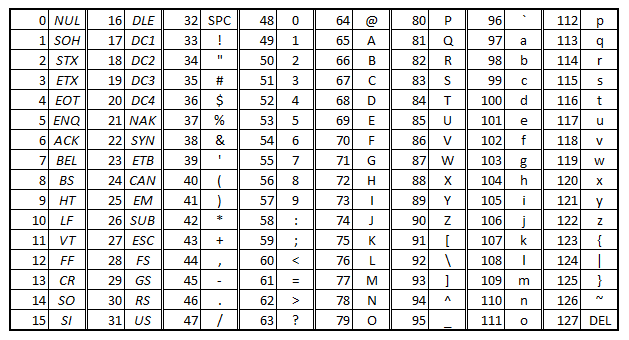

顯示ASCII碼
char ch = 'A';
cout << (int)ch;
65
B
int code = 66;
cout << (char)code;
利用(int)將字元強行轉型整數
反之
字元
char
字元
- 在 C++ 中,字元使用char資料型別表示
- 一個char變數可以儲存 一個 ASCII 字元
char ch = 'A'; // 存的是 ASCII 65用單引號 ' '
C-Style
多個字元char組成的陣列
char name[] = "ZSISC";在最後會自動加入一個 結尾符號 '\0'表示字串結束
'Z' 'S' 'I' 'S' 'C' '\0'C-Style
導致記憶體錯誤或輸出亂碼
在最後會自動加入一個 結尾符號 '\0'表示字串結束
char word[5] = "ZSISC"; // 錯誤,沒有空間放 '\0'
常見函式
| isupper(ch) | 判斷是否為大寫字母 |
| islower(ch) | 判斷是否為小寫字母 |
| isalpha(ch) | 判斷是否為字母(不管大小寫) |
| isdigit(ch) | 判斷是否為數字 |
| isalnum(ch) | 判斷是否為字母或數字 |
| ispunct(ch) | 刪除部分內容 |
| isspace(ch) | 判斷是否為空白字元 |
範例
#include <iostream>
using namespace std;

int main() {
    char ch = 'a';

    cout << isalpha(ch) << endl;  // 1(是字母)
    cout << isdigit(ch) << endl;  // 0(不是數字)
    cout << (char)toupper(ch) << endl; // A
}
*toupper(ch) 轉成大寫
*tolower(ch) 轉成小寫
C-Style
-
長度固定
-
操作麻煩
-
忘記放
'\0'或長度不足時會出現錯誤
在 C++ 裡更常用 string 類別!
範例
讀入一行字串(長度不超過 100)
字串中包含 英文字母與數字,
輸出
#字母的個數
#數字的個數
輸入:Hello123
輸出:5 3
範例
#include <iostream>
using namespace std;

int main() {
    char str[101];
    cin >> str;

    int letters = 0, digits = 0;

    for (int i = 0; str[i] != '\0'; i++) {
        if ((str[i] >= 'A' && str[i] <= 'Z') || (str[i] >= 'a' && str[i] <= 'z')) {
            letters++;
        }
        else if (str[i] >= '0' && str[i] <= '9') {
            digits++;
        }
    }

    cout << letters << " " << digits << endl;
    return 0;

}
*toupper(ch) 轉成大寫
*tolower(ch) 轉成小寫
字串
string
字串(string)
「由字元組成的文字資料」常用來處理輸入文字、名字、訊息等。
#include <iostream>
using namespace std;

int main() {
    string name = "ZSISC";
    cout << "Hello, " << name << "!" << endl;
}
Hello,ZSISC!
用雙引號 " "
輸入輸出
#include <iostream>
using namespace std;
int main() {
	string word;
	cin >> word;
	cout << word;
} - 輸入遇空格或換行結束
輸入: oh ya! 輸出: oh
輸入整行文字
#include <iostream>
using namespace std;
int main() {
	string sentence;
	getline(cin, sentence);
    cout << sentence;
}- 可以讀取包含空白的整行文字
輸入: oh ya!
輸出: oh ya!
getline( )
常見函式
string a = "Apple";
cout << a.length();
- 取得字串長度
輸出: 5
- 判斷是否為空字串
string a = " ";
if (a.empty()) cout << "oh";
else cout << "no";
輸出: oh
其他常見函式
| .length() | 取得字串長度 |
| .empty() | 檢查是否為空字串 |
| .substr(pos, len) | 取出部分字串 |
| .append(str) | 在尾端加入文字 |
| .find(str) | 找出文字位置 |
| .erase(pos, len) | 刪除部分內容 |
| .replace(pos, len, str) | 取代部分文字 |
pos:起始位置 len:要取代的長度 str:字串

常見用法
string a = "cat";
a = "dog"; - 指定
直接改變內容
a => dog
- 字串相加
string a = "IZCC";
string b = "happy";
string ab = a + " " + b;
cout << ab;
輸出: IZCC happy
常見用法
int main() {
string a = "apple";
string b = "Apple";

if (a > b) cout << "a大";
else if(a < b) cout << "a小";
else cout << " 一樣";- 取單一字元或修改
輸出:a大
- 字串比較
string a = "come";
cout << a[0];
a[2] = 'd';
cout << a;
輸出: ccode
97>56 (ASCII)
實作
實作
#include <iostream>
using namespace std;

int main() {
    string a;
    cin >> a;

    bool str = true;  // 預設為是迴文

    int len = a.length();
    for (int i = 0; i < len / 2; i++) {
        if (a[i] != a[len - 1 - i]) {
            str = false;
            break;
        }
    }

    if (str)
        cout << "yes";
    else
        cout << "no";

    return 0;
}
判斷迴文

kahoot
Ya!
string
By shiny0515