Getting started with PUN
IMR Course_9
https://doc.photonengine.com/en-us/pun/v2/demos-and-tutorials/pun-basics-tutorial/intro
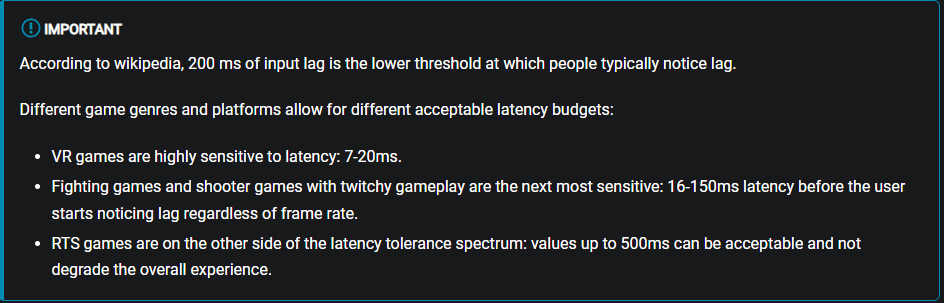
- Latency and lag => Client side Interpolation
- Package Loss
- Authority - server vs client
Terms
=> Tackle what is the most relevant to your app
Pre-game
Server
Connect to Photon Server in a certain Region
<20 CCU free
1.
2.
Join Lobby
Open, List and Join rooms
-Random Matchmaking
3.
Join Room
It's time to take the product live - the end if the build phase but the beginning of being in market.
# CHAPTER 2
Connect Server -> Lobby -> Room
public class NetworkManager : MonoBehaviourPunCallbacks
{
    private string gameVersion = "0.1";


    public void JoinServer()
    {
      PhotonNetwork.AutomaticallySyncScene = true;
      PhotonNetwork.NickName = GeneralSettings.myNickname;
      PhotonNetwork.GameVersion = gameVersion;
      PhotonNetwork.ConnectUsingSettings();

      Debug.Log("Connecting...");
    }

    public override void OnConnectedToMaster()
    {
        base.OnConnectedToMaster();
        Debug.Log("Connected to master!");

        PhotonNetwork.JoinLobby();
    }

    public override void OnJoinedLobby()
    {
        base.OnJoinedLobby();
    }

    public override void OnDisconnected(DisconnectCause cause)
    {
        OnConnectionFailed?.Invoke(cause.ToString());
        Debug.LogWarningFormat("Disconnected with reason {0}", cause);
    }

    public void JoinRoom()
    {
        PhotonNetwork.JoinRoom(GeneralSettings.roomCode);
    }

    public override void OnJoinedRoom()
    {
        Debug.Log("Joined room!");

        //Change to game scene
        PhotonNetwork.LoadScene("MainScene");
    }

    public override void OnJoinRoomFailed(short returnCode, string message)
    {
        Debug.LogWarning("Room join failed " + message);
        Debug.Log("Creating room...");
        PhotonNetwork.CreateRoom(GeneralSettings.roomCode, new RoomOptions { MaxPlayers = 33, IsOpen = true, IsVisible = true }, TypedLobby.Default);
    }
}
# PRESENTING CODE
Synced components = PhotonView
# PRESENTING CODE
1. Make a prefab with PhotonView component on GameObject
2. Store prefab inside Resources/
3. PhotonNetwork.Instantiate("path-in-resources"); - who does that is the OWNER
** photonView.IsMine
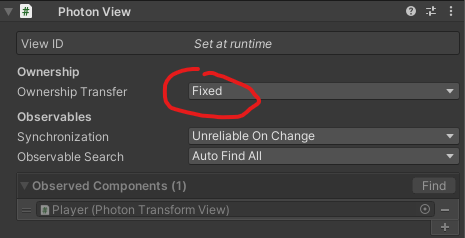
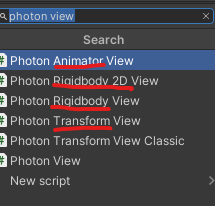
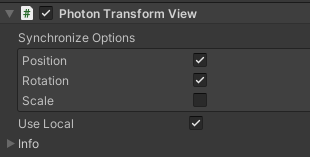
RPC = Remote procedures calls
# PRESENTING CODE
- Communication between PhotonViews
RpcTarget.All / RpcTarget.Others / by User Id
private void OnWeaponOutChanged(int val)
{
  photonView.RPC("NetworkedChangeWeaponState", RpcTarget.All, val);
}

[PunRPC]
private void NetworkedChangeWeaponState(int val)
{
  ....
}
Other ways to communicate
# PRESENTING CODE
- photon view custom Stream Buffers
void OnPhotonSerializeView(PhotonStream stream, PhotonMessageInfo info)
{
  if (stream.isWriting)
  {
  stream.SendNext(x);
  stream.SendNext(y);
  stream.SendNext(z);
  }
  else
  {
  x = (int)stream.ReceiveNext();
  y = (int)stream.ReceiveNext();
  z = (int)stream.ReceiveNext();
  }
}
Other ways to communicate
# PRESENTING CODE
Room Props, Player Props
public void SetPlayerTeam(string teamString)
{
  if (!playerProperties.ContainsKey("team"))
  {
  	playerProperties.Add("team", teamString);
  }
  playerProperties["team"] = teamString;
  PhotonNetwork.LocalPlayer.SetCustomProperties(playerProperties);
}
Resources
# PRESENTING CODE
- #1 recommendation: https://doc.photonengine.com/en-us/pun/v2/demos-and-tutorials/pun-basics-tutorial/intro
- Similar - Unity Netcode: https://www.youtube.com/watch?v=3yuBOB3VrCk&t=5s&ab_channel=CodeMonkey
- Theory: https://docs-multiplayer.unity3d.com/netcode/current/reference/glossary/high-level-terminology
- Photon Voice: https://assetstore.unity.com/packages/tools/audio/photon-voice-2-130518
- https://doc.photonengine.com/en-us/voice/current/getting-started/voice-for-pun
imr_2022_course_9
By silidragos