Teaching Alexa New Skills
Part 1: The Amazon Echo
Why Program for Echo?
Allows the developer to work in a voice-controlled environment without needing to build a speech recognition engine of their own.
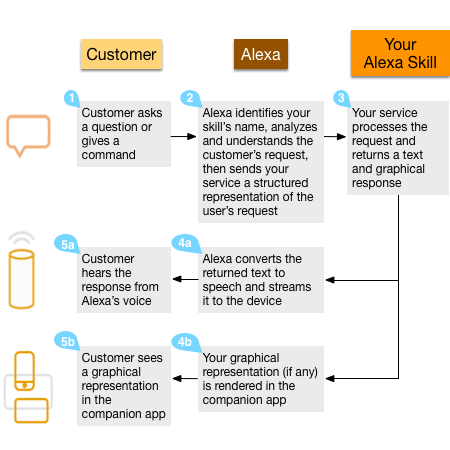
Amazon's service sends your app parsed responses in string form.
The Echo App Workflow
Teaching Alexa New Skills
Part 2: AWS Lambda & Echo's Dev Workflow
What is Lambda?
-
AWS Lambda is a compute service that runs developers' code in response to events and automatically manages the compute resources for them, making it easy to build applications that respond quickly to new information.
- Supports Node.js, Python, or Java.
- Requires no external hosting (though if you want to host your own service, Alexa can use that too).
Five Simple Steps
a. Settle on an Idea
b. Create your Intent Schema
c. Provide Alexa some Sample Utterances
d. Write your Lambda Function
e. Create your skill
Teaching Alexa New Skills
Part 3: Echo's Echo
3a. The Idea
Why doesn't a device named 'Echo' have the ability to echo responses?
3b. The Intent Schema
Tell Alexa the types of commands allowed in your app
{
  "intents": [
    {
      "intent": "EchoIntent",
      "slots": [
      {
        "name" : "Echo",
        "type": "AMAZON.LITERAL"
      }
     ]
    },
    {
      "intent": "AMAZON.HelpIntent"
    },
    {
      "intent": "AMAZON.StopIntent"
    }
  ]
}
3c. Sample Utterances
Tell Alexa the form of commands and interactions
EchoIntent {echoa|Echo} {echob|Echo}But wait? Why wouldn't this work...
EchoIntent {only_echo|Echo}3d.1 'Main' Function
exports.handler = function (event, context) {
    try {
        if (event.session.new) {
            onSessionStarted({requestId: event.request.requestId}, event.session);
        }
        if (event.request.type === "LaunchRequest") {

            // call onLaunch function

        } else if (event.request.type === "IntentRequest") {

            // call onIntent function

        } else if (event.request.type === "SessionEndedRequest") {

            onSessionEnded(event.request, event.session); // Handle session end
            context.succeed();
        }
    } catch (e) {
        context.fail("Exception: " + e);
    }
};
3d.2 Intent Router
//Called when the user specifies an intent for this skill.

function onIntent(intentRequest, session, callback) {

    var intent = intentRequest.intent,
        intentName = intentRequest.intent.name;

    // Dispatch to your skill's intent handlers
    if ("EchoIntent" === intentName) {

        echoReply(intent, session, callback); // Handle the EchoIntent

    } else if ("AMAZON.HelpIntent" === intentName) {

        getWelcomeResponse(callback); // Handle the HelpIntent

    } else if ("AMAZON.StopIntent" === intentName) {

        getStopResponse(callback); // Handle the StopIntent

    } else {

        throw "Invalid intent";

    }
}
3d.3 Welcome Handler
//function getStopResponse(callback)

function getWelcomeResponse(callback) {
    // If we wanted to initialize the session to have some attributes
    // we could add those here.
    var sessionAttributes = {};

    var cardTitle = "Welcome";

    var speechOutput = "Entering echo mode. " +
        "I will now repeat everything you say until I hear 'stop'" +
        ", or it stays quiet for 5 seconds.";

    // If the user either does not reply to the welcome message or
    // says something that is not understood, they will be prompted
    // again with this text.
    var repromptText = "";

    var shouldEndSession = false;

    callback(sessionAttributes,
        buildSpeechletResponse(cardTitle, speechOutput,
            repromptText, shouldEndSession));
}
3d.4 Echo Handler
function echoReply(intent, session, callback) {

    var cardTitle = intent.name;

    var wordsToRepeat = intent.slots.Echo;

    var repromptText = "";

    var sessionAttributes = {};

    var shouldEndSession = false;

    var speechOutput = wordsToRepeat.value;

    repromptText = "";

    callback(sessionAttributes,
         buildSpeechletResponse(cardTitle, speechOutput,
             repromptText, shouldEndSession));
}
3e. Assemble the App!
- Create your Lambda Function and record your ARN value.
- In Amazon's Developer Console, create a new Skill and initialize it with your ARN value, Intent Schema, Custom Slot Types (optional), and Sample Utterances.
- Assuming no errors, your Skill will validate and become testable!
4. Test your Skill
If you don't have an Echo, there's a JSON based tester in the Amazon Developers Console
Resources
- My Github Repo for tests: https://github.com/spencer-carver/alexa
- AWS Lambda: https://console.aws.amazon.com/lambda/home?region=us-east-1#/functions
- Amazon Dev Console: https://developer.amazon.com/edw/home.html#/skills/list
Teaching Amazon Echo New Skills
By Spencer Carver


