Publishing an Echo Skill
Part 1: Brief Recap
Five Simple Steps
a. Settle on an Idea
b. Create your Intent Schema
c. Provide Alexa some Sample Utterances
d. Write your Lambda Function
e. Create your skill
Six
f. Submit your skill for approval
Publishing an Echo Skill
Part 2: Stepping through an Idea
2a. The Idea
Have you ever wondered how long you (or another member of the household) has been gone?

Next we need a name that conveys the app's functionality, and a logo.
I have!
WatchDog
2b. The Intent Schema
Tell Alexa the types of commands allowed in your app
{
  "intents": [
    {
      "intent": "SingleLeaveIntent",
      "slots": [ { "name" : "User", "type": "AMAZON.US_FIRST_NAME" } ]
    },
    {
      "intent": "SingleReturnIntent",
      "slots": [ { "name" : "User", "type": "AMAZON.US_FIRST_NAME" } ]
    },
    {
      "intent": "AbsenceQueryIntent",
      "slots": [ { "name" : "User", "type": "AMAZON.US_FIRST_NAME" } ]
    },
    {
      "intent": "AMAZON.HelpIntent"
    },
    {
      "intent": "AMAZON.StopIntent"
    },
    {
      "intent": "AMAZON.CancelIntent"
    }
  ]
}
2c. Sample Utterances
Tell Alexa the form of commands and interactions
SingleLeaveIntent {User} is leaving now
SingleLeaveIntent {User} is heading out
SingleLeaveIntent {User} is leaving for work
SingleLeaveIntent {User} is heading to work
SingleLeaveIntent {User} is off for the day
SingleLeaveIntent {User} is heading out for the day
SingleReturnIntent {User} has returned
SingleReturnIntent {User} is back
SingleReturnIntent {User} is home
AbsenceQueryIntent How long has {User} been gone
AbsenceQueryIntent How long {User} has been gone
AbsenceQueryIntent How long has {User} been away
AbsenceQueryIntent How long {User} has been away
Persisting Data
Utilize DynamoDB from AWS
var doc = require('dynamodb-doc');
var dynamo = new doc.DynamoDB();
var tableName = "departureTimes";
2d. Database Operations
// Store an item
var now = new Date();
var item = { "username": user.value, "dateTime": now.toString() };
var params = { TableName: tableName, Item: item };

dynamo.putItem(params, function (err, data) {
    if (err) {
        processError(options, callback);
    } else {
        processLeaveData(options, data.Item, callback);
    }
});

// Retrieve an item

var key = { "username": user.value };
var params = { TableName: tableName, Key: key };

dynamo.getItem(params, function (err, data) {
    if (err) {
        processError(options, callback);
    } else if (data.Item === undefined) {
        processEmptyResponse(options, user.value, callback);
    } else {
        processQueryData(options, data.Item, callback);
    }
});
2e. Assemble the App!
- Create your Lambda Function and record your ARN value.
- In Amazon's Developer Console, create a new Skill and initialize it with your ARN value, Intent Schema, Custom Slot Types (optional), and Sample Utterances.
- Assuming no errors, your Skill will validate and become testable!
- Test your skill!
2f. Submit your Skill
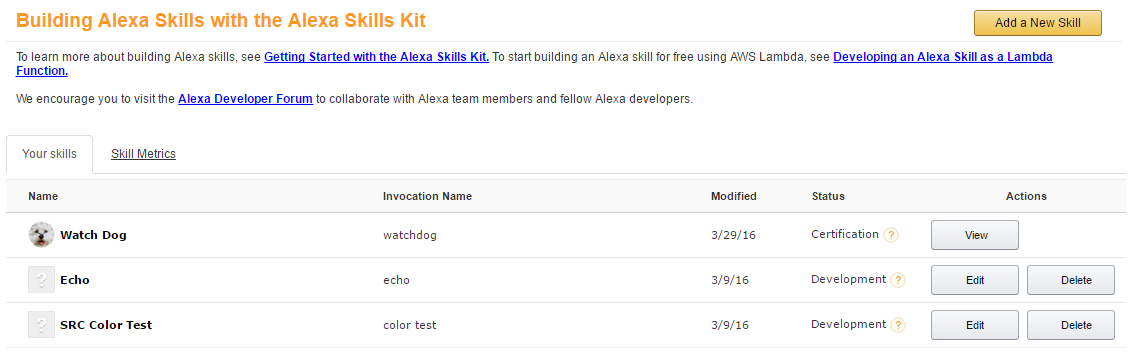
Once you have adequately tested your app, you are required to fill out some basic information (sample uses, description [short/long], privacy/linked accounts requirements). Amazon will then have their team evaluate your app.
Resources
- My Github Repo for tests: https://github.com/spencer-carver/alexa
- AWS Lambda: https://console.aws.amazon.com/lambda/home?region=us-east-1#/functions
- AWS DynamoDB:
https://console.aws.amazon.com/dynamodb/home?region=us-east-1# - Amazon Dev Console: https://developer.amazon.com/edw/home.html#/skills/list
Teaching Amazon Echo New Skills: Part 2
By Spencer Carver


