Node.js 網頁 (Old)
v0.29.7 - by 晴☆
Slides.com
就是你現在正在看的簡報網站,按 吧


使用方法
右下角的箭頭可以換頁,但簡報頁面的排列方式不是網格狀的,而是像很多串投影片,而它會記住使用者在每一串投影片的垂直位置(預設是最上方),所以先往下滑到底看完一個章節,再往右滑至另一個章節吧!
Title A
Title B
Title C
Title D
A1
B1
C1
D1
A2
C2
為什麼要用
- 線上方便共用
- 編輯介面簡單
- 支援數學嵌入
- 支援程式嵌入
- 很容易分章節
- 看起來就很酷

小提示:
-
也可以用鍵盤的方向鍵換頁
-
按 [Esc] 可以看縮圖
-
回到標題頁可以重置簡報順序
什麼是 Node.js
嗯 我知道它是一個綠色六角形

JavaScript
一種程式語言,通常用在網頁互動程式
- 感覺就很隨便
- 其實很好用
- 大部分人覺得很毒瘤
- 寫起來蠻漂亮的(至少我覺得
它不是 Java! 它不是 Java!
它不是 Java! 它不是 Java!
它不是 Java! 它不是 Java!

Node.js
可以單獨執行 JavaScript 的平台!
還可以裝模組包、分成很多檔案,很像在做專案
一般網頁:

執行 Node 程式:

> node ./MyFile.js
x: 10
y: █
實作一下
好像有個做漢堡的說法
開始實作之前
要確定 Node.js 有裝好欸
node -v還有 NPM(Node Package Manager)
npm -v然後記得開個終端機!
Hello World!
學程式肯定要從 Hello World 開始
console.log("Hello World!");-
console 就是你的控制台
可以用 .log() 輸出內容 .error() 報錯 .warn() 警告,都會換行
甚至還有 .time() 等奇怪功能
-
"Hello World!" 就是個普通字串
在 JavaScript 中單引號 ' 和雙引號 " 是等價的
-
分號
其實可以不要加,但我喜歡加一下,比較保險
node <your file name>Hello, AaW!
AaW 是誰?
超強,一三學術長 🛐
那我們的主題是輸出 Hello, <名字>!
const NAME = "AaW";

console.log("Hello, " + NAME + "!");-
const 宣告常數,不能改,相對地 var 則是宣告一般變數
變數不用宣告型別!
- 「+」可以組合字串
輸入……?
是不是有 console.input() 呢?
沒有!
npm install stdio然後理論上就可以輸入了!
理論上……
但內建有 readline,超難用
這邊推薦 stdio 模組包
改一下 code
為了避免以後麻煩
先把 code 改成這樣:
function main() {
    const NAME = "AaW";
    console.log("Hello, " + NAME + "!");
}

main();
宣告 main() 然後呼叫它
- function 宣告一個函數,不用標記回傳值型別
接著改成這樣,加上輸入:
const std = require("stdio");

function main() {
    const NAME = std.ask("Your name");
    console.log("Hello, " + NAME + "!");
}

main();
Your name: Hello, [object Promise]!結果:
好像不太對耶
來不及輸入,就輸出了奇怪的東西
因為 std.ask() 是非同步的函數!
怎麼忽然就變難了?
漢堡
我剛才講了非同步
本來就不太好理解
何況只有一堆程式碼
所以我要舉個例子
比方說我們來做個漢堡 🍔
Overcooked...
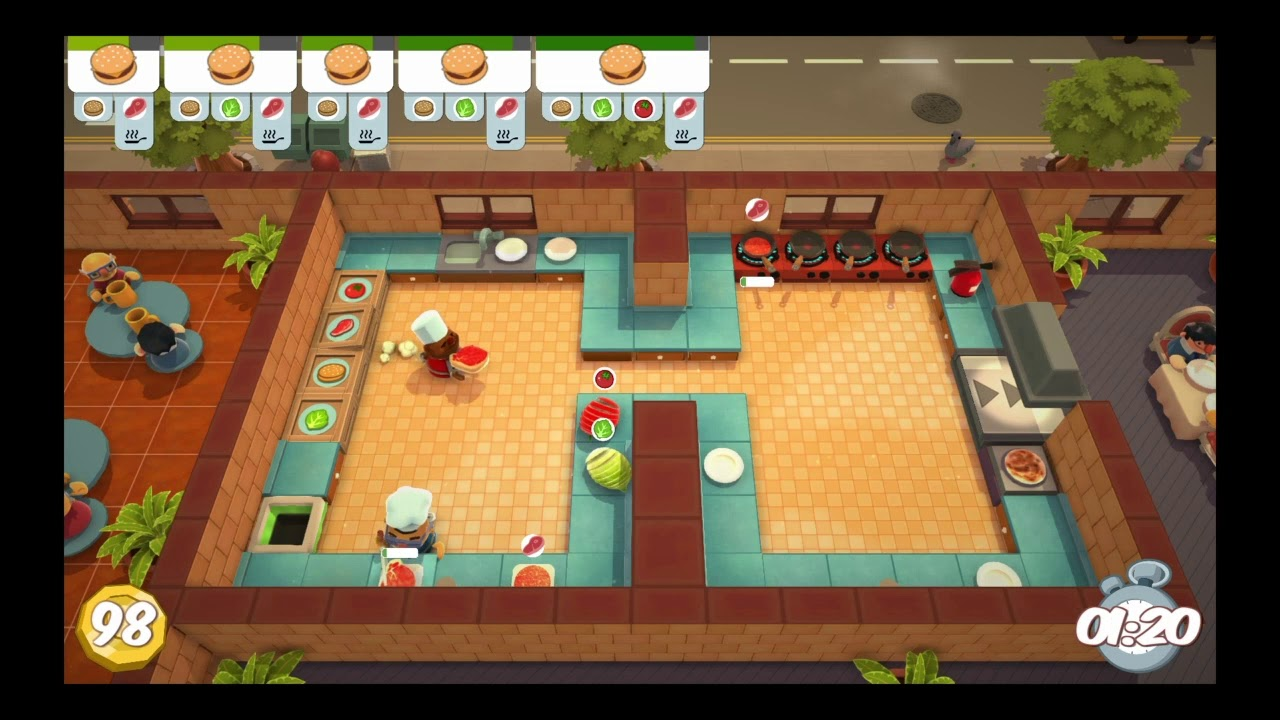













做漢堡
切菜
煮肉
做漢堡
切菜
煮肉
高
麗
菜
切
好
的
菜
所
有
食
材
生
豬
肉
煮
好
的
肉
漢
堡
做漢堡
切菜
煮肉
做漢堡
切菜
煮肉
等肉和菜做好才結束!
回來看 code
一個人做漢堡,同步的做法:
function cut(thing) {
    // 略
    return thing;
}

function fry(thing) {
    // 略
    return thing;
}

function makeHamburger(vegetable, meat, bread) {
    var cutVegetable = cut(vegetable);
    var friedMeat    = fry(meat);

    return bread + cutVegetable + friedMeat;
}

makeHamburger();
回來看 code
三個人做漢堡,非同步的做法:
async function cut(thing) {
    // 略
    return thing;
}

async function fry(thing) {
    // 略
    return thing;
}

async function makeHamburger(vegetable, meat, bread) {
    var cutVegetable = await cut(vegetable);
    var friedMeat    = await fry(meat);

    return bread + cutVegetable + friedMeat;
}

makeHamburger();
回來看 code
好像不太對!
這樣寫的話應該是:
    var cutVegetable = await cut(vegetable);
    var friedMeat    = await fry(meat);
(等待)
(等待)
煮肉
切菜
做漢堡
好像跟同步的一樣?
Promise
非同步的東西會回傳一個 Promise
……承諾?
回去看一下一開始的輸入:
const std = require("stdio");

function main() {
    const NAME = std.ask("Your name");
    console.log("Hello, " + NAME + "!");
}

main();
Your name: Hello, [object Promise]!正解:
const std = require("stdio");

async function main() {
    const NAME = await std.ask("Your name");
    console.log("Hello, " + NAME + "!");
}

main();
Your name: Huey☆
Hello, Huey☆!結果:
(上面那行的 Huey☆ 是我輸入的)
Promise 帶有它的狀態,比方說:
當還沒完成處理時是 Promise { <pending> }
完成時可能是 Promise { 結果 }
若使用 await 等待它,就會直接回傳值
var a = myAsyncFunction()
// a 現在是 Promise { <pending> }

// 過了 10 秒以後
// a 是 Promise { 0 }
假設今天我有一個 10 秒後會回傳 0 的函數:
var b = await myAsyncFunction()
// 等待十秒後,b 是 0
同時做,一起等?
剛才那樣是先發派去切菜,等菜切完,再發派去煮肉
var cutVegetable = await cut(vegetable);
var friedMeat    = await fry(meat);
var promise1 = cut(vegetable);
var promise2 = fry(meat);
var cutVegetable = await promise1;
var friedMeat = await promise2;應該要兩邊都先法派去工作,然後等待兩個人做完
Promise
Value
同時做,一起等?
剛才那樣是先發派去切菜,等菜切完,再發派去煮肉
var cutVegetable = await cut(vegetable);
var friedMeat    = await fry(meat);
var promise1 = cut(vegetable);
var promise2 = fry(meat);
var cutVegetable = await promise1;
var friedMeat = await promise2;應該要兩邊都先法派去工作,然後等待兩個人做完
Value
Promise
FS
Friendly Smile

檔案系統
內建的 File System 可以處理本機檔案
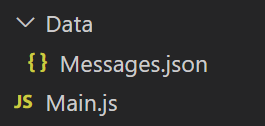
右邊是我的資料夾結構,下圖是檔案內容:
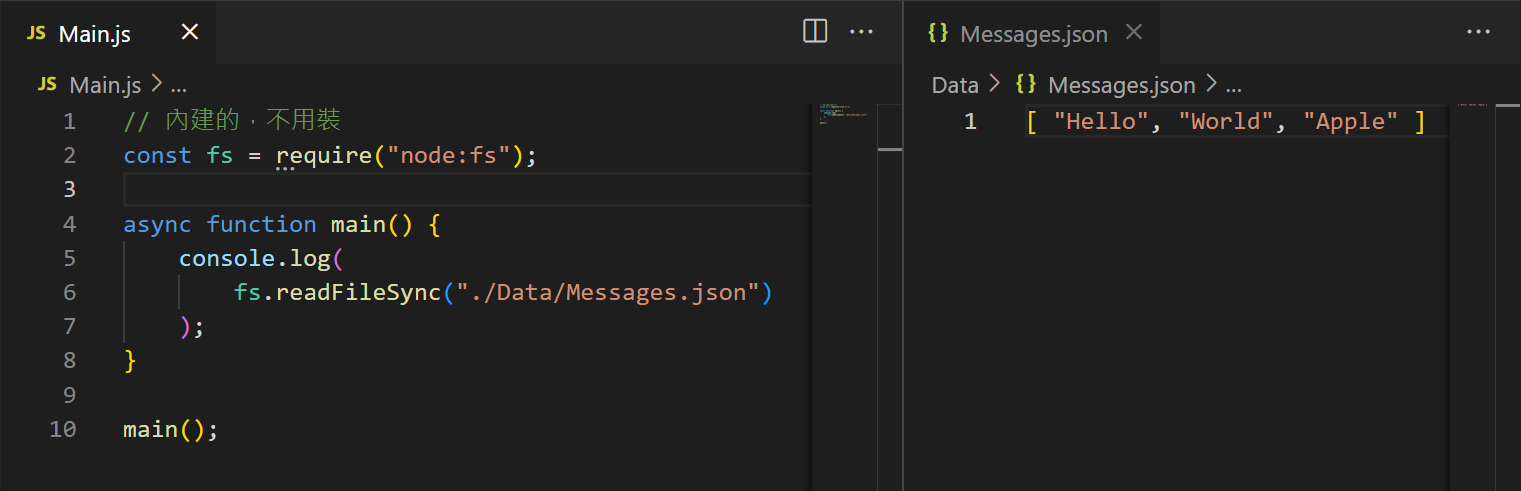
然後就得到了下列這一串奇怪的東西:
<Buffer 5b 20 22 48 65 6c 6c 6f 22 2c 20 22 57 6f 72 6c 64 22 2c 20 22 41 70 70 6c 65 22 20 5d>因為它是 Buffer, 不能顯示 加上 .toString() 方法:
const fs = require("node:fs");

async function main() {
    console.log(
        fs.readFileSync("./Data/Messages.json").toString()
    );
}

main();
[ "Hello", "World", "Apple" ]但它還是字串!
我們需要 JSON 資料
加上 JSON.parse(...) 解譯:
const fs = require("node:fs");

async function main() {
    const arr = JSON.parse(
        fs.readFileSync("./Data/Messages.json")
    );
    console.log(arr[0]);
}

main();HelloExpress
幾乎無關剛才講了半天的東西

檔案配置
我的檔案 Tree 如下:
C:.
│  Main.js
│
└─Data
        Index.html
        Script.js
        Style.css
Tree /fC:.
│ Main.js
│ README.md
│ RUN.sh
│
├─.vscode
│ launch.json
│ settings.json
│
├─Build
│ │ Client.js
│ │ ReloadCommands.js
│ │ SystemData.json
│ │ UpdateFileSystem.js
│ │
│ └─Commands
│ CustomResponse.js
│ Economy.js
│ Essentials.js
│ Games.js
│ Music.js
│ Quiz.js
│ Remineder.js
│ Scoreboard.js
│ Tools.js
│
├─ConstantListeners
│ │ Button.js
│ │ ClientReady.js
│ │ InteractionCommand.js
│ │ JoinGuild.js
│ │ MessageCommand.js
│ │ UpdateMember.js
│ │
│ └─Disabled
│ btn.old.js
│ general.template.js
│ itr_cmd.old.js
│ msg_cmd.old.js
│ normal_msg.old.js
│
├─Functions
│ ├─CustomResponse
│ │ ├─Buttons
│ │ │ List.js
│ │ │
│ │ ├─Commands
│ │ │ AddReact.js
│ │ │ AddReply.js
│ │ │ ForgetKeyword.js
│ │ │ ForgetSpecific.js
│ │ │ List.js
│ │ │
│ │ └─Handlers
│ │ Message.js
│ │
│ ├─EconomyBasic
│ │ └─Commands
│ │ Coins.js
│ │ Daily.js
│ │ Give.js
│ │
│ ├─Encryption
│ │ ├─Buttons
│ │ │ Publish.js
│ │ │
│ │ └─Commands
│ │ Decrypt.js
│ │ Encrypt.js
│ │
│ ├─ImageProcessing
│ │ │ MainHandler.js
│ │ │
│ │ └─Commands
│ │ Autocrop.js
│ │ Blur.js
│ │ Circle.js
│ │ Dither.js
│ │ Fisheye.js
│ │ Flip.js
│ │ Mirror.js
│ │ Resize.js
│ │ Rotate.js
│ │ Scale.js
│ │ Separate.js
│ │
│ ├─Mail
│ │ ├─Buttons
│ │ │ Check.js
│ │ │
│ │ └─Commands
│ ├─Music
│ │ └─Commands
│ │ Join.js
│ │ Leave.js
│ │ Pause.js
│ │ Play.js
│ │ Resume.js
│ │ Stop.js
│ │ Volume.js
│ │
│ ├─Reminder
│ │ └─Commands
│ │ Add.js
│ │
│ ├─RoleSystem
│ ├─Scoreboard
│ │ ├─Buttons
│ │ │ Add.js
│ │ │ Remove.js
│ │ │ Value.js
│ │ │
│ │ ├─Commands
│ │ │ Create.js
│ │ │
│ │ └─Tools
│ │ CircleEmoji.js
│ │
│ └─Various
│ ├─Buttons
│ │ ChooseAgain.js
│ │
│ └─Commands
│ Calculate.js
│ Choose.js
│ Impersonate.js
│ Ping.js
│
├─Hacks
│ │ General.js
│ │ Listener.js
│ │
│ ├─Commands
│ │ Logger.js
│ │ Transfer.js
│ │
│ ├─Data
│ │ Logger.json
│ │ Transfer.json
│ │
│ ├─Handlers
│ │ Logger.js
│ │ Transfer.js
│ │
│ └─Modules
│ Stamen.js
│
├─Modules
│ EmbedList.js
│ Logger.js
│ Pistil.js
│ Timer.js
│
└─ServersData
├─1014155633110556763
│ │ Data.json
│ │
│ └─Users
├─1016628892997517322
│ │ Data.json
│ │
│ └─Users
├─1074132253568938044
│ │ Data.json
│ │
│ └─Users
│ 845923211127947274.json
│ 880102161881632869.json
│
├─941613122358239273
│ │ Data.json
│ │
│ └─Users
│ 1091618094339854406.json
│ 845923211127947274.json
│ 947651644219359273.json
│
├─981914320415891536
│ │ Data.json
│ │
│ └─Users
│ 1091618094339854406.json
│ 845923211127947274.json
│
└─Template
│ Data.json
│
└─Users
Template.jsonExpress
簡易的網頁伺服器架設工具
參見 Mdn Docs
npm i express// Main.js
const PORT = 80;
const express = require("express"),
fs = require("node:fs");
var app = express();
app.get("/", async (req, res) => {
res.write(fs.readFileSync("./Source/Index.html"));
res.end();
});
app.post("/", async (req, res, next) => {
res.write("<body>This is a blank page!</body>");
res.end();
});
var server = app.listen(PORT, "0.0.0.0", async () => {
console.log(`Starting web server at port ${PORT}`);
});
IP 與 Port
IP 就是區分每一台電腦在網路上的位置
而可以申請網域,由好記的文字名稱連接到難記的 IP 位置
注意 IP 只是一個標記,外網 IP 和內網 IP 等等都不同
例如:127.0.0.1 或 localhost 可以連線到本機
Port 就是區分連線到這台主機是要幹什麼
比方說 80 和 443 是網站的預設,Minecraft 伺服器則是 25565
總共有 0 ~ 65535 不過有一些是保留,不可使用
可以用 my.cool.ip.address:port 指定 port
Request & Response
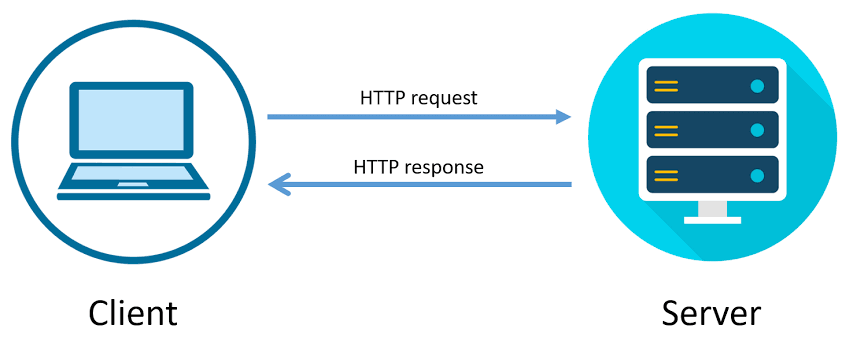
Get & Post
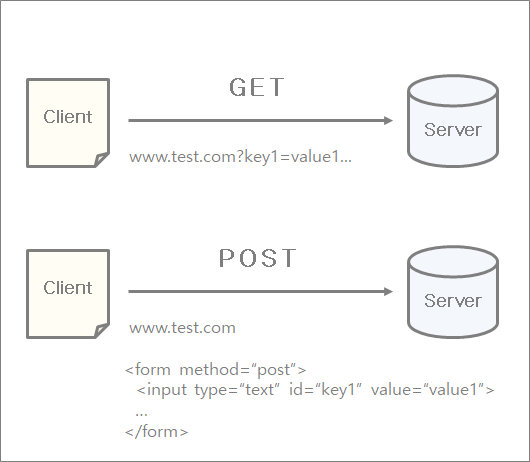
| Get | 我要看網頁 |
| Post | 我要傳資料 |
連線到 Google
→ Get Request
搜尋關鍵字
→ Get Request
輸入帳密,登入
→ Post Request
HTML
<!DOCTYPE html>
<html lang="zh-TW">
    <head>
        <!-- Bootstrap  -->
        <link
            rel="stylesheet"
            href="https://cdn.jsdelivr.net/npm/bootstrap@latest/dist/css/bootstrap.min.css"
        >
        <script
            src="https://maxcdn.bootstrapcdn.com/bootstrap/3.4.1/js/bootstrap.min.js"
        ></script>

        <!-- jQuery -->
        <script
            src="https://ajax.googleapis.com/ajax/libs/jquery/3.6.4/jquery.min.js"
        ></script>

        <meta charset="utf-8">

        <title> Homepage - Huey☆ </title>

        <!-- Custom -->
        <link rel="stylesheet" href="./Style.css">
        <script src="./Script.js"></script>

    </head>
    <body class="bg-dark text-white">
        <div class="container-fluid py-3 bd-navbar bg-secondary sticky-top">
            <ul class="nav justify-content-end">
                <li class="nav-item">
                    <a class="nav-link text-white" href="#">One</a>
                </li>
                <li class="nav-item">
                    <a class="nav-link text-white" href="#">Two</a>
                </li>
                <li class="nav-item">
                    <a class="nav-link text-white" href="#">Three</a>
                </li>
            </ul>
        </div>

        <div class="container py-5 scrollbar scrollbar-primary">
            <div class="h2"> Test Page! </div>

            <p> So, here is my test page. What is this for? I don't know, either.</p>

            <form method="POST" action="/">
                <input class="btn btn-primary" type="submit" value="Send Request" />
            </form>
        </div>
    </body>
</html>
參見 Mdn Docs
補充知識


登入系統
登入,然後就沒了

檔案 Tree
用 FS 來儲存使用者的資料
這樣就算重新啟動資料也不會消失
C:.
│  Main.js
│
├─Data
│      Users.json
│
└─Source
    │  Index.html
    │
    └─Login
            Index.html
HTML
<!DOCTYPE html>
<html lang="zh-TW" class="w-100 h-100">
    <head>
        <!-- Bootstrap  -->
        <link
            href="https://cdn.jsdelivr.net/npm/bootstrap@5.3.0-alpha3/dist/css/bootstrap.min.css"
            rel="stylesheet"
            integrity="sha384-KK94CHFLLe+nY2dmCWGMq91rCGa5gtU4mk92HdvYe+M/SXH301p5ILy+dN9+nJOZ"
            crossorigin="anonymous"
        />
        <script
            src="https://cdn.jsdelivr.net/npm/bootstrap@5.3.0-alpha3/dist/js/bootstrap.bundle.min.js"
            integrity="sha384-ENjdO4Dr2bkBIFxQpeoTz1HIcje39Wm4jDKdf19U8gI4ddQ3GYNS7NTKfAdVQSZe"
            crossorigin="anonymous"
        ></script>

        <!-- jQuery -->
        <script
            src="https://ajax.googleapis.com/ajax/libs/jquery/3.6.4/jquery.min.js"
        ></script>

        <meta charset="utf-8">

        <title> Login - Huey☆ </title>
    </head>
    <body data-bs-theme="dark" class="w-100 h-100 bg-dark text-white">
        <div class="w-100 h-100 p-0 m-0 d-flex flex-column">
            <div class="container-fluid py-3 bd-navbar bg-secondary sticky-top">
                <ul class="nav justify-content-end">
                    <li class="nav-item">
                        <a class="nav-link text-white" href="#">One</a>
                    </li>
                    <li class="nav-item">
                        <a class="nav-link text-white" href="#">Two</a>
                    </li>
                    <li class="nav-item">
                        <a class="nav-link text-white" href="#">Three</a>
                    </li>
                </ul>
            </div>

            <form class="container p-5 h-100 d-flex justify-content-center" method="POST" action="/account">
                <div class="login-box container p-0 bg-body-tertiary rounded d-flex flex-column" style="width: 40em;">
                    <div
                        class="rounded-top w-100 p-4 bg-light-subtle d-flex"
                        style="height: 5em;"
                    >
                        <h3>Login</h3>
                    </div>
                    <div class="w-100 p-4 flex-grow-1 d-flex flex-column align-content-center">
                        <p>User ID:</p>
                        <input type="text" name="id" />
                        <br />
                        <p>Password:</p>
                        <input type="password" name="password" />
                    </div>
                    <div
                        class="rounded-bottom w-100 p-4 bg-light-subtle d-flex justify-content-end"
                        style="height: 5em;"
                    >
                        <input
                            class="btn btn-secondary ms-2"
                            type="button"
                            name="register"
                            value="Register"
                        />
                        <input
                            class="btn btn-primary ms-2"
                            type="submit"
                            name="login"
                            value="Login"
                        />
                    </div>
                </div>
            </form>
        </div>
    </body>
</html>
HTML
Body
Form (POST)
Input...
Input...
處理 Request
app.get("/login", async (req, res, next) => {
    res.write(fs.readFileSync("./Source/Login/Index.html"));
    res.end();
});

app.post("/account", async (req, res, next) => {
    let body = "";

    req.on("data", function(chunk) {
      body += chunk.toString();
    });

    req.on("end", function() {
      console.log(body);
      res.send("Received POST request body: " + body);
    });
});
結果
長得很怪欸
Received POST request body: id=I+just+wanna+tell+you+how+I%27m+feeling...https://www.google.com.tw/search?q=i+just+wanna+tell+you+how+i%27m+feeling是百分號編碼 aka. 網址的格式 (url encoding)
翻譯一下……?
Body Parser
const bodyParser = require("body-parser");

// ...


app.use(bodyParser.urlencoded({ extended: false }));
app.post("/account", async (req, res, next) => {
console.log(req.body);
});npm i body-parser[Object: null prototype] {
name: "I just wanna tell you how I'm feeling..."
}存到檔案中
目前我們會收到的資料:
Starting web server at port 80
[Object: null prototype] { id: '', password: '', register: 'Register' }
[Object: null prototype] { id: '', password: '', login: 'Login' }
[Object: null prototype] { id: '', password: '', register: 'Register' }
[Object: null prototype] { id: '', password: '', login: 'Login' }
if (req.body["register"]) {
// ...
}
else if (req.body["login"]) {
// ...
}處理它:
const PORT = 80;

const express    = require("express"),
      bodyParser = require("body-parser"),
      fs         = require("node:fs"),
      path       = require("node:path");

var app = express();

app.use(bodyParser.urlencoded({ extended: false }));

app.get("/", async (req, res) => {
    res.write(fs.readFileSync("./Source/Index.html"));
    res.end();
});

app.post("/", async (req, res) => {
    res.send("This is a blank page!");
});

app.get("/login", async (req, res) => {
    res.write(fs.readFileSync("./Source/Login/Index.html"));
    res.end();
});

app.post("/account", async (req, res) => {
    var users = JSON.parse(fs.readFileSync("./Data/Users.json"));

    var { id, password } = req.body;

    if (!id) {
        res.send("Please enter your id!");
        return;
    }

    if (req.body["register"]) {
        if (users[id] !== undefined) {
            res.send("An account with the given ID already exists!");
            return;
        }
        users[id] = password;
        res.send(`Successfully registered as ${id}!`);
        return;
    }
    else if (req.body["login"]) {
        if (users[id] == password) {
            res.send(`Hello, ${id}! You have logged in!`);
            return;
        }
        else if (users[id]) {
            res.send("Wrong password!");
            return;
        }
        else {
            res.send("Account not found!");
            return;
        }
    }

    fs.writeFileSync("./Data/Users.json", JSON.stringify(users, null, 4));
});

var server = app.listen(PORT, "0.0.0.0", async () => {
    console.log(`Starting web server at port ${PORT}`);
});
檔案內容
{
    "username-1": "password-1",
    "star_huey": "960817"
}
不過這樣不太好
如果之後會加上其它資料的話
最好是寫成這樣:
{
    "star_huey": {
        "password": "960817",
        "height": 173,
        "weight": 47.5,
        "favorite-color": "orange"
    }
}
我們剛才儲存了使用者的資料
那我們來看看檔案內容
大概會長這樣:
其它功能
這個登入系統真的非常簡易
沒有規定密碼字元限制
沒辦法刪除帳號
也沒有「記住我」的功能
不過「記住我」的功能會用到 Cookies
像是這樣 →

下課
慘了 沒什麼內容
我是燒雞
對不起嘛
Node.js 筆記
By 晴☆