

Что не так с
чистым Реактом?
Минусы React 🫠
- Местами слишком гибкий
- Нет единой структуры проекта
- Роутинг
- Cложно настроить
- Code-splitting
- Негативно влияет на SEO
- Не поддерживает SSR "из коробки"
Старт проекта 👷♂️
- Код должен быть объединен с помощью сборщика, такого как webpack, и преобразован с помощью компилятора, такого как Babel.
- Вам необходимо провести оптимизацию, например, разделение кода.
- Возможно, вы захотите статически предварительно сгенерировать некоторые страницы для повышения производительности и SEO. Вы также можете использовать рендеринг на стороне сервера или на стороне клиента.

Заказчик
The React Framework
for Production

Еще один фреймворк?

За что мы любим Next.js ❤️
- SSG и SSR
- Оптимизация изображений
- Роутинг (включая интернационализацию)
- Code-splitting
- CCS modules и SASS
- Fast Refresh (Hot reload)
- И многое другое...
В Next.js страница - это компонент React, экспортированный из файла .js, .jsx, .ts или .tsx в папке pages.
Каждая страница связана с маршрутом на основе имени файла.
Роутинг
function About() {
  return <div>About</div>
}

export default About
Роутинг
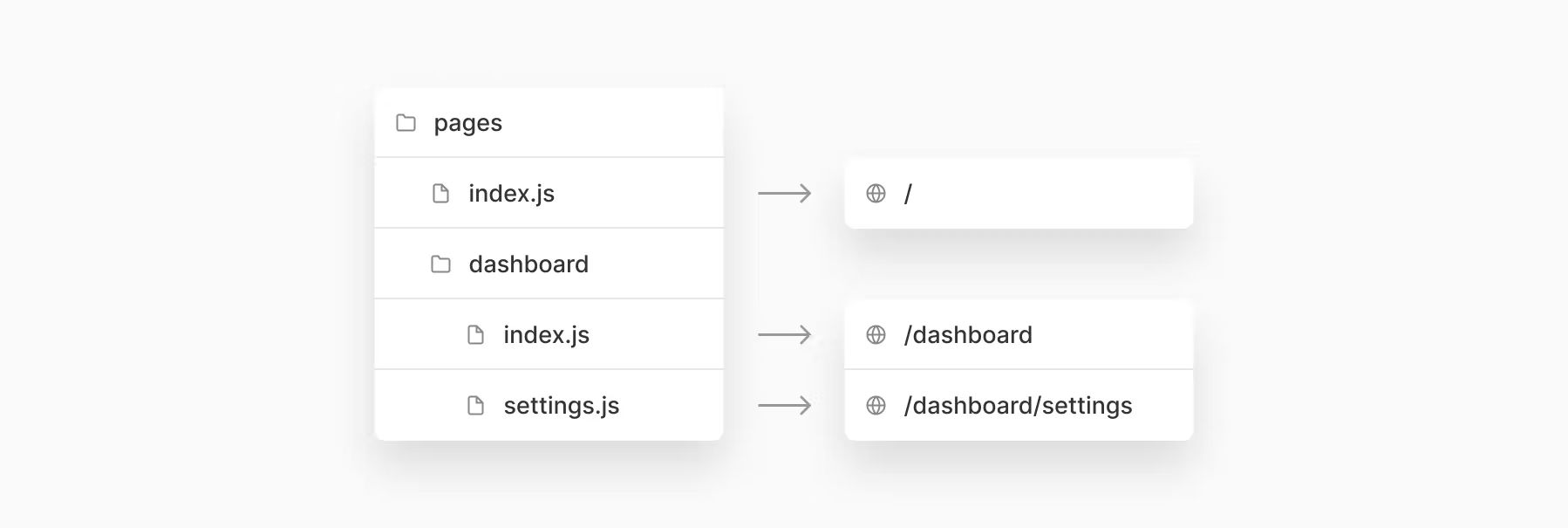
Динамические пути
pages/blog/[slug].js → /blog/:slug
pages/[username]/settings.js → /:username/settings
Встроенные страницы
- pages/_app
- pages/_document
- pages/404
- pages/500
next/link
import Link from 'next/link'

function Home() {
  return (
    <ul>
      <li>
        <Link href="/">
          <a>Home</a>
        </Link>
      </li>
      <li>
        <Link href="/about">
          <a>About Us</a>
        </Link>
      </li>
      <li>
        <Link href="/blog/hello-world">
          <a>Blog Post</a>
        </Link>
      </li>
    </ul>
  )
}

export default Home
next/router
import { useRouter } from 'next/router'

export default function Page() {
  const router = useRouter()

  return (
    <button type="button" onClick={() => router.push('/about')}>
      Click me
    </button>
  )
}
_app
import App from 'next/app'

export default function MyApp({ Component, pageProps }) {
  return <Component {...pageProps} />
}
_document
import { Html, Head, Main, NextScript } from 'next/document'

export default function Document() {
  return (
    <Html>
      <Head />
      <body>
        <Main />
        <NextScript />
      </body>
    </Html>
  )
}
Рендериг
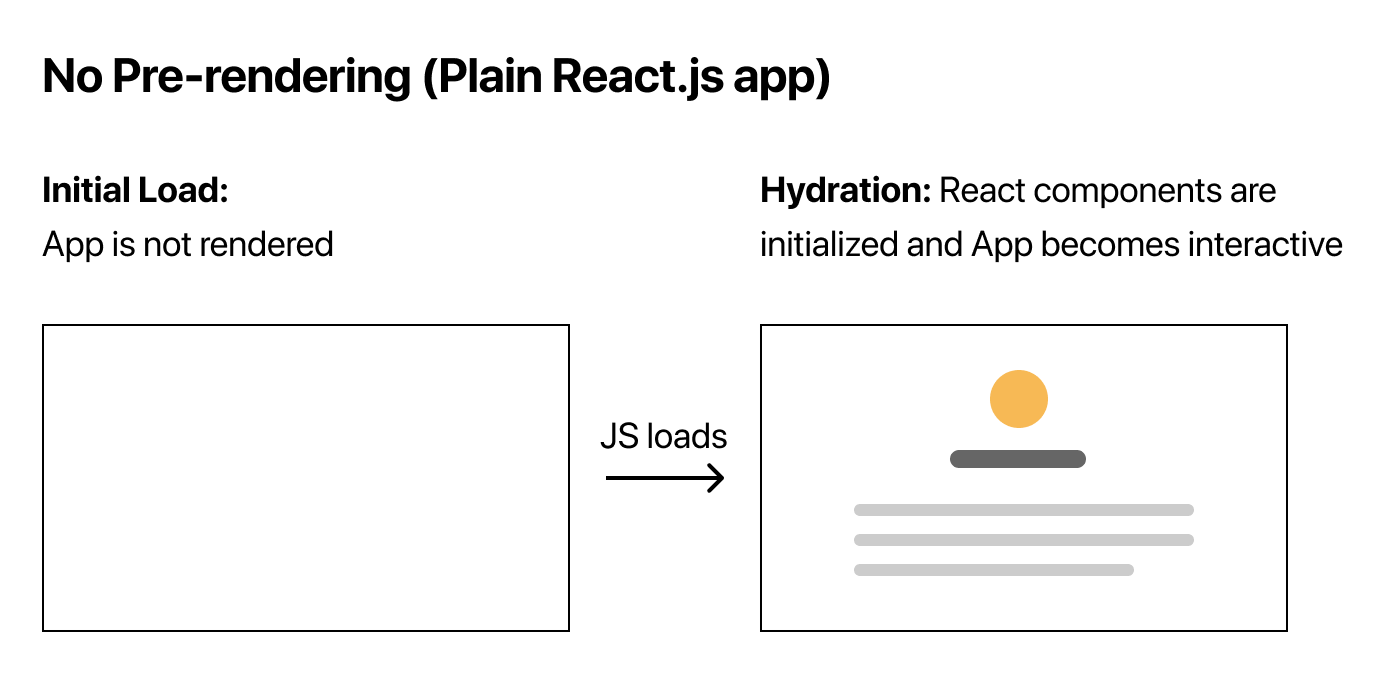
Рендеринг в Реакте 😕
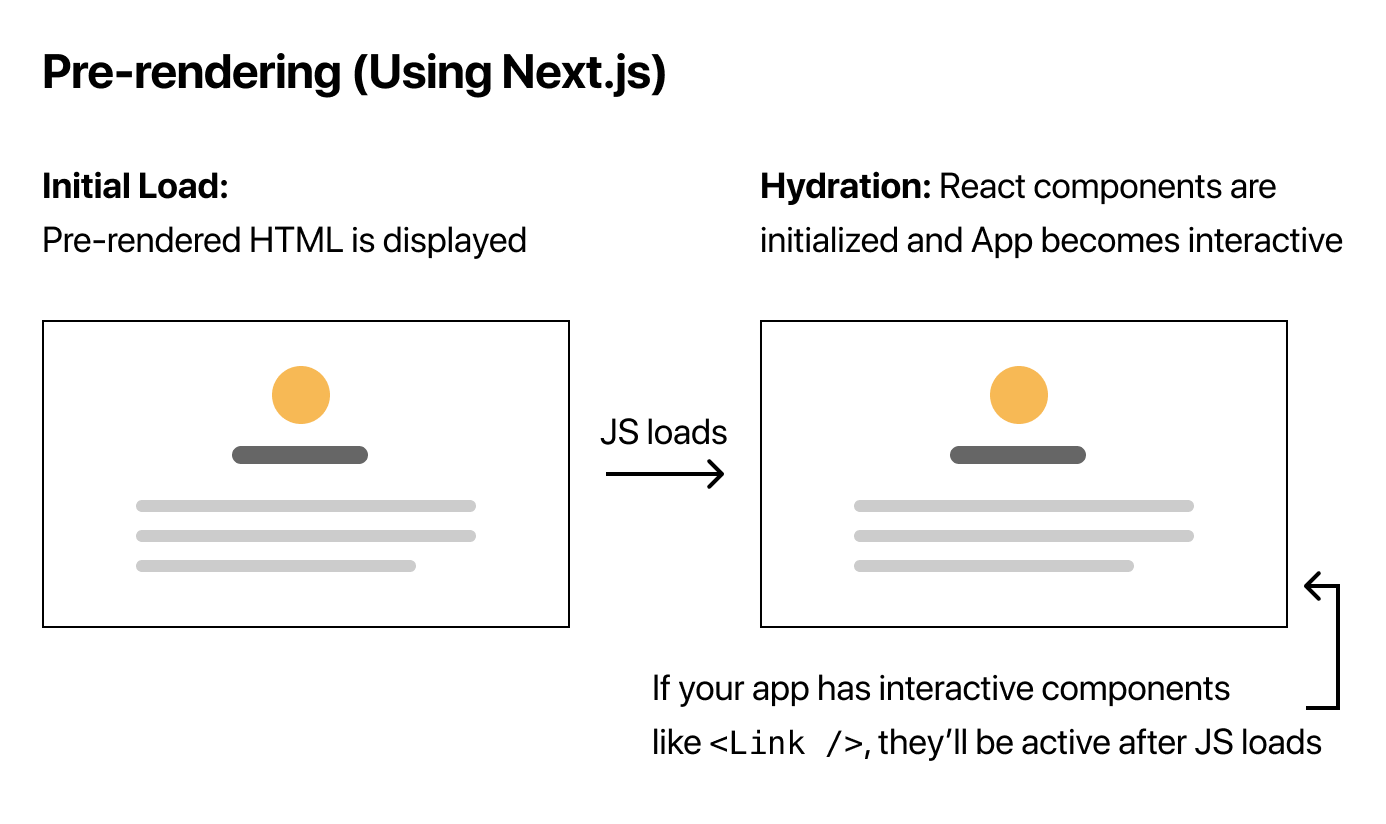
Пререндеринг 🤩
CSR (Client-side rendering)
SSR (Server-side rendering)
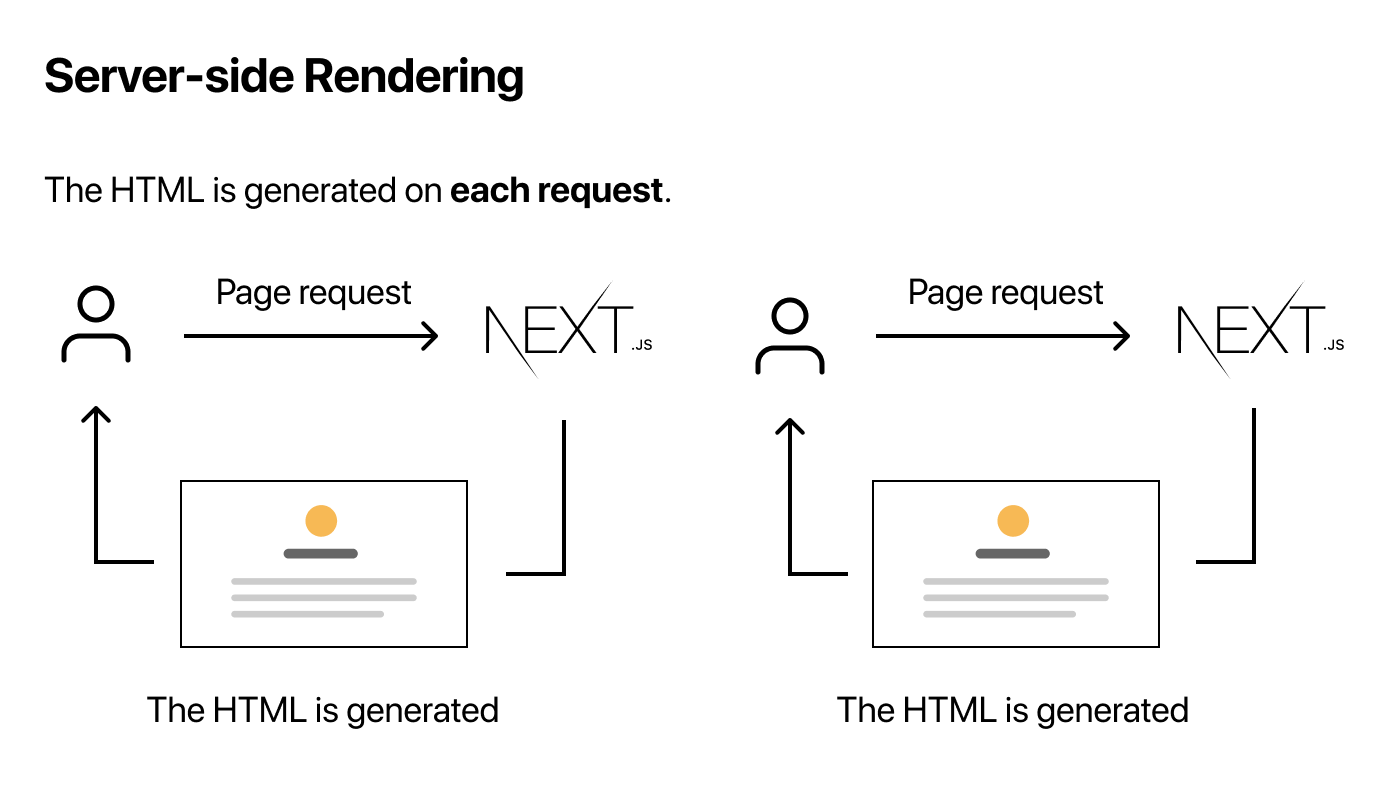
SSG (Static site generation) ❤️
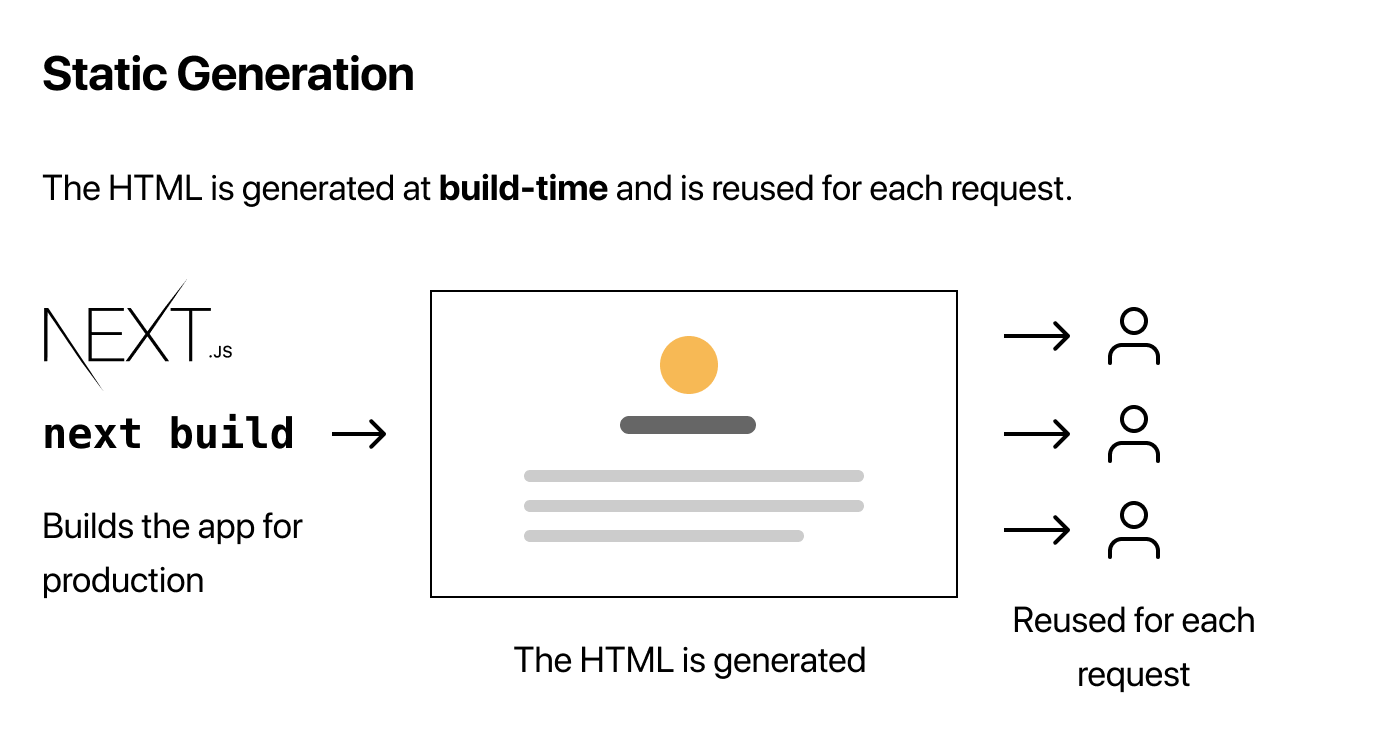
SSR - getServerSideProps
function Page({ data }) {
  // Render data...
}

// This gets called on every request
export async function getServerSideProps() {
  // Fetch data from external API
  const res = await fetch(`https://.../data`)
  const data = await res.json()

  // Pass data to the page via props
  return { props: { data } }
}

export default Page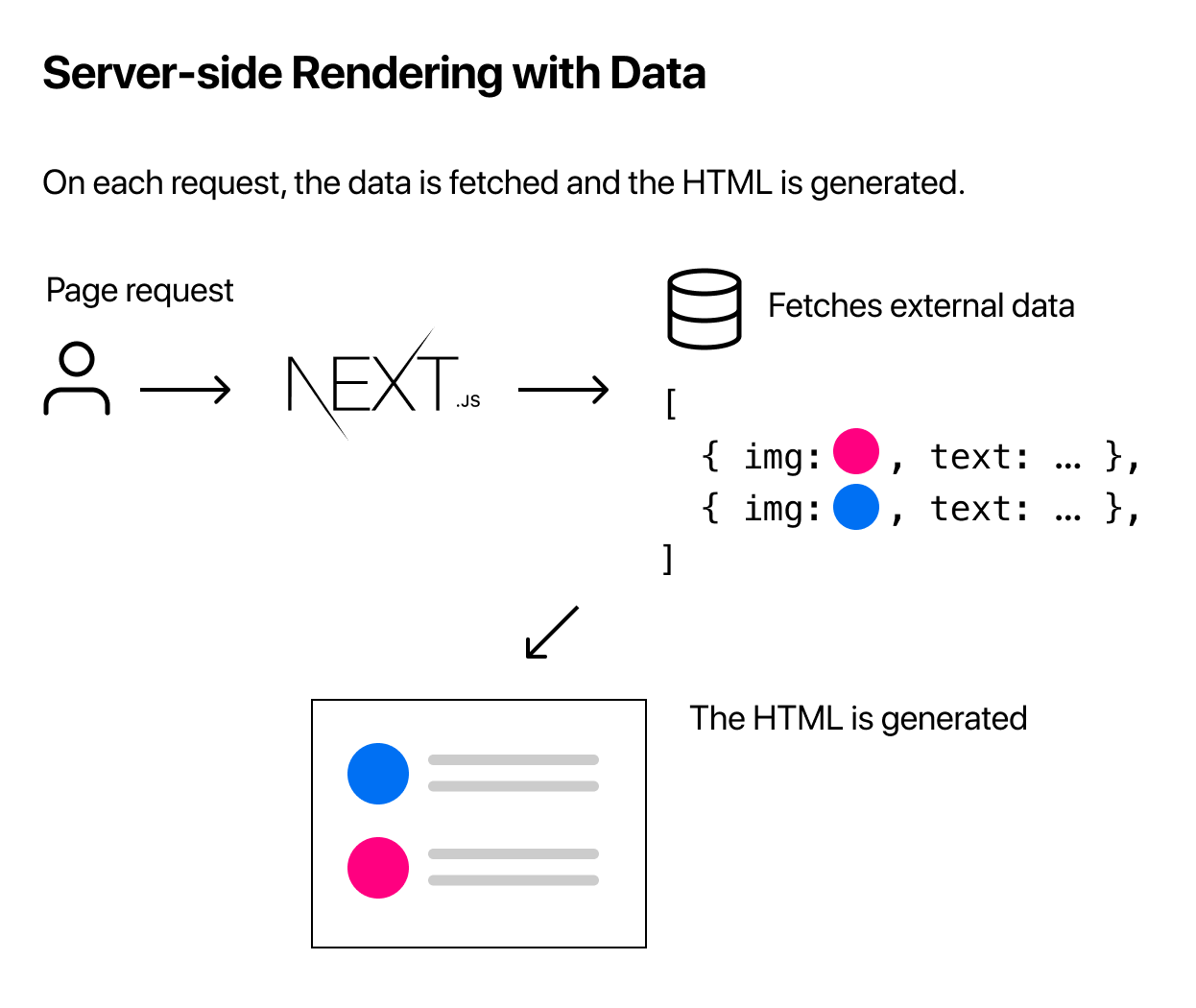
SSR со сторонними данными
SSG - getStaticProps
function Blog({ posts }) {
  return (
    <ul>
      {posts.map((post) => (
        <li>{post.title}</li>
      ))}
    </ul>
  )
}

export async function getStaticProps() {
  // Call an external API endpoint to get posts
  const res = await fetch('https://.../posts')
  const posts = await res.json()

  // By returning { props: { posts } }, the Blog component
  // will receive `posts` as a prop at build time
  return {
    props: {
      posts,
    },
  }
}

export default Blog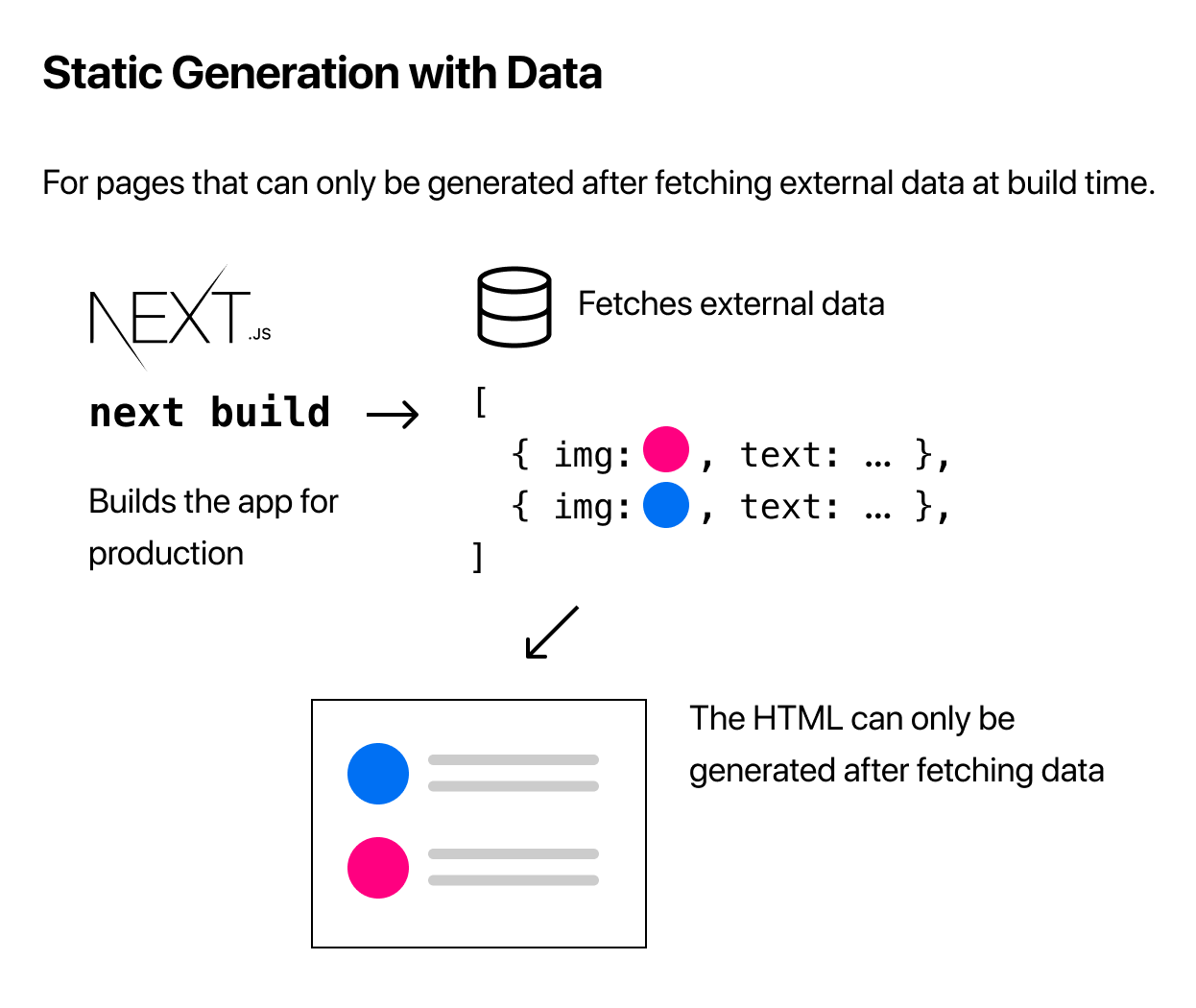
SSG со сторонними данными
А если SSG с динамическими роутами? 🧐
export async function getStaticPaths() {
  const res = await fetch('https://.../posts')
  const posts = await res.json()

  const paths = posts.map((post) => ({
      params: { postId: post.id },
  }))

  return {
    paths,
  };
}
А что использовать то? 🥸
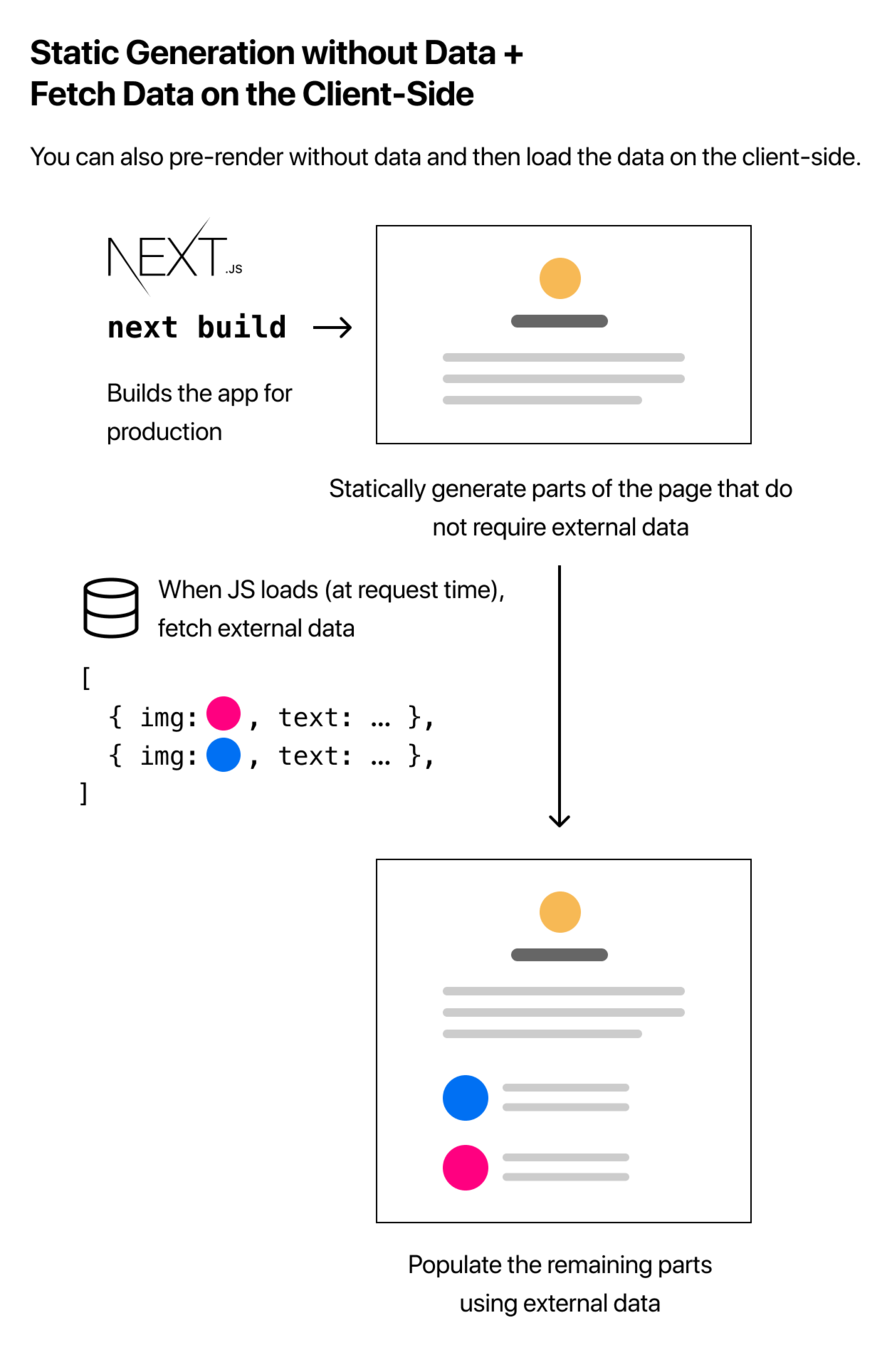
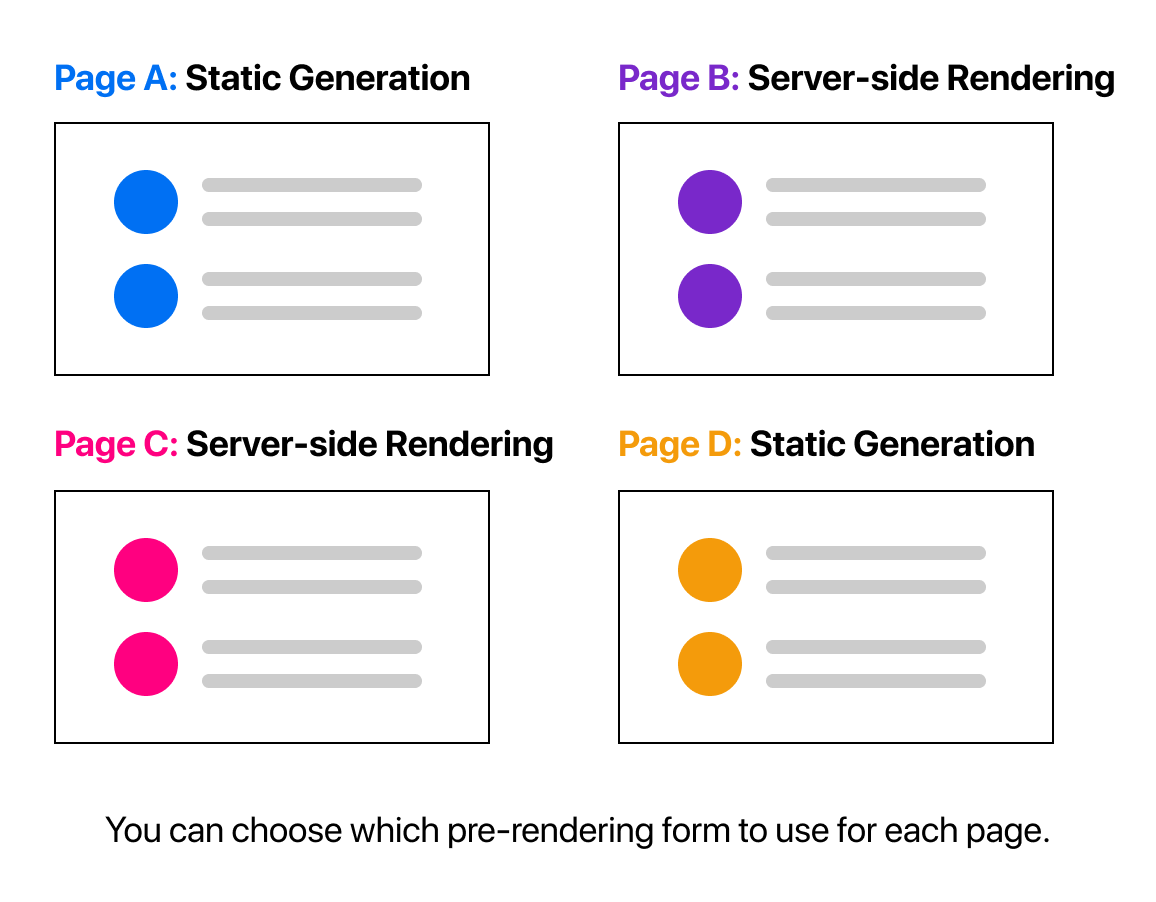
Можно использовать все 😎
API Routes
Можно писать backend!
Любой файл внутри папки pages/api сопоставляется
с /api/* и будет рассматриваться как эндпоинт сервера, а не страница.
Эндпоинты не включаются в бандл клиента.
export default function handler(req, res) {
  res.status(200).json({ name: 'John Doe' })
}
Управление состоянием
Client state и Server state
-
Состояние Интерфейса (Client State) — состояние в котором есть смысл только в интерфейсе пользователя, оно нужно для управления интерактивными частями приложения (к примеру, открытие модального окна — modal isOpen)
-
Кэш Сервера (Server State) — состояние которое размещено на сервере для быстрого доступа к нему на клиенте (к примеру — данные пользователя).
Управление клиентским состоянием
- useState
- useContext
- useReducer
- query Params
- browser storage
- возможно Redux, Redux Toolkit, Mobx, Recoil, ...

Performant and powerful data synchronization for React
Добавление в проект
import { QueryClient, QueryClientProvider } from 'react-query'

 // Create a client
 const queryClient = new QueryClient()

 function App() {
   return (
     // Provide the client to your App
     <QueryClientProvider client={queryClient}>
       <Todos />
     </QueryClientProvider>
   )
 }
useQuery
 import { useQuery } from 'react-query'

 const fetchTodoList = () => fetchTodos();

 function Todos() {
   const { isLoading, isFetching, isError, data, error } = useQuery('todos', fetchTodoList)

   if (isLoading) {
     return <span>Loading...</span>
   }

   if (isFetching) {
     return <span>Fetching...</span>
   }

   if (isError) {
     return <span>Error: {error.message}</span>
   }

   return (
     <ul>
       {data.map(todo => (
         <li key={todo.id}>{todo.title}</li>
       ))}
     </ul>
   )
}Query Keys
 // An individual todo
 useQuery(['todo', 5], ...)
 // queryKey === ['todo', 5]

 // Query Keys are hashed deterministically!
 // This means that no matter the order of keys in objects,
 // all of the following queries are considered equal:
 useQuery(['todos', { status, page }], ...)
 useQuery(['todos', { page, status }], ...)
 useQuery(['todos', { page, status, other: undefined }], ...)


 // The following query keys, however, are not equal.
 // Array item order matters!
 useQuery(['todos', status, page], ...)
 useQuery(['todos', page, status], ...)
 useQuery(['todos', undefined, page, status], ...)
Prefetching
 const prefetchTodos = async () => {
   // The results of this query will be cached like a normal query
   await queryClient.prefetchQuery('todos', fetchTodos)
 }
Mutations
import { useMutation } from 'react-query';

function App() {
   const { isLoading, isError, isSuccess, mutate } = useMutation(newTodo => {
     return axios.post('/todos', newTodo)
   })

   return (
     <div>
       {isLoading ? 'Adding todo...'
        : (
         <>
           {isError ? (<div>An error occurred: {mutation.error.message}</div>)
      		: null}

           {isSuccess ? <div>Todo added!</div> : null}

           <button
             onClick={() => {
               mutate({ id: new Date(), title: 'Do Laundry' })
             }}
           >
             Create Todo
           </button>
         </>
       )}
     </div>
   )
 }
Query Invalidation
 // Invalidate every query in the cache
 queryClient.invalidateQueries()
 // Invalidate every query with a key that starts with `todos`
 queryClient.invalidateQueries('todos')
import { useMutation, useQueryClient } from 'react-query'
const queryClient = useQueryClient()
// When this mutation succeeds, invalidate any queries
// with the `todos` or `reminders` query key
const mutation = useMutation(addTodo, {
onSuccess: () => {
queryClient.invalidateQueries('todos')
queryClient.invalidateQueries('reminders')
},
}) import { useMutation, useQueryClient } from 'react-query'
const queryClient = useQueryClient()
// When this mutation succeeds, invalidate any queries
// with the `todos` or `reminders` query key
const mutation = useMutation(addTodo, {
onSuccess: () => {
queryClient.invalidateQueries('todos')
queryClient.invalidateQueries('reminders')
},
})Updates from Mutation Response
 const useMutateTodo = () => {
   return useMutation(editTodo, {
     // Notice the second argument is the variables object
     // that the `mutate` function receives
     onSuccess: (data) => {
       queryClient.setQueryData(['todo', { id: data.id }], data)
     },
   })
 }
Next.js и React Query
By Startup Summer