Composants fondamentaux d'Android
Manifest
- Description XML des composants d'une application
- Fichier AndroidManifest.xml
- L'espace de nom Android déclare des balises et attributs à utiliser pour construire un manifeste
- La majorité des attributs ont le préfixe android:
<?xml version="1.0" encoding="utf-8"?>
<manifest xmlns:android="http://schemas.android.com/apk/res/android"
    package="edu.android.helloworld">

    <uses-sdk android:minSdkVersion="19" android:targetSdkVersion="21" />
    <uses-permission android:name="android.permission.INTERNET" />

    <application
        android:allowBackup="true"
        android:icon="@drawable/ic_launcher"
        android:label="@string/app_name"
        android:theme="@style/AppTheme">
        <activity
            android:name=".MainActivity"
            android:label="@string/app_name">
            <intent-filter>
                <action android:name="android.intent.action.MAIN" />
                <category android:name="android.intent.category.LAUNCHER" />
            </intent-filter>
        </activity>
    </application>

</manifest>
Tag <manifest>
-
<manifest> : noeud principal
- package : nom du package de l'application
- android:versionCode : code de la version de l'application
- android:versionName : nom de la version de l'application
-
<uses-sdk> : compatibilité de l'application
- android:minSdkVersion : version minimum de l'API
- android:targetSdkVersion : version recommandée de l'API
-
<uses-feature> : fonctionnalité utilisée
- android:name : nom de la fonctionnalité
- android:required : indique si la fonctionnalité est obligatoire
-
<uses-permissions> : permission d'exécution
- android:name : nom de la permission demandée
- android:maxSdkVersion : version maximum pour la demande
Tag <application>
-
<application> : déclaration de l'application
- android:icon : icône de l'application
- android:logo : logo de l'application (utilisée dans l'ActionBar)
- android:name : nom de l'application
- android:theme : thème visuel des interfaces graphiques
- <activity> : déclaration d'une activité
- <service> : déclaration d'un service
- <receiver> : déclaration d'un auditeur d'événements
- <provider> : déclaration d'un fournisseur de contenu
- <uses-library> : déclaration d'une librairie externe
Activité
- Composant principal d'une application gérant un écran (ou plusieurs mais c'est déconseillé)
- Instance de la classe Activity
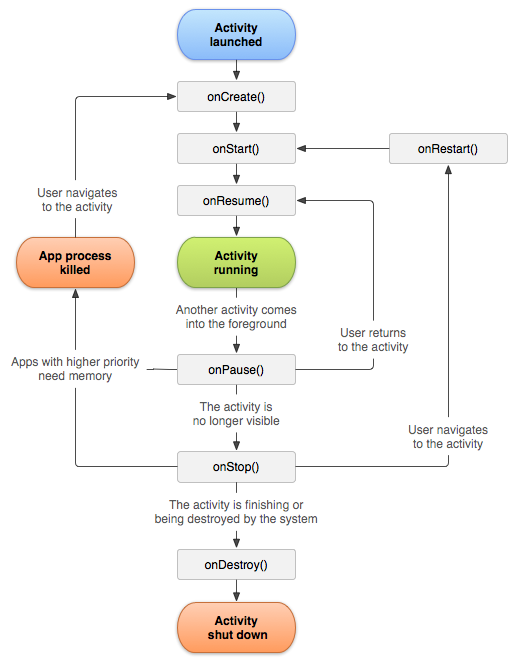
- Son cycle de vie est géré par des méthodes appelées par le système
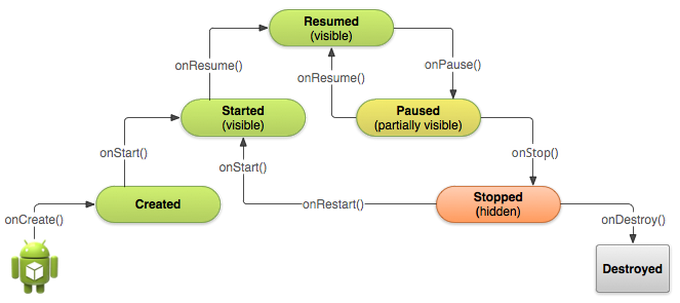
Cycle de vie
-
onCreate()
Appelée quand l'activité est créée -
onStart()
Appelée quand l'activité est visible -
onResume()
Appelée quand l'activité passe au premier plan -
onPause()
Appelée quand l'activité n'est plus au premier -
onStop()
Appelée quand l'activité va être arrêtée -
onDestroy()
Appelée avant l'arrêt de l'activité
<!-- AndroidManifest.xml -->
<activity android:name=".MainActivity" android:label="@string/app_name">
    <intent-filter>
        <action android:name="android.intent.action.MAIN" />
        <category android:name="android.intent.category.LAUNCHER" />
    </intent-filter>
</activity>


// MainActivity.java
public class MainActivity extends Activity implements SurfaceHolder.Callback {
    private Camera mCamera = null;
    @Override
    public void onCreate(Bundle savedInstanceState) {
        super.onCreate(savedInstanceState); // Always call the superclass method first
        setContentView(R.layout.main_activity); // Set the user interface layout for this Activity
        SurfaceView surface = (SurfaceView) findViewById(R.id.menu_settings);
        SurfaceHolder holder = surface.getHolder();
        holder.setType(SurfaceHolder.SURFACE_TYPE_PUSH_BUFFERS);
        holder.addCallback(this);
    }
    @Override
    public void surfaceCreated(SurfaceHolder holder) {
        initializeCamera();
    }
    @Override
    public void surfaceDestroyed(SurfaceHolder holder) {
        if (mCamera != null) { mCamera.stopPreview(); }
    }
    @Override
    public void onPause() {
        super.onPause(); // Always call the superclass method first
        // Release the Camera because we don't need it when paused and other activities might need to use it.
        if (mCamera != null) { mCamera.release(); mCamera = null; }
    }
    @Override
    public void onResume() {
        super.onResume(); // Always call the superclass method first
        // Get the Camera instance as the activity achieves full user focus
        if (mCamera == null) { initializeCamera(); }
    }
    private void initializeCamera() {
        try { mCamera.setPreviewDisplay(holder); mCamera.startPreview();
        } catch (IOException e) { e.printStackTrace(); }
    }
}
Restauration
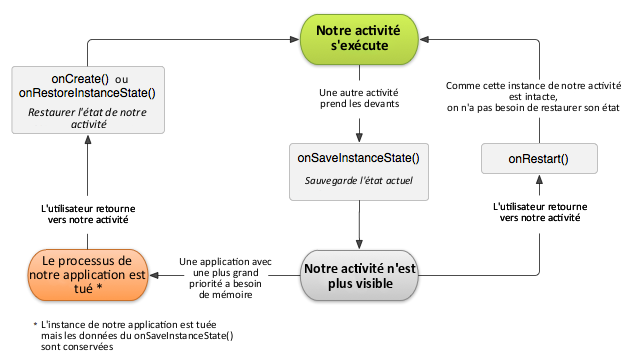
- La méthode onCreate() prend en paramètre une instance Bundle
- Bundle est une table clé/valeur utilisée pour conserver des informations après destruction
- La méthode onSaveInstanceState() est déclenchée lorsqu'il y a des chances que l'activité soit tuée
    private final static
        String MYKEY = "my.key";

    @Override
    protected void onSaveInstanceState
        (Bundle bundle) {

      super.onSaveInstanceState(bundle);
      bundle.putInt(MYKEY, 10);

      /*
       * On pourra le récupérer
       * plus tard avec
       * int resultat =
       *   bundle.getInt(MYKEY);
       */

    }
Types d'activités
-
AccountAuthenticatorActivity
Activité qui utilise AbstractAccountAuthenticator -
ActivityGroup
Afficher un ensemble d’activités dans un écran -
AliasActivity
Activité qui lance une autre activité -
ExpandableListActivity
Activité qui affiche une liste extensible -
ListActivity
Activité qui affiche une liste d’éléments -
LauncherActivity
Affiche une liste des activités utilisable pour une intention donnée -
PreferenceActivity
Affiche un arbre de préférence sous forme de liste -
TabActivity
Gère plusieurs activités imbriquées ou des vues
Service
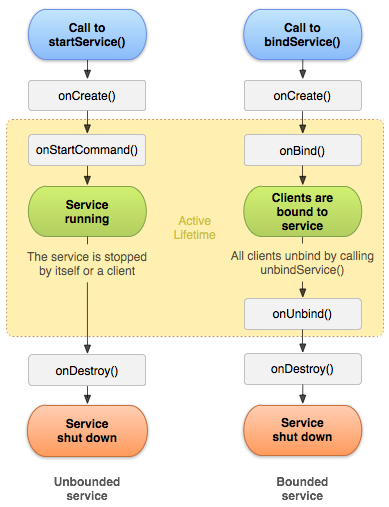
- Composant d'une application s'exécutant en tâche de fond
- Instance de la classe Service
- Un service peut être lancé manuellement...
- ...ou lorsqu'une activité tente d'y accéder
- Il peut être local ou accepter les connexions d'autres applications
public class LocalService extends Service {
    private NotificationManager mNM;
    // Unique Identification Number for the Notification. We use it on Notification start, and to cancel it.
    private int NOTIFICATION = R.string.local_service_started;
    /** Class for clients to access because we know this service runs in the same process as its clients, we don't need to deal with IPC. */
    public class LocalBinder extends Binder {
        LocalService getService() {
            return LocalService.this;
        }
    }
    @Override
    public void onCreate() {
        mNM = (NotificationManager)getSystemService(NOTIFICATION_SERVICE);
        // Display a notification about us starting.  We put an icon in the status bar.
        showNotification();
    }
    @Override
    public int onStartCommand(Intent intent, int flags, int startId) {
        Log.i("LocalService", "Received start id " + startId + ": " + intent);
        // We want this service to continue running until it is explicitly stopped, so return sticky.
        return START_STICKY;
    }
    @Override
    public void onDestroy() {
        // Cancel the persistent notification.
        mNM.cancel(NOTIFICATION);
        // Tell the user we stopped.
        Toast.makeText(this, R.string.local_service_stopped, Toast.LENGTH_SHORT).show();
    }
    @Override
    public IBinder onBind(Intent intent) {
        return mBinder;
    }
    // This is the object that receives interactions from clients. See RemoteService for a more complete example.
    private final IBinder mBinder = new LocalBinder();
    /** Show a notification while this service is running. */
    private void showNotification() {
        // In this sample, we'll use the same text for the ticker and the expanded notification
        CharSequence text = getText(R.string.local_service_started);
        // Set the icon, scrolling text and timestamp
        Notification notification = new Notification(R.drawable.stat_sample, text,
                System.currentTimeMillis());
        // The PendingIntent to launch our activity if the user selects this notification
        PendingIntent contentIntent = PendingIntent.getActivity(this, 0,
                new Intent(this, LocalServiceActivities.Controller.class), 0);
        // Set the info for the views that show in the notification panel.
        notification.setLatestEventInfo(this, getText(R.string.local_service_label),
                       text, contentIntent);
        // Send the notification.
        mNM.notify(NOTIFICATION, notification);
    }
}
private LocalService mBoundService;
private ServiceConnection mConnection = new ServiceConnection() {
public void onServiceConnected(ComponentName className, IBinder service) {
// This is called when the connection with the service has been
// established, giving us the service object we can use to
// interact with the service. Because we have bound to a explicit
// service that we know is running in our own process, we can
// cast its IBinder to a concrete class and directly access it.
mBoundService = ((LocalService.LocalBinder)service).getService();
// Tell the user about this for our demo.
Toast.makeText(Binding.this, R.string.local_service_connected,
Toast.LENGTH_SHORT).show();
}
public void onServiceDisconnected(ComponentName className) {
// This is called when the connection with the service has been
// unexpectedly disconnected -- that is, its process crashed.
// Because it is running in our same process, we should never
// see this happen.
mBoundService = null;
Toast.makeText(Binding.this, R.string.local_service_disconnected,
Toast.LENGTH_SHORT).show();
}
};
void doBindService() {
// Establish a connection with the service. We use an explicit
// class name because we want a specific service implementation that
// we know will be running in our own process (and thus won't be
// supporting component replacement by other applications).
bindService(new Intent(Binding.this,
LocalService.class), mConnection, Context.BIND_AUTO_CREATE);
mIsBound = true;
}
void doUnbindService() {
if (mIsBound) {
// Detach our existing connection.
unbindService(mConnection);
mIsBound = false;
}
}
@Override
protected void onDestroy() {
super.onDestroy();
doUnbindService();
}Intention
- Message traduisant une requête d'action à faire réaliser par un composant
- Facilite la communication
entre composants - Classe Intent
-
Cas d'utilisations
- Démarrer une activité
- Démarrer un service
- Diffuser un événement
-
Types d'intentions
- Explicite : le nom du composant destinataire est défini
- Implicite : le composant destinataire est défini par les actions demandées dans la requête
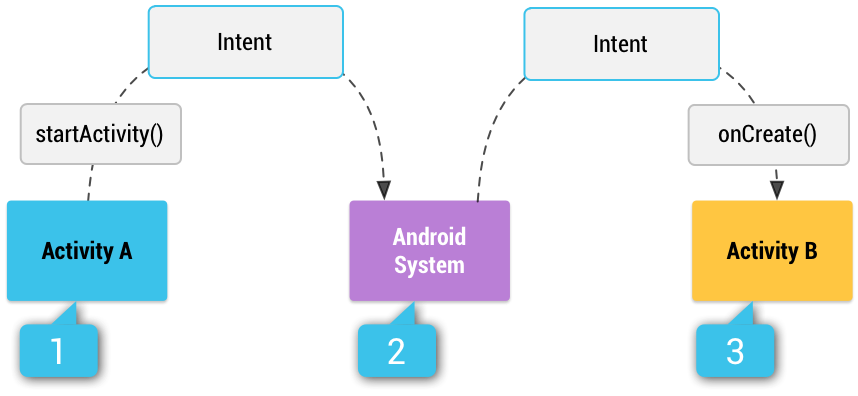
Illustration of how an implicit intent is delivered through the system to start another activity: [1] Activity A creates an Intent with an action description and passes it to startActivity(). [2] The Android System searches all apps for an intent filter that matches the intent. When a match is found, [3] the system starts the matching activity (Activity B) by invoking its onCreate() method and passing it the Intent.
Construction
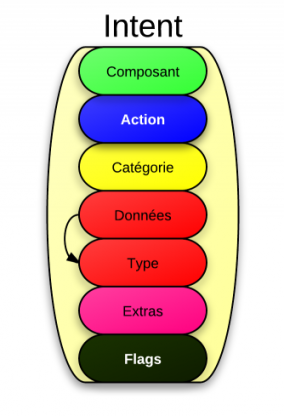
- Une intention contient des informations concernant le composant qui doit l'a traiter
- Le champ Component rend l'intention explicite en renseignant le composant destinataire
- Sinon il s'agit d'une intention implicite et il faut renseigner d'autres champs pour déterminer les destinataires
- Action : ce que le destinataire doit faire
- Data : les données utilisées pour réaliser l'action
- Type : indique le type de données incluses
- Category : détermine le type de destinataire
- Extra : informations supplémentaires
- Flags : pour modifier le comportement de l'intention
Source : OpenClassroom
// On déclare une constante dans la classe FirstClass
public final static String NOMS = "sdz.chapitreTrois.intent.examples.NOMS";

// Autre part dans le code
Intent i = new Intent();
String[] noms = new String[] {"Dupont", "Dupond"};
i.putExtra(FirstClass.NOMS, noms);

// Encore autre part
String[] noms = i.getStringArrayExtra(FirstClass.NOMS);
Traitement
- Une intention est attendue en paramètre de différentes méthodes
-
Activity
- startActivity() pour démarrer une nouvelle activité
- startActivityForResult() nouvelle activité retournant un résultat
-
Service
- startService() pour démarrer un service
- bindService() pour joindre un service (démarré si nécessaire)
-
BroadcastReceiver
- sendBroadcast() diffuse une intention
- sendOrderedBroadcast() diffuse une intention progressivement
- sendStickyBroadcast() dépréciée à partir de l'API 21
-
Activity
Filtres d'intentions
- Utilisées pour indiquer les types d'intentions pouvant être traitées par l'application
- Les filtres s'appliquent à des paramètres implicites de l'intention
- Les filtres sont définis dans le manifeste
<application android:icon="@drawable/app_notes"
  android:label="@string/app_name" >
    <provider android:name="NotePadProvider"
      android:authorities="com.google.provider.NotePad" />
    <activity android:name="NotesList" android:label="@string/title_notes_list">
        <intent-filter>
            <action android:name="android.intent.action.MAIN" />
            <category android:name="android.intent.category.LAUNCHER" />
        </intent-filter>
        <intent-filter>
            <action android:name="android.intent.action.VIEW" />
            <action android:name="android.intent.action.EDIT" />
            <action android:name="android.intent.action.PICK" />
            <category android:name="android.intent.category.DEFAULT" />
            <data android:mimeType="vnd.android.cursor.dir/vnd.google.note" />
            </intent-filter>
        <intent-filter>
            <action android:name="android.intent.action.GET_CONTENT" />
            <category android:name="android.intent.category.DEFAULT" />
            <data android:mimeType="vnd.android.cursor.item/vnd.google.note" />
        </intent-filter>
    </activity>
    <!-- ... -->
</application>
Parcelable (1/2)
- Il est possible d'associer un Bundle ou un Intent à une intention avec putExtras()
- La table clé/valeur d'un Bundle permet de définir des données de types standards
- L'implémentation de l'interface Parcelable permet à un objet d'être sérializable
- describeContents() pour indiquer la présence de paramètres spéciaux
- writeToParcel() pour écrire les attributs d'un objet dans un Parcel
- Attention ! Il faut écrire les attributs dans le Parcel dans l'ordre de déclaration de la classe
Parcelable (2/2)
import android.os.Parcel;
import android.os.Parcelable;

public class Contact implements Parcelable{
  public static final Parcelable.Creator<Contact> CREATOR = new Parcelable.Creator<Contact>() {
    @Override
    public Contact createFromParcel(Parcel source) {
      return new Contact(source);
    }
    @Override
    public Contact[] newArray(int size) {
      return new Contact[size];
    }
  };

  private String mNom;
  private String mPrenom;
  private int mNumero;
  public Contact(String pNom, String pPrenom, int pNumero) {
    mNom = pNom;
    mPrenom = pPrenom;
    mNumero = pNumero;
  }
  public Contact(Parcel in) {
    mNom = in.readString();
    mPrenom = in.readString();
    mNumero = in.readInt();
  }
  @Override
  public int describeContents() {
    //On renvoie 0, car notre classe ne
    // contient pas de paramètres spéciaux
    return 0;
  }
  @Override
  public void writeToParcel(Parcel dest, int flags) {
    // On ajoute les objets dans
    // l'ordre dans lequel on les a déclarés
    dest.writeString(mNom);
    dest.writeString(mPrenom);
    dest.writeInt(mNumero);
  }
}

// Autre part dans le code
Intent i = new Intent();
Contact c = new Contact("Dupont", "Dupond", 06);
i.putExtra("sdz.chapitreTrois.intent.examples.CONTACT", c);
// Autre part dans le code
Contact c = i.getParcelableExtra("sdz.chapitreTrois.intent.examples.CONTACT");
Intention explicite sans retour
package sdz.chapitreTrois.intent.example;

import android.app.Activity;
import android.content.Intent;
import android.os.Bundle;
import android.view.View;
import android.widget.Button;

public class MainActivity extends Activity {
  public final static String AGE
    = "sdz.chapitreTrois.intent.example.AGE";

  private Button mPasserelle = null;

  @Override
  public void onCreate(Bundle savedInstanceState) {
    super.onCreate(savedInstanceState);
    setContentView(R.layout.activity_main);

    mPasserelle = (Button) findViewById(R.id.passerelle);

    mPasserelle.setOnClickListener(new View.OnClickListener() {
      @Override
      public void onClick(View v) {
        // Le premier paramètre est le nom de l'activité actuelle
        // Le second est le nom de l'activité de destination
        Intent secondeActivite =
            new Intent(MainActivity.this, IntentExample.class);

        // On rajoute un extra
        secondeActivite.putExtra(AGE, 31);

        // Puis on lance l'intent !
        startActivity(secondeActivite);
      }
    });
  }
}
package sdz.chapitreTrois.intent.example;
import android.app.Activity;
import android.os.Bundle;
public class IntentExample extends Activity {
@Override
public void onCreate(Bundle savedInstanceState) {
super.onCreate(savedInstanceState);
setContentView(R.layout.layout_example);
// On récupère l'intent qui a lancé cette activité
Intent i = getIntent();
// Puis on récupère l'âge donné dans l'autre activité,
// ou 0 si cet extra n'est pas dans l'intent
int age = i.getIntExtra(MainActivity.AGE, 0);
// S'il ne s'agit pas de l'âge par défaut
if(age != 0)
// Traiter l'âge
age = 2;
}
}Intention explicite avec retour
public class MainActivity extends Activity {
  private Button mPasserelle = null;
  // L'identifiant de notre requête
  public final static int CHOOSE_BUTTON_REQUEST = 0;
  // L'identifiant de la chaîne de caractères
  // qui contient le résultat de l'intent
  public final static String BUTTONS =
    "sdz.chapitreTrois.intent.example.Boutons";

  @Override
  public void onCreate(Bundle savedInstanceState) {
    super.onCreate(savedInstanceState);
    setContentView(R.layout.activity_main);

    mPasserelle = (Button) findViewById(R.id.passerelle);

    mPasserelle.setOnClickListener(new View.OnClickListener() {
      @Override
      public void onClick(View v) {
        Intent secondeActivite =
            new Intent(MainActivity.this, IntentExample.class);
        // On associe l'identifiant à notre intent
        startActivityForResult(secondeActivite,
            CHOOSE_BUTTON_REQUEST);
      }
    });
  }

  @Override
  protected void onActivityResult(int requestCode,
                                    int resultCode, Intent data) {
    // On vérifie tout d'abord à quel intent on fait
    // référence ici à l'aide de notre identifiant
    if (requestCode == CHOOSE_BUTTON_REQUEST) {
      // On vérifie aussi que l'opération s'est bien déroulée
      if (resultCode == RESULT_OK) {
        // On affiche le bouton qui a été choisi
      	Toast.makeText(this, "Vous avez choisi le bouton "
            + data.getStringExtra(BUTTONS),
            Toast.LENGTH_SHORT).show();
      }
    }
  }
}
public class IntentExample extends Activity {
private Button mButton1 = null;
private Button mButton2 = null;
@Override
public void onCreate(Bundle savedInstanceState) {
super.onCreate(savedInstanceState);
setContentView(R.layout.layout_example);
mButton1 = (Button) findViewById(R.id.button1);
mButton1.setOnClickListener(new View.OnClickListener() {
@Override
public void onClick(View v) {
Intent result = new Intent();
result.putExtra(MainActivity.BUTTONS, "1");
setResult(RESULT_OK, result);
finish();
}
});
mButton2 = (Button) findViewById(R.id.button2);
mButton2.setOnClickListener(new View.OnClickListener() {
@Override
public void onClick(View v) {
Intent result = new Intent();
result.putExtra(MainActivity.BUTTONS, "2");
setResult(RESULT_OK, result);
finish();
}
});
}
}Diffusion d'intention
<receiver android:name="CoucouReceiver">
  <intent-filter>
    <action
      android:name="sdz.chapitreTrois.intent.action.coucou" />
  </intent-filter>
</receiver>


public class CoucouReceiver extends BroadcastReceiver {
  private static final String NOM_USER =
    "sdz.chapitreTrois.intent.extra.NOM";

  // Déclenché dès qu'on reçoit un broadcast intent
  // qui réponde aux filtres déclarés dans le Manifest
  @Override
  public void onReceive(Context context, Intent intent) {
    // On vérifie qu'il s'agit du bon intent
    if(intent.getAction().equals("ACTION_COUCOU")) {
      // On récupère le nom de l'utilisateur
      String nom = intent.getExtra(NOM_USER);
      Toast.makeText(context, "Coucou " + nom + " !",
        Toast.LENGTH_LONG).show();
    }
  }
}
import android.app.Activity;
import android.content.IntentFilter;
import android.os.Bundle;

public class CoucouActivity extends Activity {
  private static final String COUCOU =
    "sdz.chapitreTrois.intent.action.coucou";
  private IntentFilter filtre = null;
  private CoucouReceiver receiver = null;

  @Override
  public void onCreate(Bundle savedInstanceState) {
    super.onCreate(savedInstanceState);
    setContentView(R.layout.activity_main);

    filtre = new IntentFilter(COUCOU);
    receiver = new CoucouReceiver();
  }

  @Override
  public void onResume() {
    super.onResume();
    registerReceiver(receiver, filtre);
  }

  /** Si vous déclarez votre receiver dans le onResume,
  n'oubliez pas qu'il faut l'arrêter dans le onPause **/
  @Override
  public void onPause() {
    super.onPause();
    unregisterReceiver(receiver);
  }
}
Fournisseur de contenu
- L'accès aux données est réalisé à travers un client ContentResolver
- Un client fournit des méthodes CRUD pour gérer la persistance de données
// Queries the user dictionary and returns results
mCursor = getContentResolver().query(
    UserDictionary.Words.CONTENT_URI,   // The content URI of the words table
    mProjection,                        // The columns to return for each row
    mSelectionClause                    // Selection criteria
    mSelectionArgs,                     // Selection criteria
mSortOrder); // The sort order for the returned rows| query() argument | SELECT parameter | Notes |
|---|---|---|
| Uri | FROM table_name | Uri maps to the table in the provider named table_name. |
| projection | col,col,col,... | projection is an array of columns that should be included for each row retrieved. |
| selection | WHERE col = value | selection specifies the criteria for selecting rows. |
| selectionArgs | (No exact equivalent. Selection arguments replace ? placeholders in the selection clause.) | |
| sortOrder | ORDER BY col,col,... | sortOrder specifies the order in which rows appear in the returned Cursor. |
// SELECT _ID, word, locale FROM words WHERE word = <userinput> ORDER BY word ASC;


/*
 * This defines a one-element String array to contain the selection argument.
 */
String[] mSelectionArgs = {""};

// Gets a word from the UI
mSearchString = mSearchWord.getText().toString();

// Remember to insert code here to check for invalid or malicious input.

// If the word is the empty string, gets everything
if (TextUtils.isEmpty(mSearchString)) {
    // Setting the selection clause to null will return all words
    mSelectionClause = null;
    mSelectionArgs[0] = "";
} else {
    // Constructs a selection clause that matches the word that the user entered.
    mSelectionClause = UserDictionary.Words.WORD + " = ?";
    // Moves the user's input string to the selection arguments.
    mSelectionArgs[0] = mSearchString;
}

// Does a query against the table and returns a Cursor object
mCursor = getContentResolver().query(
    UserDictionary.Words.CONTENT_URI,  // The content URI of the words table
    mProjection,                       // The columns to return for each row
    mSelectionClause                   // Either null, or the word the user entered
    mSelectionArgs,                    // Either empty, or the string the user entered
    mSortOrder);                       // The sort order for the returned rows

// Some providers return null if an error occurs, others throw an exception
if (null == mCursor) {
    /*
     * Insert code here to handle the error. Be sure not to use the cursor! You may want to
     * call android.util.Log.e() to log this error.
     */
// If the Cursor is empty, the provider found no matches
} else if (mCursor.getCount() < 1) {
    /*
     * Insert code here to notify the user that the search was unsuccessful. This isn't necessarily
     * an error. You may want to offer the user the option to insert a new row, or re-type the
     * search term.
     */
} else {
    // Insert code here to do something with the results
}
// Defines a list of columns to retrieve from the Cursor and load into an output row
String[] mWordListColumns =
{
UserDictionary.Words.WORD, // Contract class constant containing the word column name
UserDictionary.Words.LOCALE // Contract class constant containing the locale column name
};
// Defines a list of View IDs that will receive the Cursor columns for each row
int[] mWordListItems = { R.id.dictWord, R.id.locale};
// Creates a new SimpleCursorAdapter
mCursorAdapter = new SimpleCursorAdapter(
getApplicationContext(), // The application's Context object
R.layout.wordlistrow, // A layout in XML for one row in the ListView
mCursor, // The result from the query
mWordListColumns, // A string array of column names in the cursor
mWordListItems, // An integer array of view IDs in the row layout
0); // Flags (usually none are needed)
// Sets the adapter for the ListView
mWordList.setAdapter(mCursorAdapter);public class ExampleProvider extends ContentProvider {
...
// Creates a UriMatcher object.
private static final UriMatcher sUriMatcher;
...
/*
* The calls to addURI() go here, for all of the content URI patterns that the provider
* should recognize. For this snippet, only the calls for table 3 are shown.
*/
...
/*
* Sets the integer value for multiple rows in table 3 to 1. Notice that no wildcard is used in the path
*/
sUriMatcher.addURI("com.example.app.provider", "table3", 1);
/*
* Sets the code for a single row to 2. In this case, the "#" wildcard is used. "content://com.example.app.provider/table3/3"
* matches, but "content://com.example.app.provider/table3" doesn't.
*/
sUriMatcher.addURI("com.example.app.provider", "table3/#", 2);
...
// Implements ContentProvider.query()
public Cursor query(
Uri uri,
String[] projection,
String selection,
String[] selectionArgs,
String sortOrder) {
...
/*
* Choose the table to query and a sort order based on the code returned for the incoming
* URI. Here, too, only the statements for table 3 are shown.
*/
switch (sUriMatcher.match(uri)) {
// If the incoming URI was for all of table3
case 1:
if (TextUtils.isEmpty(sortOrder)) sortOrder = "_ID ASC";
break;
// If the incoming URI was for a single row
case 2:
/*
* Because this URI was for a single row, the _ID value part is
* present. Get the last path segment from the URI; this is the _ID value.
* Then, append the value to the WHERE clause for the query
*/
selection = selection + "_ID = " uri.getLastPathSegment();
break;
default:
...
// If the URI is not recognized, you should do some error handling here.
}
// call the code to actually do the query
}
}Composants fondamentaux d'Android
By Steven Enten
Composants fondamentaux d'Android
- Manifest - Activité - Service - Intention