{Concepts of React}
with redux to have better state management
Virtual DOM
“virtual”, representation of a UI is kept in memory and synced with the “real” DOM by a library such as ReactDOM
Set of instructions React follows when creating and updating User Interface
Using React
import React from 'react';
import ReactDOM from 'react-dom';

ReactDOM.render(
  React.createElement('h1', null, 'Heading'),
  document.getElementById('react-root')
);
<body>
 <div id="react-root">
 </div>
</body>
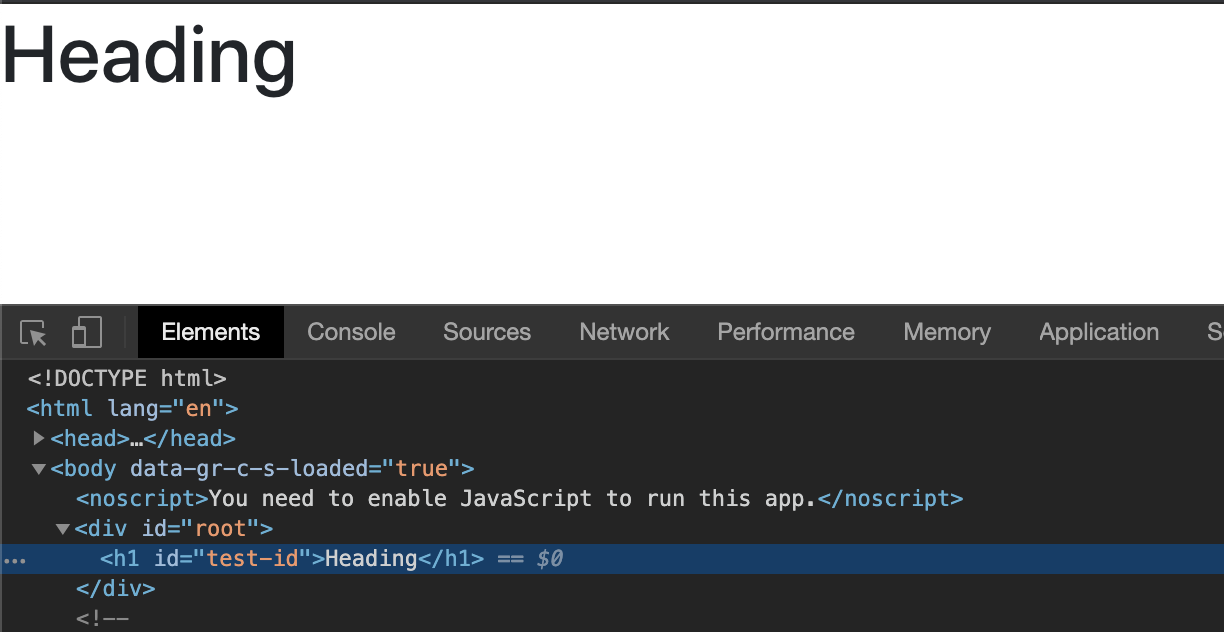
React elements
- React.createClass - back in 2013
- React functional component
- React.Component
const todoList = React.createClass({
  displayName: 'TodoListItems',
  render() {
    return React.createElement('ul', {className: 'Todos'},
      React.createElement('li', null, 'Go to grocery shop'),
      React.createElement('li', null, 'Buy tequilla'),
    );
  }
});

ReactDOM.render(
 React.createElement('TodoListItems', null, null),
 document.getElementById('react-root')
)
const TodoItemList extends React.Component {
render() {
const {items} = this.props;
return React.createElement('ul', {className: 'Todos'},
items.map((item, i) => React.createElement('li', { key: i }, item)) }
);
}
}
const todos = ['Go to Grocery Shop', 'Buy fruits', 'Get back home safely']l
ReactDOM.render(
React.createElement('TodoListItems', {item: todos }, null),
document.getElementById('react-root')
)const TodoListItems = (props) => {
return React.createElement('ul', {className: 'Todos'},
React.createElement('li', null, 'Go to grocery shop'),
React.createElement('li', null, 'Buy tequilla'),
);
}JSX
Concise syntax for creating complex Dom Trees
<div className="container">
  <h1 className="page-title"> Todos for {this.props.username}
  <h3 className="sub-title"> { this.getSubtitle() } </h3>
  <ul>
    { this.props.items.map((item, i) => { return (<li key={i}> { item } </li>) }) }
  </ul>
  <a href="#" dataAttrs="data-attr-value" onClick=> link </a>
</div>
Props and inverse data flow
- `defaultProps` to set default properties
- `propTypes` for react layer properties validation
- DOM reference of any child element using `ref` attribute. This is available in `this.refs`
const {_title} = this.refs.
const element = _this.current;

<h1 ref="_title"> Title </h1>- parent to child using props
- child to parent using callback function
<parent sendToChild="data" reciveFromChild={callbackFn} />

<child onClick={(e) => {this.props.reciveFromChild(data)> { this.props.sendToChild } </child>
States
class App extends React.Component {
  constructor(props) {
    super(props);

    this.state = {
      title : "Hello World"
    }
  }

  changeTitle = (e) => {
    this.setState({
      title: 'New title'
    });
  };

  render() {
    const {title} = this.state;
    return(
    <>
      <h1> {title} </h1>
      <button onClick={this.changeTitle} > Change Title </button>
    </>
    );
  }
}
React lifecycle methods
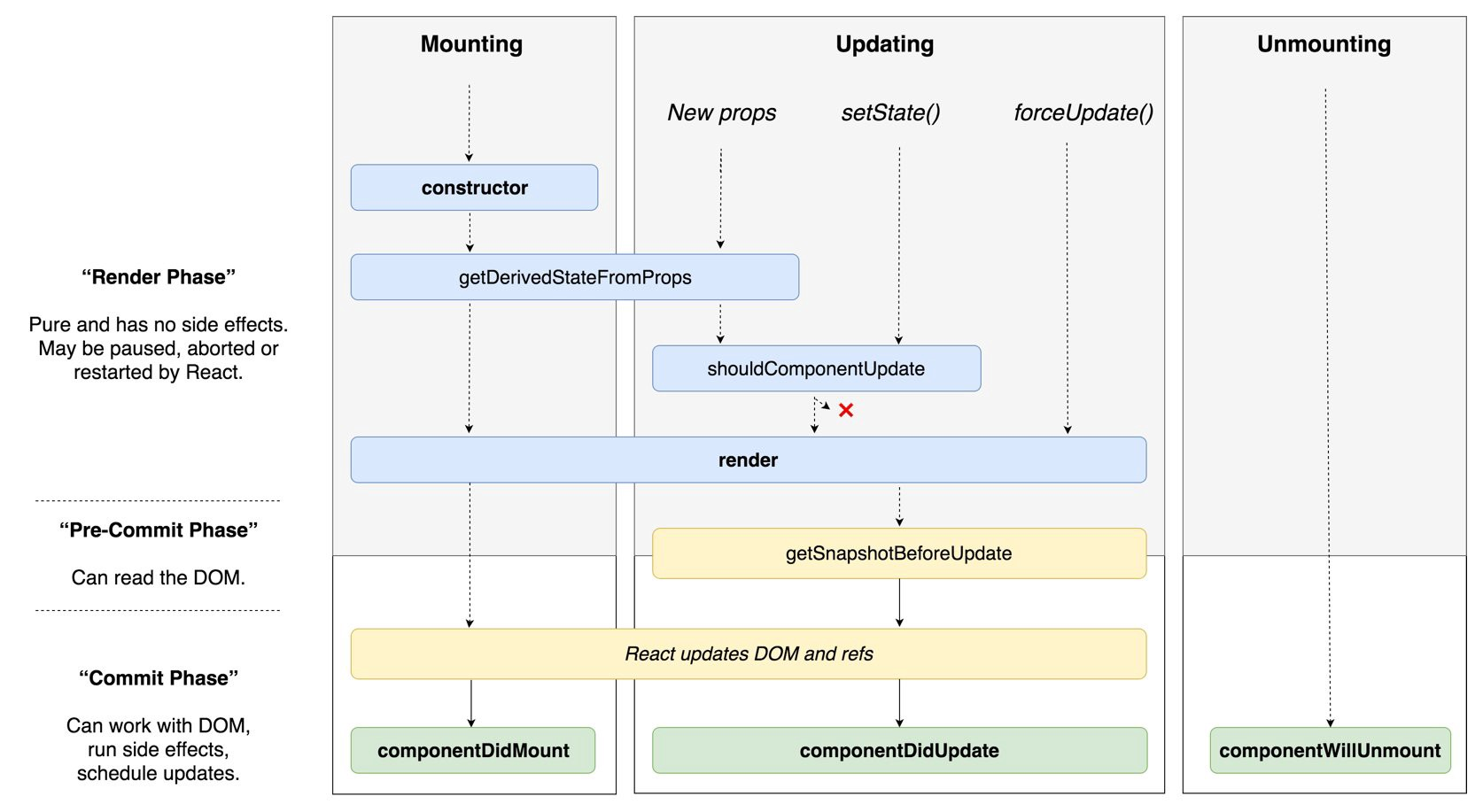
componentDidCatch
componentWillMount
UNSAFE_componentWillMount
componentWillUpdate
UNSAFE_componentWillUpdate
React redux
Managing state at a single position
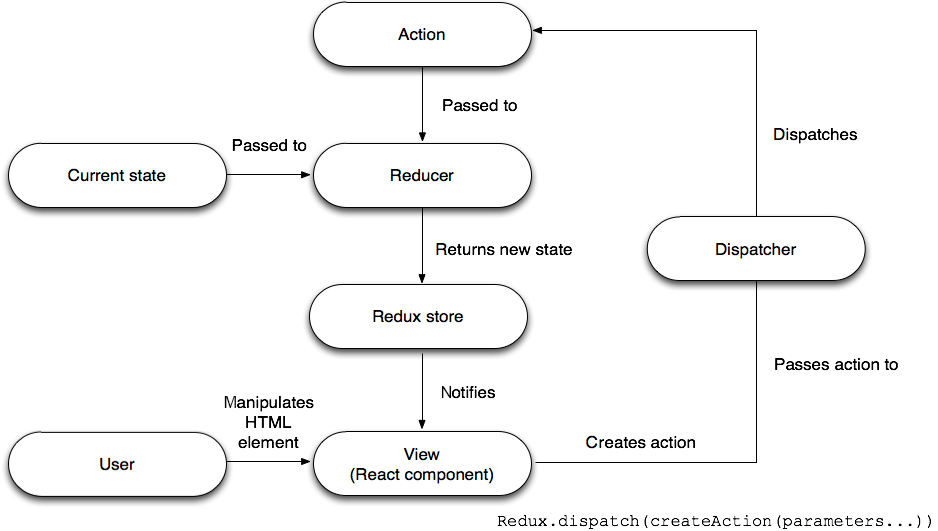
Demo

Concepts of React
By Swastik Pareek