RDBMS
Introduction...
History, classification and overview...
1. Navigational - hierarchical and network.
2. Graph - nodes, arcs and properties.
3. Relational - Tables, relations, joins, keys, normalized.
4. Object Oriented (ORM) - class <=> table, object <=> row
5. NoSQL - key => value, document oriented, denormalized.
Features...
- Normalized. Data non-redundancy.
- Predictable, reliable. Data integrity.
- Implementable behavior.
- Maintainable. Multi-user access control, constraints etc.
- Transactional.
Relational Or Non-Relational?
What's lacking then..
- Scalability.
- Dynamicity.
- Performance.
- Atomicity - "All or nothing"
- Consistency - "Follow rules - constraints, cascades, triggers..."
- Isolation - "System wide state when transactions happen serially"
- Durability - "Persist data in non-volatile memory"
A C I D

Keys and Constraints...
1. Primary key constraint
2. Foreign key constraint
3. Default
4. NOT NULL
5. Unique
6. Check
Normalization...
- First Normal Form
- Second Normal Form
- Third Normal Form
- Boyce-Codd Normal Form
Normalization...
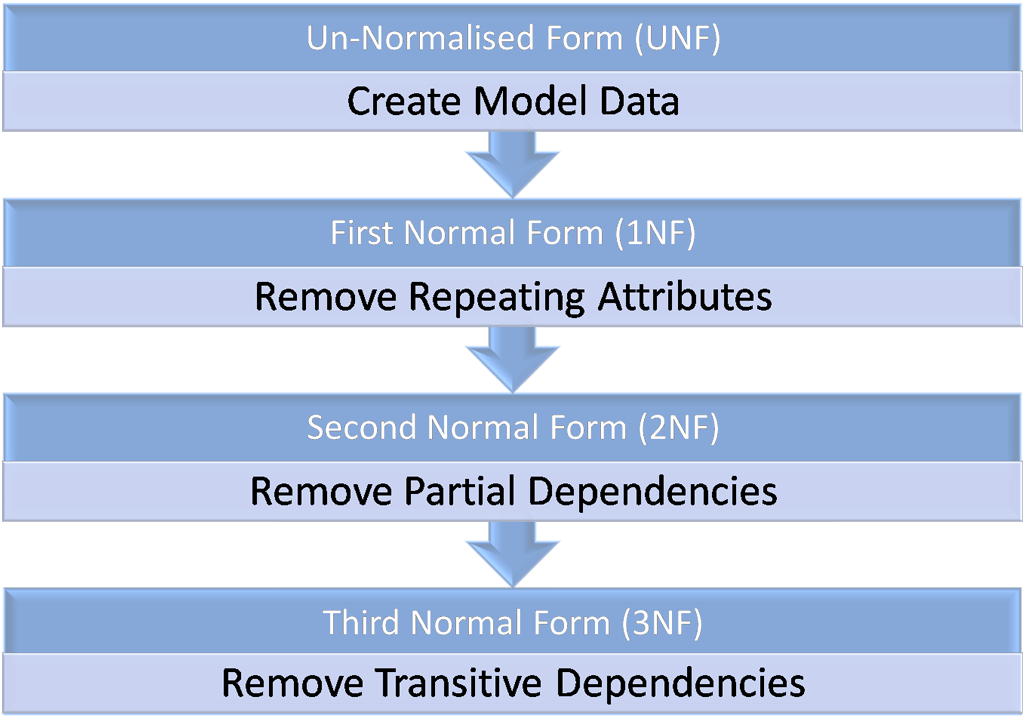
First Normal Form
- Each record should be unique
- Each cell contains a single value
- No duplicate fields
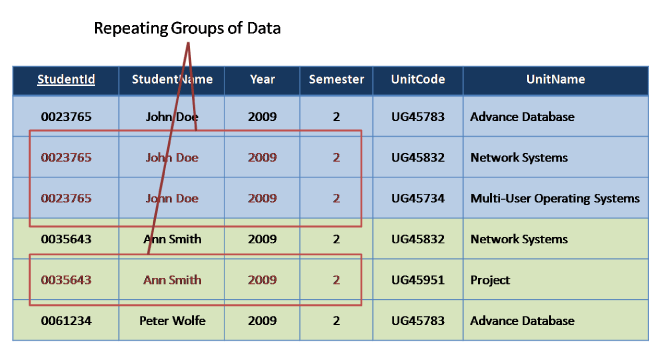
First Normal Form
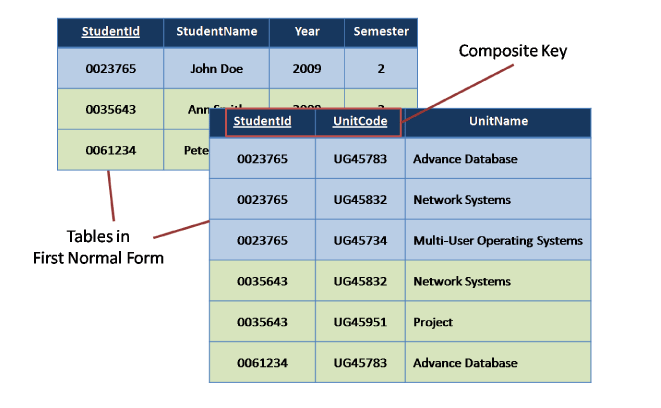
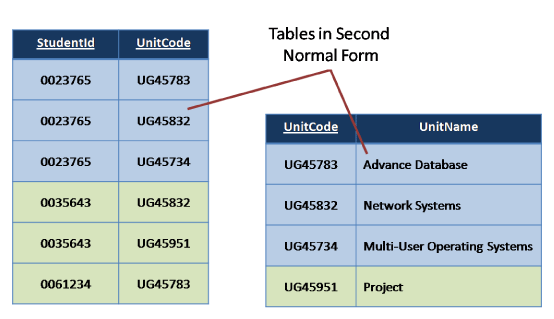
Second Normal Form
Remove repetitive rows associated directly to primary key (remove partial dependencies).
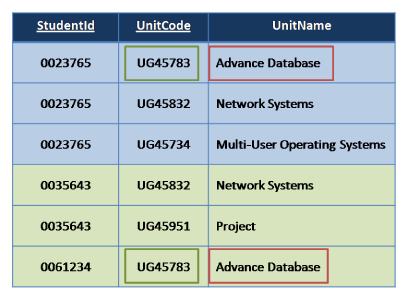
Second Normal Form
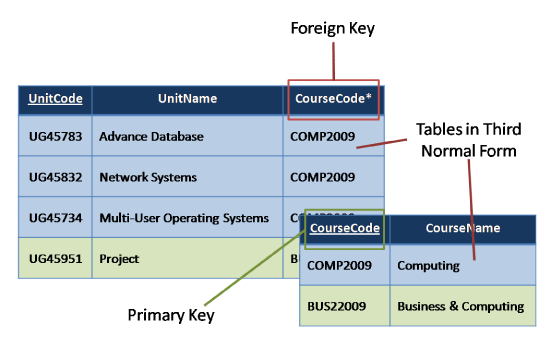
Third Normal Form
Non-key fields should depend only on primary key (remove transitive dependencies).
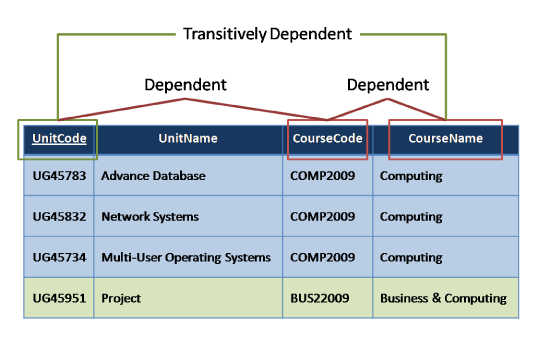
Third Normal Form
Boyce Codd Normal Form
| Author | Nationality | Book Title | Genre | Number of Pages |
|---|---|---|---|---|
| William Shakespere | English | The Comedy of Errors | Comedy | 100 |
| Markus Winand | Austrian | SQL Performance Explained | Textbook | 200 |
| Jeffery Ullman | American | A First Course in Database System | Textbook | 500 |
| Jennifer Widom | American | A First Course in Database System | Textbook | 500 |
Each attribute must represent a fact about the key, the whole key, and nothing but the key.
Boyce Codd Normal Form
| Author | Nationality |
|---|---|
| William Shakespere | English |
| Markus Winand | Austrian |
| Jeffery Ullman | American |
| Jennifer Widom | American |
| Book Title | Genre | Number of Pages |
|---|---|---|
| The Comedy of Errors | Comedy | 100 |
| SQL Performance Explained | Textbook | 200 |
| A First Course in Database System | Textbook | 500 |
| Author | Book Title |
|---|---|
| William Shakespere | The Comedy of Errors |
| Markus Winand | SQL Performance Explained |
| Jeffery Ullman | A First Course in Database System |
| Jennifer Widom | A First Course in Database System |
Naming conventions...
Avoid quotes.
Quoted identifiers are a serious pain. Writing SQL by hand using quoted identifiers is frustrating and writing dynamic SQL that involves quoted identifiers is even more frustrating.
This also means that you should never include whitespace in identifier names.
Ex: Avoid using names like "FirstName" or "All Employees".
Naming conventions...
Lowercase.
Identifiers should be written entirely in lower case. This includes tables, views, column, and everything else too.
Mixed case identifier names means that every usage of the identifier will need to be quoted in double quotes (which we already said are not allowed).
Ex: Use first_name, not "First_Name".
Naming conventions...
Data types are not names.
Database object names, particularly column names, should be a noun describing the field or object.
Avoid using words that are just data types such as text or timestamp. The latter is particularly bad as it provides zero context.
Naming conventions...
Underscores separate words.
Object name that are comprised of multiple words should be separated by underscores (ie. snake case).
Ex: Use word_count or team_member_id, not wordcount or wordCount.
Naming conventions...
Full words, not abbreviations.
Object names should be full English words. In general avoid abbreviations, especially if they're just the type that removes vowels.
Most SQL databases support at least 30-character names which should be more than enough for a couple English words.
PostgreSQL supports up to 63-character for identifiers.
Ex: Use middle_name, not mid_nm.
Naming conventions...
Avoid reserved words.
Avoid using any word that is considered a reserved word in the database that you are using. There aren't that many of them so it's not too much effort to pick a different word.
Another benefit of avoiding reserved words is that less-than-intelligent editor syntax highlighting won't erroneously highlight them.
Ex: Avoid using words like lock, or table.
Here are the list of reserved words for PostgreSQL, MySQL, Oracle, and MSSQL.
Naming conventions...
Relations
There is a constant argument between plural and singular names.
Tables, views, and other relations that hold data should have plural names, not singular.This means our tables and views would be named users, not user.
Naming conventions...
Primary Keys
Single column primary key fields should be named id. It's short, simple, and unambiguous. This means that when you're writing SQL you don't have to remember the names of the fields to join on.
CREATE TABLE users (
  id            bigint PRIMARY KEY,
  full_name     text NOT NULL,
  birth_date    date NOT NULL);
Some guides suggest prefixing the table name in the primary key field name, ie. user_id vs id. The extra prefix is redundant. All field names in non-trivial SQL statements (i.e. those with more than one table) should be explicitly qualified and prefixing as a form of namespacing field names is a bad idea.
Naming conventions...
Foreign Keys
Foreign key fields should be a combination of the name of the referenced table and the name of the referenced fields.
For single column foreign keys (by far the most common case) this will be something like foo_id, user_id etc..
CREATE TABLE team_members (
  team_id       bigint NOT NULL REFERENCES teams(id),
  person_id     bigint NOT NULL REFERENCES persons(id),
  CONSTRAINT team_members_pkey PRIMARY KEY (team_id, person_id));
Structured Query Language
1. Data Definition Language
2. Data Manipulation Language
3. Data Control Language
Data Definition Language
- CREATE
- ALTER
- DROP
- INDEX
Data Manipulation Language
- INSERT
- UPDATE
- DELETE
- SELECT
Data Control Language
- GRANT
- REVOKE
Other SQL clauses...
- FROM
- WHERE
- DISTINCT
- GROUP BY
- HAVING
- ORDER BY
- LIMIT OR TOP
- OFFSET
- Aggregate - COUNT, MIN, MAX, SUM etc
Joins
- INNER JOIN
- LEFT JOIN
- RIGHT JOIN
- OUTER JOIN
- LEFT JOIN EXCLUDING INNER JOIN
- RIGHT JOIN EXCLUDING INNER JOIN
- OUTER JOIN EXCLUDING INNER JOIN
Refer - SQL Joins
INNER JOIN
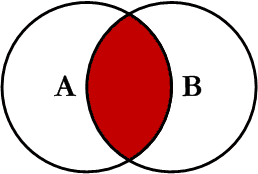
SELECT profiles.first_name,
       profiles.last_name,
       users.email
FROM users
INNER JOIN profiles
ON profiles.user_id = users.id
LEFT JOIN
SELECT profiles.first_name,
       profiles.last_name,
       users.email
FROM users
LEFT JOIN profiles
ON profiles.user_id = users.id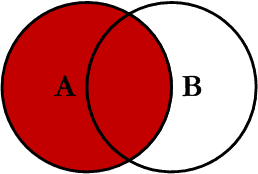
RIGHT JOIN
SELECT profiles.first_name,
       profiles.last_name,
       users.email
FROM users
RIGHT JOIN profiles
ON profiles.user_id = users.id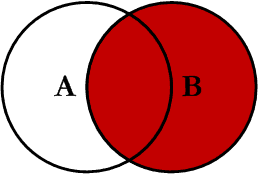
OUTER JOIN (FULL JOIN)
SELECT profiles.first_name,
       profiles.last_name,
       users.email
FROM users
FULL OUTER JOIN profiles
ON profiles.user_id = users.id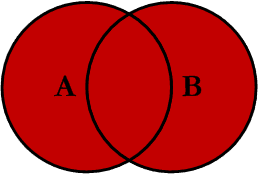
LEFT JOIN EXCLUDING INNER JOIN
SELECT profiles.first_name,
       profiles.last_name,
       users.email
FROM users
LEFT JOIN profiles
ON profiles.user_id = users.id
WHERE profiles.user_id IS NULL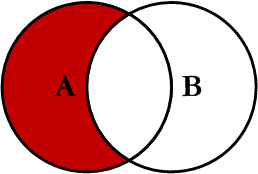
RIGHT JOIN EXCLUDING INNER JOIN
SELECT profiles.first_name,
       profiles.last_name,
       users.email
FROM users
RIGHT JOIN profiles
ON profiles.user_id = users.id
WHERE users.id IS NULL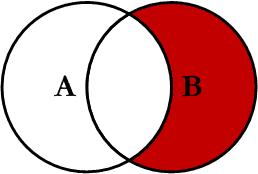
OUTER JOIN EXCLUDING INNER JOIN
SELECT profiles.first_name,
       profiles.last_name,
       users.email
FROM users
FULL OUTER JOIN profiles
ON profiles.user_id = users.id
WHERE users.id IS NULL
   OR profiles.user_id IS NULL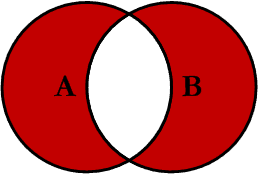
Subquery
Subquery or Inner query or Nested query is a query in a query. SQL subquery is usually added in the where clause of the SQL statement.
Can be used with following statements
- SELECT
- INSERT
- UPDATE
- DELETE
Note - Avoid using subqueries unless there is no other option.
Subquery - SELECT, UPDATE, DELETE
SELECT id, first_name
FROM profiles
WHERE first_name IN (SELECT first_name
FROM profiles
WHERE state = 5);
UPDATE profiles SET zip = '111111'
WHERE first_name IN (SELECT first_name
FROM profiles
WHERE state = 5);DELETE FROM profiles
WHERE first_name IN (SELECT first_name
FROM profiles
WHERE state = 5);Subquery - INSERT
INSERT INTO addresses(id, address)
SELECT id,
       address1 || ' ' || address2 || ', ' || city || ', ' || zip
FROM profiles WHERE state = 5
Index
An index is a data structure (most commonly a B- tree) that stores the values for a specific column in a table. An index is created on a column of a table .
CREATE INDEX col_name_index
ON table_name (col_name);
CREATE INDEX country_id_state_id_index
ON profiles (country_id, state_id);Multi-column index
As a general rule, an index should only be created on a table if the data in the indexed column will be queried frequently.
Refer - DB Indexing
Views
A view is simply any SELECT query that has been given a name and saved in the database. For this reason, a view is sometimes called a named query or a stored query.
CREATE OR REPLACE VIEW discounted_products_view AS
SELECT products.name,
       products.price
FROM products
INNER JOIN discounts
ON discounts.product_id = products.id
Materialized Views
CREATE OR REPLACE MATERIALIZED VIEW discounted_products_view AS
SELECT products.name,
       products.price
FROM products
INNER JOIN discounts
ON discounts.product_id = products.id;
REFRESH MATERIALIZED VIEW discounted_products_view;A materialized view create and store the result table in advance, filled with data.
Refer - Views and Mat Views
PL/SQL
PL/SQL is a combination of SQL along with the procedural features of programming languages.
Each PL/SQL program consists of SQL and PL/SQL statements which from a PL/SQL block.
PL/SQL Block consists of three sections:
- The Declaration section (optional).
- The Execution section (mandatory).
- The Exception Handling (or Error) section (optional).
PL/SQL
DECLARE
   <declarations section>
BEGIN
   <executable command(s)>
EXCEPTION
   <exception handling>
END;
DECLARE
a integer := 10;
b integer := 20;
c integer;
f real;
BEGIN
c := a + b;
dbms_output.put_line('Value of c: ' || c);
f := 70.0/3.0;
dbms_output.put_line('Value of f: ' || f);
END;Functions, Stored Procedures...
Just like any other language, to execute a piece of code later, PL/SQL have Functions and Stored Procedures.
Functions, Stored Procedures... differences
Refer: differences
1. Return value
2. Arguments (input, output values)
...
Functions, Stored Procedures... syntax
CREATE [OR REPLACE] PROCEDURE procedure_name
[(parameter_name [IN | OUT | IN OUT] type [, ...])]
{IS | AS}
BEGIN
  < procedure_body >
END;
CREATE [OR REPLACE] FUNCTION function_name
[(parameter_name [IN | OUT | IN OUT] type [, ...])]
RETURN return_data_type
{IS | AS}
DECLARE
< declaration >
BEGIN
< function_body >
return return_data_type
EXCEPTION
< exception handling >
END;Triggers
A trigger is a PL / SQL block structure which is fired when a DML statements like Insert, Delete, Update is executed on a database table.
A trigger is triggered automatically when an associated DML statement is executed. Refer - Triggers
CREATE [OR REPLACE ] TRIGGER trigger_name
    {BEFORE | AFTER | INSTEAD OF }
    {INSERT [OR] | UPDATE [OR] | DELETE}
    [OF col_name]
    ON table_name
    [REFERENCING OLD AS o NEW AS n]
    [FOR EACH ROW]
    WHEN (condition)
    BEGIN
       ---sql statements
    END;
Triggers.. example
CREATE TRIGGER update_user_modtime
BEFORE UPDATE
ON users
FOR EACH ROW
EXECUTE PROCEDURE
update_modified_column();
Cursors
Cursors are used to avoid repetitive usage of select statements and facilitate a loop traversal of all the rows a desired select statement fetches in PL/SQL procedure.
CURSOR cursor_name AS select_statement;DECLARE
CURSOR delhi_users AS SELECT users.id,
users.email,
profiles.name,
profiles.address
FROM users
INNER JOIN profiles ON profiles.user_id = users.id
WHERE profiles.city = "Delhi";
BEGIN
OPEN delhi_users;
FETCH delhi_users;
-- sql statements
CLOSE delhi_users;
END;Questions...
Here be assignment...
RDBMS
By Taha Husain
RDBMS
Webonator - RDBMS