Angular JS part I
Angular.JS - Introduction
- MVC front-end framework based on JavaScript
- Thousands of plugins, libraries and examples
- Whole new ecosystem of FE technologies exists - building system, package management, unit testing frameworks, browser extensions,...
- Based on extending standard HTML with new vocabulary - building your own HTML tags
- Prepared for rich FE applications - background communication with server based on AJAX, no page refresh, massive plugin library, easy extensible
Angular.JS #2
- Two-way data binding - automatically synchronize model with all view components and vice versa
- Dependency injection - Angular.JS is split into multiple modules, wired up together by dependency injection
- Angular.JS adds custom attributes to standard HTML file - by these attributes static web becomes Angular.JS app
- Big community of developers, tons of plugins and extensions, actively developed by Google
- Whole computational logic is done on client side in browser, with server only REST communication - servers are not overwhelmed by tons of clients, sessions, requests,...
Angular.JS #3
- Angular.JS keywords are standard HTML attributes
- all keywords starts with ng prefix
- Angular.JS has two forms of naming convention:
- camel case - e.g. ngApp
- dash case- e.g. ng-app
- camel case is used when defining own directive, e.g. customApplicationDirective
- dash case is used when calling this directive as attribute in HTML template - custom-application-directive
- Angular.JS application is defined by attribute ng-app in HTML template - can be defined in any element, usually defined in <html>
Angular.JS #4
- Angular.JS application has multiple scopes, app itself has one, each controller | directive (not always) another
- Model - object that holds data shown to user
- Scope - context, where model is stored to be accessed from controllers, directives or expressions
- Application consists of multiple controllers
- Controller defines business logic for view, do data manipulation, communicate with server,...
- Directive - custom component, encapsulates logic and|or HTML tags to one reusable peace, e.g. user directive, which holds information about name, email and presents it as HTML <div> element with multiple <span>
- View - DOM displayed to user
Modules
- Angular.JS application consists of multiple modules
- Module is container of the application - groups together controllers, services, directives,...
- App has no main method, modules declaratively specify how app should be bootstrapped (loaded)
- App itself is module, custom set of components can be module and they are wired up together
- Each module has 2 phases -> config and run
- Each phase has its own collection of blocks -> every module may have multiple config blocks and multiple run blocks -> all are executed at proper phase of initialization
// main.js file
var myAppModule = angular.module('myApp', []);

// HTML template
<html ng-app="myApp">
...
</html>Modules #2
- config phase - configuring module services, called at the beginning of the initialization process
- run phase - after all services and objects were initialized by injector, run phase started, service instances can be used to kickstart the application
angular.module('myModule', []); // create module myModule

angular.module('myModule')
    .config(function(injectables) { // provider-injector
      // This is an example of config block.
      // You can have as many of these as you want.
      // You can only inject Providers (not instances) into config blocks.
    })
    .run(function(injectables) { // instance-injector
      // This is an example of a run block.
      // You can have as many of these as you want.
      // You can only inject instances (not Providers) into run blocks
});MVC
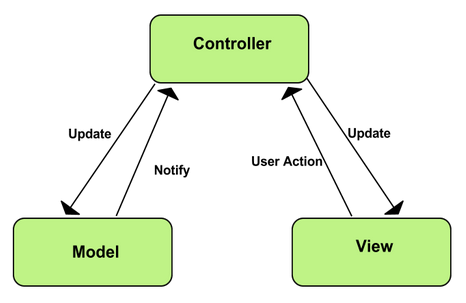
- SW architectural pattern for implementing UI
- divide application to 3 parts communicating with each other
- M - model, V - view, C - controller
- Model represents data, View presents data to user, Controller manipulates with data
- Angular.JS apps strictly follow MVC principle
- Application is divided into separate blocks
- Model - scope of controller
- View - HTML template
- Controller - Angular.JS Controller object
- By dividing application to these blocks, maintainability is guaranteed - all business logic is executed in controller, all data is stored in scope of controller and data is presented in template
MVC #2
Dependency Injection
- software design pattern that deals with how components get hold of their dependencies
- Angular.JS has own injector subsystem - responsible for creating components, resolving their dependencies and providing them to other components
- Components (directives, services,...) available for DI must be defined via constructor function or factory method
- Injector system is able to create 2 types of objects
- Services - objects defined by developer, custom API
-
Specialized objects - proprietary Angular.JS objects, injector creates them according to a recipe
- 5 types of recipes - Provider, Value, Factory, Constant, Service
Dependency Injection #2
- Constant recipe - definition of constant, available during config phase
myApp.constant('planetName', 'Greasy Giant');

myApp.config(function(myAppProvider, planetName) {
  myAppProvider.stampText(planetName);
});- Factory recipe - service definition, can be DI in run phase, can have dependencies
// factory definition
var myApp = angular.module('myApp', []);
myApp.factory('clientIdFactory', function clientIdFactory() {
  return 'a12345654321x';
});

// obtaining factory 'clientIdFactory' by DI
myApp.controller('DemoController', function (clientIdFactory) {
  this.clientId = clientIdFactory;
});
Dependency Injection #3
- Service recipe - simplifies Factory recipe, used when logic is defined in another object -> service invoked by constructor injection, DI in run phase
function LaunchAppService(token) {

  this.launchedCount = 0;
  this.launch = function() {
    // Make a request to the remote API and include the token
    ...
    this.launchedCount++;
  }
}

// factory definition of service
myApp.factory('LaunchAppService', function(token) {
  return new LaunchAppService(token);
});

// service definition, LaunchAppService is invoked by constructor injection
myApp.service('LaunchAppService', LaunchAppService);
Dependency Injection #4
- Provider recipe - universal recipe, custom type implementing $get method-> return new instance of service, additional parameter can be set up to instance of service, DI during config phase
myApp.provider('MyTranslateService', function () {
  var lang = 'en';

  this.setPreferredLang = function(value) {
    lang = value;
  };

  this.$get = function () {
    return new MyTranslateServiceImpl(lang);
  };
});

myApp.config(function(MyTranslateServiceProvider) {
  MyTranslateServiceProvider.setPreferredLang('en');
});

function MyTranslateServiceImpl(lang) {
    this.translate = function(text) {
        return lang.translate(text);
    };
}
Dependency Injection #5
- Special purposed objects - objects of 4 types - controller, directive, filter, animation
- extend Angular.JS framework as plugins -> must follow API
myApp.controller('DemoController', function (clientId) {
  this.clientId = clientId;
});

myApp.filter('greet', function() {
 return function(name) {
    return 'Hello, ' + name + '!';
  };
});

// HTML template
<div ng-app="myApp">
  <div>
    {{ 'World' | greet }} // output Hello, World!
  </div>
</div>
Dependency Injection #6
- Angular.JS services are prefixed with $
- Custom app services should be prefixed with application specific prefix, e.g. Hotel Booking Application with hb-
- Services should be postfixed with Service, factories with Factory, Providers are automatically postfixed with Provider
Controller
- Angular.JS core object for representing single page, or directive (later...)
- every controller has it's own scope, scope extends parent scope - hierarchical order, scope inheritance
- usage of controller:
- set initial state to scope -> model
- add behavior to scope -> methods manipulating data,...
- not use controller for:
- direct DOM manipulation -> violation of MVC principle
- format input, filter output -> use another components
- instantiate other components
- share business logic -> transform to services
Controller #2
var myApp = angular.module('myApp',[]);

// inject $scope service from Angular -> controller scope is created representing model
myApp.controller('GreetingController', function($scope) {
  $scope.greeting = 'Hola!';
});

// HTML template
<div ng-controller="GreetingController">
  {{ greeting }} // display Hola! from controller scope
</div>

-----------------------------------------------------------------------------------------

// adding custom behavior to scope
myApp.controller('GreetingController', function($scope) {
  $scope.tripple = function (val) { return val*val*val; };
});

// HTML template
<div ng-controller="GreetingController">
  2*2*2 = {{ tripple(2) }} // display 2*2*2 = 8
</div>- Controllers can be instantiated via ngController directive or via $route service
- $route service links together URL with HTML templates and controllers
- $route service comes from ngRoute module, more used is AngularUI Router - https://github.com/angular-ui/ui-router
Scope
- Scope represents model in MVC
- execution context of Angular.JS expressions - JavaScript-like code snippets that are usually placed in bindings such as {{ expression }}.
- Angular expressions can be:
- 1 + 2
- a * b
- user.name
- item[i]
- Characteristics:
- evaluated against scope they are created in
- forgiving ->undefined reference won't throw error -> null
- no control flow statements ->only ternary operator, no loop or condition
Scope #2
- Scopes are arranged in hierarchical order
- child scope inherits data and behaviors from its parent scope
- All data and behaviors can be overridden in child scopes
- Another type of scope is isolated scope, which does not inherit from parent scope -> used with directives
- scope has API for watching model changes -> $watch
- scope has API for applying model changes to view -> $apply
- every Angular application has exactly one root scope and can have multiple child scopes -> controllers, directives
- Example: evaluation of expression {{name}} first searches scope associated with expression name, if nothing is found it traverses all parent scopes until it founds match -> prototypical inheritance
Scope #3
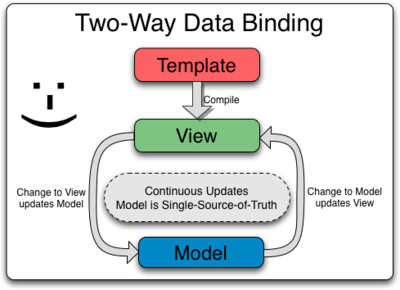
- Angular.JS data binding enables two way data binding between view components and model
- Regular applications allows only one way binding -> merge template and model and show view
- Two way binding first compile the template and then starts cycle, where model updates view and vice versa
- This principle ensures that model is valid for the whole time -> no conflicts in view and model
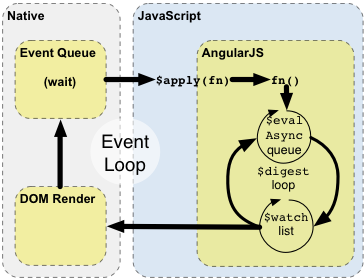
- This principle is based on dirty checking Angular scope -> every time any kind of event occurs, Angular recalculates every scope changes and updates all data -> this is called digest loop
- digest loop is working until all calculations are finished (max 10 times) and then re-renders the DOM
Scope #4
Day-01 Angular 1.5
By Tarun Sharma