AngularJS Training
JavaScript tips and best pratices
Variable declaration
What is the diffrence between:
function() {
    var name = "Toto"
    console.log("Hello, " + name);
}
And:
function() {
    name = "Toto"
    console.log("Hello, " + name);
}
Variable declaration
If you do not use "var" to declare a variable, the variable would be declare directly on the window object
function() {
    name = "Toto"

    // this
    console.log("Hello, " + name);

    // same as this
    console.log("Hello, " + window.name);
}

// and also available from every where
// outside the scope of the function
console.log("Hello, " + window.name);- can be source of conflict (jQuery declare "$" as a global variable, for exemple)
- use this notation to create a namespace for your application
Variable declaration
Exemple of namespace:
// create the namespace
ManagersUtils = {};

// declare a variable in the namespace
ManagersUtils.cxsContext = '/cxs/';
ManagersUtils.formMappingActionStrategies = ['alwaysSet', 'setIfMissing', 'merge'];

// declare a function in the namespace
ManagersUtils.getQueryOrDefault = function (query) {
    // do something
};
ManagerUtils wrap all the function, constants, variables needed for the application, this limit the conflict with other API in the page, because "ManagerUtils" is a reserved name for us.
Stop global declarations
- Always use namespace to wrap your functions
- Stop global declarations
- Using namespace is the first step of JavaScript Object programming
- A namespace is in fact an object with properties containing variables and functions.
- APIs use namespace, jquery use "$", angularjs use "angular", underscore use "_"
- Don't use existing API namespace for your namespaces
JavaScript is turn based
The JavaScript code we write doesn’t all run in one go, instead it executes in turns. Each of these turns runs uninterupted from start to finish, and when a turn is running, nothing else happens in our browser.
var button = document.getElementById('clickMe');

function buttonClicked () {
  alert('the button was clicked');
}

button.addEventListener('click', buttonClicked);

function timerComplete () {
  alert('timer complete');
}

setTimeout(timerComplete, 2000);
Callbacks system
a callback is a piece of executable code that is passed as an argument to other code
function mySandwich(param1, param2, callback) {
    alert('Started eating my sandwich.\n\nIt has: ' + param1 + ', ' + param2);
    callback();
}

mySandwich('ham', 'cheese', function() {
    alert('Finished eating my sandwich.');
});
Really powerfull system, allow to create generics behavior. Also usefull for Asynchronous operations
AngularJs concepts
Angularjs, HTML extends ?
Angular is used directly in the HTML to attach logical operations.
Tags, attributs or class are the commons usage of angularjs html elements.
This approach allow to separate the JavaScript code from the view.
Angular provide builtin elements, but allow us to create new components by many ways that we will see later.
<div ng-repeat="(tagId, tag) in tags">
    <div ng-if="tag.enabled">
        <h2>{{tag.name}}</h2>
    </div>
</div>
Cross data binding
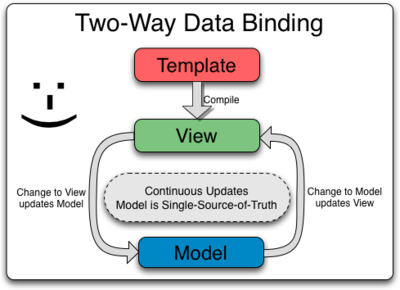
Remember JavaScript is turn based, angular perform changes on model and view at the end of each turn of executions.
Cross data binding
<div ng-app>
    <input type="text" ng-model="message" />
    <input type="range"  min="1" max="100" ng-model="size" />
    <hr>
    <div style="font-size:{{size}}em;">{{message}}</div>
</div>
Cross data binding: apply
Sometime you would need to apply the modification on the model manually, why and when do you have to do that ?
function Ctrl($scope) {
  $scope.message = "Waiting 2000ms for update";

    setTimeout(function () {
        $scope.$apply(function () {
            $scope.message = "Timeout called!";
        });
    }, 2000);
}
Remember javascript is turn based. Angular can't know that the timeout turn need to update the model. That's why we have to manualy wrap the model update in the apply fct
Angular provide a $timeout service to avoid that, it was fot the exemple :)
Cross data binding: watch
Sometime you want to listen on model modification, to update the state of the model, or execute action. For that there is the "watch" function.
var scope = $rootScope;
scope.name = 'misko';
scope.counter = 0;

expect(scope.counter).toEqual(0);
scope.$watch('name', function(newValue, oldValue) {
  scope.counter = scope.counter + 1;
});
expect(scope.counter).toEqual(0);

scope.$digest();
// the listener is always called during the first $digest loop after it was registered
expect(scope.counter).toEqual(1);

scope.$digest();
// but now it will not be called unless the value changes
expect(scope.counter).toEqual(1);

scope.name = 'adam';
scope.$digest();
expect(scope.counter).toEqual(2);
Cross data binding: watch
// Using a function as a watchExpression
var food;
scope.foodCounter = 0;
expect(scope.foodCounter).toEqual(0);
scope.$watch(
  // This function returns the value being watched. It is called for each turn of the $digest loop
  function() { return food; },
  // This is the change listener, called when the value returned from the above function changes
  function(newValue, oldValue) {
    if ( newValue !== oldValue ) {
      // Only increment the counter if the value changed
      scope.foodCounter = scope.foodCounter + 1;
    }
  }
);
// No digest has been run so the counter will be zero
expect(scope.foodCounter).toEqual(0);

// Run the digest but since food has not changed count will still be zero
scope.$digest();
expect(scope.foodCounter).toEqual(0);

// Update food and run digest.  Now the counter will increment
food = 'cheeseburger';
scope.$digest();
expect(scope.foodCounter).toEqual(1);
Angularjs bootstraping app
Bootstraping of angular app is done automatically on DOMContentLoaded event or when angular.js script is evaluated. Automatic bootstraping only bootstrap the first ng-app="module" in the page.
But sometime we need to have more control over the initialization process. A manual bootstraping is possible, using manual bootstraping you can have multiple ng-app in the same page.
Angularjs manual bootstraping
<!doctype html>
<html>
<body>
  <div ng-controller="MyController">
    Hello {{greetMe}}!
  </div>
  <script src="http://code.angularjs.org/snapshot/angular.js"></script>

  <script>
    angular.module('myApp', [])
      .controller('MyController', ['$scope', function ($scope) {
        $scope.greetMe = 'World';
      }]);

    angular.element(document).ready(function() {
      angular.bootstrap(document, ['myApp']);
    });
  </script>
</body>
</html>
AngularJS App details
Angularjs components:
<div ng-app="ngAppDemo" ng-strict-di>
    <div ng-controller="GoodController1">
        I can add: {{a}} + {{b}} =  {{ a+b }}
    </div>

    <div ng-controller="GoodController2">
        Name: <input ng-model="name"><br />
        Hello, {{name}}!
    </div>
</div>
angular.module('ngAppDemo', [])
.controller('GoodController1', ['$scope', function($scope) {
$scope.a = 1;
$scope.b = 2;
}])
.controller('GoodController2', GoodController2);
function GoodController2($scope) {
$scope.name = "World";
}
GoodController2.$inject = ['$scope'];identify:
application, controller, scope, injection, template, module.
Dependency injection
angular.module('myModule', [])


.factory('serviceId', ['depService', function(depService) {
  // ...
}])
.directive('directiveName', ['depService', function(depService) {
  // ...
}])
.filter('filterName', ['depService', function(depService) {
  // ...
}]);
The way you define a directive, service, or filter is with a factory function. The factory methods are registered with modules. The recommended way of declaring factories is:
Dependency injection
someModule.controller('MyController', ['$scope', 'dep1', 'dep2', function($scope, dep1, dep2) {
  ...
  $scope.aMethod = function() {
    ...
  }
  ...
}]);
Controllers are "classes" or "constructor functions" that are responsible for providing the application behavior that supports the declarative markup in the template. The recommended way of declaring Controllers is using the array notation:
Module
Angular apps don't have a main method. Instead modules declaratively specify how an application should be bootstrapped. There are several advantages to this approach:
- The declarative process is easier to understand.
- You can package code as reusable modules.
- The modules can be loaded in any order (or even in parallel) because modules delay execution.
- Unit tests only have to load relevant modules, which keeps them fast.
- End-to-end tests can use modules to override configuration.
Module
<div ng-app="myApp">
  <div>
    {{ 'World' | greet }}
  </div>
</div>
// declare a module
var myAppModule = angular.module('myApp', []);
// configure the module.
// in this example we will create a greeting filter
myAppModule.filter('greet', function() {
return function(name) {
return 'Hello, ' + name + '!';
};
});introducing filters !
- notice the empty array
- notice the ng-app
Module config
angular.module('myModule', []).
config(function(injectables) { // provider-injector
  // You can have as many of these as you want.
  // You can only inject Providers (not instances)
  // into config blocks.
}).
run(function(injectables) { // instance-injector
  // You can have as many of these as you want.
  // You can only inject instances (not Providers)
  // into run blocks
});
Run blocks are the closest thing in Angular to the main method. A run block is the code which needs to run to kickstart the application.
Module config
angular.module('myModule', []).
  value('a', 123).
  factory('a', function() { return 123; }).
  directive('directiveName', ...).
  filter('filterName', ...);

// is same as

angular.module('myModule', []).
  config(function($provide, $compileProvider, $filterProvider) {
    $provide.value('a', 123);
    $provide.factory('a', function() { return 123; });
    $compileProvider.directive('directiveName', ...);
    $filterProvider.register('filterName', ...);
  });
When bootstrapping, first Angular applies all constant definitions. Then Angular applies configuration blocks in the same order they were registered.
There are some convenience methods on the module which are equivalent to the config block. For example:
Providers:
Each web application you build is composed of objects that collaborate to get stuff done. These objects need to be instantiated and wired together for the app to work. In Angular apps most of these objects are instantiated and wired together automatically by the injector service.
Provider, value, factory, service and constant are differente entry point to create your own API (services) or angular specialized objects (directives, filters, controllers, ...)
Providers: Value recipe
Let's say that we want to have a very simple service called "clientId" that provides a string representing an authentication id used for some remote API. You would define it like this:
// declaration of a service "clientId" using value recipe
var myApp = angular.module('myApp', []);
myApp.value('clientId', 'a12345654321x');

// declaration of a controller, where we inject the "clientId" service
myApp.controller('DemoController', ['clientId', function DemoController(clientId) {
  this.clientId = clientId;
}]);
<html ng-app="myApp">
<body ng-controller="DemoController as demo">
Client ID: {{demo.clientId}}
</body>
</html>Notice this new notation, no scope
Providers: Factory recipe
The Value recipe is very simple to write, but lacks some important features we often need when creating services.
- ability to use other services (have dependencies)
- service initialization
- delayed/lazy initialization
// we could have parameters here for dependencies on other services
myApp.factory('clientId', function clientIdFactory() {
  return 'a12345654321x';
});
Providers: Service recipe
JavaScript developers often use custom types to write object-oriented code.
function UnicornLauncher(apiToken) {

  this.launchedCount = 0;
  this.launch = function() {
    // Make a request to the remote
    // API and include the apiToken
    this.launchedCount++;
  }
}
// using factory
myApp.factory('unicornLauncher', ["apiToken", function(apiToken) {
return new UnicornLauncher(apiToken);
}]);// using service is faster for this need
myApp.service('unicornLauncher', ["apiToken", UnicornLauncher]);Providers: Service recipe
Angular services are substitutable objects that are wired together using injection. You can use services to organize and share code across your app.
Angular only instantiates a service when an application component depends on it.
Each component dependent on a service gets a reference to the single instance generated by the service factory.
Angular offers several useful services (like $http), but for most applications you'll also want to create your own.
Providers: Provider recipe
core recipe type and all the other recipe types are just syntactic sugar on top of it.
myApp.provider('unicornLauncher', function UnicornLauncherProvider() {
  var useTinfoilShielding = false;

  this.useTinfoilShielding = function(value) {
    useTinfoilShielding = !!value;
  };

  this.$get = ["apiToken", function unicornLauncherFactory(apiToken) {

    // let's assume that the UnicornLauncher constructor was also changed to
    // accept and use the useTinfoilShielding argument
    return new UnicornLauncher(apiToken, useTinfoilShielding);
  }];
});
myApp.config(["unicornLauncherProvider", function(unicornLauncherProvider) {
unicornLauncherProvider.useTinfoilShielding(true);
}]);Providers: Constant recipe
Constants are available during configuration and runtime phase
myApp.constant('planetName', 'Greasy Giant');

// config phase, let's configure the unicornLauncher with a default planet
myApp.config(['unicornLauncherProvider', 'planetName',
    function(unicornLauncherProvider, planetName) {
      unicornLauncherProvider.useTinfoilShielding(true);
      unicornLauncherProvider.stampText(planetName);
    }]);

// runtime, let's use the default planet of other purpose
myApp.controller('DemoController', ["clientId", "planetName",
    function DemoController(clientId, planetName) {
      this.clientId = clientId;
      this.planetName = planetName;
    }]);
Providers: Conclusion
- The injector uses recipes to create two types of objects: services and special purpose objects
- There are five recipe types that define how to create objects: Value, Factory, Service, Provider and Constant.
- Factory and Service are the most commonly used recipes.
- Provider is the most complex recipe type. You don't need it unless you are building a reusable piece of code that needs global configuration.
- All special purpose objects except for the Controller are defined via Factory recipes.
Service example
<body ng-app="myServiceModule">
    <div id="simple" ng-controller="MyController">
        <input ng-init="message='test'" ng-model="message" />
        <button ng-click="callLog(message);">Log</button>
        <button ng-click="callNotify();">Notify</button>
    </div>
</body>
angular.module('myServiceModule', [])
.service('notifyService', function(){
// list of msg logged
var msgs = [];
// log a new message
this.log = function(msg) {
msgs.push(msg);
}
// display all the message
this.notify = function() {
window.alert(msgs.join("\n"));
msgs = [];
}
})angular.module('myServiceModule').
controller('MyController',
['$scope','notifyService',
function ($scope, notifyService) {
// init message
$scope.message = "test";
$scope.callLog = function(msg) {
notifyService.log(msg);
$scope.message = "";
};
$scope.callNotify = function() {
notifyService.notify();
};
}])Directive
At a high level, directives are markers on a DOM element (such as an attribute, element name, comment or CSS class) that tell AngularJS'sHTML compiler to attach a specified behavior to that DOM element (e.g. via event listeners), or even to transform the DOM element and its children.
Angular normalizes an element's tag and attribute name to determine which elements match which directives.
Directive declare as ngBind, sould be use in HTML with ng-bind, there is other syntaxes for usage, but this is the prefered one.
Directive
<body ng-app="HelloApp">
  <div ng-controller="HelloCtrl">
    <input type="text" ng-model="name"/>
    <hello-world name="name"></hello-world>
  </div>
</body>
angular.module('components', [])
.directive('helloWorld', function () {
return {
restrict: 'E',
scope:{
name:'='
},
template: '<span>Hello {{name}}</span>'
}
})
angular.module('HelloApp', ['components'])
.controller("HelloCtrl", ["$scope", function($scope){
$scope.name = "Toto";
}])Directive: Types
<my-dir></my-dir>
<span my-dir="exp"></span>
<!-- directive: my-dir exp -->
<span class="my-dir: exp;"></span>
Best Practice: Prefer using directives via tag name and attributes over comment and class names.
You can restrict the type of the directive, using "restrict" option:
- 'A' : only matches attributes name
- 'E' : only matches element name
- 'C' : only matches class name
- 'AEC' : matches attribute, element or class name
Directive: Template
Not mandatory but a directive can have associated template:
angular.module('docsSimpleDirective', [])
.controller('Controller', ['$scope', function($scope) {
  $scope.customer = {
    name: 'Naomi',
    address: '1600 Amphitheatre'
  };
}])
.directive('myCustomer', function() { // using templateUrl
  return {
    restrict: 'E',
    templateUrl: 'my-customer.html'
  };
})
.directive('myCustomer', function() { // using plain template
  return {
    restrict: 'E',
    template: 'Name: {{customer.name}} Address: {{customer.address}}'
  };
});
<div ng-controller="Controller">
<div my-customer></div>
</div>notice the inheritance of the scope and the restrict 'E'
Directive: Isolated scope
By default directive inherit of the parent scope, but directive can have there own scope.
angular.module('docsIsolateScopeDirective', [])
.controller('Controller', ['$scope', function($scope) {
  $scope.naomi = { name: 'Naomi', address: '1600 Amphitheatre' };
  $scope.igor = { name: 'Igor', address: '123 Somewhere' };
}])
.directive('myCustomer', function() {
  return {
    restrict: 'E',
    scope: {
      customerInfo: '=info',
      info: '=' // in case attr is same name
    },
    templateUrl: 'my-customer-iso.html'
  };
});
<div ng-controller="Controller">
<my-customer info="naomi"></my-customer>
<hr>
<my-customer info="igor"></my-customer>
</div>notice the "=info"
and the "="
Directive: isolated scope
There is multiple way to pass data to the isolated scope. We have seen thr "=info" or "=" when the attribut is the same name as the scoped model.
But there is also "@info" or "&info"
- @ or @attr - bind a local scope property to the value of DOM attribute. The result is always a string since DOM attributes are strings.
- = or =attr - set up bi-directional binding between a local scope property and the parent scope property of name defined via the value of the attr attribute.
- & or &attr - provides a way to execute an expression in the context of the parent scope. If no attr name is specified then the attribute name is assumed to be the same as the local name.
Directive: DOM modification
angular.module('docsTimeDirective', [])
.controller('Controller', ['$scope', function($scope) {
  $scope.format = 'M/d/yy h:mm:ss a';
}])
.directive('myCurrentTime', ['$interval', 'dateFilter', function($interval, dateFilter) {
  return {
    link: function (scope, element, attrs) {
        var format, timeoutId;

        scope.$watch(attrs.myCurrentTime, function(value) {
          format = value;
          element.text(dateFilter(new Date(), format));
        });

        // start the UI update process; save the timeoutId for canceling
        timeoutId = $interval(function() {
          element.text(dateFilter(new Date(), format)); // update DOM
        }, 1000);
    }
  };
}]);
<div ng-controller="Controller">
Date format: <input ng-model="format"> <hr/>
Current time is: <span my-current-time="format"></span>
</div>Directive: Transclude
sometime you want to use the body of the directive inside the directive template it self, for that have "transclude" property
<div ng-controller="Controller">
  <my-dialog>Check out the contents, {{name}}!</my-dialog>
</div>
angular.module('docsTransclusionDirective', [])
.controller('Controller', ['$scope', function($scope) {
$scope.name = 'Tobias';
}])
.directive('myDialog', function() {
return {
restrict: 'E',
transclude: true,
template: '<div class="alert" ng-transclude></div>'
};
});Directive: definition
Finally directive can have there own controller, exactly the same way a controller work on a piece of the template.
Directive can be really complexe, it's always better to keep them simple. But sometime it's not possible. Here is a link with all the parameter explained for directives:
https://docs.angularjs.org/api/ng/service/$compile
And also an interesting article on different DOM modification hooks, compile, link, pre-link and post-link. A must read for directive developer:
http://www.jvandemo.com/the-nitty-gritty-of-compile-and-link-functions-inside-angularjs-directives/
Routing
Sometime you want to provide pages in your app, sort of flow of views. This is possible using routes.
<div ng-controller="MainController">
  Choose:
  <a href="Book/Moby">Moby</a> |
  <a href="Book/Moby/ch/1">Moby: Ch1</a> |
  <a href="Book/Gatsby">Gatsby</a> |
  <a href="Book/Gatsby/ch/4?key=value">Gatsby: Ch4</a> |
  <a href="Book/Scarlet">Scarlet Letter</a><br/>

  <div ng-view></div>

  <hr />

  <pre>{{$location.path()}}</pre>
  <pre>{{$route.current.templateUrl}}</pre>
  <pre>{{$route.current.params}}</pre>
  <pre>{{$route.current.scope.name}}</pre>
  <pre>{{$routeParams}}</pre>
</div>
// routing using config block to configure the routeProvider
.config(function($routeProvider) {
$routeProvider
.when('/Book/:bookId', {
templateUrl: 'book.html',
controller: 'BookController'
})
.when('/Book/:bookId/ch/:chapterId', {
templateUrl: 'chapter.html',
controller: 'ChapterController'
});
});Base template:
Routing:
Routing
.controller('MainController', function($scope, $route, $routeParams, $location) {
     $scope.$route = $route;
     $scope.$location = $location;
     $scope.$routeParams = $routeParams;
 })

 .controller('BookController', function($scope, $routeParams) {
     $scope.name = "BookController";
     $scope.params = $routeParams;
 })

 .controller('ChapterController', function($scope, $routeParams) {
     $scope.name = "ChapterController";
     $scope.params = $routeParams;
 })
controller: {{name}}<br />
Book Id: {{params.bookId}}<br />
Chapter Id: {{params.chapterId}}controller: {{name}}<br />
Book Id: {{params.bookId}}book.html
chapter.html
Routing: resolve
The exemple above was simple, sometime you want to resolve some object before display the view. Because you are loading the book using an external service for exemple. Let see how to do that:
// routing using config block to configure the routeProvider
.config(function($routeProvider) {
  $routeProvider
   .when('/Book/:bookId', {
    templateUrl: 'book.html',
    controller: 'BookController',
    resolve: {
         // resolve book here to avoid async issue using deferred API
         "book": function ($q, $route, bookService) {
             var book = $q.defer();
             bookService.getBook($route.current.params.bookId).success(function (bookData) {
                 book.resolve(bookData);
             });
             return book.promise;
          }
    }
  })
...
});
Routing: resolve
The "book" is now injectable directly in the BookContoller, let take a look at the bookService also:
.controller('BookController', function($scope, $routeParams, book) {
     $scope.name = "BookController";
     $scope.params = $routeParams;
     $scope.book = book;
 })
.service('bookService', ['$http', function ($http) {
...
this.getBook = function (id) {
return $http.get("/externalAPI/book/" + id);
};
...
});Advantages: view display only when book is back from the request, error can be handle to cancel the display of the view. and catch error message
Routing: resolve + service
I really like this approach to design routes, centralize all the services that call external API or not in "services" so they are the only place where $http is used.
By doing that I can use a .config block to react to configure $http only one time for all the calls in my app.
This allow me to catch all the errors using a generic function, use credentials, etc ...
angular.module('wemServices', ['underscore', 'ui-notification', 'i18n'])
    .config(['$httpProvider', 'NotificationProvider', function ($httpProvider, NotificationProvider) {
        $httpProvider.defaults.headers.common['Accept-Language'] = ManagersContext.jahiaUILocale;

        $httpProvider.interceptors.push(function ($q) {
            return {
                'responseError': function (rejection) {
                    if (ManagersUtils.notificationProvider && rejection.status != 404) {
                        ManagersUtils.notificationProvider.error("Error : " + rejection.statusText);
                    }
                    return $q.reject(rejection);
                }
            };
        });
...
Tutorial
We are now more than ready to start devellop an Angularjs APP let's do the angularjs APP tutorial: https://docs.angularjs.org/tutorial
AngularJS 2
(small talk)
Angular2
- Written inTypeScript, typed language.
- Type error at compile time, easy to debug
- better support auto-completion by IDEs
- JavaScript VM is able to make better code optimizations
- No controllers, Angular2 bet on component-based UI.
- No more cross data binding, More explicit data-flow, no circular dependencies, better perf.
- Real modules, version 1 doesn't allow to load module asynchronously without hacky solutions
- No more $scope, properties are directly bind to properties of the "component"
Component exemple
@Component({
  selector: 'sample-app',
  componentServices: [
    NameList
  ]
})
@Template({
  url: './templates/sample-app.html',
  directives: [Foreach]
})
class SampleApp {
  constructor() {
    this.names = NameList.get();
    this.newName = '';
  }
  addName(newname) {
    this.names.push(newname.value);
    newname.value = '';
  }
}
...
<ul>
<li *foreach="#name in names"></li>
</ul>
...No scope at all :)
Day-02 Angular 1.0
By Tarun Sharma