Introduction to HTML
Objectives!
BE ABLE TO:
- Describe the purpose of HTML
- Create a valid HTML page from scratch
- Describe the purpose of element attributes
- Use semantic HTML to create accessible, optimized pages
- Describe the difference between block-level and inline elements
What is HTML?

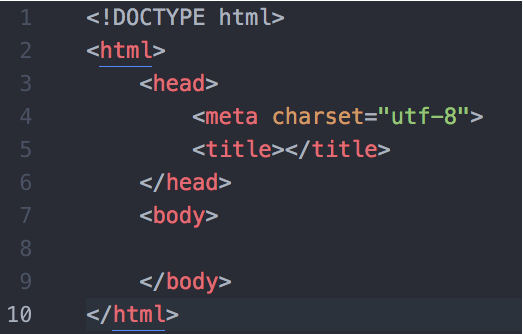
HyperText Markup Language
What is HTML?
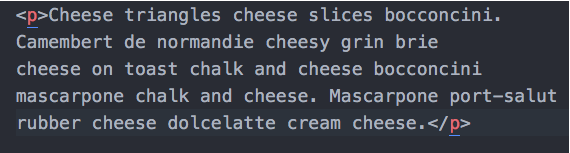
CONTENT!
STRUCTURE!
What is HTML?
Tell your neighbor in your own words the purpose of HTML
HTML Syntax
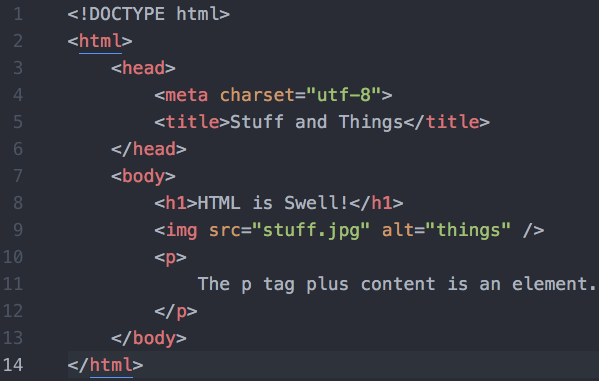
HTML Syntax
<p> The p tags plus this content is an element. </p>Opening tag
Closing tag
Element
HTML Syntax
<img src="../img/stuff.jpg" alt="img is a self-closing tag" >- br
- hr
- img
- input
- link
Common Self-closing Tags
Is this an element?

HTML Attributes
Additional information attached to an element.
"id" and "class" attributes are typically used to generate content or to act as a reference for other technologies like CSS & JS.
<img src="./resources/stuff.jpg" alt="Write something descriptive"><p class="lead">Content content content</p><h1 id="brand">Apple</h1><input type="password"
required
minlength="8"
>HTML Attributes
Now add appropriate attributes to 3 elements on cities.html
HTML Structure
<ul>
    <li>List item #1</li>
    <li>List item #2</li>
    <li>List item #3</li>
</ul>
Nesting Elements
<nav>
    <ul>
        <li><a href="http://slides.com">Home</a></li>
        <li><a href="http://google.com">About</a></li>
        <li><a href="https://developer.mozilla.org">Contact</a></li>
    </ul>
</nav>
HTML Structure
<ul>
    <li>List item #1</li>
    <li>List item #2</li>
    <li>List item #3</li>
</ul>
Parents & Children
What are the siblings in this code snippet?
HTML Structure
<nav>
    <ul>
        <li><a href="http://slides.com">Home</a></li>
        <li><a href="http://google.com">About</a></li>
        <li><a href="https://developer.mozilla.org">Contact</a></li>
    </ul>
</nav>
Talk to a different neighbor about the parents, children and siblings in this code snippet
Semantic HTML
Don't be like this guy.
Semantic HTML
Which of these is more intuitive?
<!DOCTYPE html>
<html>
    <head>
        <meta charset="utf-8">
        <title>Stuff and Things</title>
    </head>
    <body>
        <div>
            <h1>Big Header</h1>
        </div>
        <div>
            <p>
                <b>Middle Content!!</b>
            </p>
        </div>
        <div>
            <p>
                © 2016
            </p>
        </div>
    </body>
</html>
<!DOCTYPE html>
<html>
<head>
<meta charset="utf-8">
<title>Stuff and Things</title>
</head>
<body>
<header>
<h1>Big Header</h1>
</header>
<main>
<p>
<strong>Middle Content!!</strong>
</p>
</main>
<footer>
<p>
© 2016
</p>
</footer>
</body>
</html>Semantic HTML
Why use semantic HTML?
- Readability
- Accessibility
- SEO
Semantic HTML
Examples of structural semantic HTML
<header>
<nav>
<main>
<aside>
<section>
<footer>
<figure>
Semantic HTML
Examples of text markdown semantic HTML
<strong>
<em>
<figcaption>
<summary>
<date>
<time>
<details>
<pre>
Block-level vs. Inline elements
Elements are usually either "block-level" elements or "inline" elements.
Block-level
-
occupies an entire row space of its parent element (container), thereby creating a "block."
-
Block-level elements may appear only within a <body> element.
Inline
-
occupies only the space bounded by the tags that define the inline element.
- Elements that are inline
Review!

What is the purpose of HTML?
<p>
Tag or element?
Example of a self-closing tag.
What is the primary difference between an id and a class?
Why do we use semantic HTML?
What is the difference between block-level and inline elements?
How do you know your HTML is valid?
html
By Valerie Kraucunas