


Woongjae Lee
Daangn - Frontend Core Team ex) NHN Dooray - Frontend Team Leader ex) ProtoPie - Studio Team
Feb 26th, 2026
Timothy @ Daangn Frontend Core
Software Engineer, Frontend @Daangn Frontend Core Team
ex) Senior Lead Software Engineer @NHN Dooray (2021 ~ 2023)
ex) Lead Software Engineer @ProtoPie (2016 ~ 2021)
ex) Microsoft MVP
이 웅재
Tk 의 폰트 객체는 고정된 크기, 스타일, 글자 두께 같은 정보를 담고 있습니다.
class Browser:
    def load(self, url):
        body = url.request()
        nodes = HTMLParser(body).parse()
        self.display_list = Layout(nodes).display_list
        self.draw()
class Browser:
def load(self, url):
body = url.request()
nodes = HTMLParser(body).parse()
self.document = Layout(nodes) #
self.document.layout() #
self.display_list = self.document.display_list #
self.draw()레이아웃 객체를 생성하는 것과 실제로 레이아웃을 수행하는 것은 별개의 과정
class Layout:
    def __init__(self, node):
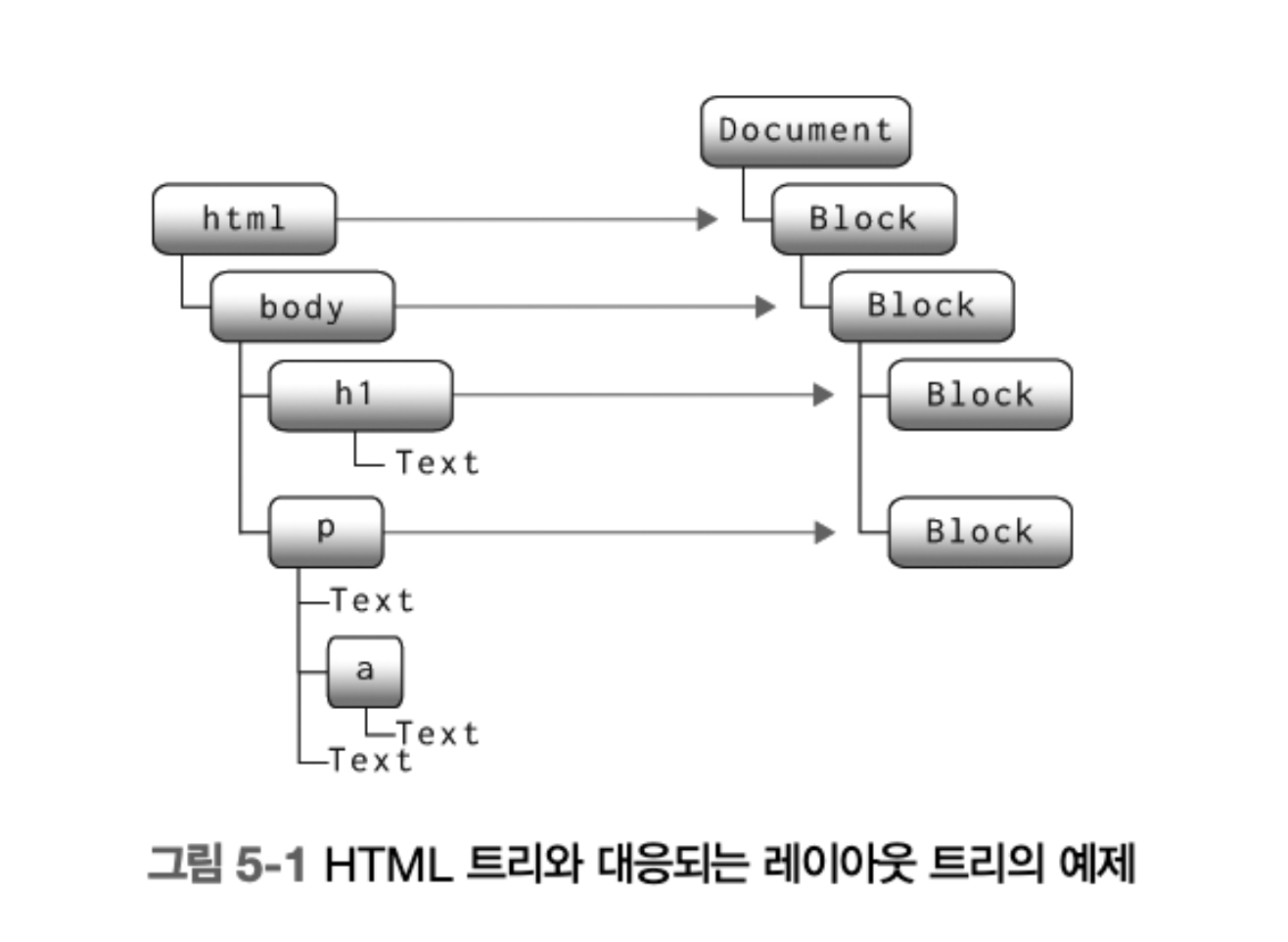
self.node = node트리로 만들려면, 자식과 부모 이전 형제 포인터를 저장
나중에 크기와 위치를 계산하는데 유용하게 사용
class Layout:
    def __init__(self, node, parent, previous):
        self.node = node
        self.parent = parent
        self.previous = previous
self.children = []레이아웃 트리의 루트 역할을 할 두번째 레이아웃 객체
class DocumentLayout:
    def __init__(self, node):
        self.node = node
        self.parent = None
        self.children = []

    def layout(self):
        child = Layout(self.node, self, None)
        self.children.append(child)
child.layout()모호함을 줄이기
class BlockLayout:
    def __init__(self, node, parent, previous):
        self.node = node
        self.parent = parent
        self.previous = previous
        self.children = []

    def layout(self):
        self.display_list = []
        self.cursor_x = HSTEP
        self.cursor_y = VSTEP
        self.weight = "normal"
        self.style = "roman"
        self.size = 12
        self.line = []
        self.recurse(self.node)
self.flush()class DocumentLayout:
def __init__(self, node):
self.node = node
self.parent = None
self.children = []
def layout(self):
child = BlockLayout(self.node, self, None)
self.children.append(child)
child.layout()class Browser:
def load(self, url):
body = url.request()
nodes = HTMLParser(body).parse()
self.document = DocumentLayout(nodes)
self.document.layout()
self.display_list = self.document.display_list
self.draw()텍스트나 <b> 같은 텍스트 관련 태그인지
<p> 나 <h1> 같은 블록인지
BLOCK_ELEMENTS = [
    "html", "body", "article", "section", "nav", "aside",
    "h1", "h2", "h3", "h4", "h5", "h6", "hgroup", "header",
    "footer", "address", "p", "hr", "pre", "blockquote",
    "ol", "ul", "menu", "li", "dl", "dt", "dd", "figure",
    "figcaption", "main", "div", "table", "form", "fieldset",
    "legend", "details", "summary"
]

class BlockLayout:
    def layout_mode(self):
        if isinstance(self.node, Text):
            return "inline"
        elif any([isinstance(child, Element) and child.tag in BLOCK_ELEMENTS for child in self.node.children]):
            return "block"
        elif self.node.children:
            return "inline"
        else:
return "block"class BlockLayout:
def layout(self):
mode = self.layout_mode()
if mode == "block":
previous = None
for child in self.node.children:
next = BlockLayout(child, self, previous)
self.children.append(next)
previous = next
else:
self.cursor_x = 0
self.cursor_y = 0
self.weight = "normal"
self.style = "roman"
self.size = 12
self.line = []
self.recurse(self.node)
self.flush()class BlockLayout:
def layout(self):
# ...
for child in self.children:
child.layout()자식도 재귀적으로 layout 수행
각 레이아웃 객체마다 크기와 위치를 독립적으로 계산
class BlockLayout:
    def __init__(self, node, parent, previous):
        self.node = node
        self.parent = parent
        self.previous = previous
        self.children = []
        self.x = None
        self.y = None
        self.width = None
self.height = None페이지 상의 절대 위치를 표시하는 대신 BlockLayout의 x 와 y 에 대한 상대 위치로 처리
class BlockLayout:
    def layout(self):
        mode = self.layout_mode()
        if mode == "block":
            # ...
        else:
            self.cursor_x = 0          #
            self.cursor_y = 0          #
            self.weight = "normal"
            self.style = "roman"
            self.size = 12

            self.line = []
            self.recurse(self.node)
self.flush()상대적인 값이므로 flush 에서 디스플레이 리스트를 계산할 때 블록의 x 와 y 를 더해줘야 함
class BlockLayout:
    def flush(self):
        if not self.line: return
        metrics = [font.metrics() for x, word, font in self.line]
        max_ascent = max([metric["ascent"] for metric in metrics])
        baseline = self.cursor_y + 1.25 * max_ascent
        for rel_x, word, font in self.line:                             #
            x = self.x + rel_x                                          #
            y = self.y + baseline - font.metrics("ascent")              #
            self.display_list.append((x, y, word, font))                #
        max_descent = max([metric["descent"] for metric in metrics])
        self.cursor_y = baseline + 1.25 * max_descent
        self.cursor_x = 0                                               #
self.line = []cursor_x 가 이 블록의 width 에 도달하면 줄바꿈을 수행
class BlockLayout:
    def word(self, word):
        font = get_font(self.size, self.weight, self.style)
        w = font.measure(word)
        if self.cursor_x + w > self.width:                     #
            self.flush()
        self.line.append((self.cursor_x, word, font))
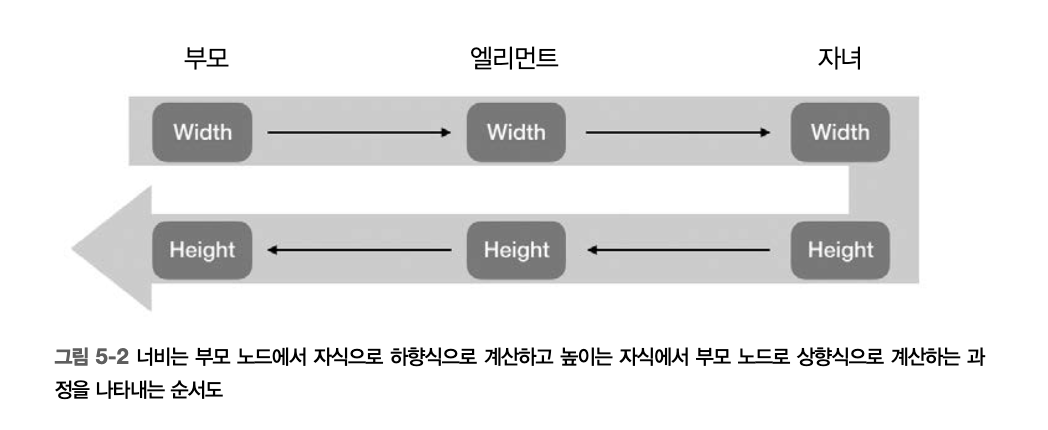
self.cursor_x += w + font.measure(" ")각 객체는 부모의 왼쪽 가장자리에서 시작하여 부모 엘리먼트를 채워감
레아아웃 객체의 세로 위치는 이전 형제 노드가 있는지에 따라 달라짐
있으면 형제 객체의 바로 뒤에서 시작
없으면 부모 객체의 상단
class BlockLayout:
    def layout(self):
        self.x = self.parent.x
        self.width = self.parent.width

        if self.previous:
            self.y = self.previous.y + self.previous.height
        else:
self.y = self.parent.y높이는 자식들의 높이를 합한 값
텍스트를 담고 있는 BlockLayout 은 자식 블록이 없음
class BlockLayout:
    def layout(self):
        # ...

        if mode == "block":
            self.height = sum([
                child.height for child in self.children])
        else:
self.height = self.cursor_y문서가 항상 같은 위치에서 시작하기 때문에 매우 간단함
class DocumentLayout:
    def layout(self):
        child = BlockLayout(self.node, self, None)
        self.children.append(child)

        self.width = WIDTH - 2*HSTEP
        self.x = HSTEP
        self.y = VSTEP
        child.layout()
self.height = child.height각 레이아웃 객체에 paint 함수를 추가하여 해당 객체의 디스플레이 리스트를 반환
모든 레이아웃 객체에 대하여 paint 를 재귀적으로 호출
def paint_tree(layout_object, display_list):
    display_list.extend(layout_object.paint())

    for child in layout_object.children:
paint_tree(child, display_list)페인트할 것이 아무것도 없음
class DocumentLayout:
    def paint(self):
return []recurse 와 flush 에서 계산한 display_list 를 복사
class BlockLayout:
    def paint(self):
return self.display_listclass Browser:
def load(self, url):
body = url.request()
self.nodes = HTMLParser(body).parse()
self.document = DocumentLayout(self.nodes)
self.document.layout()
self.display_list = []
paint_tree(self.document, self.display_list)
self.draw()class DrawText:
def __init__(self, x1, y1, text, font):
self.top = y1
self.left = x1
self.text = text
self.font = font
self.bottom = y1 + font.metrics("linespace")
def execute(self, scroll, canvas):
canvas.create_text(
self.left, self.top - scroll,
text=self.text,
font=self.font,
anchor='nw'
)class DrawRect:
def __init__(self, x1, y1, x2, y2, color):
self.top = y1
self.left = x1
self.bottom = y2
self.right = x2
self.color = color
def execute(self, scroll, canvas):
canvas.create_rectangle(
self.left, self.top - scroll,
self.right, self.bottom - scroll,
width=0,
fill=self.color
)인라인 모드일때 한하여 각 단어를 그리는 Draw 객체를 추가
pre 태그에 회색 배경을 추가
class BlockLayout:
    def paint(self):
        cmds = []
        if isinstance(self.node, Element) and self.node.tag == "pre":
            x2, y2 = self.x + self.width, self.y + self.height
            rect = DrawRect(self.x, self.y, x2, y2, "gray")
            cmds.append(rect)

        if self.layout_mode() == "inline":
            for x, y, word, font in self.display_list:
                cmds.append(DrawText(x, y, word, font))
return cmdsclass Browser:
def draw(self):
self.canvas.delete("all")
for cmd in self.display_list:
if cmd.top > self.scroll + HEIGHT: continue
if cmd.bottom < self.scroll: continue
cmd.execute(self.scroll, self.canvas)
# 전체 크기를 알 수 있기 때문에, 크기를 넘으면 스크롤 방지
def scrolldown(self, e):
max_y = max(self.document.height + 2*VSTEP - HEIGHT, 0)
self.scroll = min(self.scroll + SCROLL_STEP, max_y)
self.draw()By Woongjae Lee