Семантичний підхід до тестування UI

-
Міжнародний e-commerce проект 🌍
-
Кілька десятків розробників в кількох країнах 👩🏽💻👨🏻💻👨🏼💻
-
Фронтенд розбитий на кілька репозиторіїв, які ділять між собою дизайн систему у вигляді внутрішньої UI бібліотеки 💅
-
Код нерівномірно, але покритий тестами (Jest, Puppeteer, Enzyme) 🥽
Дано:
-
Тестування UI-компонентів (на прикладі React, Enzyme, Testing Library)
-
Спроба переосмислити і актуалізувати best practices
-
Спроба переконати вас в доцільності такого переосмислення на прикладі case study
Говоритимемо про
-
базові штуки (що таке Jest? як працюють тести?)
-
end-to-end тестування
-
істини в останній інстанції та інші silver bullet solutions
А про це не будемо 😉
export class FAQItem extends React.Component {
  state = {
    open: false,
    answerHeight: 0,
  };
  answerRef = React.createRef();

  toggleAnswer = () => {
    this.setState({
      answerHeight: this.answerRef.current ? answerRef.current.scrollHeight : 0,
      open: !this.state.open,
    });
  };

  render() {
    const { question, answer } = this.props;
    const { open, answerHeight } = this.state;
    return (
      <Wrapper>
        <Toggle onClick={this.toggleAnswer}>
          <Paragraph fontWeight="bold">{question}</Paragraph>
          <PlusIcon open={open} />
        </Toggle>
        <AnswerWrapper
          innerRef={this.answerRef}
          open={open}
          height={answerHeight}
        >
          <Answer open={open}>{answer}</Answer>
        </AnswerWrapper>
      </Wrapper>
    );
  }
}
import { shallow } from "enzyme";
describe("FAQItem", () => {
test("renders according to snapshot", () => {
expect(
shallow(<FAQItem question="Question?" answer="Answer" />)
).toMatchSnapshot();
});
test("toggles", () => {
const instance = shallow(
<FAQItem question="Question?" answer="Answer" />
).instance();
instance.toggleAnswer();
expect(instance.state.open).toBe(true);
instance.toggleAnswer();
expect(instance.state.open).toBe(false);
});
});
export class FAQItem extends React.Component {
  state = {
    isOpen: false,
    answerHeight: 0,
  };
  answerRef = React.createRef();

  toggleAnswer = () => {
    this.setState({
      answerHeight: this.answerRef.current ? answerRef.current.scrollHeight : 0,
      isOpen: !this.state.isOpen,
    });
  };

  render() {
    const { question, answer } = this.props;
    const { isOpen, answerHeight } = this.state;
    return (
      <Wrapper>
        <Toggle onClick={this.toggleAnswer}>
          <Paragraph fontWeight="bold">{question}</Paragraph>
          <PlusIcon isOpen={isOpen} />
        </Toggle>
        <AnswerWrapper
          innerRef={this.answerRef}
          isOpen={isOpen}
          height={answerHeight}
        >
          <Answer isOpen={isOpen}>{answer}</Answer>
        </AnswerWrapper>
      </Wrapper>
    );
  }
}
import { shallow } from "enzyme";

describe("FAQItem", () => {
  test("renders according to snapshot", () => {
    expect(
      shallow(<FAQItem question="Question?" answer="Answer" />)
    ).toMatchSnapshot();
  });

  test("toggles", () => {
    const instance = shallow(
      <FAQItem question="Question?" answer="Answer" />
    ).instance();

    instance.toggleAnswer();
    expect(instance.state.isOpen).toBe(true);
    instance.toggleAnswer();
    expect(instance.state.isOpen).toBe(false);
  });
});
export const FAQItem = ({ question, answer }) => {
  const [open, setOpen] = useState(false);
  const [answerHeight, setAnswerHeight] = useState(0);
  const answerRef = useRef();

  const toggleAnswer = () => {
    setOpen(!open);
    setAnswerHeight(answerRef.current ? answerRef.current.scrollHeight : 0);
  };

  return (
    <Wrapper>
      <Toggle onClick={toggleAnswer}>
        <Paragraph fontWeight="bold">{question}</Paragraph>
        <PlusIcon open={open} />
      </Toggle>
      <AnswerWrapper innerRef={answerRef} open={open} height={answerHeight}>
        <Answer open={open}>{answer}</Answer>
      </AnswerWrapper>
    </Wrapper>
  );
};
import { shallow } from "enzyme";
describe("FAQItem", () => {
// 🟡 потребує оновлення
test("renders according to snapshot", () => {
expect(
shallow(<FAQItem question="Question?" answer="Answer" />)
).toMatchSnapshot();
});
// 🔴 функціональні компоненти не працюють з .instance() взагалі
test("toggles", () => {
const instance = shallow(
<FAQItem question="Question?" answer="Answer" />
).instance();
instance.toggleAnswer();
expect(instance.state.isOpen).toBe(true);
instance.toggleAnswer();
expect(instance.state.isOpen).toBe(false);
});
});
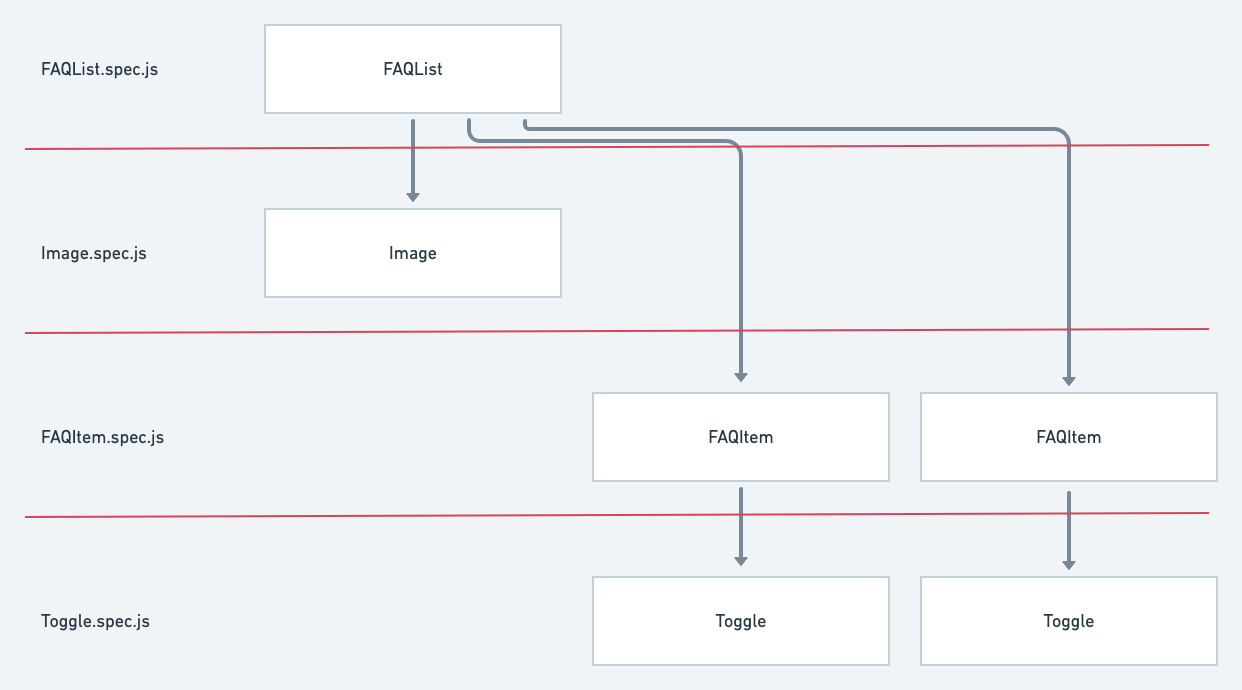
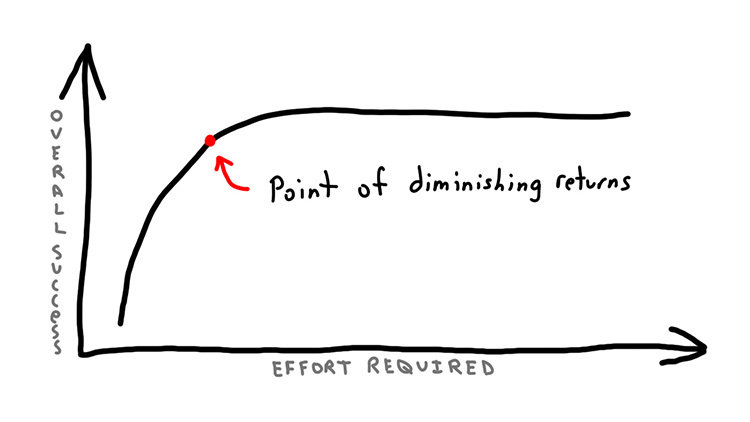
image credit: https://nickjanetakis.com/blog/have-you-hit-the-point-of-diminishing-returns-as-a-developer
image credit: https://www.sketchplanations.com/post/167369765942/goodharts-law-when-a-measure-becomes-a-target
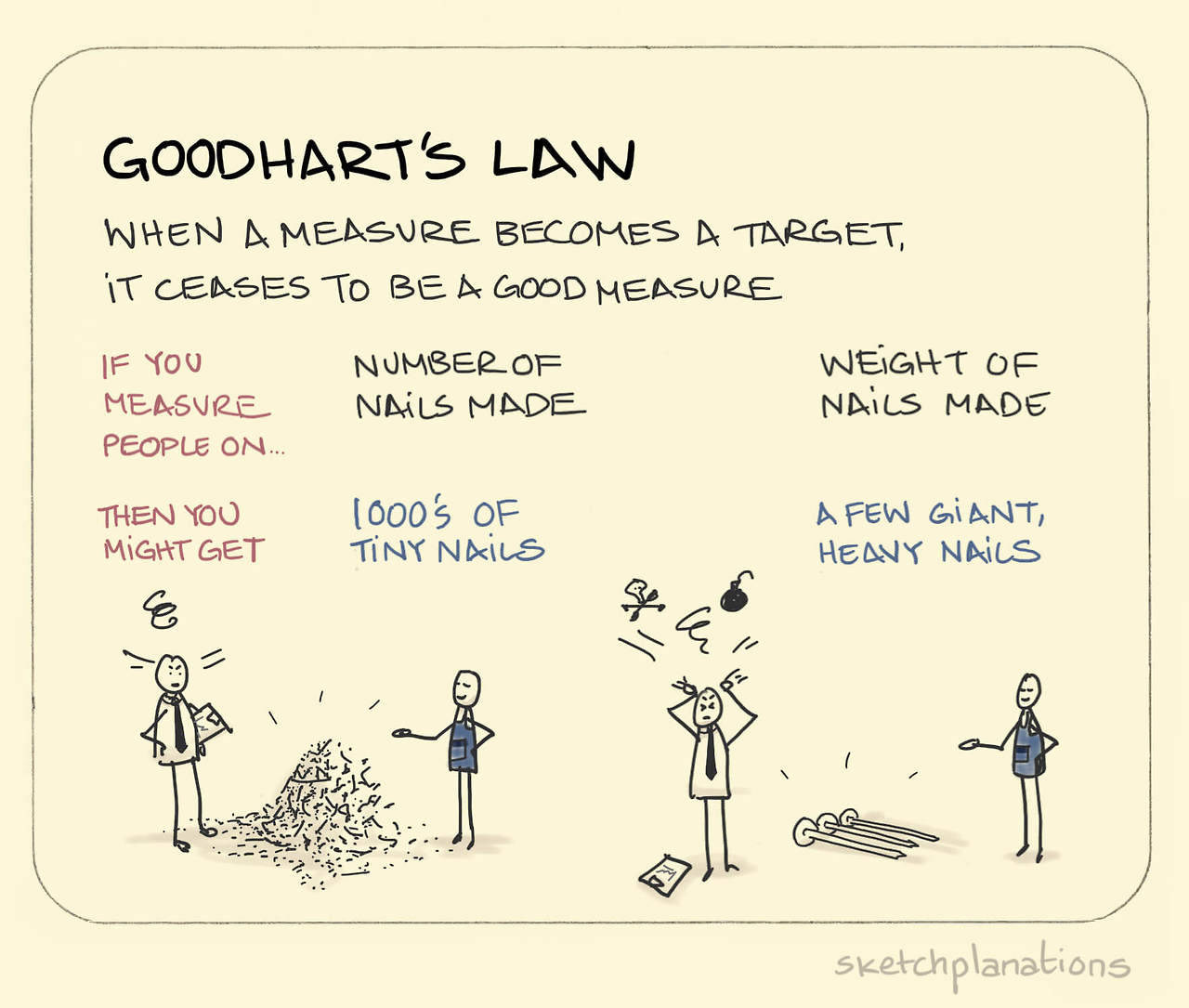
Міряємо покриття
Відсотками від LoC - погана метрика.
Краще юзкейсами.
Отже, хороші практики:
1. No false positives — якщо функціонал зламався вглибині компонента, я хочу про це знати
2. No false negatives — якщо все працює, тест не має падати (інакше розробник перестає довіряти тестам)
import { shallow } from "enzyme";

describe("FAQItem", () => {
  test("renders according to snapshot", () => {
    expect(
      shallow(<FAQItem question="Question?" answer="Answer" />)
    ).toMatchSnapshot();
  });

  test("toggles", () => {
    const instance = shallow(
      <FAQItem question="Question?" answer="Answer" />
    ).instance();

    instance.toggleAnswer();
    expect(instance.state.isOpen).toBe(true);
    instance.toggleAnswer();
    expect(instance.state.isOpen).toBe(false);
  });
});
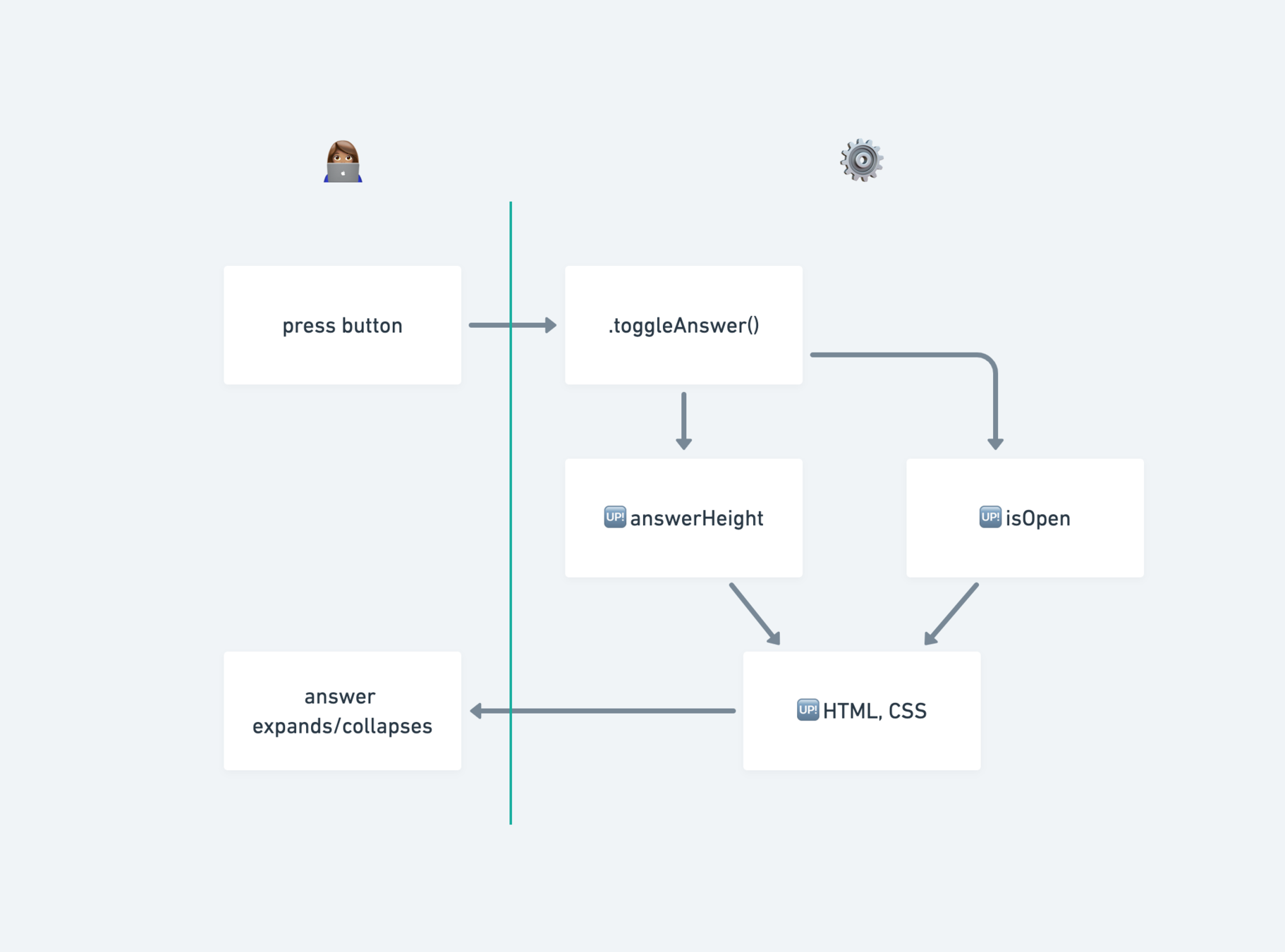
import { shallow } from "enzyme";

describe("FAQItem", () => {
  test("renders according to snapshot", () => {
    expect(
      shallow(<FAQItem question="Question?" answer="Answer" />)
    ).toMatchSnapshot();
  });

  test("toggles", () => {
    const instance = shallow(
      <FAQItem question="Question?" answer="Answer" />
    ).instance();

    instance.toggleAnswer();
    expect(instance.state.isOpen).toBe(true);
    instance.toggleAnswer();
    expect(instance.state.isOpen).toBe(false);
  });
});
const wrapper = shallow(<FAQItem question="Question?" answer="Answer" />
wrapper.find('button').simulate('click');
// емм, "visible"? "height"? 🤔export const FAQItem = ({ question, answer }) => {
const [open, setOpen] = useState(false);
const [answerHeight, setAnswerHeight] = useState(0);
const answerRef = useRef();
const toggleAnswer = () => {
setOpen(!open);
setAnswerHeight(answerRef.current ? answerRef.current.scrollHeight : 0);
};
return (
<Wrapper>
<Toggle
onClick={toggleAnswer}
aria-expanded={isOpen}
aria-label="Expand content"
>
<Paragraph fontWeight="bold">{question}</Paragraph>
<PlusIcon isOpen={isOpen} />
</Toggle>
<AnswerWrapper
innerRef={answerRef}
isOpen={isOpen}
height={answerHeight}
aria-hidden={!isOpen}
aria-label="Expanded content"
>
<Answer isOpen={isOpen}>{answer}</Answer>
</AnswerWrapper>
</Wrapper>
);
};
test("expands on click", () => {
  const wrapper = mount(<FAQItem question="Question?" answer="Answer" />);

  expect(
    wrapper.find(`[aria-label="Expand content"]`).first().prop("aria-expanded")
  ).toBe(false);
  expect(
    wrapper.find(`[aria-label="Expanded content"]`).first().prop("aria-hidden")
  ).toBe(true);

  wrapper.find(`[aria-label="Expand content"]`).first().simulate("click");

  expect(
    wrapper.find(`[aria-label="Expand content"]`).first().prop("aria-expanded")
  ).toBe(true);
  expect(
    wrapper.find(`[aria-label="Expanded content"]`).first().prop("aria-hidden")
  ).toBe(false);
});

DOM API
Enzyme
being a powerful,
unopinionated tool
UI = 𝒇(state)
/**
 * Find first node with aria-label that matches query.
 */
export const findByAriaLabel = (wrapper: ReactWrapper, ariaLabel: string) =>
  wrapper.find(`[aria-label="${ariaLabel}"]`).first();

/**
 * Simulate click on the element. If selector is passed, simulate click on the first element child that matches selector.
 */
export const click = (wrapper: ReactWrapper, selector?: string) => {
  if (selector) {
    wrapper.find(selector).first().simulate("click");
  } else {
    wrapper.simulate("click");
  }
};
test("expands on click", () => {
const wrapper = mount(<FAQItem question="Question?" answer="Answer" />);
expect(findByAriaLabel(wrapper, "Expand content").prop("aria-expanded")).toBe(
false
);
expect(findByAriaLabel(wrapper, "Expanded content").prop("aria-hidden")).toBe(
true
);
click(wrapper, `[aria-label="Expand content"]`);
expect(findByAriaLabel(wrapper, "Expand content").prop("aria-expanded")).toBe(
true
);
expect(findByAriaLabel(wrapper, "Expanded content").prop("aria-hidden")).toBe(
false
);
});
Мінуси:
- треба підтримувати
- треба слідкувати, щоб всі дотримувались best practices
API surface area
те, скільки API забороняє робити, не менш важливе ніж те, скільки він дозволяє
Testing Library
- забороняє доступ до state і методів компонента
- забороняє shallow rendering
- пріоритизує інтеграційні тести над юніт-тестами
- Фокус API селекторів — на семантиці
Словом, не дає писати 💩

Селектори:
- ByLabelText
- ByPlaceholderText
- ByText
- ByAltText
- ByTitle
- ByDisplayValue
- ByRole
- ByTestId
jest-dom
бібліотека-компаньйон з кастомними метчерами
-
toBeDisabled
-
toBeEnabled
-
toBeEmpty
-
toBeInTheDocument
-
toBeInvalid
-
toBeRequired
-
toBeValid
-
toBeVisible
-
toContainElement
-
toContainHTML
-
toHaveAttribute
-
toHaveClass
-
toHaveFocus
-
toHaveFormValues
-
toHaveStyle
-
toHaveTextContent
-
toHaveValue
-
toHaveDisplayValue
-
toBeChecked
-
toBePartiallyChecked
-
toHaveDescription
import { render, fireEvent } from "@testing-library/react";
import '@testing-library/jest-dom';

describe('FAQItem', () => {
  it('expands when clicked', () => {
    const { getByLabelText } = render(
      <FAQItem question="Question?" answer="Answer" />
    );
    const button = getByLabelText(/expand content/i);
    const content = getByLabelText(/expanded content/i);

    expect(button).toHaveAttribute('aria-expanded', 'false');
    expect(content).toHaveAttribute('aria-hidden', 'true');

    fireEvent.click(button);

    expect(button).toHaveAttribute('aria-expanded', 'true');
    expect(content).toHaveAttribute('aria-hidden', 'false');
  });
});
Фінальний варіант
import { render } from "@testing-library/react";
import '@testing-library/jest-dom';

describe('FAQItem', () => {
    it("renders critical UI elements", () => {
    const { getByText, getByLabelText } = render(
      <FAQItem question="Question?" answer="Answer" />
    );
    const button = getByLabelText(/expand content/i);
    const question = getByText(/question/i);
    const answer = getByText(/answer/i);

    expect(button).toBeInTheDocument();
    expect(question).toBeInTheDocument();
    expect(answer).toBeInTheDocument();
  });
});
Замість снепшотів - тільки критичний UI
Це все дуже добре, але
що робити, якщо проект вже тестує все на Enzyme?
починати з малого 🐜
- Визначитись з кандидатурою для тестів
- Зробити proof of concept
- Показати колегам
- Отримати зелене світло
60 UI компонентів,
приблизно половина тестується дуже мінімально (одним снепшотом)
expect(wrapper).toMatchSnapshot();1. Заміна snapshot-only тестів на більш лаконічні.
import { shallow } from 'enzyme';

const wrapper = shallow(<MyComponent />);

expect(wrapper).toMatchSnapshot();
import { render } from '@testing-library/react';
const component = render(<MyComponent />);
expect(component.asFragment()).toMatchSnapshot();
2. Зміна фокусу з юніт-тестів на інтеграційні тести.
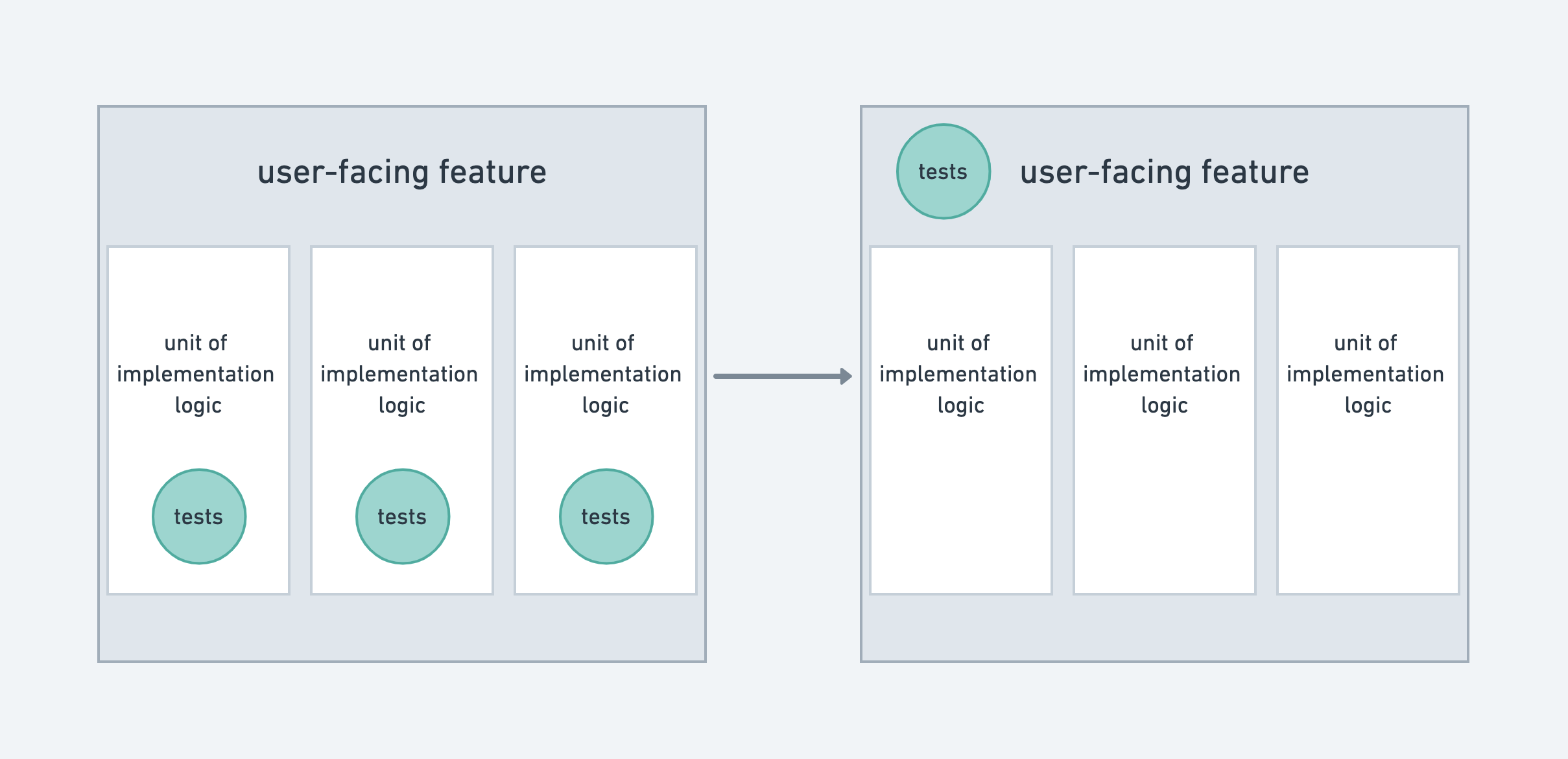
3. Публічний API, гарантований в документації, має бути протестований
const renderCheckbox = (size) => {
  const MOCK_LABEL = "My checkbox";
  const { getByText } = render(<Checkbox label={MOCK_LABEL} size={size} />);
  return getByText(MOCK_LABEL);
};

describe("renders correctly in all available sizes", () => {
  it("m", () => {
    expect(renderCheckbox("m")).toHaveStyle({ "font-size": "16px" });
  });
  it("s", () => {
    expect(renderCheckbox("s")).toHaveStyle({ "font-size": "14px" });
  });
  it("xs", () => {
    expect(renderCheckbox("xs")).toHaveStyle({ "font-size": "12px" });
  });
});
4. Компроміси - це нормально
Підхід "ніяких снепшотів, тільки критичний UI" не зустрів підтримки.
Для перестраховки залишили по одному снепшоту на верхніх рівнях компонентів.
¯\_(ツ)_/¯
- Відрізняти практичну користь від хайпу
- Акцентувати на вирішенні існуючих проблем
- Почавши, бути готовим до критики
- Аргументувати думку, слухати і йти на компроміси
Підсумок. Як робити великі зміни


semantic-testing-ui
By Yevhen Orlov