網頁前端4
楓資-廖姸惁
目錄
陣列與物件
是在 JavaScript 世界中處理資料時最常使用的資料格式。
1
2
3
陣列與物件
宣告陣列
陣列內的內容可以是數值、字串或者另一個物件。
let izcc = ['infor','zsisc','ckcsc','cmioc']陣列名稱
物件
let izcc = ['infor', 'zsisc', 'ckcsc', 'cmioc']陣列與物件
增加陣列物件(加在後面)
let izcc = ['infor', 'zsisc', 'ckcsc'];
izcc.push('cmioc');
console.log(izcc); // ['infor', 'zsisc', 'ckcsc', 'cmioc']增加陣列物件(加在前面)
let izcc = ['zsisc', 'ckcsc', 'cmioc']
izcc.unshift('infor');
console.log(izcc);  // ['infor', 'zsisc', 'ckcsc', 'cmioc']
陣列與物件
移除陣列最後面的物件
let izcc = ['infor', 'zsisc', 'ckcsc', 'cmioc'];
izcc.pop();
console.log(izcc); // ['infor', 'zsisc', 'ckcsc']移除陣列最前面的物件
let izcc = ['infor', 'zsisc', 'ckcsc', 'cmioc'];
izcc.shift();
console.log(izcc);  // ['zsisc', 'ckcsc', 'cmioc'];
陣列與物件
陣列裡物件的數量
let izcc = ['infor', 'zsisc', 'ckcsc', 'cmioc'];
console.log(izcc.length); // 4
陣列與物件
lengft常見應用
let izcc = ['infor', 'zsisc', 'ckcsc', 'cmioc'];

for (let i = 0; i < izcc.length; i++) {
  console.log(izcc[i]);
}
陣列與物件
結合前面的
let arr = ['a', 'b', 'c'];
console.log(arr.length); // 3

arr.push('d');
console.log(arr.length); // 4

arr.pop();
console.log(arr.length); // 3
按鈕互動
按鈕的基本語法
HTML 按鈕的標籤是 <button>
<button>點我一下</button>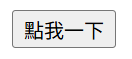
按鈕互動
onclick是被點擊的意思
這樣按按鈕才會有事件發生
<button onclick="alert('你好!')">點我一下</button>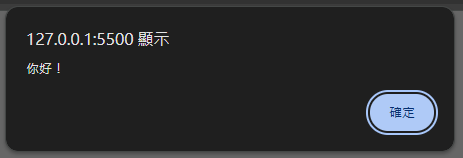
按鈕互動
改變背景顏色
<button id="color">改變背景顏色</button>const colorBtn = document.getElementById('color');
color.onclick = function() {
document.body.style.backgroundColor = 'lightblue';
};按鈕互動
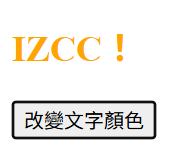
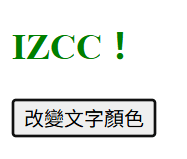
題目:每按一次就會改變文字顏色 顏色是自訂的多個
<h2 id="text">IZCC!</h2>
<button id="color">改變文字顏色</button>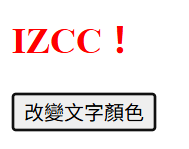
按鈕互動
const text = document.getElementById('text');
const btn = document.getElementById('color');

const colors = ['red', 'orange', 'green', 'blue', 'purple'];

let index = 0;

btn.onclick = function() {
    text.style.color = colors[index];
    index++;

    if (index >= colors.length) {
        index = 0;
    }
};
滑鼠與鍵盤事件
常見滑鼠事件
| 事件名稱 | 觸發時機 |
|---|---|
| onclick | 滑鼠點擊元素時 |
| onmouseover | 滑鼠移入元素時 |
| onmouseout | 滑鼠移出元素時 |
| ondblclick | 滑鼠雙擊時 |
滑鼠與鍵盤事件
滑鼠移入/移出改變文字顏色
<p id="test">把滑鼠移過來!</p>const test = document.getElementById('test');
test.onmouseover = function() {
test.style.color = 'red';
test.innerText = '滑鼠移進來囉 🔥';
};
test.onmouseout = function() {
test.style.color = 'black';
test.innerText = '滑鼠離開了~';
};滑鼠與鍵盤事件
滑鼠點擊改變背景顏色
<button id="bgBtn">點我換背景色</button>const bgBtn = document.getElementById('bgBtn');
bgBtn.onclick = function() {
const colors = ['lightblue','lightgreen','pink','lavender'];
const random = Math.floor(Math.random() * colors.length);
document.body.style.backgroundColor = colors[random];
};無條件捨去
取0~1之間隨機小數
滑鼠與鍵盤事件
雙擊事件
<p id="dbl">雙擊我看看!</p>const dbl = document.getElementById('dbl');
dbl.ondblclick = function() {
dbl.innerText = '你雙擊成功!🎉';
dbl.style.color = 'purple';
};滑鼠與鍵盤事件
常見鍵盤事件
| 事件名稱 | 說明 |
|---|---|
| onkeydown | 按下任意鍵(連按時會重複觸發) |
| onkeyup | 放開按鍵時觸發 |
| oninput | 文字框內容變動時(輸入或刪除) |
滑鼠與鍵盤事件
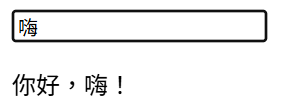
輸入框即時顯示輸入文字
<input id="name" placeholder="請輸入你的名字">
<p id="output"></p>
const nameInput = document.getElementById('name');
const output = document.getElementById('output');
nameInput.oninput = function() {
output.innerText = '你好,' + nameInput.value + '!';
};
滑鼠與鍵盤事件
偵測特定按鍵
<input id="input" placeholder="按Enter看結果">
<p id="result"></p>
const input = document.getElementById('input');
const result = document.getElementById('result');
input.onkeydown = function(e) {
if (e.key === 'Enter') {
result.innerText = '你剛剛按下了 Enter 鍵!';
}
};THANKS!!!
網頁前端4
By ys