What's all the fuss about
React.js?
+Bjoern Brauer
A declarative, efficient, and flexible JavaScript library for building user interfaces.
class LikeButton extends React.Component {
    getInitialState() {
        return { liked: false };
    }

    handleClick() {
        this.setState({ liked: !this.state.liked });
    }

    render() {
        let text = this.state.liked ? 'like' : 'don\'t like';
        return (
            <p onClick={this.handleClick}>
                You {text} this. Click to toggle.
            </p>
        );
    }
}
class LikeButton extends React.Component {
getInitialState() {
return { liked: false };
}
handleClick() {
this.setState({ liked: !this.state.liked });
}
render() {
let text = this.state.liked ? 'like' : 'don\'t like';
return React.DOM.p(
{ onClick: this.handleClick },
'You ' + text + 'this. Click to toggle.'
);
}
}Everything is a component
There are no
- controllers
- directives
- templates
- models
- etc
Components provide:
- modularity
- reusability
- testability
- composability
Declarative code makes your code easier to read and understand
<header>
    <div class="username"></div>
</header>
$.get('/user', function (user) {
$('header .username').show().text(user.userName);
});class Header extends React.Component {
getInitialState() {
return { userName: '' };
}
componentDidMount() {
request('/user', function (user) {
this.setState({ username: user.userName });
});
}
render() {
return (
<header>
<div class="username">{this.state.userName}</div>
</header>
);
}
}Separation of concerns
instead of
Separation of technologies
A more complex example
class Filterform extends React.Component {
    render() {
        return (
            <form onSubmit={this.props.onSearch}>
                <input type="search" />
            </form>
        );
    }
}

class ChannelList extends React.Component {
    render() {
        let channels = this.props.channels.filter(function (channel) {
                return channel.startsWith(this.props.query);
            }).map(function (channel) {
                return (<div className="channel">{channel}</div>);
            });

        return (
            <div className="channels">
                {channels}
            </div>
        );
    }
}

class App extends React.Component {
    getInitialState() {
        return {
            query: '',
            channels: ['ARD', 'ZDF', 'Arte', 'Pro 7', 'RTL', 'Super RTL']
        };
    }

    updateQuery(query) {
        this.setState({ query: query });
    }

    render() {
        return (
            <div>
                <Filterform onSearch={this.updateQuery} />
                <ChannelList query={this.state.query} channels={this.state.channels} />
            </div>
        );
    }
}
Data changing over time makes it hard to reason about the app
Our intellectual powers are rather geared to master static relations and our powers to visualize processes evolving in time are relatively poorly developed. For that reason we should do (as wise programmers aware of our limitations) our utmost to shorten the conceptual gap between the static program and the dynamic process, to make the correspondence between the program (spread out in text space) and the process (spread out in time) as trivial as possible.
- Dijkstra
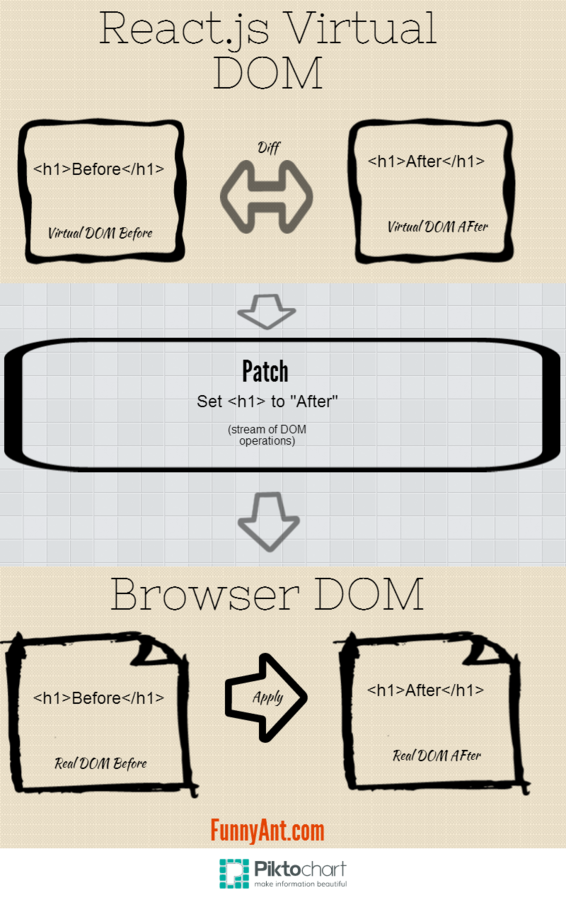
Thus React just re-renders the entire app every time the underlying data changes (like a server rendered app when you hit the refresh button).
The virtual DOM
One-way data flow
- components should have as little state as possible
- shared state should be stored in the neared common ancestor
- everything else should be passed down as props
complimentary tools
- react-router
- Flux
- GraphQL (hopefully soon)
- superagent / request
- babel
- browserify
Getting started
- create a new folder`mkdir myreactproject`
- create an empty package.json `npm init`
- install required dependencies `npm install --save-dev browserify babelify watchify`
- add the following line to your package.json:
"scripts": {
    "watch": "watchify -d main.js -o bundle.js"
}- start hacking on your first React project
Conclusion
- unidirectional data flow keeps complexity low
- easy to debug and test self-contained components
- React devtools (for chrome) are awesome
- freedom to combine it with any other library or framework (for data-fetching, models, routing, etc)
What the heck is
By Björn Brauer