A Critique Of: An Updated Performance Comparison of Virtual Machines and Linux Containers
Background
- Why do we need virtualization?
- Where is virtualization used?
- What are the problems with virtualization?
- What solutions are out there?
Why Virtualization?
- The answer lies with UNIX (and its failures)
- Least Privilege
- 'Every program and every user should operate using the least set of privileges necessary'
- Least Common Mechanism
- 'Every shared mechanism ... represents a potential information path between users...'
Why Virtualization?
- Unix does not enforce these principles
- Global filesystem, processes, networking
- Lack of Configuration Isolation
- Think: Installing several applications with many conflicting requirements
- Package managers are often not sufficient
- Lack of Resource Isolation
- Provisioning resources between applications
- 'I want a cloud server with 2 cores and a gig of RAM'
- Causes security issues and high administration costs
Why Virtualization?
- A layer of abstraction on top of the OS is needed to provide isolation
- Enter: VMs and containers
Where Virtualization?
- These problems manifest in cloud environments
- IaaS, PaaS
- Smaller servers as well (here at RPI!)
- Whenever we want to pool and provision resources
Virtualization Solutions
- Two solutions are compared: Containers and Virtual Machines
- Container manager: Docker
- Good Choice!
- VM Hypervisor: KVM
- Type 1
- Hardware virtualization
Docker
- Layered, reusable Images
- Extends existing OS
- Kernel namespaces
- Syscalls through host
- Only one level of scheduling, allocation
- Easy, efficient resource sharing (volumes)
-
Easily resizable with cgroups
KVM
- Disk Image per Instance
- Full copy of OS
- Hypervisor
- Emulated I/O
- Scheduling, allocation in host and guest
- Sharing is tedious and has overhead
-
Static number of CPUs, RAM
The Qualitative
Quantitative Testing - Why?
- How do these properties actually affect performance?
- What do administrators need to watch out for?
- How and where can and should we optimize?
- Where are the 'gotchas'
Quantitative Testing - How?
- Nine Experiments
- Microbenchmarks
- CPU - PXZ
- HPC - Linpack
- Memory Bandwidth - Stream
- Random Memory Access - RandomAccess
- Network Bandwidth - nuttcp
- Network Latency - netperf
- Block I/O - fio
- Application Benchmarks
- Redis
- MySQL
- Microbenchmarks
Quantitative Testing - How?
- Hardware:
- IBM System x3650
- 2 x 8-core 3GHz Sandy Bridge Xeon
- 256GB RAM
- 20TB SSD RAID Array (2x8Gbps link)
- 10 Gbps Ethernet
- Ubuntu 13.10
- Linux 3.11.0
- Docker 1.0
- QEMU 1.5.0
- libvirt 1.1.1
CPU Benchmarks
- PXZ - Parallel lossless compression
- Task: Compress a 1GB Wikipedia data dump
- Large number of threads (32) to eliminate I/O bottleneck
- Results:
| Unit | Native | Docker | KVM Untuned | KVM Tuned |
|---|---|---|---|---|
| MB/s | 0% | -4% | -22% | -18% |
- Docker heavily outperforms
- Suspected cause: Nested TLB pages in KVM
- Not investigated further
- CPU pinning has small effect
CPU Benchmarks
- Linpack: Linear equation solving benchmark tool
- Capable of taking advantage of CPU cache topology
- Results:
| Unit | Native | Docker | KVM Untuned | KVM Tuned |
|---|---|---|---|---|
| GFLOPS | 0% | -0% | -17% | -2% |
- Applications that take advantage of system architecture suffer in KVM
- Can be mitigated with CPU pinning
- This test may reveal a bias
- Stated that using cgroups can cause similar unawareness of system resources in Docker but this is not explored
Memory Benchmarks
- Stream: memory bandwidth benchmark
- Uses large working set relative to cache
- Results:
| Unit | Native | Docker | KVM Untuned | KVM Tuned |
|---|---|---|---|---|
| GB/s | 0% | -0% | -(1-3)% | -- |
- Not affected by latency
- KVM and Docker exhibit very similar performance
Memory Benchmarks
- RandomAccess: random memory access benchmarker
- Designed to completely break TLB caching
- Results:
| Unit | Native | Docker | KVM Untuned | KVM Tuned |
|---|---|---|---|---|
| GB/s | 0% | -2% | -1% | -- |
- Also does not test latency
- KVM and Docker exhibit very similar performance
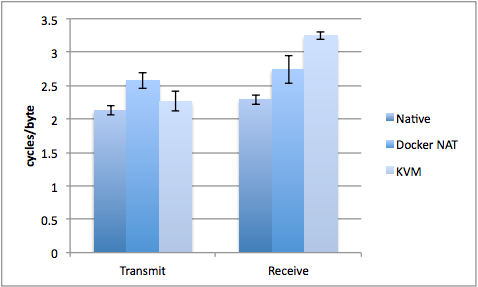
Network Benchmarks
- nuttcp: measures network bandwidth
- Using NAT for Docker networking
- Using virtio and vhost for best KVM performance
- Results:
- Docker without NAT assumed to have exactly native performance - not tested
- NAT has some CPU overhead
- vhost networking has efficient transmit but high receive overhead (communicates directly with kernel)
- KVM not tested with different IO solutions either
Network Benchmarks
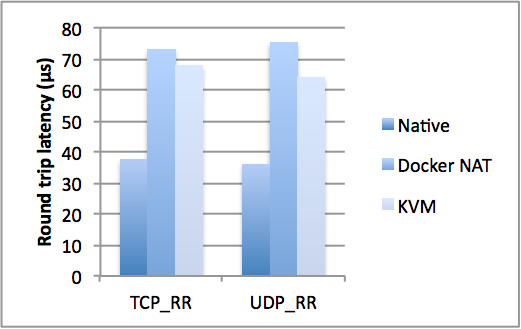
- netperf: measures round-trip network latency
- Using NAT for Docker networking
- Using virtio and vhost for best KVM performance
- Results:
- As expected, NAT doubles latency
- KVM adds 80% to latency (~30us per transaction)
- Unavoidable accept other than using host networking in Docker
Disk IO Benchmarks
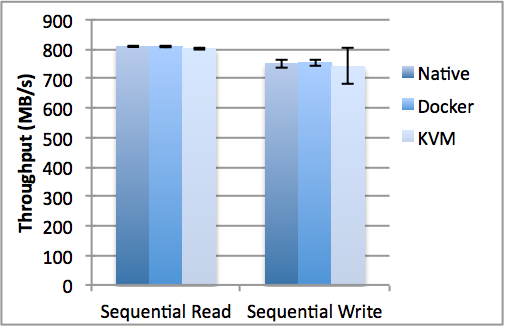
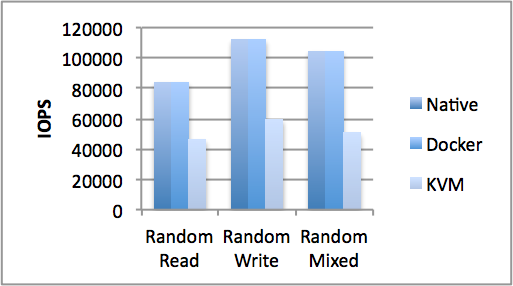
- fio: measures disk IO performance
- Results:
- Sequential operations have little overhead
- Docker adds no overhead
- KVM uses more cycles per IO operation
- increases read latency by 2-3x
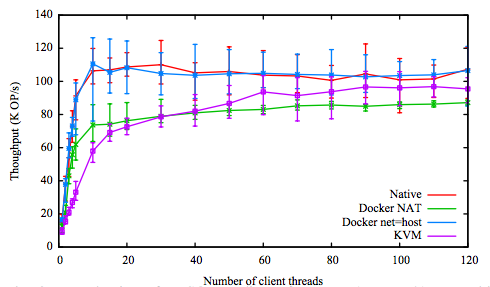
Redis Benchmarks
- redis: unstructured key-value store
- Uses many small network operations to many clients
- Results:
- Results align with previous network testing
- Docker with NAT and KVM add similar overhead
- Docker without NAT adds no overhead
MySQL Benchmarks
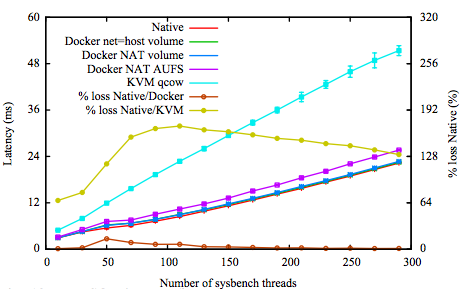
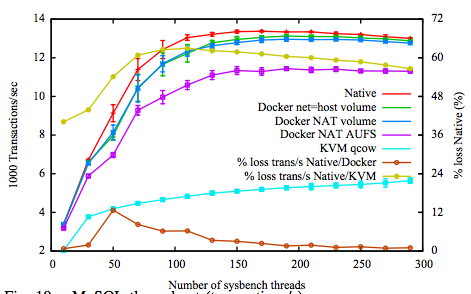
- MySQL: popular relation database
- Stresses memory, CPU, networking, filesystem
- Results:
- Docker with volumes uses native filesystem with almost no overhead
- Docker with AUFS and KVM virtualize at the block layer with much overhead
Concluding Remarks
- Both containers and VMs have little effect on CPU and memory performance
- Although tuning may be needed
- The overhead is in I/O and OS interaction
- Small IO worse than big IO
- Docker generally outperforms KVM in every case
Concluding Remarks
- Docker adds many convenience features
- Layered images
- NAT
- Docker Compose
- Dockerhub
- Kubernetes
- Convenience features add overhead though
- Authors suggest the ease of deployment and configuration will drive adoption
- It has!
Concluding Remarks
- KVM Adds overhead to all IO
-
KVM can be optimized
- But it's tedious and poorly documented
- Much trial and error needed
- Complexity is a significant barrier to entry
General Criticism
- Containers within VMs are not explored
- Dismissed by authors
- This is often needed to combine benefits of both
- Would be interesting to see overhead stacking in a real application
General Criticism
- Application tests do not test disk performance!
- 3GB cache is used in MySQL tests
- Frustrating, as IO is the major issue with virtualization
General Criticism
- Experiment design seems biased
- Difficult not to, as Docker is known to be more performant
- Docker is only tested in ideal conditions in many cases where KVM is tested tuned and untuned
- If using Docker on hardware it will be necessary to use cgroups
Appendix - Dockerfile
# Dockerfile

FROM ubuntu:16.04

RUN apt-get update
RUN apt-get install gcc make

COPY ./src ./

RUN make configure
RUN make install

CMD ./my_app
$ tree .
.
├── src
│ ├── Makefile
│ ├── my_app.cpp
└── Dockerfile## Pull
$ docker pull my_repo/my_app
> ...
## Run
$ docker run my_repo/my_app
> Hello, Docker!# my_app.cpp
#include <stdio>
int main(int argc, char *argv[]) {
std::cout << "Hello, Docker!" << std::endl;
return 0;
}
## Build
$ docker build -t my_repo/my_app .
> ...
## Push
$ docker push my_repo/my_app
> ...
Appendix - Docker Compose
version: '2'

services:
  postgres:
    image: postgres:9.5.6
    expose:
      - "5432"
    volumes:
      - ./data/postgres:/var/lib/postgresql/data

  redis:
    image: redis
    expose:
      - "6379"
    volumes:
      - ./data/redis/:/var/lib/redis/data/

  nginx:
    build: ./nginx
    image: nginx:1.11.9
    ports:
      - "80:80"
      - "443:443"
    links:
      - web
    volumes:
      - .:/usr/src/app/
web:
build: .
environment:
- RAILS_ENV=${RAILS_ENV}
- SECRET_KEY_BASE=${SECRET_KEY_BASE}
- SECRET_TOKEN=${SECRET_TOKEN}
- WEB_CONCURRENCY=${WEB_CONCURRENCY}
- MAX_THREADS=${MAX_THREADS}
volumes:
- .:/usr/src/app/
depends_on:
- postgres
- redis
command: bundle exec puma -C config/puma.rb
expose:
- "3000"
worker:
build: .
environment:
- RAILS_ENV=${RAILS_ENV}
volumes:
- .:/usr/src/app/
depends_on:
- postgres
- redis
command: bundle exec cronoAppendix - More
- Want to learn more about / try out Docker?
- Check out this presentation from RCOS! https://slides.com/josephlee/docker/
- Follow along with the exercises https://github.com/rcos/docker-examples
DCI
By Ada Young


